p-limit review
p-limit 7.3.2 feeds promise-returning functions through one memory-backed queue and starts only the number allowed by its concurrency setting. Its callable limiter reports running and waiting counts, maps synchronous iterables, discards queued calls, and accepts a new concurrency value while work is pending. `limitFunction()` gives one reusable operation its own cap. The 7.3.2 patch exposes `clearQueue()` on that wrapper, fixing an API gap in 7.3.1. Our 7.3.1 sandbox loaded the package through ESM `import` and `require()`, and the TypeScript declarations were already included. p-limit has no interval clock, retry policy, persistent storage, or coordination between JavaScript processes.
Our p-limit 7.3.1 install completed in 0.3 seconds, left 2 packages in 1 MB, produced a 0.9 KB gzipped browser build, and returned 0 known vulnerabilities from npm audit. Install 7.3.2 for a concurrency ceiling inside one process, and select a different scheduler for clock-based quotas or work shared across processes.
We installed it
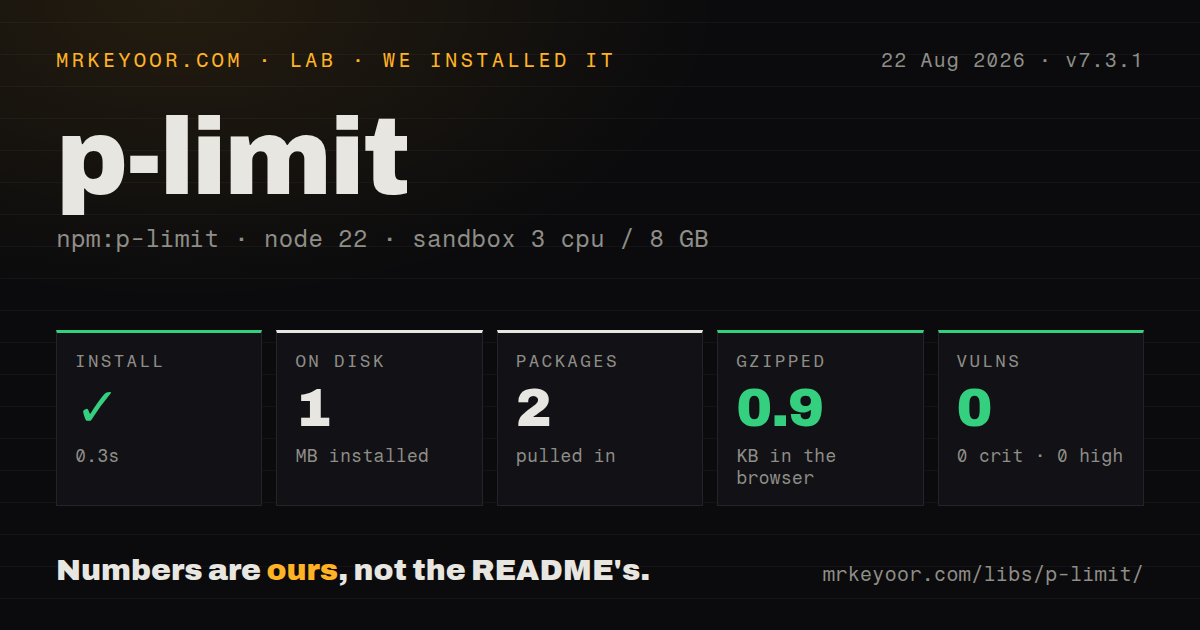
| Install | ✓ · 0.3s | 2 packages on disk · 1 MB |
| Import | ✓ | ESM import works · require() works · ESM package with exports map |
| Browser | 0.9 KB | gzipped (1.7 KB minified), bundled with esbuild |
| Types | ✓ | TypeScript types bundled |
| Known vulns | 0 | 0 critical · 0 high · 0 moderate · 0 low (npm audit) |
Answers from our run
Does p-limit install cleanly?
Yes. In a fresh container with an empty cache, npm install p-limit finished in 0.3s, leaving 2 packages and 1 MB on disk. npm audit reported no known vulnerabilities.
How much does p-limit add to a browser bundle?
0.9 KB gzipped (1.7 KB minified) when the whole package is bundled for the browser with esbuild. Importing only part of it is usually smaller.
Does p-limit work with both ESM and CommonJS?
Yes. Both import 'p-limit' and require('p-limit') worked in Node 22 in our run. The package is published as ESM with an exports map.
Does p-limit include TypeScript types?
Yes, type declarations ship inside the package, so no @types install is needed.
p-limit or p-queue: which should you use?
p-queue: Use p-queue when the queue also needs priorities, pausing, events, interval caps, or a timeout for each operation. Our p-limit 7.3.1 install completed in 0.3 seconds, left 2 packages in 1 MB, produced a 0.9 KB gzipped browser build, and returned 0 known vulnerabilities from npm audit.
When should you not use p-limit?
Production is pinned to Node 18 or earlier. The 7.3.2 package metadata requires Node 20 or newer
Use it if
- A Node service must stop a burst of fetches, file reads, or database calls from running all at once
- Several callers should share one in-process allowance and expose its running and waiting counts to your logs
- Runtime feedback needs to raise or lower concurrency without rebuilding the queue or changing each call site
- One repeated async operation should carry its own cap through `limitFunction()`, including queue clearing in 7.3.2
- Production is pinned to Node 18 or earlier. The 7.3.2 package metadata requires Node 20 or newer
- An API contract allows a fixed number of starts per second or minute. p-limit counts simultaneous work and has no interval setting
- Queued jobs require priority, pause and resume, events, or operation timeouts. The README sends broader queue use cases to p-queue
- Shutdown must cancel work that has already begun. The README says `clearQueue()` discards waiting calls and cannot stop running promises
- A limited callback has to submit and await more work on the same limiter. The README warns that a full queue can deadlock in that call shape
Setup reality
We installed p-limit 7.3.1 in a fresh unprivileged Node 22 Bookworm container with 3 CPUs and 8 GB of RAM. npm finished in 0.3 seconds, and the install left 2 packages occupying 1 MB. The package was 32 KB unpacked, declared 1 direct dependency and 0 peer dependencies, and carried the MIT license. npm audit found 0 known vulnerabilities. Bundled TypeScript declarations loaded without an extra types package. ESM import and require() both succeeded despite the package declaring ESM and an exports map.
p-limit asks for no account, secret, background service, or config file. In 7.3.2 you can pass a number to pLimit() or an options object containing concurrency and rejectOnClear. The queue exists only in the JavaScript process that created it. When a server starts several workers, each worker receives a separate allowance unless another system coordinates them. There is no cache or saved queue to restore after a restart.
Give the limiter a function so it controls when the operation begins: limit(() => fetch(url)). A fetch promise made before that call is already running. limit.map() accepts a synchronous iterable, turns it into an array, and waits with Promise.all. That makes the helper suitable for finite batches. An async stream or an endless producer needs a consumer with backpressure. One rejected task leaves the remaining queued functions eligible to start.
A full limiter can deadlock when every running callback awaits inner work submitted to that same queue. Split the limits by resource or remove the nested scheduling step. clearQueue() cannot stop active operations. With rejectOnClear left at its false default, discarded calls stay unsettled. Setting it to true rejects them with AbortError. The 7.3.2 release makes this method available on limitFunction() wrappers. Running fetches still require their own AbortSignal. Our full browser import measured 1.7 KB minified and 0.9 KB gzipped.
Patterns
Keep four HTTP calls in flight cap-api-fetches
import pLimit from 'p-limit';

const limit = pLimit(4);
const payloads = await Promise.all(
  urls.map((url) => limit(async () => {
    const response = await fetch(url);
    if (!response.ok) throw new Error(`HTTP ${response.status}`);
    return response.json();
  }))
);
The limiter controls each start because `fetch()` is created inside its callback. A fetch promise created earlier has already begun.
Read files through five slots bound-file-reads
import {readFile} from 'node:fs/promises';

const limit = pLimit(5);
const documents = await limit.map(paths, async (path, index) => ({
  index,
  text: await readFile(path, 'utf8'),
}));
`limit.map()` preserves input order through `Promise.all` and converts the synchronous iterable to an array before the batch finishes.
Put one cap around a reusable client call wrap-api-client
import {limitFunction} from 'p-limit';

const loadAccount = limitFunction(
  (id) => api.accounts.get(id),
  {concurrency: 3}
);

const accounts = await Promise.all(ids.map(loadAccount));
Calls made through this `loadAccount` wrapper share one 3-operation allowance in the current process.
Reject calls waiting behind a wrapper clear-wrapped-calls
const sendEmail = limitFunction(deliverEmail, {
  concurrency: 1,
  rejectOnClear: true,
});

const deliveries = messages.map(sendEmail);
sendEmail.clearQueue();
const outcomes = await Promise.allSettled(deliveries);
p-limit 7.3.2 adds `clearQueue()` to a `limitFunction()` result, and waiting calls reject with `AbortError` when `rejectOnClear` is true.
Abort running fetches and clear the wait list stop-active-and-waiting
const controller = new AbortController();
const limit = pLimit({concurrency: 2, rejectOnClear: true});

const requests = urls.map((url) =>
  limit(() => fetch(url, {signal: controller.signal}))
);

controller.abort();
limit.clearQueue();
const outcomes = await Promise.allSettled(requests);
`clearQueue()` rejects only the waiting calls here. The shared `AbortController` sends the cancellation signal to the 2 active fetches.
Log running and waiting counts observe-queue-load
const tasks = rows.map((row) => limit(() => saveRow(row)));
const interval = setInterval(() => {
  console.log({
    running: limit.activeCount,
    waiting: limit.pendingCount,
  });
}, 250);

await Promise.allSettled(tasks);
clearInterval(interval);
`activeCount` counts promises that started, while `pendingCount` counts queued functions that have not been called.
Open more slots on a busy limiter raise-live-concurrency
const limit = pLimit(2);
const tasks = records.map((record) => limit(() => writeRecord(record)));

if (limit.pendingCount > 100) {
  limit.concurrency = 6;
}

await Promise.all(tasks);
Setting concurrency to 6 lets more queued functions start. Reducing the value never interrupts promises already counted as active.
Collect successes and errors from one batch retain-task-failures
const outcomes = await Promise.allSettled(
  jobs.map((job) => limit(() => runJob(job)))
);

const errors = outcomes
  .filter((item) => item.status === 'rejected')
  .map((item) => item.reason);
A rejection does not drain p-limit's queue, and `Promise.allSettled()` keeps the outcome of every submitted job.
Pass a client and record without a closure forward-call-arguments
async function insert(client, record) {
  return client.records.create(record);
}

const tasks = records.map((record) =>
  limit(insert, database, record)
);

await Promise.all(tasks);
The callable limiter forwards all arguments to the task. The README treats this as a closure-allocation optimization for very large queues.
Give outer and inner work different limiters separate-nested-resources
const projectLimit = pLimit(2);
const assetLimit = pLimit(8);

await Promise.all(projects.map((project) =>
  projectLimit(async () => {
    const assets = await listAssets(project);
    return Promise.all(assets.map((asset) =>
      assetLimit(() => downloadAsset(asset))
    ));
  })
));
The README says nested calls to one full limiter can deadlock. Separate queues prevent outer jobs from occupying every slot needed by inner jobs.
Export one queue for several modules share-module-budget
// upstream-limit.js
import pLimit from 'p-limit';
export const upstreamLimit = pLimit(4);

// profiles.js
import {upstreamLimit as profileLimit} from './upstream-limit.js';
export const getProfile = (id) =>
  profileLimit(() => fetch(`/profiles/${id}`));
Every module importing `upstreamLimit` shares its 4 slots. Constructing another limiter creates another independent queue and allowance.
Lower concurrency after an HTTP 429 reduce-after-throttle
const limit = pLimit(8);

async function request(url) {
  const response = await fetch(url);
  if (response.status === 429) {
    limit.concurrency = Math.max(1, Math.floor(limit.concurrency / 2));
  }
  return response;
}

const responses = await limit.map(urls, request);
Changing concurrency after a 429 reduces later overlap, but p-limit still does not enforce a calls-per-interval quota.
Alternatives
| Package | Registry | Pick it when |
|---|---|---|
| p-queue | npm | Use p-queue when the queue also needs priorities, pausing, events, interval caps, or a timeout for each operation. |
| p-throttle | npm | Choose p-throttle for a rule that limits how many calls may start inside a time window. |
| p-map | npm | An async iterator, backpressure, abort signals, or aggregate errors make p-map the better mapper. |
| bottleneck | npm | Bottleneck fits a Redis-backed rate or concurrency limit shared by several Node processes. |
More utils guides
lru-cache · type-fest · ajv · zod · find-up · uuid · the whole shelf →
How this guide is made: grounded in the library's documentation, release notes, changelog, and issue history, on a fixed rubric — not a hands-on install of every release. The 50 most-downloaded entries are additionally install-verified in clean containers. Corrections: contact the desk.