langchain-core review
langchain-core contains the interfaces and data types shared by Python's LangChain packages: chat messages, prompt templates, tools, output parsers, callbacks, and the Runnable composition protocol. It does not include a provider model or a finished agent. Provider packages and LangGraph build against these contracts. Version 1.6.0 adds standard model exception types, tightens strict nested tool schemas, resolves postponed annotations in StructuredTool, and fixes RunnablePick deserialization. Our install imported successfully and included typing metadata, but it also placed 30 packages and 48 MB in the sandbox.
Install langchain-core when compatibility with LangChain integrations is an explicit requirement, especially for reusable libraries. A single-provider application should first price in the measured dependency footprint and the debugging cost of Runnable indirection.
We installed it
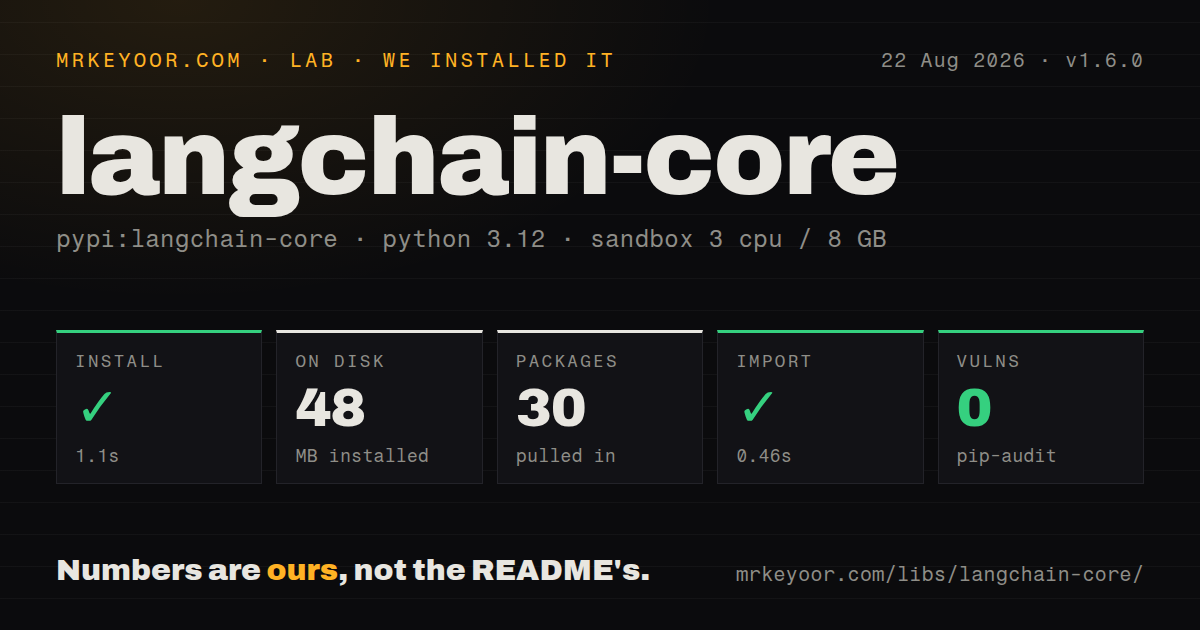
| Install | ✓ · 1.1s | 30 packages on disk · 48 MB |
| Import | ✓ | import langchain_core in 0.46s · pure Python · py.typed · requires Python <4.0.0,>=3.10.0 |
| Known vulns | 0 | (pip-audit) |
Answers from our run
Does langchain-core install cleanly?
Yes. In a fresh container with an empty cache, pip install langchain-core finished in 1 seconds, leaving 30 packages and 48 MB on disk. pip-audit reported no known vulnerabilities.
What does langchain-core need to run?
Python <4.0.0,>=3.10.0, and nothing compiled: it is pure Python. In our run import langchain_core succeeded in 0.46s, and the package ships py.typed for type checkers.
langchain-core or langchain: which should you use?
langchain: Use it when the application wants LangChain's higher-level agent entry points rather than only shared contracts. Install langchain-core when compatibility with LangChain integrations is an explicit requirement, especially for reusable libraries.
When should you not use langchain-core?
The application calls one model provider with a few prompts; the provider SDK has fewer layers and produces shorter failure traces
Discussed on
Use it if
- A library must expose LangChain-compatible tools, retrievers, messages, or Runnables without depending on the higher-level langchain package
- Application code needs one message and invocation interface across several supported model providers
- Prompt, model, parser, retry, fallback, batch, and streaming stages will be composed through Runnable operations
- A custom provider integration must conform to the same base classes used by LangChain and LangGraph
- The application calls one model provider with a few prompts; the provider SDK has fewer layers and produces shorter failure traces
- A 48 MB measured environment and 30 installed packages are excessive for the service's narrow model call
- You expect a model client after installing core; a separate provider package and its credentials are still required
- Frequent compatibility pins across core, langchain, LangGraph, and provider integrations are unacceptable
- Operator-composed Runnable stacks make debugging harder than explicit functions in your team's normal tooling
Setup reality
Our clean install of langchain-core 1.6.0 completed in 1.1 seconds. It left 30 packages using 48 MB, and pip-audit reported no known vulnerabilities. The package declares 10 direct dependencies, requires Python 3.10 or newer and below 4.0, is pure Python, and ships py.typed. import langchain_core worked in 0.46 seconds. This is a sizable foundation package even before a model provider is added.
Core itself needs no API credential. A useful model call still requires a provider integration such as langchain-openai or langchain-anthropic, plus that provider's configuration. LangSmith tracing is separate; the installed client remains inactive unless tracing is configured. Pin compatible versions across core and every LangChain integration because provider packages declare their own supported core ranges.
Runnable methods share invoke, ainvoke, batch, stream, retry, and fallback conventions, but a custom step can still contain blocking code. Wrapping such a function in RunnableLambda does not make its IO asynchronous. Batch concurrency can also exhaust provider quotas quickly, so pass a max_concurrency value chosen for the account rather than accepting an unexamined fan-out.
Tool schemas and structured output cross provider boundaries. Version 1.6.0 now fails earlier on unresolved forward references and requires nested properties in strict tool schemas, which can expose models that previously serialized loosely. Provider support for tool calling and JSON schemas still differs. Log the final rendered messages and provider response metadata when debugging instead of relying only on a deep Runnable traceback.
Patterns
Create a prompt from chat messages build-chat-prompt
from langchain_core.prompts import ChatPromptTemplate

prompt = ChatPromptTemplate.from_messages([
    ('system', 'Answer in {language}.'),
    ('human', '{question}'),
])
value = prompt.invoke({'language': 'French', 'question': 'What is LCEL?'})
Escape literal braces as {{ and }} inside formatted templates, especially when embedding JSON examples.
Compose a prompt, model, and text parser compose-runnables
from langchain_core.output_parsers import StrOutputParser

chain = prompt | model | StrOutputParser()
text = chain.invoke({'language': 'English', 'question': 'Explain retries.'})
Without StrOutputParser, a chat model returns a message object rather than plain text.
Invoke a model with typed messages send-messages
from langchain_core.messages import HumanMessage, SystemMessage

response = model.invoke([
    SystemMessage(content='Answer briefly.'),
    HumanMessage(content='What is a Runnable?'),
])
Keep message objects when later code needs tool calls, usage metadata, or provider response fields.
Expose a Python function as a tool define-tool
from langchain_core.tools import tool

@tool
def lookup_order(order_id: str) -> str:
    """Return the current status for an order ID."""
    return orders.lookup(order_id)

bound = model.bind_tools([lookup_order])
The model can request the tool after bind_tools, but your code or an agent loop must execute it and return a ToolMessage.
Validate model output with Pydantic structured-output
from pydantic import BaseModel

class Ticket(BaseModel):
    priority: str
    summary: str

extract = model.with_structured_output(Ticket)
ticket = extract.invoke('Payment failed twice for order 42')
Schema support varies by provider and model. Version 1.6.0 applies stricter requirements to nested tool-schema properties.
Stream parsed text chunks stream-output
for text in chain.stream({
    'language': 'English',
    'question': 'Explain vector search.',
}):
    print(text, end='', flush=True)
A raw chat model streams AIMessageChunk objects. The text parser changes downstream chunks to strings.
Call a chain asynchronously invoke-async
result = await chain.ainvoke({
    'language': 'English',
    'question': 'Explain tool calling.',
})
Custom synchronous IO inside a Runnable still blocks; use an async implementation or offload it deliberately.
Bound batch concurrency batch-inputs
inputs = [
    {'language': 'English', 'question': question}
    for question in questions
]
answers = chain.batch(inputs, config={'max_concurrency': 4})
Results retain input order. Set concurrency below the provider's request and token limits.
Run two branches over one input parallel-branches
from langchain_core.runnables import RunnableParallel, RunnablePassthrough

fanout = RunnableParallel(
    summary=summary_chain,
    original=RunnablePassthrough(),
)
result = fanout.invoke(document)
Parallel branches can multiply model calls and quota use even though the source input is shared.
Adapt a plain function to Runnable wrap-function
from langchain_core.runnables import RunnableLambda

def normalize(text: str) -> str:
    return ' '.join(text.split())

normalized = RunnableLambda(normalize)
chain = normalized | prompt | model
RunnableLambda provides composition methods; it does not change a blocking function into non-blocking code.
Retry selected provider failures retry-model
resilient = model.with_retry(
    retry_if_exception_type=(TimeoutError, ConnectionError),
    stop_after_attempt=3,
)
answer = (prompt | resilient).invoke(inputs)
Do not retry authentication, validation, or malformed-request errors. Version 1.6.0 adds standard model exception types that integrations can adopt.
Fall back to another compatible model fallback-model
model_with_fallback = primary.with_fallbacks([backup])
chain = prompt | model_with_fallback | StrOutputParser()
answer = chain.invoke(inputs)
The fallback must accept the same input shape and tool schema. Different providers may return different metadata or structured-output behavior.
Alternatives
| Package | Registry | Pick it when |
|---|---|---|
| langchain | PyPI | Use it when the application wants LangChain's higher-level agent entry points rather than only shared contracts |
| llama-index-core | PyPI | Use it when document ingestion, indexes, and retrieval are the main abstractions |
| pydantic-ai-slim | PyPI | Use it for typed model and agent workflows with a narrower optional-dependency footprint |
More ai / ml guides
@modelcontextprotocol/sdk · openai · mcp · huggingface-hub · @anthropic-ai/sdk · openai · the whole shelf →
How this guide is made: grounded in the library's documentation, release notes, changelog, and issue history, on a fixed rubric — not a hands-on install of every release. The 50 most-downloaded entries are additionally install-verified in clean containers. Corrections: contact the desk.