@langchain/core review
@langchain/core 1.2.9 defines the shared contracts used by LangChain.js integrations: messages, prompt templates, tools, output parsers, retrievers, callbacks, tracing, and the Runnable interface for invoke, batch, stream, retry, and fallback behavior. Provider packages supply the actual chat models and embeddings. Version 1.2.9 fixes Google and Vertex message conversion so tool calls appear as tool_call content blocks without empty text blocks. The preceding 1.2.8 release added retry classifications that stop deterministic failures such as bad credentials, unknown models, aborted calls, and oversized payloads from consuming every retry layer.
@langchain/core 1.2.9 installed in 4.2 seconds and left 48 MB across 17 packages in our sandbox, while a root namespace browser build tree-shook to 0.2 KB gzipped. Install it when LangChain interoperability is the requirement; a direct provider SDK is easier to audit when one model client and a few calls are enough.
We installed it
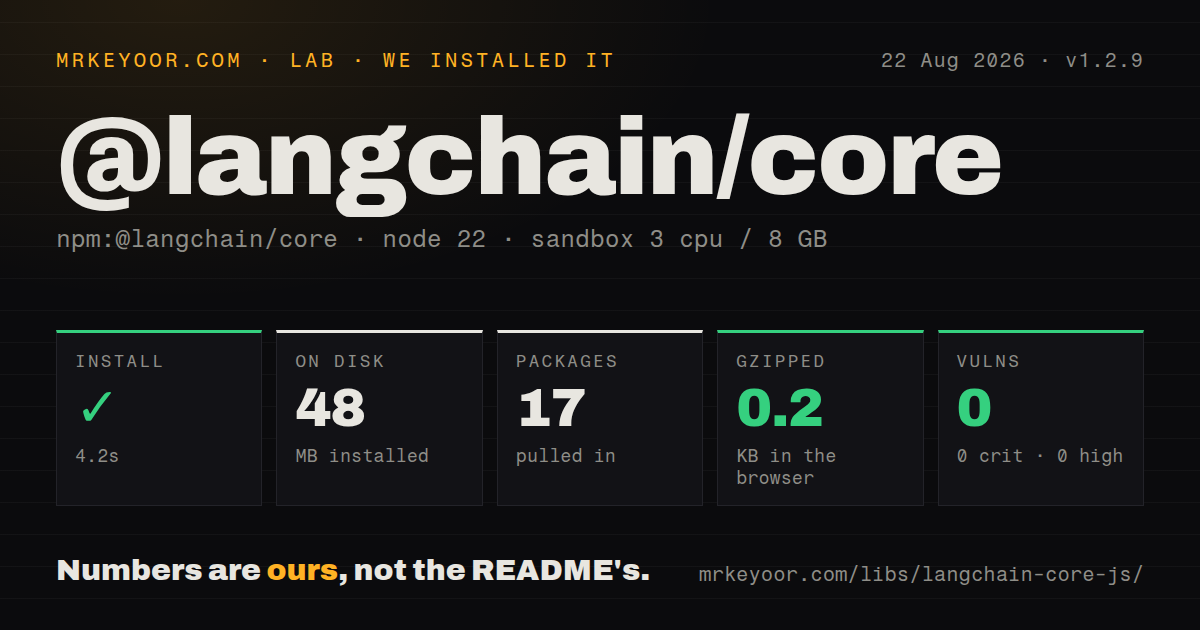
| Install | ✓ · 4.2s | 17 packages on disk · 48 MB |
| Import | ✓ | ESM import works · require() works · ESM package with exports map |
| Browser | 0.2 KB | gzipped (0.3 KB minified), bundled with esbuild |
| Types | ✓ | TypeScript types bundled |
| Known vulns | 0 | 0 critical · 0 high · 0 moderate · 0 low (npm audit) |
Answers from our run
Does @langchain/core install cleanly?
Yes. In a fresh container with an empty cache, npm install @langchain/core finished in 4 seconds, leaving 17 packages and 48 MB on disk. npm audit reported no known vulnerabilities.
How much does @langchain/core add to a browser bundle?
0.2 KB gzipped (0.3 KB minified) when the whole package is bundled for the browser with esbuild. Importing only part of it is usually smaller.
Does @langchain/core work with both ESM and CommonJS?
Yes. Both import '@langchain/core' and require('@langchain/core') worked in Node 22 in our run. The package is published as ESM with an exports map.
Does @langchain/core include TypeScript types?
Yes, type declarations ship inside the package, so no @types install is needed.
@langchain/core or ai: which should you use?
ai: Use it for TypeScript streaming, tool calls, and framework UI helpers with a smaller orchestration model. @langchain/core 1.2.9 installed in 4.2 seconds and left 48 MB across 17 packages in our sandbox, while a root namespace browser build tree-shook to 0.2 KB gzipped.
When should you not use @langchain/core?
One provider SDK and a few direct calls cover the product. The official provider client has fewer abstractions and less version coupling.
Use it if
- Several LangChain provider packages need one shared message, tool, prompt, and Runnable contract.
- You are implementing a model, retriever, tool, or callback that should plug into LangChain.js.
- Provider swapping matters enough to keep application code behind BaseChatModel and standard messages.
- Chains need the same invoke, stream, batch, retry, fallback, and tracing controls.
- One provider SDK and a few direct calls cover the product. The official provider client has fewer abstractions and less version coupling.
- The app cannot run Node 20 or newer. Package 1.2.9 declares Node 20 as its minimum runtime.
- A 13,536 KB unpacked foundation package is too much for shared contracts. The install also brings 7 direct dependencies before any model provider.
- Most code is browser UI streaming. The ai package has framework-facing hooks and transport helpers without adopting LangChain's full object model.
- You expect provider-neutral output to erase provider differences. AIMessage content blocks, structured output, token metadata, and tool-call details still vary by integration and model.
Setup reality
We installed @langchain/core 1.2.9 in 4.2 seconds in a clean Node 22 container. The result was 17 packages and 48 MB on disk. npm audit reported 0 known vulnerabilities. Core has 7 direct dependencies, no peers, and 13,536 KB unpacked. It is ESM with an exports map, bundled TypeScript declarations, and working require() and ESM import paths.
Install a provider package separately because core does not call a model by itself. API credentials belong to that provider's environment variables or constructor config. Deep imports such as @langchain/core/messages, /prompts, /tools, and /runnables are public export paths and keep intent clear. Node 20 is the declared floor. Browser and edge support depends on the exact subpaths and provider package, so test the deployed runtime rather than assuming every integration follows core.
Our namespace browser build measured 0.3 KB minified and 0.2 KB gzipped. That figure reflects the root import's tree-shaken surface, not the cost of prompts, tokenization, LangSmith, or a provider client used by a real application. Inspect the production entry points you actually import. Version 1.2.9's tool-call conversion fix also means serialized message and cross-provider handoff tests should compare contentBlocks along with message.content.
Runnable batch work is concurrent unless maxConcurrency bounds it, and provider rate limits still apply. Retries can nest across model, tool, and outer workflow layers. Version 1.2.8 marks known deterministic errors as non-retryable and stops on the first such mark; third-party errors remain unclassified and retain prior retry behavior. Pass AbortSignal through config for cancellation, keep tracing credentials optional by environment, and pin compatible LangChain package ranges so one lockfile does not mix behavior from separate 1.x patch lines.
Patterns
Build a message prompt format-chat-prompt
import { ChatPromptTemplate } from '@langchain/core/prompts';

const prompt = ChatPromptTemplate.fromMessages([
  ['system', 'Answer only from the supplied context.'],
  ['human', 'Context: {context}\nQuestion: {question}'],
]);
const value = await prompt.invoke({ context, question });
Single braces declare template variables. Use doubled braces when the output must contain a literal brace.
Pipe a prompt into a model and parser compose-runnable-chain
import { StringOutputParser } from '@langchain/core/output_parsers';

const chain = prompt
  .pipe(model)
  .pipe(new StringOutputParser());

const answer = await chain.invoke({ context, question });
The provider model comes from another package. StringOutputParser turns message chunks into text and discards non-text structure.
Consume text chunks stream-runnable
const stream = await chain.stream({ context, question });
for await (const text of stream) {
  process.stdout.write(text);
}
A final StringOutputParser makes each chunk a string. Without it, chat models emit AIMessageChunk objects.
Invoke a model with typed messages construct-messages
import { HumanMessage, SystemMessage } from '@langchain/core/messages';

const response = await model.invoke([
  new SystemMessage('Reply in one sentence.'),
  new HumanMessage('What does an LRU cache evict?'),
]);
response.content may be text or an array of content blocks. Version 1.2.9 also surfaces tool calls through contentBlocks for Google and Vertex conversions.
Create a schema-checked tool define-tool
import { tool } from '@langchain/core/tools';
import { z } from 'zod';

const lookupOrder = tool(
  async ({ id }) => database.orders.find(id),
  {
    name: 'lookup_order',
    description: 'Read one order by ID',
    schema: z.object({ id: z.string() }),
  },
);
Defining or binding a tool does not execute it. An agent loop or application handler must run each returned tool call.
Turn a function into a Runnable wrap-business-function
import { RunnableLambda } from '@langchain/core/runnables';

const normalize = RunnableLambda.from(async (text: string) => text.trim());
const normalized = await normalize.invoke('  value  ');
RunnableLambda adds invoke, batch, stream, and composition around the function; it does not make CPU work parallel.
Execute two branches for one input run-parallel-branches
import { RunnableMap } from '@langchain/core/runnables';

const branches = RunnableMap.from({
  summary: summaryChain,
  labels: labelChain,
});
const result = await branches.invoke({ input: text });
Branches start concurrently, so both can consume provider quota at the same time and can fail independently.
Limit concurrent batch calls bound-batch-concurrency
const results = await chain.batch(
  inputs.map((input) => ({ input })),
  { maxConcurrency: 2 },
);
Results preserve input order. maxConcurrency=2 limits in-flight Runnable work but does not implement provider-specific rate scheduling.
Retry then switch models retry-with-fallback
const callable = primary
  .withRetry({ stopAfterAttempt: 3 })
  .withFallbacks([backup]);

const response = await callable.invoke(messages);
Version 1.2.8 stops known non-retryable errors on the first attempt. Unclassified third-party errors can still spend the full retry budget.
Abort an in-flight Runnable cancel-invocation
const controller = new AbortController();
const pending = chain.invoke(input, { signal: controller.signal });
controller.abort();
await pending;
The promise rejects after cancellation only if each Runnable and provider integration forwards the AbortSignal.
Ask a model for typed data parse-structured-output
import { z } from 'zod';

const schema = z.object({
  sentiment: z.enum(['positive', 'negative', 'neutral']),
  confidence: z.number().min(0).max(1),
});
const classifier = model.withStructuredOutput(schema);
const result = await classifier.invoke(review);
withStructuredOutput relies on the provider's tool-calling or JSON mechanism. Support and failure behavior differ across model integrations.
Mark a custom failure as final classify-retry-error
import { stampRetryable } from '@langchain/core/errors';

try {
  await validateAccount();
} catch (error) {
  throw stampRetryable(error, false);
}
Version 1.2.8 lets retry middleware stop on an explicit false mark while preserving the original error class and instanceof behavior.
Alternatives
| Package | Registry | Pick it when |
|---|---|---|
| ai | npm | Use it for TypeScript streaming, tool calls, and framework UI helpers with a smaller orchestration model. |
| openai | npm | Use the direct SDK when OpenAI-compatible endpoints are the only model boundary. |
| llamaindex | npm | Use it when document ingestion, indexes, and retrieval engines are the central abstractions. |
More ai / ml guides
@modelcontextprotocol/sdk · openai · mcp · huggingface-hub · @anthropic-ai/sdk · openai · the whole shelf →
How this guide is made: grounded in the library's documentation, release notes, changelog, and issue history, on a fixed rubric — not a hands-on install of every release. The 50 most-downloaded entries are additionally install-verified in clean containers. Corrections: contact the desk.