ink review
Ink 7.1.1 is a React renderer for terminal interfaces. Components return Text, Box, Static, and other terminal primitives; Ink reconciles that tree, uses Yoga for cell-based Flexbox layout, and updates ANSI output in place. Hooks cover keyboard input, paste events, focus, terminal dimensions, cursor placement, and app shutdown. It does not parse command arguments or run shell commands for you. Version 7.1 added suspendTerminal() so a child process can temporarily own the TTY, and 7.1.1 fixes a completed Static line being erased after a full-screen clear while adding x and y coordinates to measureElement().
Ink 7.1.1 installed in 4.3 seconds with 38 packages, 23 MB on disk, and 0 audit findings in our sandbox, while require() and browser bundling both failed. It fits a real interactive terminal application whose team already works in React; a prompt sequence or log-producing command should use a smaller CLI-specific tool.
We installed it
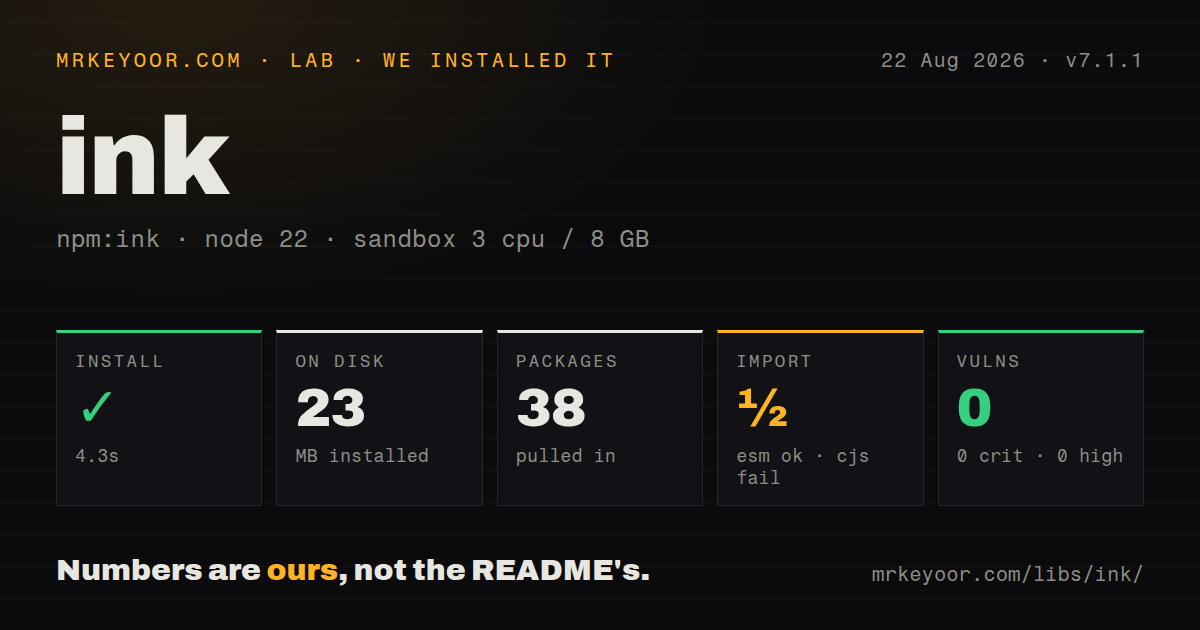
| Install | ✓ · 4.3s | 38 packages on disk · 23 MB |
| Import | ½ | ESM import works · require() fails · ESM package with exports map |
| Browser | n/a | could not be bundled for the browser (Node-only code, most likely) |
| Types | — | no TypeScript types found |
| Known vulns | 0 | 0 critical · 0 high · 0 moderate · 0 low (npm audit) |
Answers from our run
Does ink install cleanly?
Yes. In a fresh container with an empty cache, npm install ink finished in 4 seconds, leaving 38 packages and 23 MB on disk. npm audit reported no known vulnerabilities.
Can ink run in a browser?
Not directly: esbuild could not bundle it for the browser in our run, which normally means it depends on Node built-ins. Use it on the server, or find a browser-targeted alternative.
Does ink work with both ESM and CommonJS?
ESM only. import 'ink' worked, require('ink') failed in our run, so CommonJS projects need a dynamic import or a build step.
Does ink include TypeScript types?
No type declarations were found in our install, so TypeScript users need their own declarations.
ink or @clack/prompts: which should you use?
@clack/prompts: Use it for polished questions, confirmations, selections, and progress in a short command flow. Ink 7.1.1 installed in 4.3 seconds with 38 packages, 23 MB on disk, and 0 audit findings in our sandbox, while require() and browser bundling both failed.
When should you not use ink?
The command asks a few questions and exits. @clack/prompts or Enquirer provides prompt controls without a React renderer and 38 installed packages.
Use it if
- The command has persistent views, keyboard navigation, live progress, and enough shared UI state to benefit from React components.
- Your team already knows React hooks and wants that programming model for a terminal dashboard or interactive developer tool.
- Cell-based Flexbox layout is easier to maintain than handwritten cursor movement and line-clearing sequences.
- The interface needs a tested plain-output path alongside an interactive TTY experience.
- The command asks a few questions and exits. @clack/prompts or Enquirer provides prompt controls without a React renderer and 38 installed packages.
- You must support Node 20. Ink 7.1.1 declares Node 22 or newer and peers on React, @types/react, and react-devtools-core.
- The package must load through CommonJS require(). It failed under Node 22.23.2 in our sandbox; Ink 7 is ESM and loaded only through import().
- You expect browser reuse. Our esbuild browser build failed because Ink depends on terminal and Node behavior; its layout vocabulary does not turn it into a web renderer.
- Most users redirect output to files or CI logs. Ink's documented non-interactive mode skips cursor control and resize handling, then writes only the final changing frame at unmount.
Setup reality
We installed Ink 7.1.1 in a fresh Node 22 Bookworm sandbox in 4.3 seconds. The result was 38 packages and 23 MB on disk, and npm audit found 0 known vulnerabilities. Ink declares 25 direct dependencies and 3 peers; its own unpacked package is 1104 KB. ESM import worked, while require() failed under Node 22.23.2. Our package check found no bundled TypeScript declarations.
Install React beside Ink and satisfy the React 19.2, @types/react 19.2, and optional React DevTools peer ranges declared by 7.1.1. JSX still needs a compiler or runtime transform. The project scaffold configures that path; a manual JavaScript setup needs Babel plus the React preset. No credentials are involved. Text must sit inside Text, and each Box is a Yoga Flexbox container measured in terminal cells rather than CSS pixels.
Our esbuild browser bundle failed, which matches a Node-only terminal renderer. A live app also needs stdin and stdout that behave like a terminal. Before enabling useInput, check isRawModeSupported; pipes and many CI jobs cannot enter raw mode. In non-interactive mode, Ink omits ANSI erase commands, synchronized output, resize handling, and keyboard protocol detection. For automation, an explicit JSON or line-oriented output branch is easier to consume than the last rendered frame.
Timers, input listeners, sockets, and pending promises keep the Node process alive. Clean them up in React effects, then call exit() or unmount when the command is finished. Version 7.1's suspendTerminal() can hand the TTY to an editor or child command, but nested suspension throws and the handoff only occurs in an interactive TTY. Static output is append-only: changing an item already rendered does not rewrite its old terminal line.
Patterns
Render a terminal component render-cli
import React from 'react';
import {render, Text} from 'ink';

function App() {
  return <Text color="green">Ready</Text>;
}

const app = render(<App />);
await app.waitUntilExit();
Ink 7 is ESM in our package check, so run this through an ESM-aware JSX or TypeScript build instead of require().
Arrange a status row with Box layout-status-row
import {Box, Text} from 'ink';

export function StatusRow() {
  return (
    <Box width={60} gap={2}>
      <Box width={16}><Text bold>compile</Text></Box>
      <Box flexGrow={1}><Text color="yellow">running</Text></Box>
    </Box>
  );
}
Box uses Yoga and terminal-cell widths. Every visible string still belongs inside a Text component.
Update progress and clear its timer update-progress
import React, {useEffect, useState} from 'react';
import {Text} from 'ink';

export function Progress() {
  const [seconds, setSeconds] = useState(0);
  useEffect(() => {
    const id = setInterval(() => setSeconds(value => value + 1), 1000);
    return () => clearInterval(id);
  }, []);
  return <Text>{seconds}s elapsed</Text>;
}
The 1000 ms interval keeps Node alive. Returning clearInterval from the effect lets unmount finish the command.
Move selection and quit from the keyboard handle-keyboard
import {Text, useApp, useInput} from 'ink';

export function Controls() {
  const {exit} = useApp();
  useInput((input, key) => {
    if (input === 'q' || key.escape) exit();
    if (key.upArrow) move(-1);
    if (key.downArrow) move(1);
  });
  return <Text dimColor>Up/down move; q quits</Text>;
}
useInput needs raw-mode-capable stdin. Check useStdin().isRawModeSupported before mounting this control in a piped or CI environment.
Receive a pasted block as one value capture-paste
import {Text, usePaste} from 'ink';

export function PasteBox() {
  usePaste(text => importJson(text));
  return <Text>Paste JSON</Text>;
}
usePaste uses bracketed paste mode and keeps embedded newlines in one callback. Validate the pasted string before parsing or executing anything from it.
Keep finished tasks above a live row keep-completed-lines
import {Static, Text} from 'ink';

export function Results({finished, current}) {
  return (
    <>
      <Static items={finished}>
        {item => <Text key={item.id}>✓ {item.name}</Text>}
      </Static>
      <Text>Running: {current}</Text>
    </>
  );
}
Static writes only items appended after earlier renders. Mutating an item already emitted will not change its existing terminal line.
Give the terminal to a child command suspend-for-child-process
import {Text, useApp, useInput} from 'ink';
import {spawn} from 'node:child_process';

export function EditorControl() {
  const {suspendTerminal} = useApp();
  useInput(input => {
    if (input !== 'e') return;
    void suspendTerminal(() => new Promise((resolve, reject) => {
      const child = spawn('git', ['commit'], {stdio: 'inherit'});
      child.once('exit', code => code === 0 ? resolve() : reject(new Error(`git exited ${code}`)));
    }));
  });
  return <Text>Press e to open git commit</Text>;
}
suspendTerminal() arrived in Ink 7.1. It throws if another suspension is active and performs no TTY handoff in non-interactive mode.
Read a Box position after layout measure-layout
import React, {useEffect, useRef} from 'react';
import {Box, measureElement} from 'ink';

export function Panel() {
  const ref = useRef(null);
  useEffect(() => {
    console.log(measureElement(ref.current));
  }, []);
  return <Box ref={ref} width={20} height={4} />;
}
Version 7.1.1 returns x, y, width, and height. Calling measureElement during render yields four zero values because layout has not run.
Switch layout at a terminal width handle-terminal-width
import {Text, useWindowSize} from 'ink';

export function WidthMode() {
  const {columns, rows} = useWindowSize();
  return <Text>{columns < 80 ? 'compact' : 'wide'} ({columns}x{rows})</Text>;
}
Non-interactive mode disables resize handling. Treat the reported dimensions as a live-TTY feature rather than a dependable CI signal.
Expose a focusable terminal control manage-focus
import {Text, useFocus} from 'ink';

export function Choice({id, label}) {
  const {isFocused} = useFocus({id});
  return <Text inverse={isFocused}>{isFocused ? '> ' : '  '}{label}</Text>;
}
useFocus tracks which component owns focus, but the component must still handle its keys with useInput.
Return a value when the app exits return-result
const instance = render(<Picker />);
const chosenId = await instance.waitUntilExit();
console.log(chosenId);

// Inside Picker:
// useApp().exit(selectedId);
exit(value) resolves waitUntilExit with that value. Passing an Error rejects the promise and should be handled by the command entry point.
Emit plain data when stdout is redirected support-redirected-output
import process from 'node:process';

if (process.stdout.isTTY) {
  const app = render(<Dashboard />);
  await app.waitUntilExit();
} else {
  process.stdout.write(JSON.stringify(await readStatus()) + '\n');
}
Ink writes only the final changing frame at unmount in non-interactive mode. A separate JSON branch gives scripts a stable contract.
Alternatives
| Package | Registry | Pick it when |
|---|---|---|
| @clack/prompts | npm | Use it for polished questions, confirmations, selections, and progress in a short command flow. |
| enquirer | npm | Use it when the interface is a sequence of prompts and custom prompt types matter more than persistent layout. |
| terminal-kit | npm | Use it for direct terminal control, widgets, drawing, and input without React reconciliation. |
| blessed | npm | Use it for an older widget-style terminal UI when maintaining its callback-oriented API is acceptable. |
More cli & tooling guides
commander · chalk · typescript · esbuild · yargs · click · the whole shelf →
How this guide is made: grounded in the library's documentation, release notes, changelog, and issue history, on a fixed rubric — not a hands-on install of every release. The 50 most-downloaded entries are additionally install-verified in clean containers. Corrections: contact the desk.