enquirer review
Enquirer 2.4.1 asks interactive questions in a terminal and resolves the answers through promises. Its built-ins go well beyond text and yes-or-no input: select, multiselect, autocomplete, form, survey, scale, sort, quiz, and snippet prompts all live in the same CommonJS package. Question callbacks can validate an answer, skip a later question, or derive choices from earlier state. The current release is a compatibility correction that replaced newer assignment operators introduced in 2.4.0, rather than a feature release. Our browser build failed because the implementation expects Node terminal facilities.
Enquirer 2.4.1 installed in 0.4 seconds and left 4 packages using 1 MB in our sandbox, but its last npm release was in 2023. Keep it for established CommonJS CLIs that use its broad prompt catalogue; start a new TypeScript command with @inquirer/prompts or @clack/prompts unless Enquirer's unusual prompt classes are the deciding feature.
We installed it
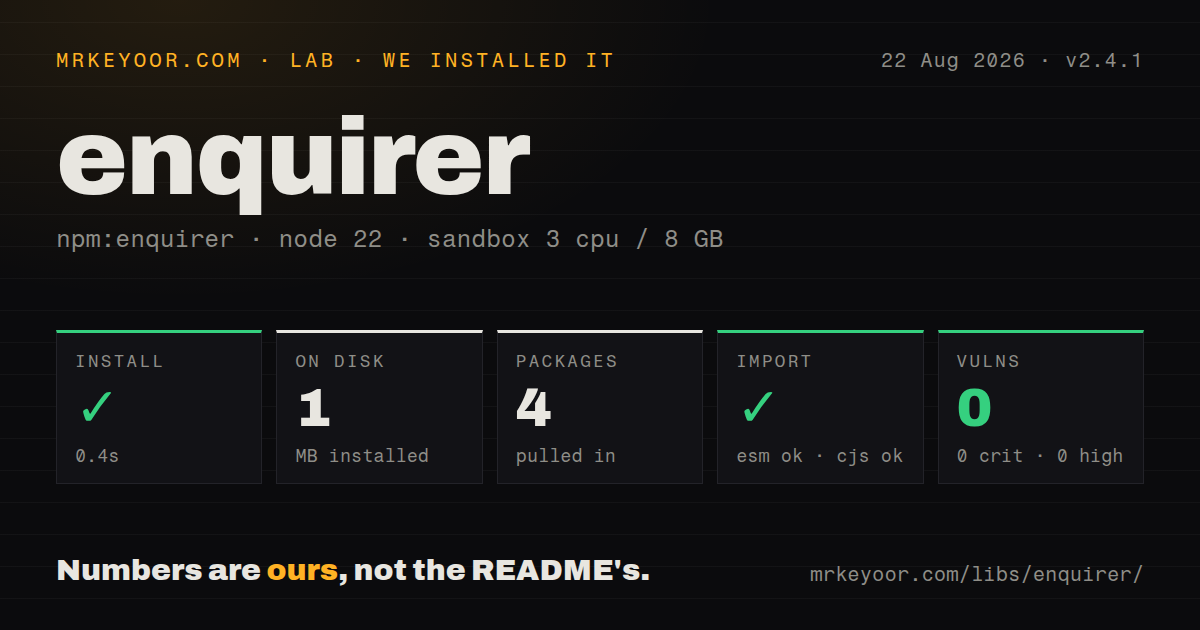
| Install | ✓ · 0.4s | 4 packages on disk · 1 MB |
| Import | ✓ | ESM import works · require() works · CommonJS package |
| Browser | n/a | could not be bundled for the browser (Node-only code, most likely) |
| Types | ✓ | TypeScript types bundled |
| Known vulns | 0 | 0 critical · 0 high · 0 moderate · 0 low (npm audit) |
Answers from our run
Does enquirer install cleanly?
Yes. In a fresh container with an empty cache, npm install enquirer finished in 0.4s, leaving 4 packages and 1 MB on disk. npm audit reported no known vulnerabilities.
Can enquirer run in a browser?
Not directly: esbuild could not bundle it for the browser in our run, which normally means it depends on Node built-ins. Use it on the server, or find a browser-targeted alternative.
Does enquirer work with both ESM and CommonJS?
Yes. Both import 'enquirer' and require('enquirer') worked in Node 22 in our run. The package is published as CommonJS.
Does enquirer include TypeScript types?
Yes, type declarations ship inside the package, so no @types install is needed.
enquirer or @inquirer/prompts: which should you use?
@inquirer/prompts: Use it for actively maintained modular prompts and stronger current TypeScript ergonomics. Enquirer 2.4.1 installed in 0.4 seconds and left 4 packages using 1 MB in our sandbox, but its last npm release was in 2023.
When should you not use enquirer?
New releases are part of your support policy; npm 2.4.1 dates to July 2023 and the repository was last pushed in June 2024
Discussed on
- hnJeff Bezos Accuses National Enquirer of Blackmail433 points
- hnDoes Jeff Bezos Have a Legal Case Against the National Enquirer?67 points
- hnJeff Bezos goes public with alleged AMI blackmail over nudes58 points
- hnBezos probe concludes mistress' brother was Enquirer source18 points
- hnBezos’ Girlfriend Gave Texts to Brother Who Leaked to National Enquirer16 points
Use it if
- A Node CLI needs several prompt styles, including forms, surveys, sorting, or editable snippets
- Later questions must inspect earlier answers before choosing their initial value, choices, validation, or skip state
- A bespoke terminal control is worth extending from Enquirer's Prompt classes
- A CommonJS application needs a prompt package that still declares support back to Node 8.6
- New releases are part of your support policy; npm 2.4.1 dates to July 2023 and the repository was last pushed in June 2024
- The CLI is TypeScript-first and needs precise declarations for every concrete prompt class; the bundled types cover the main runner better than the full class catalogue
- The module can enter a browser bundle; our esbuild browser attempt failed on its Node terminal code
- Commands must work unattended in CI or through piped stdin; Enquirer needs a TTY unless your application supplies a flag or default path
- Cancellation must always be an Error object; interrupt rejection values need narrowing before code reads message or stack
Setup reality
We installed Enquirer 2.4.1 in our fresh Node 22 sandbox in 0.4 seconds. The result was 4 packages and 1 MB on disk. npm audit found 0 known vulnerabilities. Enquirer's own package is 320 KB unpacked, declares 2 direct dependencies and 0 peers, and includes TypeScript declarations under an MIT license. Its engines field says Node 8.6 or newer, an unusually old floor that explains some conservative source syntax.
No account, credential, or config file is involved. The real requirement is an interactive terminal: Enquirer reads keypresses from stdin and repaints output. Check process.stdin.isTTY before prompting in a command that also runs in CI, a pipe, or a background job. Give those callers flags, environment variables, or a direct error. Tests are easier when business decisions sit outside the prompt layer and receive a prepared answers object.
Enquirer is CommonJS and publishes no exports map. Both require() and ESM import worked on our Node 22 box, but ESM consumers rely on Node's CommonJS interop rather than a native module entry. A browser-targeted esbuild run failed, which is the expected result for terminal code. Keep prompt imports out of modules shared with web clients, even when a bundler appears able to inspect the package.
Validation may be synchronous or asynchronous and must return true or an error string. skip can also be a value or callback, and a skipped prompt may contribute its initial value. Ctrl+C follows the rejection path, but code should treat the rejected value as unknown instead of assuming Error. Set exit code 130 for an intentional interrupt. Long choice arrays need a visible limit and often a custom suggest function; Enquirer does not fetch or paginate remote choices for you.
Patterns
Ask for one text value ask-text
const { prompt } = require('enquirer');
const { name } = await prompt({ type: 'input', name: 'name', message: 'Service name?' });
prompt resolves an object keyed by name, even when the run contains 1 question.
Run questions in sequence ask-sequence
const answers = await prompt([
  { type: 'input', name: 'name', message: 'Name?' },
  { type: 'confirm', name: 'deploy', message: 'Deploy?', initial: false }
]);
Question results accumulate in 1 object; repeating a name replaces its earlier answer.
Return a stable select value select-value
const { Select } = require('enquirer');
const target = await new Select({
  name: 'target', message: 'Target?',
  choices: [{ name: 'dev', message: 'Development' }, { name: 'prod', message: 'Production' }]
}).run();
Select resolves the choice name, so keep name machine-friendly and reserve message for display text.
Choose several items select-many
const { MultiSelect } = require('enquirer');
const features = await new MultiSelect({
  name: 'features', message: 'Features?', choices: ['auth', 'billing'], required: true
}).run();
MultiSelect returns selected names as an array; required prevents submission with 0 selections.
Keep invalid input on screen validate-input
const { port } = await prompt({
  type: 'numeral', name: 'port', message: 'Port?', initial: 3000,
  validate: value => value >= 1024 && value <= 65535 ? true : 'Use 1024 through 65535'
});
Validation accepts true or an error string; the string is rendered while the same prompt stays active.
Skip a dependent question skip-question
const answers = await prompt([
  { type: 'confirm', name: 'custom', message: 'Custom registry?' },
  { type: 'input', name: 'url', message: 'Registry URL?', skip() { return !this.state.answers.custom; } }
]);
A skip callback can read earlier answers through this.state.answers because questions run in order.
Filter a long choice list autocomplete-choice
const { AutoComplete } = require('enquirer');
const value = await new AutoComplete({
  name: 'pkg', message: 'Package?', limit: 8, choices: names,
  suggest(input, choices) { return choices.filter(c => c.message.includes(input)); }
}).run();
limit changes visible rows, while suggest controls which choices match typed input.
Edit related fields together collect-form
const { Form } = require('enquirer');
const author = await new Form({
  name: 'author', message: 'Author',
  choices: [{ name: 'name', message: 'Name' }, { name: 'email', message: 'Email' }]
}).run();
Form resolves 1 object whose property names come from the choice definitions.
Handle an interrupt separately handle-cancel
try {
  await prompt(questions);
} catch (reason) {
  if (!(reason instanceof Error)) { process.exitCode = 130; } else { throw reason; }
}
Ctrl+C rejection is not guaranteed to be an Error, so narrow the value before reading message or stack.
Refuse an unattended prompt guard-tty
if (!process.stdin.isTTY) {
  throw new Error('Interactive terminal required; pass CLI flags.');
}
const answers = await prompt(questions);
A non-TTY process can wait forever for keypresses; this check makes CI fail immediately.
Alternatives
| Package | Registry | Pick it when |
|---|---|---|
| @inquirer/prompts | npm | Use it for actively maintained modular prompts and stronger current TypeScript ergonomics |
| @clack/prompts | npm | Use it when grouped flows, status output, spinners, and explicit cancellation shape the command |
| prompts | npm | Use it for a smaller runner when forms, surveys, and subclassing are unnecessary |
More cli & tooling guides
commander · chalk · typescript · esbuild · yargs · click · the whole shelf →
How this guide is made: grounded in the library's documentation, release notes, changelog, and issue history, on a fixed rubric — not a hands-on install of every release. The 50 most-downloaded entries are additionally install-verified in clean containers. Corrections: contact the desk.