framer-motion review
framer-motion 13.1.1 is the legacy package name for Motion's React animation runtime. It provides motion components, spring and transform values, gestures, exit animation with AnimatePresence, and geometry-based layout transitions. The maintainers direct new React projects to the motion package and the motion/react import path. Version 13.1 introduced two-dimensional Reorder, automatic axis detection, and RTL handling; 13.1.1 guards window access outside browsers and adjusts AnimatePresence for React 19 strict mode.
framer-motion 13.1.1 installed in 1.4 seconds and used 12 MB in our sandbox, yet both Node 22 loading routes and our browser build failed. Keep it for an existing React codebase after a framework-level smoke test; new projects should follow the repository and use motion/react.
We installed it
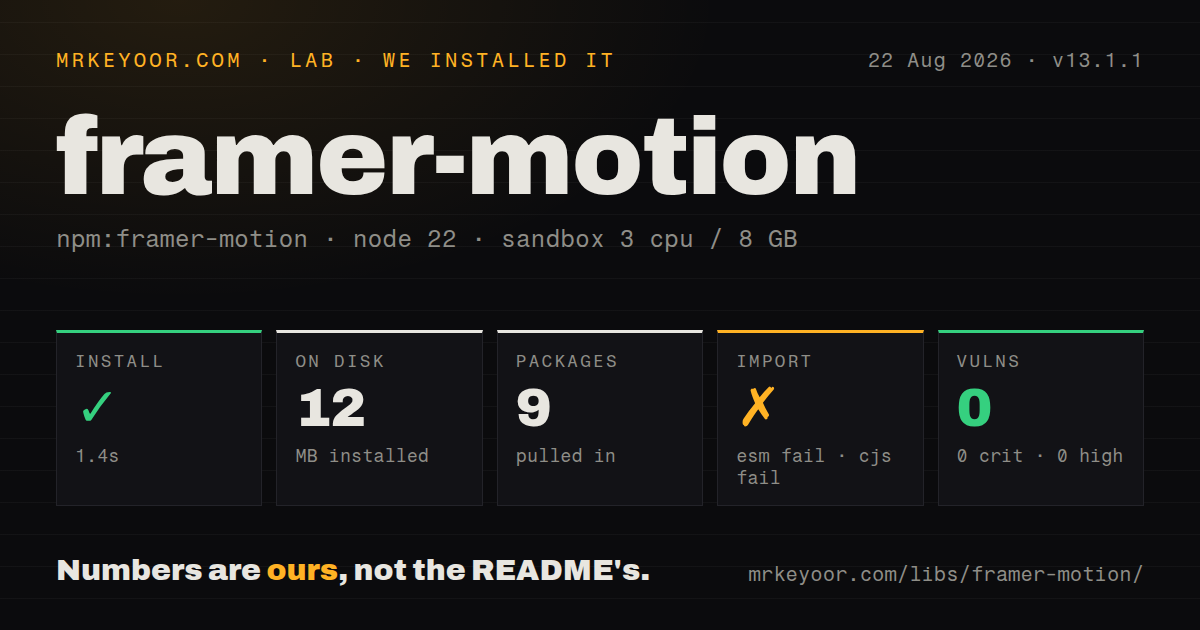
| Install | ✓ · 1.4s | 9 packages on disk · 12 MB |
| Import | ✗ | ESM import fails · require() fails · CommonJS package with exports map |
| Browser | n/a | could not be bundled for the browser (Node-only code, most likely) |
| Types | ✓ | TypeScript types bundled |
| Known vulns | 0 | 0 critical · 0 high · 0 moderate · 0 low (npm audit) |
Answers from our run
Does framer-motion install cleanly?
Yes. In a fresh container with an empty cache, npm install framer-motion finished in 1 seconds, leaving 9 packages and 12 MB on disk. npm audit reported no known vulnerabilities.
Can framer-motion run in a browser?
Not directly: esbuild could not bundle it for the browser in our run, which normally means it depends on Node built-ins. Use it on the server, or find a browser-targeted alternative.
Does framer-motion work with both ESM and CommonJS?
Neither plain import nor require succeeded in our sandbox, so it needs a bundler or extra setup.
Does framer-motion include TypeScript types?
Yes, type declarations ship inside the package, so no @types install is needed.
framer-motion or motion: which should you use?
motion: Use the maintained package name and motion/react imports for new React animation work. framer-motion 13.1.1 installed in 1.4 seconds and used 12 MB in our sandbox, yet both Node 22 loading routes and our browser build failed.
When should you not use framer-motion?
This is a new React project; the repository now tells users to install motion and import from motion/react
Discussed on
Use it if
- An established React application already imports from framer-motion and needs current version 13 fixes
- A keyed child must animate out before React removes it from the tree
- Drag, scroll, or pointer input should drive spring values without a React render on every frame
- Cards, tabs, or route panels need measured layout or shared-element transitions
- This is a new React project; the repository now tells users to install motion and import from motion/react
- The effect is a fixed opacity or color transition that CSS can express with less runtime code
- Your server tooling must load the bare entry in Node 22; both require and ESM import failed in our probe
- The interface uses Vue or plain JavaScript; the project publishes motion-v and motion for those targets
- The work depends on long imperative timelines and detailed SVG choreography; GSAP maps more directly to that style
Setup reality
Our Node 22 sandbox installed framer-motion 13.1.1 in 1.4 seconds. Nine packages occupied 12 MB, while npm audit found 0 vulnerabilities across all severity levels. The package itself was 5,984 KB unpacked and included TypeScript declarations. It declares 3 direct dependencies plus 2 peer dependencies, React and React DOM. Both peers accept versions 18 and 19.
Installation did not prove the entry point could load. require() failed under Node.js v22.23.2, and an ESM import failed under the same runtime. Our esbuild browser bundle also failed, so there is no successful browser build measurement from that probe. Framework bundlers may take a different path through the exports map. SSR, tests, and build scripts should exercise the exact import they ship.
There are no credentials or required config files. React and React DOM must resolve as peers. Under a server-component framework, animation hooks and interactive motion components need a client boundary. Version 13 removed the optional @emotion/is-prop-valid dependency; styled wrapper components that require filtering must install a validator themselves and pass isValidProp through MotionConfig.
AnimatePresence has to outlive the keyed child it is tracking, so put the conditional inside the presence component. Layout animation measures boxes and writes transforms; a transformed ancestor, scroll container, or competing CSS transition can alter that geometry. MotionValues bypass React renders, and useMotionValueEvent is the supported bridge back to application logic. Provide a reduced-motion path and test drag bounds at the actual mobile width.
Patterns
Animate the first render animate-entry
import { motion } from "framer-motion";

export function Notice() {
  return (
    <motion.aside
      initial={{ opacity: 0, y: 12 }}
      animate={{ opacity: 1, y: 0 }}
      transition={{ duration: 0.2 }}
    >
      Saved
    </motion.aside>
  );
}
This component needs a client boundary in frameworks that render React components on the server.
Keep a leaving child mounted for animation animate-exit
import { AnimatePresence, motion } from "framer-motion";

<AnimatePresence mode="wait">
  {open && (
    <motion.div
      key="dialog"
      initial={{ opacity: 0 }}
      animate={{ opacity: 1 }}
      exit={{ opacity: 0 }}
    />
  )}
</AnimatePresence>
AnimatePresence must remain in the tree, with the conditional child beneath it and a stable key identifying that child.
Pass staggered variants to children stagger-children
const list = {
  hidden: {},
  shown: { transition: { staggerChildren: 0.06 } },
};
const item = {
  hidden: { opacity: 0, y: 8 },
  shown: { opacity: 1, y: 0 },
};

<motion.ul variants={list} initial="hidden" animate="shown">
  {rows.map((row) => (
    <motion.li key={row.id} variants={item}>{row.label}</motion.li>
  ))}
</motion.ul>
Variant labels propagate through motion descendants. A child with its own animate prop stops following the parent label.
Animate a measured resize animate-layout
<motion.div layout className={expanded ? "card wide" : "card"}>
  <button onClick={() => setExpanded((value) => !value)}>Resize</button>
</motion.div>
Motion compares the previous and next boxes. CSS transitions on the same element can fight the generated transform and cause jitter.
Hand one layout identity between views share-layout-id
import { LayoutGroup, motion } from "framer-motion";

<LayoutGroup>
  {!selected && <motion.img layoutId="product-photo" src={thumb} />}
  {selected && <motion.img layoutId="product-photo" src={large} />}
</LayoutGroup>
Only one persistent element in a LayoutGroup should own a given layoutId during the handoff.
Drive styles from page scroll track-scroll-progress
import { motion, useScroll, useTransform } from "framer-motion";

function ReadingProgress() {
  const { scrollYProgress } = useScroll();
  const opacity = useTransform(scrollYProgress, [0, 0.1], [0, 1]);
  return <motion.div style={{ scaleX: scrollYProgress, opacity }} />;
}
MotionValues can update the DOM without rendering React for every scroll event. Observe them with useMotionValueEvent when code needs the value.
Limit dragging to one axis drag-with-bounds
import { motion } from "framer-motion";

<motion.button
  drag="x"
  dragConstraints={{ left: 0, right: 240 }}
  dragElastic={0.1}
  onDragEnd={(_, info) => saveOffset(info.offset.x)}
>
  Drag
</motion.button>
info.offset starts at the pointer-down position, whereas info.point uses viewport coordinates. Pick one coordinate system for thresholds.
Reveal a section once in view animate-on-visibility
<motion.section
  initial={{ opacity: 0 }}
  whileInView={{ opacity: 1 }}
  viewport={{ once: true, amount: 0.4 }}
>
  <Pricing />
</motion.section>
viewport.once stops later replays, and amount sets the visible fraction required before the animation starts.
Run an imperative sequence inside one scope sequence-dom-elements
import { useAnimate } from "framer-motion";

function Menu() {
  const [scope, animate] = useAnimate();
  async function open() {
    await animate(scope.current, { opacity: 1 });
    await animate("li", { x: 0, opacity: 1 }, { delay: 0.04 });
  }
  return <ul ref={scope}>{items.map((x) => <li key={x.id}>{x.label}</li>)}</ul>;
}
Selector strings passed to animate search only below the scope ref, preventing matches in another component.
Load the domAnimation feature set lazily reduce-feature-weight
import { LazyMotion, domAnimation, m } from "framer-motion";

<LazyMotion features={domAnimation} strict>
  <m.button whileTap={{ scale: 0.96 }}>Save</m.button>
</LazyMotion>
Use the m factory throughout the LazyMotion subtree. strict reports an accidental full motion import.
Remove spatial movement when requested respect-reduced-motion
import { motion, useReducedMotion } from "framer-motion";

function Panel() {
  const reduce = useReducedMotion();
  return (
    <motion.div
      initial={{ opacity: 0, x: reduce ? 0 : 24 }}
      animate={{ opacity: 1, x: 0 }}
    />
  );
}
Keep a clear state change such as opacity while suppressing travel, then verify the operating-system preference in a browser.
Provide a validator for wrapped components configure-prop-filter
import isPropValid from "@emotion/is-prop-valid";
import { MotionConfig, motion } from "framer-motion";

const AnimatedCard = motion.create(Card);

<MotionConfig isValidProp={isPropValid}>
  <AnimatedCard animate={{ opacity: 1 }} />
</MotionConfig>
Version 13 stopped carrying the optional Emotion validator. Add it only for wrappers that need custom prop filtering.
Alternatives
| Package | Registry | Pick it when |
|---|---|---|
| motion | npm | Use the maintained package name and motion/react imports for new React animation work. |
| @react-spring/web | npm | Use it when hooks and spring values are a better fit than motion element props. |
| react-transition-group | npm | Use it when lifecycle classes around enter and exit are enough and CSS owns the effects. |
| gsap | npm | Use it for imperative timelines, SVG sequences, and coordinated scroll animation. |
More web frontend guides
postcss · react · react-dom · tailwindcss · clsx · htmlparser2 · the whole shelf →
How this guide is made: grounded in the library's documentation, release notes, changelog, and issue history, on a fixed rubric — not a hands-on install of every release. The 50 most-downloaded entries are additionally install-verified in clean containers. Corrections: contact the desk.