gsap review
GSAP 3.15.0 animates CSS, SVG attributes, canvas or WebGL state, and ordinary JavaScript values with one imperative timeline API. Its core strength is scheduling: tweens can overlap, repeat, reverse, seek to labels, or follow scroll position through plugins. The current release adds `easeReverse`, which lets backward playback use a different easing curve and supersedes `yoyoEase`; it also fixes context cleanup around ScrollTrigger snapping and several SplitText and iframe cases. Our install had no direct or peer dependencies, included TypeScript declarations, and produced a 27.1 KB gzipped full-package browser bundle. The standard no-charge license permits common commercial work but is not an OSI license.
GSAP 3.15.0 installed in 0.7 seconds with 0 audit findings and yielded a 27.1 KB gzipped full import in our sandbox. Use it when controlled timelines, ScrollTrigger, or its specialist plugins carry the interaction; use CSS or a smaller API for routine UI motion, and read the custom license before shipping an animation builder.
We installed it
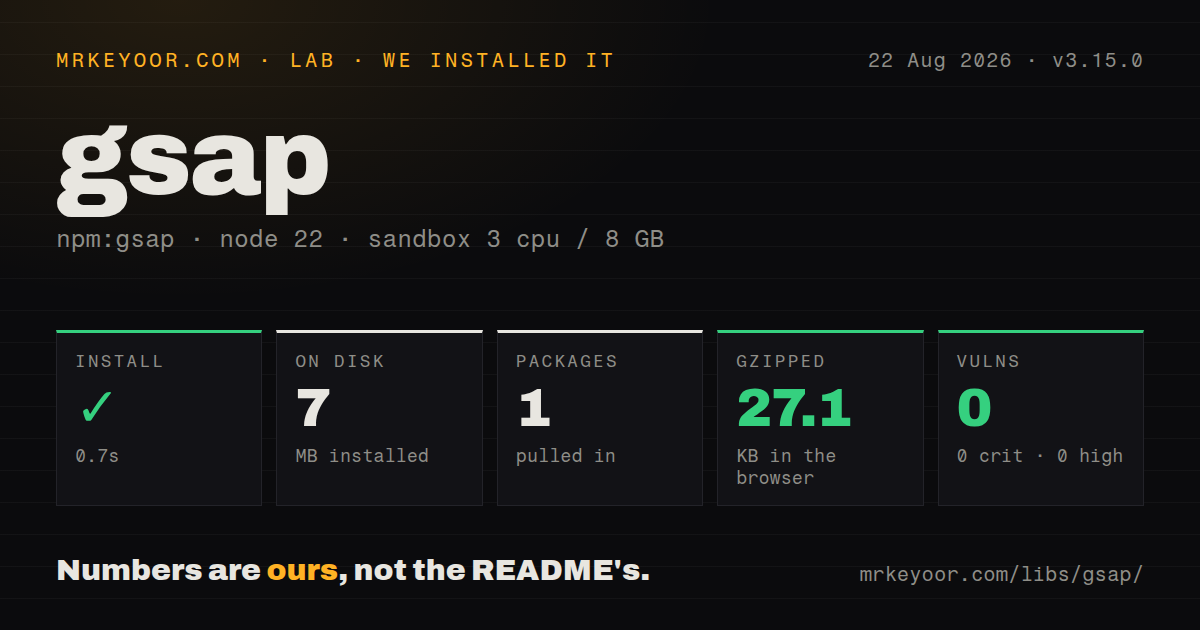
| Install | ✓ · 0.7s | 1 package on disk · 7 MB |
| Import | ✓ | ESM import works · require() works · CommonJS package with exports map |
| Browser | 27.1 KB | gzipped (69.5 KB minified), bundled with esbuild |
| Types | ✓ | TypeScript types bundled |
| Known vulns | 0 | 0 critical · 0 high · 0 moderate · 0 low (npm audit) |
Answers from our run
Does gsap install cleanly?
Yes. In a fresh container with an empty cache, npm install gsap finished in 0.7s, leaving 1 package and 7 MB on disk. npm audit reported no known vulnerabilities.
How much does gsap add to a browser bundle?
27.1 KB gzipped (69.5 KB minified) when the whole package is bundled for the browser with esbuild. Importing only part of it is usually smaller.
Does gsap work with both ESM and CommonJS?
Yes. Both import 'gsap' and require('gsap') worked in Node 22 in our run. The package is published as CommonJS with an exports map.
Does gsap include TypeScript types?
Yes, type declarations ship inside the package, so no @types install is needed.
gsap or motion: which should you use?
motion: Choose it for smaller DOM animation APIs, gestures, and framework integrations. GSAP 3.15.0 installed in 0.7 seconds with 0 audit findings and yielded a 27.1 KB gzipped full import in our sandbox.
When should you not use gsap?
The interface only fades or slides a few elements; CSS or the Web Animations API avoids a 27.1 KB gzipped measured import
Use it if
- Animation timing is a product feature and needs labels, overlap, seeking, reversing, repeats, or playback-speed controls
- The same timeline must change DOM styles, SVG attributes, canvas state, and plain object values
- ScrollTrigger's scrub, pin, snap, and refresh model matches a designed scroll sequence
- You need maintained plugins such as Flip, SplitText, MorphSVG, MotionPath, or Draggable under one API
- The interface only fades or slides a few elements; CSS or the Web Animations API avoids a 27.1 KB gzipped measured import
- Your policy requires an OSI-approved license; GSAP ships under GreenSock's standard no-charge terms
- The team cannot own cleanup and reduced-motion behavior; GSAP changes inline styles and does not choose an accessibility policy for you
- The page cannot tolerate scroll pinning that changes layout or a refresh pass after fonts, images, or routed content alter measurements
- Your React codebase insists on declarative animation state; GSAP manipulates targets after mount and its recommended hook lives in the separate `@gsap/react` package
Setup reality
Our GSAP 3.15.0 install finished in 0.7 seconds in a fresh Node 22 container. It placed 1 package on disk using 7 MB, and npm audit found 0 known vulnerabilities. The package has 0 direct dependencies and 0 peer dependencies, with 6,516 KB unpacked. It is CommonJS with an exports map; both require() and ESM import worked. TypeScript declarations ship inside it. Importing the whole package through esbuild measured 69.5 KB minified and 27.1 KB gzipped.
No credentials or config file are required. Import gsap, import each plugin by its documented path, then call gsap.registerPlugin() before creating related animations. The package contains many tools, so avoid gsap/all when only the core and 1 plugin are used. Version 3.15.0 introduces easeReverse; use it for backward easing because yoyoEase is now deprecated.
Browser elements must exist before a tween selects them. In React or another routed UI, create animations after mount, scope selectors with gsap.context(), and call revert() during cleanup. The separate @gsap/react hook packages that lifecycle for React. Development Strict Mode exposes missing cleanup by rerunning effects. A from() tween can flash its unanimated CSS state before JavaScript, so establish a safe initial style when that flash is unacceptable.
ScrollTrigger measures document positions and may add pin spacing. Web fonts, images, accordions, and route changes can invalidate those numbers; call ScrollTrigger.refresh() after the layout settles. Reduced motion is opt-in through gsap.matchMedia() or application logic. Review the standard license before building a product that lets customers visually construct animations, since the published terms exclude certain competing visual builders even though ordinary commercial use has no charge.
Patterns
Tween transform and opacity animate-css
import gsap from 'gsap';

gsap.to('.card', {x: 120, rotation: 8, opacity: 1, duration: 0.6, ease: 'power2.out'});
The 0.6-second tween writes inline transform and opacity values; scope the selector when several components reuse `.card`.
Control both tween endpoints set-start-and-end
gsap.fromTo('.notice', {autoAlpha: 0, y: 16}, {autoAlpha: 1, y: 0, duration: 0.4});`autoAlpha` changes opacity and visibility. CSS should define a safe first paint before this 0.4-second tween runs.
Overlap timeline steps sequence-timeline
const tl = gsap.timeline({defaults: {duration: 0.4}});
tl.from('.title', {y: 20, autoAlpha: 0})
  .from('.copy', {y: 12, autoAlpha: 0}, '-=0.2')
  .from('.action', {scale: 0.9, autoAlpha: 0}, '<');
`-=0.2` overlaps the preceding step by 0.2 seconds; `<` starts beside the previous tween.
Give reverse playback its own ease use-reverse-ease
const panel = gsap.to('.panel', {xPercent: 100, duration: 0.8, ease: 'power3.out', easeReverse: 'power3.in'});
panel.reverse();
Version 3.15.0 adds `easeReverse`; `yoyoEase` is deprecated for this job.
Stagger list entrances stagger-elements
gsap.from('.row', {y: 10, opacity: 0, duration: 0.35, stagger: {each: 0.06, from: 'start'}});Each matched node receives animation work; cap the list when hundreds of rows can appear together.
Seek and reverse a timeline control-playback
const intro = gsap.timeline({paused: true}).to('.panel', {xPercent: 0}).addLabel('open');
intro.play();
intro.seek('open');
intro.timeScale(1.5).reverse();
Keep 1 owned timeline instance so controls do not reach into GSAP's global timeline.
Revert scoped component animation cleanup-component
const root = document.querySelector('.widget');
const ctx = gsap.context(() => { gsap.from('.item', {y: 12, opacity: 0}); }, root);

function destroy() { ctx.revert(); }
`revert()` kills captured work and restores the inline state from before the context ran.
Switch behavior by motion preference respect-reduced-motion
const mm = gsap.matchMedia();
mm.add('(prefers-reduced-motion: no-preference)', () => {
  gsap.to('.hero', {x: 100, duration: 0.8});
});

function destroy() { mm.revert(); }
GSAP does not enforce reduced motion automatically; this query creates the 0.8-second tween only for users who allow it.
Bind progress to document scroll scrub-on-scroll
import ScrollTrigger from 'gsap/ScrollTrigger';
gsap.registerPlugin(ScrollTrigger);
gsap.to('.progress', {scaleX: 1, ease: 'none', scrollTrigger: {trigger: '.article', start: 'top top', end: 'bottom bottom', scrub: true}});
Register ScrollTrigger once and refresh its measurements after late layout changes.
Pin a scrubbed sequence pin-scroll-story
const story = gsap.timeline({scrollTrigger: {trigger: '.story', start: 'top top', end: '+=800', pin: true, scrub: 1}});
story.to('.scene-a', {autoAlpha: 0}).from('.scene-b', {autoAlpha: 0});
The `+=800` span and pin spacing change page flow; test zoom, keyboard travel, and narrow screens.
Reuse pointer tweens update-pointer-animation
const xTo = gsap.quickTo('.cursor', 'x', {duration: 0.2});
const yTo = gsap.quickTo('.cursor', 'y', {duration: 0.2});
function move(e) { xTo(e.clientX); yTo(e.clientY); }
window.addEventListener('pointermove', move);
`quickTo` reuses tween machinery for frequent updates; remove the 1 global listener during teardown.
Drive a canvas value animate-object
const state = {progress: 0};
gsap.to(state, {progress: 1, duration: 1.2, onUpdate() { drawFrame(state.progress); }});
GSAP updates 1 numeric property; your `drawFrame` function still owns clearing and painting within the frame budget.
Alternatives
| Package | Registry | Pick it when |
|---|---|---|
| motion | npm | Choose it for smaller DOM animation APIs, gestures, and framework integrations. |
| animejs | npm | Choose it for timelines and SVG or object animation under an MIT license. |
| framer-motion | npm | Choose it for React components, layout animation, and declarative gesture states. |
More web frontend guides
postcss · react · react-dom · tailwindcss · clsx · htmlparser2 · the whole shelf →
How this guide is made: grounded in the library's documentation, release notes, changelog, and issue history, on a fixed rubric — not a hands-on install of every release. The 50 most-downloaded entries are additionally install-verified in clean containers. Corrections: contact the desk.