@react-spring/web review
@react-spring/web 10.1.2 animates React DOM and SVG values with spring physics, while its `animated` components apply frame updates outside normal React renders. Hooks cover one spring, item collections, enter and leave transitions, trails, scroll values, and imperative controllers. The current patch fixes missing TypeScript keys when `from` is partial, changes SpringValue `onChange` to receive AnimationResult, and caches numeric parsing for large string interpolations. Our full-package browser import measured 24.3 KB gzipped.
@react-spring/web 10.1.2 installed in 3.4 seconds as 10 packages using 10 MB, produced a 24.3 KB gzipped full import, and had 0 audit findings in our sandbox. Choose it when interruptible spring motion or value-driven interaction earns that runtime; use CSS for ordinary fades and fixed transitions.
We installed it
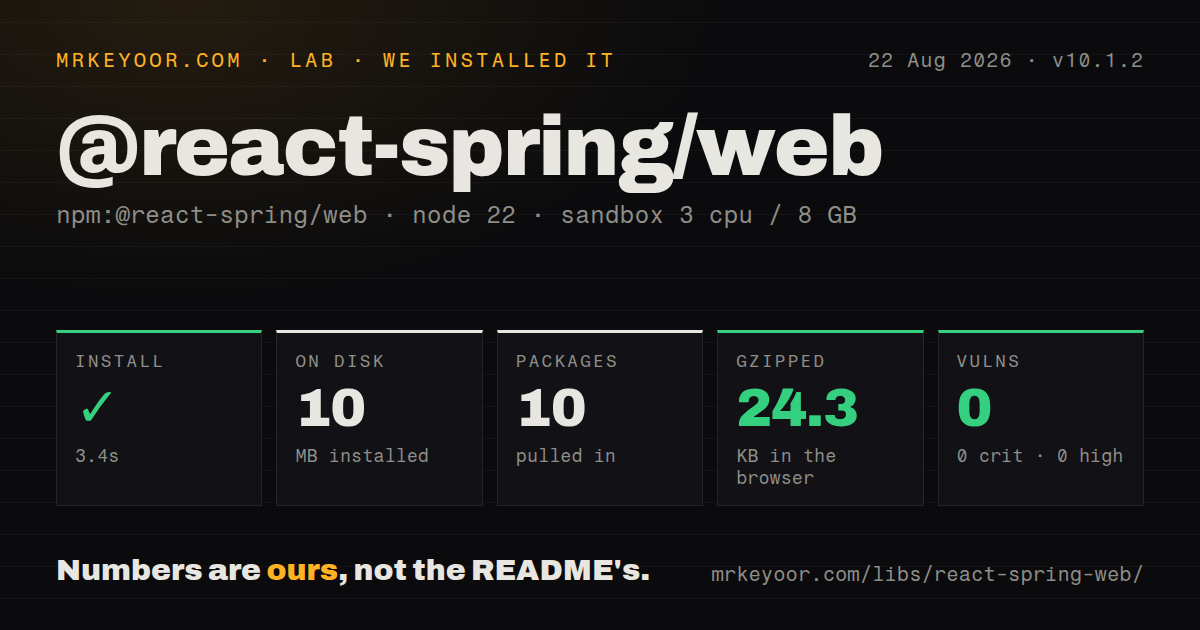
| Install | ✓ · 3.4s | 10 packages on disk · 10 MB |
| Import | ✓ | ESM import works · require() works · CommonJS package with exports map |
| Browser | 24.3 KB | gzipped (63.1 KB minified), bundled with esbuild |
| Types | ✓ | TypeScript types bundled |
| Known vulns | 0 | 0 critical · 0 high · 0 moderate · 0 low (npm audit) |
Answers from our run
Does @react-spring/web install cleanly?
Yes. In a fresh container with an empty cache, npm install @react-spring/web finished in 3 seconds, leaving 10 packages and 10 MB on disk. npm audit reported no known vulnerabilities.
How much does @react-spring/web add to a browser bundle?
24.3 KB gzipped (63.1 KB minified) when the whole package is bundled for the browser with esbuild. Importing only part of it is usually smaller.
Does @react-spring/web work with both ESM and CommonJS?
Yes. Both import '@react-spring/web' and require('@react-spring/web') worked in Node 22 in our run. The package is published as CommonJS with an exports map.
Does @react-spring/web include TypeScript types?
Yes, type declarations ship inside the package, so no @types install is needed.
@react-spring/web or motion: which should you use?
motion: Use it for declarative variants, layout animation, gestures, and scroll features within a broader component API. @react-spring/web 10.1.2 installed in 3.4 seconds as 10 packages using 10 MB, produced a 24.3 KB gzipped full import, and had 0 audit findings in our sandbox.
When should you not use @react-spring/web?
You need a couple of opacity or transform transitions. CSS avoids the 24.3 KB gzipped full-package import we measured.
Use it if
- Interaction can change its destination mid-flight, so velocity-preserving spring motion fits better than a fixed keyframe.
- A React list, route, or dialog needs enter and leave states that survive long enough to animate removed items.
- Drag, hover, scroll, or gesture input should drive values continuously without rerendering React for every frame.
- One typed API should animate DOM styles, SVG attributes, colors, transforms, and derived values.
- You need a couple of opacity or transform transitions. CSS avoids the 24.3 KB gzipped full-package import we measured.
- Design requires exact durations and easing curves throughout. Duration mode exists, but spring tuning is the package's main model.
- You need automatic layout animation and gesture props in one declarative component API. Motion is a closer fit for that workflow.
- Your tests cannot account for animation scheduling. The official testing guide uses the global skipAnimation switch and still waits for React updates.
- The target is React Native or React Three Fiber. This web package peers on React DOM; those renderers use separate React Spring target packages.
Setup reality
We installed @react-spring/web 10.1.2 in a fresh Node 22 Bookworm sandbox. npm took 3.4 seconds and left 10 packages using 10 MB on disk. The package is 100 KB unpacked, declares 5 direct dependencies and 2 peers, and includes TypeScript declarations under MIT. npm audit found 0 known vulnerabilities.
The package is CommonJS with an exports map, and both require() and ESM import worked in our checks. Its peers accept React and React DOM 16.8 through 19. A full import * browser build measured 63.1 KB minified and 24.3 KB gzipped. Import only the hooks and animated target you use, then inspect the production bundle rather than treating that full-import figure as every app's final cost.
Spring values belong on animated.div, animated.svg, or another animated target. The object form of useSpring() returns styles; the function form with dependencies can return [styles, api]. Version 10.1.2 fixes type inference when a partial from object omitted keys that still animate through to, and SpringValue-level onChange now receives an AnimationResult with its live value under result.value.
Removed React items need useTransition() so they remain mounted through leave. Server-component frameworks need a client boundary around hook usage. Call useReducedMotion() near the application root to synchronize the library's global skip setting. Tests that set Globals.assign({ skipAnimation: true }) must still flush the scheduled React update before asserting final styles.
Patterns
Animate from a boolean prop animate-state
import { animated, useSpring } from "@react-spring/web"

function Panel({ open }) {
  const styles = useSpring({
    opacity: open ? 1 : 0,
    y: open ? 0 : 16,
  })

  return <animated.div style={styles}>Settings</animated.div>
}
SpringValue fields must reach an `animated` element; a plain div does not subscribe to their frame updates.
Start motion from an event imperative-control
import { animated, useSpring } from "@react-spring/web"

function Nudge() {
  const [styles, api] = useSpring(() => ({ x: 0 }), [])

  return (
    <animated.button
      style={styles}
      onClick={() => api.start({ from: { x: 0 }, to: { x: 20 } })}
    >
      Nudge
    </animated.button>
  )
}
The function form with a dependency list provides the `[styles, api]` tuple. A plain configuration object returns only styles.
Tune spring physics spring-config
const styles = useSpring({
  from: { opacity: 0, scale: 0.9 },
  to: { opacity: 1, scale: 1 },
  config: { mass: 1, tension: 210, friction: 20 },
})
Physics-based springs do not have a fixed duration. Use `config.duration` only when the specification is time-based.
Configure each property separately per-key-config
const styles = useSpring({
  from: { opacity: 0, y: 30 },
  to: { opacity: 1, y: 0 },
  config: key => key === "opacity"
    ? { duration: 180 }
    : { tension: 220, friction: 22 },
})
Easing applies to duration animations. The config callback receives each animated key and can mix timing models.
Keep leaving list items mounted transition-list
import { animated, useTransition } from "@react-spring/web"

const transitions = useTransition(items, {
  keys: item => item.id,
  from: { opacity: 0, height: 0 },
  enter: { opacity: 1, height: 40 },
  leave: { opacity: 0, height: 0 },
})

return transitions((style, item) => (
  <animated.div style={style}>{item.label}</animated.div>
))
Stable keys let `useTransition()` retain removed items until their leave animation finishes.
Create an independent spring per row animate-collection
const [springs, api] = useSprings(
  rows.length,
  index => ({
    from: { opacity: 0, y: 12 },
    to: { opacity: 1, y: 0 },
    delay: index * 40,
  }),
  [rows.length],
)

return springs.map((style, index) => (
  <animated.div key={rows[index].id} style={style}>
    {rows[index].label}
  </animated.div>
))
The spring count and item array must stay aligned. Use `useTransition()` when rows are inserted and removed by identity.
Make each spring follow the previous one trail-items
const trail = useTrail(labels.length, {
  from: { opacity: 0, x: -12 },
  to: { opacity: 1, x: 0 },
})

return trail.map((style, index) => (
  <animated.span key={labels[index]} style={style}>
    {labels[index]}
  </animated.span>
))
`useTrail()` couples each spring to its predecessor. Use `useSprings()` when destinations and timing must be independent.
Map one spring into a transform derive-value
const { progress } = useSpring({
  from: { progress: 0 },
  to: { progress: 1 },
})

return (
  <animated.div
    style={{
      transform: progress.to(value => `scale(${0.8 + value * 0.2})`),
    }}
  />
)
Use `.to()` for a subscribed derived value. Calling `.get()` during render only reads the current snapshot.
Read the v10.1.2 onChange payload handle-change
const value = new SpringValue(0)

value.start({
  to: 1,
  onChange: result => {
    console.log(result.value, result.finished, result.cancelled)
  },
})
At SpringValue level, version 10.1.2 passes AnimationResult. Code written for the old raw-value callback must read `result.value`.
Act only after a completed spring rest-callback
const styles = useSpring({
  opacity: visible ? 1 : 0,
  onRest: result => {
    if (result.finished && !result.cancelled) {
      markSettled()
    }
  },
})
An interrupted animation can still invoke event callbacks. Check `finished` and `cancelled` before advancing application state.
Follow the system motion preference reduced-motion
import { useReducedMotion } from "@react-spring/web"

function App() {
  useReducedMotion()
  return <Routes />
}
The hook updates React Spring's global skipAnimation setting. Mount it near the root so controllers share one preference.
Skip animation frames in tests test-final-state
import { Globals } from "@react-spring/web"

beforeEach(() => {
  Globals.assign({ skipAnimation: true })
})

afterEach(() => {
  Globals.assign({ skipAnimation: false })
})
The final React update is still scheduled. Await `waitFor()` or advance configured fake timers before reading styles.
Alternatives
| Package | Registry | Pick it when |
|---|---|---|
| motion | npm | Use it for declarative variants, layout animation, gestures, and scroll features within a broader component API. |
| react-transition-group | npm | Use it when you only need enter and exit lifecycle states and prefer to own the CSS. |
| @motionone/react | npm | Use it for a smaller React layer built around duration-driven Web Animations API behavior. |
More web frontend guides
postcss · react · react-dom · tailwindcss · clsx · htmlparser2 · the whole shelf →
How this guide is made: grounded in the library's documentation, release notes, changelog, and issue history, on a fixed rubric — not a hands-on install of every release. The 50 most-downloaded entries are additionally install-verified in clean containers. Corrections: contact the desk.