dependency-cruiser review
In our sandbox, dependency-cruiser 18.2.0 behaved like an ESM-only Node analysis tool: import succeeded, require failed, and esbuild could not make a browser bundle. Its useful output is a checked module graph. You describe forbidden paths or dependency types, then the CLI reports cycles, missing package declarations, unresolved imports, or layer violations with a CI-friendly exit code. Release 18.2.0 adds TypeScript config loading and makes the cache honor nested .gitignore files. The many graph formats are handy for investigation, but enforceable import rules are the stronger reason to use it.
Use dependency-cruiser when an architecture boundary deserves a failing CI check and path conventions are clear enough to encode. Leave it out when you only need dead-code cleanup, Node 20 support, or a CommonJS callable API.
We installed it
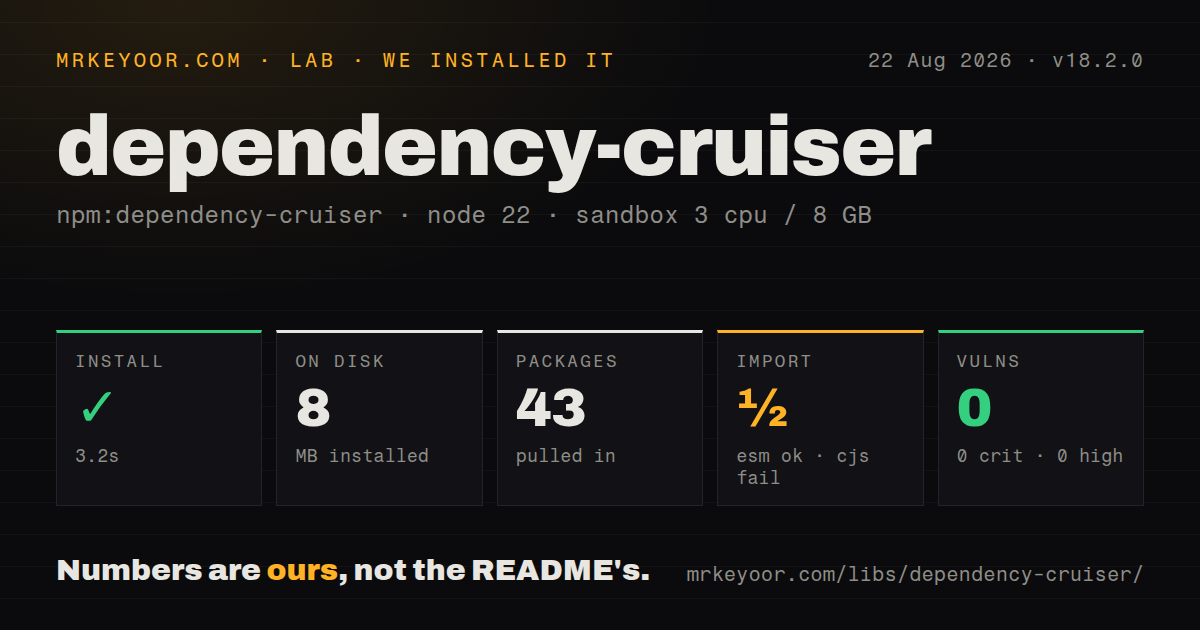
| Install | ✓ · 3.2s | 43 packages on disk · 8 MB |
| Import | ½ | ESM import works · require() fails · ESM package with exports map |
| Browser | n/a | could not be bundled for the browser (Node-only code, most likely) |
| Types | ✓ | TypeScript types bundled |
| Known vulns | 0 | 0 critical · 0 high · 0 moderate · 0 low (npm audit) |
Answers from our run
Does dependency-cruiser install cleanly?
Yes. In a fresh container with an empty cache, npm install dependency-cruiser finished in 3 seconds, leaving 43 packages and 8 MB on disk. npm audit reported no known vulnerabilities.
Can dependency-cruiser run in a browser?
Not directly: esbuild could not bundle it for the browser in our run, which normally means it depends on Node built-ins. Use it on the server, or find a browser-targeted alternative.
Does dependency-cruiser work with both ESM and CommonJS?
ESM only. import 'dependency-cruiser' worked, require('dependency-cruiser') failed in our run, so CommonJS projects need a dynamic import or a build step.
Does dependency-cruiser include TypeScript types?
Yes, type declarations ship inside the package, so no @types install is needed.
dependency-cruiser or madge: which should you use?
madge: Pick it for quick circular-dependency checks and simple diagrams without a policy rule set. Use dependency-cruiser when an architecture boundary deserves a failing CI check and path conventions are clear enough to encode.
When should you not use dependency-cruiser?
You still run Node 20: version 18.2.0 supports Node ^22, ^24, or >=26
Use it if
- You want CI to stop a domain, feature, or package boundary from being crossed by a new import
- You need one dependency scan that can flag circular edges, orphans, unresolved modules, and package declaration mistakes
- You need a focused Mermaid, GraphViz, JSON, CSV, HTML, or text view of a JavaScript or TypeScript module graph
- You have an existing codebase and want to freeze current violations in a baseline while rejecting new ones
- You still run Node 20: version 18.2.0 supports Node ^22, ^24, or >=26
- A CommonJS script must call the API: require failed on Node 22.23.2 in our check, although ESM import succeeded
- Unused exports and dependencies are the main problem: Knip is aimed at removal work, while this tool judges relationships in a module graph
- You expect SVG output without another executable: the dot reporter produces GraphViz input and the dot command is a separate install
- Your aliases and folder boundaries are informal: rules match paths with regular expressions, so unclear conventions create exclusions and false alarms
Setup reality
Our fresh Node 22 Bookworm install finished in 3.2 seconds and left 43 packages occupying 8 MB. npm audit found zero known vulnerabilities. The package has 18 direct dependencies, no peer dependencies, bundled TypeScript declarations, and 1,764 KB unpacked. Its Node range is ^22 || ^24 || >=26. ESM import worked on Node 22.23.2, while require failed. An esbuild browser bundle also failed because the dependency tree uses Node code.
Install it locally as a development dependency, then run npx depcruise --init. The initializer inspects the project, asks questions, and writes a starting config. Version 18.2.0 can load a TypeScript config file. For source that uses tsconfig paths, Babel transforms, or webpack aliases, pass the matching configuration; otherwise valid imports can appear unresolved. The README recommends depcruise --info when compiler discovery looks wrong.
The first scan often reports test entry points as orphans and exposes cycles that were already present. On a mature repository, generate a known-violations baseline, commit it, and use --ignore-known in CI. Do not regenerate that file during the CI run because new violations would disappear into it. Release 18.2.0 also changed cached walks so nested .gitignore files participate in exclusion decisions.
A full graph becomes noise quickly. Limit traversal with includeOnly, exclude, and doNotFollow before rendering, then use focus or reaches for a small question. Mermaid, JSON, CSV, HTML, and text reporters work without GraphViz. The dot reporter needs the external dot executable to turn its output into SVG. Vue, Svelte, CoffeeScript, and other nonstandard syntax also require their compiler to be discoverable beside the local install.
Patterns
Install locally and generate a starting config install-and-initialize
npm install --save-dev dependency-cruiser
npx depcruise --init
npx depcruise src
The 18.2.0 engine range is ^22, ^24, or >=26. A local install lets compiler discovery use the same dependency tree as the project.
Use the TypeScript config format added in 18.2.0 write-typescript-config
// .dependency-cruiser.ts
import type { IConfig } from 'dependency-cruiser';

const config: IConfig = {
  forbidden: [],
  options: { doNotFollow: { path: 'node_modules' } },
};
export default config;
Pass --config with the filename if automatic discovery does not select it. TypeScript config loading arrived in version 18.2.0.
Turn circular imports into errors reject-circular-imports
export default {
  forbidden: [{
    name: 'no-circular', severity: 'error',
    from: {}, to: { circular: true },
  }],
};
Error severity contributes to the command's nonzero result. Warn and info severities report without enforcing the same failure behavior.
Forbid domain imports from infrastructure protect-domain-layer
export default {
  forbidden: [{
    name: 'domain-away-from-infrastructure', severity: 'error',
    from: { path: '^src/domain/' },
    to: { path: '^src/(infrastructure|adapters)/' },
  }],
};
These path strings are regular expressions over normalized module paths. Anchors prevent a similarly named nested directory from matching accidentally.
Stop production source from importing dev dependencies check-dev-dependencies
export default {
  forbidden: [{
    name: 'production-away-from-dev-deps', severity: 'error',
    from: { path: '^src/' }, to: { dependencyTypes: ['npm-dev'] },
  }],
};
Add exclusions when tests, stories, or build scripts live under src and are supposed to consume devDependencies.
Resolve aliases and type-only dependencies load-typescript-paths
export default {
  forbidden: [],
  options: {
    tsConfig: { fileName: 'tsconfig.json' },
    tsPreCompilationDeps: true,
    doNotFollow: { path: 'node_modules' },
  },
};
Use npx depcruise --info if aliased imports are absent. The matching TypeScript compiler must be discoverable from the project install.
Create a filtered SVG with GraphViz render-svg-graph
npx depcruise src \
  --include-only '^src/' \
  --output-type dot \
  | dot -T svg > dependency-graph.svg
dependency-cruiser emits dot syntax here. The dot program comes from GraphViz and must be installed separately.
Write Mermaid without GraphViz write-mermaid-graph
npx depcruise src \
  --include-only '^src/' \
  --output-type mermaid \
  --output-to dependency-graph.mmd
Narrow the path set first. Large repository graphs can exceed renderer limits and usually hide the relationship you wanted to inspect.
Focus a graph around one module inspect-nearby-modules
npx depcruise src \
  --focus '^src/services/billing\.ts$' \
  --focus-depth 2 \
  --output-type text
Quote the expression so shell metacharacters reach dependency-cruiser unchanged. Focus is applied after static analysis, unlike early traversal filters.
Find everything that can reach a module trace-dependents
npx depcruise src \
  --include-only '^src/' \
  --reaches '^src/platform/logger\.ts$' \
  --output-type text
Use reaches for impact analysis because it follows dependents toward the target. Use focus when immediate neighbors are enough.
Freeze existing violations before enforcing CI baseline-existing-errors
npx depcruise src --output-type baseline \
  --output-to .dependency-cruiser-known-violations.json

npx depcruise src --ignore-known
Commit the baseline and edit it downward over time. Recreating it in CI would bless the new violations that the job should catch.
Cruise files from an ESM script call-programmatic-api
import { cruise } from 'dependency-cruiser';

const result = await cruise(['src'], {
  includeOnly: '^src/',
  doNotFollow: { path: 'node_modules' },
  outputType: 'json',
});
console.log(result.output);
Use import and await. Our Node 22.23.2 check loaded the ESM export, while require failed.
Alternatives
| Package | Registry | Pick it when |
|---|---|---|
| madge | npm | Pick it for quick circular-dependency checks and simple diagrams without a policy rule set |
| knip | npm | Pick it when the job is deleting unused files, exports, and dependencies |
| eslint-plugin-import | npm | Pick it when import resolution and boundary checks should run as part of ESLint |
More cli & tooling guides
commander · chalk · typescript · esbuild · yargs · click · the whole shelf →
How this guide is made: grounded in the library's documentation, release notes, changelog, and issue history, on a fixed rubric — not a hands-on install of every release. The 50 most-downloaded entries are additionally install-verified in clean containers. Corrections: contact the desk.