knip review
Knip 6.32.3 is a static-analysis CLI for unused JavaScript and TypeScript files, exports, dependencies, devDependencies, binaries, unresolved imports, and duplicate exports. It builds a reachability graph from configured entry points, package scripts, workspace manifests, and framework plugins. The current patch recognizes more tsup, Lefthook, WebdriverIO, and Vitest config locations, resolves pnpm subcommands, and fixes nested .gitignore negation. These changes matter because a missed config file or generated entry can turn working code into a false unused report.
Knip 6.32.2 installed in 11.9 seconds with 26 packages and 23 MB in our sandbox; current 6.32.3 is worth that CLI footprint when a team will tune entries and review findings. Do not hand --allow-remove-files to unattended CI or expect computed runtime imports to become statically visible.
We installed it
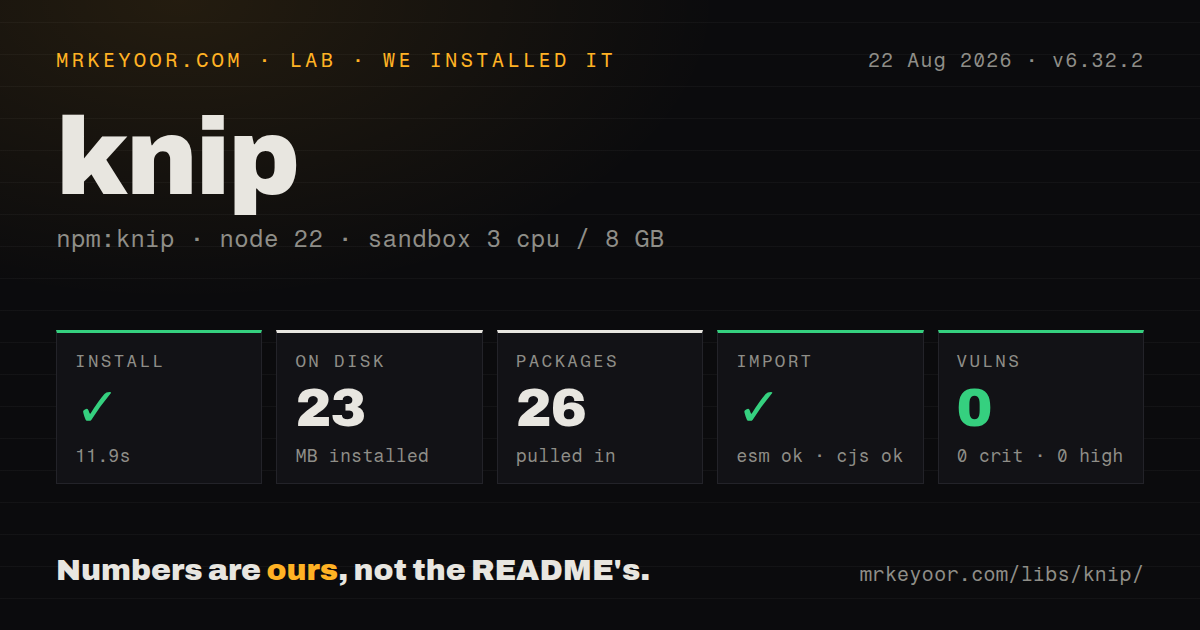
| Install | ✓ · 11.9s | 26 packages on disk · 23 MB |
| Import | ✓ | ESM import works · require() works · ESM package with exports map |
| Browser | n/a | could not be bundled for the browser (Node-only code, most likely) |
| Types | ✓ | TypeScript types bundled |
| Known vulns | 0 | 0 critical · 0 high · 0 moderate · 0 low (npm audit) |
Answers from our run
Does knip install cleanly?
Yes. In a fresh container with an empty cache, npm install knip finished in 12 seconds, leaving 26 packages and 23 MB on disk. npm audit reported no known vulnerabilities.
Can knip run in a browser?
Not directly: esbuild could not bundle it for the browser in our run, which normally means it depends on Node built-ins. Use it on the server, or find a browser-targeted alternative.
Does knip work with both ESM and CommonJS?
Yes. Both import 'knip' and require('knip') worked in Node 22 in our run. The package is published as ESM with an exports map.
Does knip include TypeScript types?
Yes, type declarations ship inside the package, so no @types install is needed.
knip or depcheck: which should you use?
Pick depcheck when depcheck 1.x is enough when the question is limited to unused and missing package dependencies. Knip 6.32.2 installed in 11.9 seconds with 26 packages and 23 MB in our sandbox; current 6.32.3 is worth that CLI footprint when a team will tune entries and review findings.
When should you not use knip?
You want an automatic deletion list from a zero-config run. Dynamic imports, filename routes, generators, shell scripts, and external consumers can sit outside Knip's graph.
Use it if
- Knip 6.32.3 fits a TypeScript or JavaScript repository where dead files, exports, and manifest entries should be reviewed together.
- A monorepo needs workspace-specific entry and project globs rather than one dependency check at the root.
- CI should cap known findings, emit GitHub annotations, or trace why one file, export, or dependency is reachable.
- The team can configure convention-loaded routes, generated files, package exports, and custom tool configs before deleting anything.
- You want an automatic deletion list from a zero-config run. Dynamic imports, filename routes, generators, shell scripts, and external consumers can sit outside Knip's graph.
- The repository runs Node 18, Node 20 below 20.19, or Node 22 below 22.12. The measured 6.32.2 package declares ^20.19.0 or >=22.12.0.
- Only package.json dependency usage matters. A narrower checker such as depcheck may require less graph and plugin configuration.
- The tool must run in a browser. Our esbuild browser bundle failed, matching a CLI that reads files, manifests, and tool configuration from Node.
- CI will run --fix --allow-remove-files without preserving and reviewing a diff. Knip cannot prove that a public export or convention-loaded file has no outside consumer.
- Your project depends heavily on runtime-computed specifiers that cannot be represented as entries or plugin rules. Repeated ignores can erase the benefit of graph analysis.
Setup reality
We installed Knip 6.32.2 in a fresh Node 22 Bookworm sandbox. npm finished in 11.9 seconds, left 26 packages, and used 23 MB. npm audit reported 0 known vulnerabilities. The package has 13 direct dependencies, no peer dependencies, and 6048 KB unpacked. It requires Node ^20.19.0 or >=22.12.0 and includes TypeScript declarations. Although it declares ESM with an exports map, both require() and ESM import worked in Node 22.23.2.
The registry now serves 6.32.3, so our install figures remain tied to 6.32.2. A browser bundle could not be built in the lab, which fits a Node CLI that walks a project and loads configuration. Run npx knip without --fix first. Correct entry and project globs before treating any unused-file output as actionable. Plugins discover framework conventions, but custom config names and wrapper scripts may still need explicit entries.
In a workspace, configure the root with the . key and child packages with their own globs. Production mode narrows analysis to shipped code, while strict mode checks dependency ownership per workspace. Those are different questions from a normal full-project scan. Use trace-file, trace-export, or trace-dependency when a result looks wrong; the trace usually exposes a missing root more safely than a broad ignore.
Fix mode can edit manifest entries, exports, and source. File removal needs the separate --allow-remove-files flag because it is the risky case. Keep the run on a recoverable branch and review every deletion. Version 6.32.3 improves discovery for several config extensions and nested ignore rules, but static analysis still cannot see a consumer outside the repository or a filename assembled only at runtime.
Patterns
Run a read-only first scan scan-project
npx knip

# Narrow the first review
npx knip --include files,dependencies
The first command reports every enabled issue type. Start narrower when an established repository has many unconfigured roots.
Declare entries and owned source define-roots
{
  "$schema": "https://unpkg.com/knip@6/schema.json",
  "entry": ["src/index.ts", "src/cli.ts", "scripts/*.ts"],
  "project": ["src/**/*.{ts,tsx}", "scripts/**/*.ts"]
}
A project file unreachable from every entry can be reported unused. Add framework-loaded roots that have no import parent.
Give each workspace its roots configure-workspaces
{
  "workspaces": {
    ".": { "entry": ["scripts/*.ts"] },
    "packages/*": {
      "entry": ["src/index.ts"],
      "project": ["src/**/*.ts"]
    }
  }
}
The . key is the root package. Test one child first with knip -W packages/name.
Trace a suspicious finding trace-result
npx knip --trace-file src/legacy.ts
npx knip --trace-export createClient
npx knip --trace-dependency lodash
A trace shows the graph path or missing reachability. Use that evidence before adding a directory-wide ignore.
Check shipped workspace dependencies scan-production
npx knip --production --strictProduction mode excludes development inputs. Strict mode also requires each workspace to declare what it uses.
Suppress generated file reports ignore-generated
{
  "ignoreFiles": ["src/generated/**", "**/*.generated.ts"]
}
ignoreFiles removes unused-file findings for these paths while their imports can still participate in the graph.
Remove selected dependency entries fix-manifest
npx knip --fix --fix-type dependencies

# review package.json and lockfile changes
Shell scripts and external loaders may use a package that imports never reveal. Review the manifest and lockfile diff.
Cap existing CI findings gate-ci
npx knip --reporter github-actions --no-progress --max-issues 25Exit code 1 means findings exceeded the cap. Exit code 2 means Knip itself failed to run or parse configuration.
Alternatives
| Package | Registry | Pick it when |
|---|---|---|
| depcheck | npm | depcheck 1.x is enough when the question is limited to unused and missing package dependencies. |
| ts-prune | npm | Use ts-prune for an older TypeScript-only export scan when files and manifest cleanup are outside scope. |
| unimported | npm | Use unimported when its simpler dead-file and dependency report matches the repository and Knip's plugin system is unnecessary. |
More cli & tooling guides
commander · chalk · typescript · esbuild · yargs · click · the whole shelf →
How this guide is made: grounded in the library's documentation, release notes, changelog, and issue history, on a fixed rubric — not a hands-on install of every release. The 50 most-downloaded entries are additionally install-verified in clean containers. Corrections: contact the desk.