cross-fetch review
`cross-fetch` gives one Fetch-shaped import to code that runs in browsers, workers, React Native, and Node. It selects `whatwg-fetch` in browser-like builds and `node-fetch` 2 in Node, with separate ponyfill and global-polyfill entry points. Version 4.1.0 adds stated Node 22 support, moves its Node dependency to node-fetch 2.7.0, and updates whatwg-fetch to 3.6.20. Our package inspection found a CommonJS distribution with no exports map; both `require()` and ESM `import` worked, and TypeScript declarations were included. The main reason to keep it is shared code that must cover older runtimes. Current Node and evergreen browsers already provide `fetch`.
Our cross-fetch 4.1.0 install completed in 0.6 seconds, occupied 1 MB across 6 packages, and added 3.7 KB gzipped to a full browser import with 0 audit findings. Keep it for genuinely shared code or old Node support; projects whose targets already expose fetch should remove the dependency.
We installed it
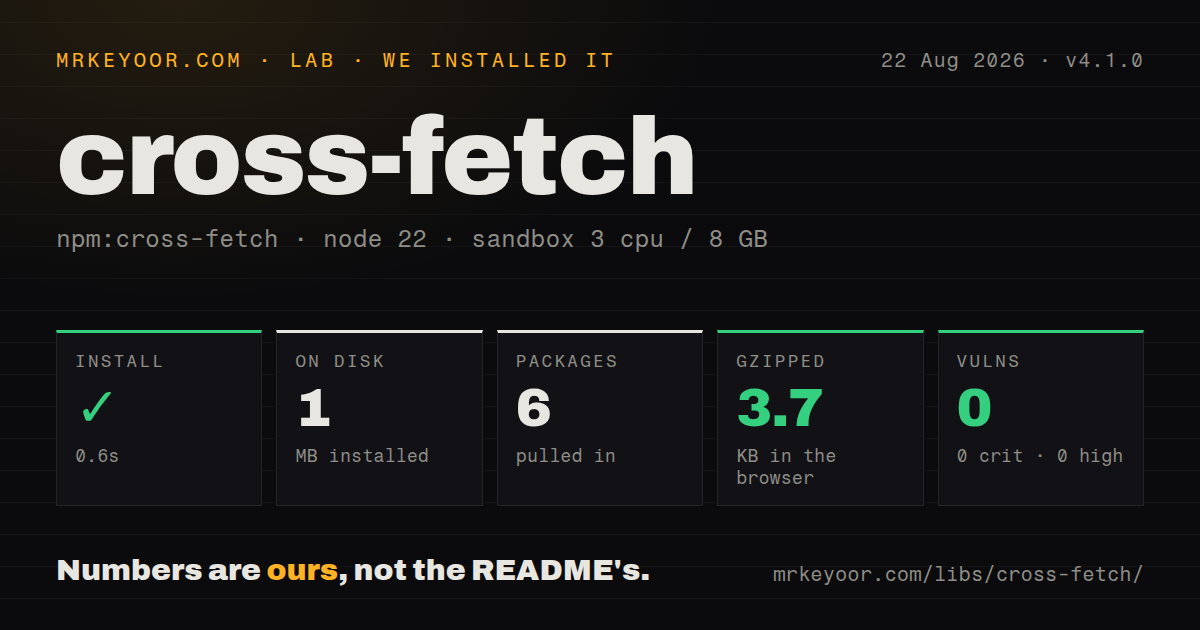
| Install | ✓ · 0.6s | 6 packages on disk · 1 MB |
| Import | ✓ | ESM import works · require() works · CommonJS package |
| Browser | 3.7 KB | gzipped (10.8 KB minified), bundled with esbuild |
| Types | ✓ | TypeScript types bundled |
| Known vulns | 0 | 0 critical · 0 high · 0 moderate · 0 low (npm audit) |
Answers from our run
Does cross-fetch install cleanly?
Yes. In a fresh container with an empty cache, npm install cross-fetch finished in 0.6s, leaving 6 packages and 1 MB on disk. npm audit reported no known vulnerabilities.
How much does cross-fetch add to a browser bundle?
3.7 KB gzipped (10.8 KB minified) when the whole package is bundled for the browser with esbuild. Importing only part of it is usually smaller.
Does cross-fetch work with both ESM and CommonJS?
Yes. Both import 'cross-fetch' and require('cross-fetch') worked in Node 22 in our run. The package is published as CommonJS.
Does cross-fetch include TypeScript types?
Yes, type declarations ship inside the package, so no @types install is needed.
cross-fetch or node-fetch: which should you use?
node-fetch: Use it directly when only Node needs a Fetch implementation and browser switching adds no value. Our cross-fetch 4.1.0 install completed in 0.6 seconds, occupied 1 MB across 6 packages, and added 3.7 KB gzipped to a full browser import with 0 audit findings.
When should you not use cross-fetch?
Every supported runtime already implements fetch. On current Node and evergreen browsers, the native API removes 6 installed packages and an extra compatibility layer.
Use it if
- A published library needs one local Fetch import that works across Node, browsers, workers, and React Native without assuming a global exists.
- An older Node target still lacks built-in fetch, while browser bundles should use the browser implementation selected by the package field.
- You want to choose between a ponyfill import and a side-effect polyfill rather than patching the global unconditionally.
- CommonJS consumers remain in the support matrix and must call `require('cross-fetch')` without an ESM-only migration.
- Every supported runtime already implements fetch. On current Node and evergreen browsers, the native API removes 6 installed packages and an extra compatibility layer.
- Node code depends on WHATWG `ReadableStream` behavior. The Node path uses node-fetch 2, whose `response.body` is a Node readable stream, so stream consumers differ from native browser fetch.
- Your package requires an exports map for strict subpath control or modern conditional resolution. Version 4.1.0 has browser and main fields but no `exports` field.
- You need retries, hooks, timeouts, JSON convenience methods, or automatic HTTP error rejection. cross-fetch deliberately stays close to Fetch and supplies none of those policies.
- A browser dependency budget cannot spare a 10.8 KB minified, 3.7 KB gzipped full import. `idb-keyval` is much smaller in our separate browser measurement, while native fetch adds no library payload at all.
Setup reality
We installed cross-fetch 4.1.0 in a fresh Node 22 Bookworm container. npm finished in 0.6 seconds and left 6 packages using 1 MB on disk. npm audit reported 0 vulnerabilities at every severity. The package itself declares 1 direct dependency and 0 peers and is 140 KB unpacked. It includes TypeScript declarations. Our module checks found a CommonJS package with no exports map, while both require() and ESM import succeeded.
No token, config file, or client object is involved. Import cross-fetch for a local ponyfill, or load cross-fetch/polyfill before dependent modules if they read globalThis.fetch. The polyfill route mutates a shared runtime, which makes load order part of correctness. Library authors should usually prefer the local import so an application keeps control of its global APIs.
A full browser import measured 10.8 KB minified and 3.7 KB gzipped in our esbuild check. Browser builds are redirected to whatwg-fetch; Node receives node-fetch 2.7.0. Those implementations share the Fetch surface but not every runtime detail. In particular, Node response bodies are Node streams, relative URLs lack a browser base URL, and cookie storage is not supplied. React Native and service workers bring their own networking constraints.
Fetch resolves on HTTP 404 or 500. Check response.ok or status before treating the body as success data. It does not encode a JavaScript object as JSON, attach a content type, retry, or impose a deadline. Use an AbortController for cancellation and clear its timer in finally. Version 4.1.0 supports Node 22 according to its release, but the package has no engines declaration to make npm enforce that statement.
Patterns
Fetch JSON without changing globals fetch-json
import fetch from 'cross-fetch';

const response = await fetch('https://api.example.com/users/42');
if (!response.ok) throw new Error(`HTTP ${response.status}`);
const user = await response.json();
A 4xx or 5xx response fulfills the promise. Test `ok` or `status` before accepting the JSON as a success payload.
Install the global polyfill polyfill-global
import 'cross-fetch/polyfill';

const response = await fetch('https://api.example.com/health');
Import this side-effect entry before code that reads global `fetch`. A local ponyfill is safer for reusable packages.
Load it from CommonJS require-commonjs
const fetch = require('cross-fetch');
const { Headers, Request, Response } = require('cross-fetch');

const response = await fetch(url);
Version 4.1.0 is a CommonJS package without an exports map, and our Node 22 `require()` check succeeded.
Post a JSON body post-json
const response = await fetch(url, {
  method: 'POST',
  headers: { 'content-type': 'application/json' },
  body: JSON.stringify({ sku: 'A-42', quantity: 2 }),
});
if (!response.ok) throw new Error(`HTTP ${response.status}`);
Fetch does not stringify objects or choose a JSON content type. Supply both pieces explicitly.
Cancel after five seconds abort-request
const controller = new AbortController();
const timer = setTimeout(() => controller.abort(), 5000);
try {
  return await fetch(url, { signal: controller.signal });
} finally {
  clearTimeout(timer);
}
The controller pattern covers targets that do not provide `AbortSignal.timeout()`. Always clear the timer after completion.
Construct portable headers set-request-headers
import fetch, { Headers } from 'cross-fetch';

const headers = new Headers({
  accept: 'application/json',
  authorization: `Bearer ${token}`,
});
const response = await fetch(url, { headers });
Import `Headers` from the package when some supported runtimes may not define the constructor globally.
Pipe a Node download stream-file-node
import fetch from 'cross-fetch';
import { createWriteStream } from 'node:fs';

const response = await fetch(fileUrl);
if (!response.ok) throw new Error(`HTTP ${response.status}`);
response.body.pipe(createWriteStream('archive.zip'));
This snippet is Node-specific because the node-fetch 2 path exposes a Node readable. Browser response bodies use web streams.
Preserve an HTTP error body capture-error-body
const response = await fetch(url);
if (!response.ok) {
  const text = await response.text();
  throw new Error(`HTTP ${response.status}: ${text.slice(0, 300)}`);
}
return response.json();
HTTP failures resolve normally, while connection errors and explicit aborts reject. Handle the two paths separately.
Send multipart data from Node upload-form-node
const FormData = require('form-data');
const fs = require('node:fs');
const fetch = require('cross-fetch');

const form = new FormData();
form.append('file', fs.createReadStream('invoice.pdf'));
await fetch(url, { method: 'POST', body: form, headers: form.getHeaders() });
On the node-fetch 2 path, forward `form.getHeaders()` so the declared multipart boundary matches the encoded body.
Read one response two ways clone-response
const response = await fetch(url);
const backup = response.clone();

try {
  return await response.json();
} catch {
  return { raw: await backup.text() };
}
A response body is consumable once. Clone it before the first read when a fallback parser needs the same bytes.
Include Fetch types in Node TypeScript configure-typescript
{
  "compilerOptions": {
    "lib": ["ES2022", "DOM"],
    "types": ["node"]
  }
}
The bundled declarations refer to web names such as `Request` and `Response`; a Node-only tsconfig may still need the DOM library.
Remove the ponyfill on current Node migrate-native-fetch
// Delete: import fetch from 'cross-fetch';
const response = await fetch(url);

// For old Node stream consumers:
// Readable.fromWeb(response.body).pipe(destination);
Audit `response.body.pipe()` and node-fetch-specific error checks first. Native Node fetch uses web stream semantics.
Alternatives
| Package | Registry | Pick it when |
|---|---|---|
| node-fetch | npm | Use it directly when only Node needs a Fetch implementation and browser switching adds no value. |
| undici | npm | Use it for Node-focused HTTP with the implementation behind modern Node's native fetch. |
| ky | npm | Use it when Fetch plus retries, hooks, timeout controls, and JSON helpers matches the application better. |
| axios | npm | Use it when interceptors, progress events, adapters, and automatic HTTP status rejection are required. |
More utils guides
lru-cache · type-fest · ajv · zod · p-limit · find-up · the whole shelf →
How this guide is made: grounded in the library's documentation, release notes, changelog, and issue history, on a fixed rubric — not a hands-on install of every release. The 50 most-downloaded entries are additionally install-verified in clean containers. Corrections: contact the desk.