axios review
Axios is a Promise-based HTTP client with adapters for browsers, Node.js, and fetch-capable runtimes. It serializes common request bodies, parses JSON responses, rejects non-success HTTP statuses, supports interceptors, exposes upload and download progress, and accepts AbortController signals. Version 1.19.0 tightens the minimum form-data dependency, carries symbol-keyed configuration through merges, adds generic parameter types, and fixes NO_PROXY matching, cancellation, progress, and response-size enforcement. Our install loaded through both require() and ESM import and included its own TypeScript declarations.
Axios earns its place when interceptors, progress events, multipart handling, and cross-runtime configuration are used across a real application. For a handful of JSON requests on current runtimes, native fetch is easier to inspect and ships no client dependency.
We installed it
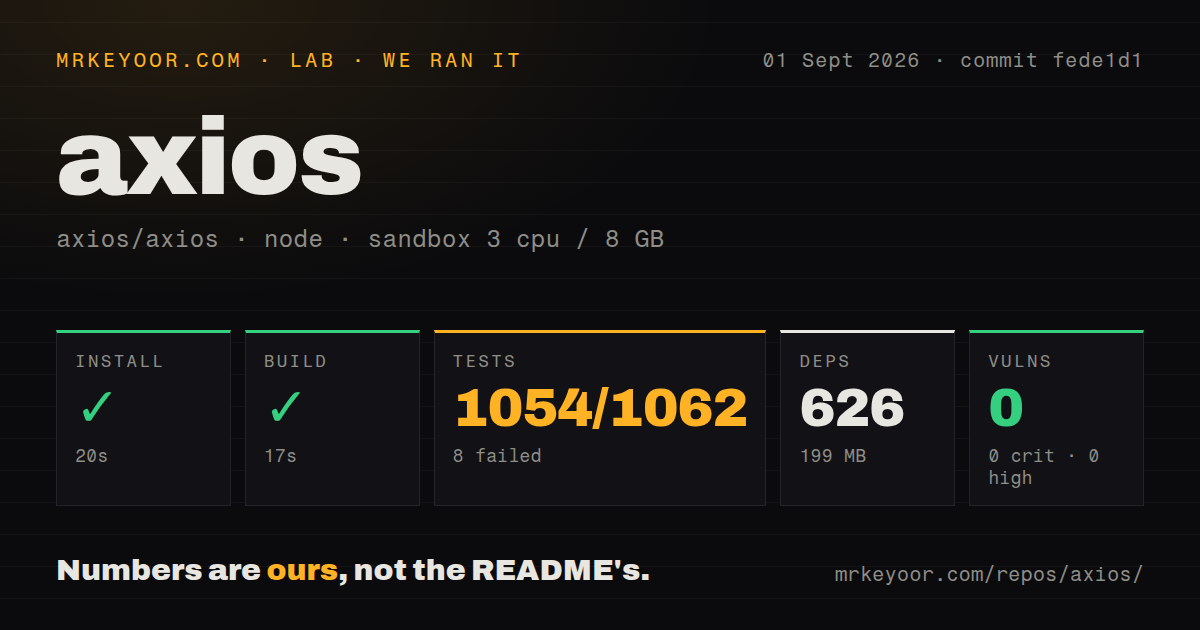

| Install | ✓ · 1.9s | 27 packages on disk · 5 MB |
| Import | ✓ | ESM import works · require() works · ESM package with exports map |
| Browser | 18.3 KB | gzipped (47.4 KB minified), bundled with esbuild |
| Types | ✓ | TypeScript types bundled |
| Known vulns | 0 | 0 critical · 0 high · 0 moderate · 0 low (npm audit) |
Answers from our run
Does axios install cleanly?
Yes. In a fresh container with an empty cache, npm install axios finished in 2 seconds, leaving 27 packages and 5 MB on disk. npm audit reported no known vulnerabilities.
How much does axios add to a browser bundle?
18.3 KB gzipped (47.4 KB minified) when the whole package is bundled for the browser with esbuild. Importing only part of it is usually smaller.
Does axios work with both ESM and CommonJS?
Yes. Both import 'axios' and require('axios') worked in Node 22 in our run. The package is published as ESM with an exports map.
Does axios include TypeScript types?
Yes, type declarations ship inside the package, so no @types install is needed.
axios or ky: which should you use?
ky: Use it for a smaller fetch-based browser client with retries and hooks. Axios earns its place when interceptors, progress events, multipart handling, and cross-runtime configuration are used across a real application.
When should you not use axios?
Your code makes a few ordinary JSON calls on current Node or modern browsers; native fetch removes 27 installed packages and an 18.3 KB gzipped measured browser bundle
Discussed on
- hnAxios compromised on NPM – Malicious versions drop remote access trojan1,934 points
- hnFacebook, Axios and NBC Paid to Whitewash Wikipedia Pages567 points
- hnPost Mortem: axios NPM supply chain compromise291 points
- hnAxios Sells for $525M140 points
- hnOpenAI's response to the Axios developer tool compromise102 points
Use it if
- You need request and response interceptors for authentication, telemetry, or one application-wide error shape
- The same client module must run in a browser and Node while keeping one configuration API
- Uploads, downloads, multipart bodies, or cancellation are common enough that a small fetch wrapper keeps growing
- You want non-2xx responses to reject automatically and JSON response bodies parsed before your handler runs
- Your code makes a few ordinary JSON calls on current Node or modern browsers; native fetch removes 27 installed packages and an 18.3 KB gzipped measured browser bundle
- Automatic retries are a requirement; Axios has no retry policy in core, so you need another package or carefully limited interceptor logic
- You need stable HTTP/2 behavior from the Node adapter; the documented support remains experimental
- You cannot set explicit timeout and response limits for calls to untrusted servers; waiting and body-size defaults need production review
- You expect baseURL to confine requests to one origin; the 1.19.0 documentation explicitly says it is not a path-security boundary
Setup reality
Our clean Node 22 install of Axios 1.19.0 succeeded in 1.9 seconds. It left 27 packages using 5 MB, and npm audit found no known vulnerabilities. Axios declares four direct dependencies and no peers; its own unpacked package is 2,120 KB. The package is ESM with an exports map, yet both require() and ESM import worked in the sandbox. Type declarations ship with it. A full esbuild browser import measured 47.4 KB minified and 18.3 KB gzipped.
No credentials or config file are required. A production client usually starts with axios.create(), a baseURL, a finite timeout, response-size caps, and the headers your service owns. Remember that baseURL only resolves URLs. If callers can supply an absolute URL, Axios can request another host unless allowAbsoluteUrls is disabled or you validate the destination yourself. Proxy behavior in Node also depends on HTTP_PROXY, HTTPS_PROXY, and NO_PROXY environment variables. Version 1.19.0 corrected several unusual NO_PROXY address forms.
Axios rejects responses outside validateStatus, but network errors, HTTP errors, and setup errors expose different fields. Check axios.isAxiosError(), then inspect response, request, and code instead of parsing message text. Cancellation uses an AbortController signal; CancelToken remains for compatibility and is deprecated. Requests do not retry by default. Add retries only for idempotent work, cap attempts, and honor server backoff headers. A timeout limits response waiting; use a signal as well when connection establishment can stall.
Browser and Node adapters do not have identical body and progress mechanics. Let Axios set the multipart boundary when passing FormData. In Node, set maxContentLength and maxBodyLength when a remote endpoint is outside your control. Download totals can be absent when Content-Length is missing, so progress UI must handle an unknown total. Version 1.19.0 fixes final Node download events and base64 data URL size accounting, but those fixes do not choose safe limits for your application.
Patterns
Read a JSON resource get-json
import axios from 'axios';

const response = await axios.get('https://api.example.com/users/42');
console.log(response.status, response.data);
Axios parses a JSON response and rejects non-2xx statuses under the default validateStatus rule.
Build a bounded API client create-client
const api = axios.create({
  baseURL: 'https://api.example.com/v1/',
  timeout: 8_000,
  maxContentLength: 8 * 1024 * 1024,
  maxBodyLength: 8 * 1024 * 1024,
  allowAbsoluteUrls: false,
});
Choose limits for your payloads. Setting allowAbsoluteUrls to false prevents a caller's absolute URL from replacing baseURL.
Post an object as JSON send-json
const { data } = await api.post('/orders', {
  sku: 'TONER-42',
  quantity: 2,
});

console.log(data.id);
A plain object is JSON-serialized and receives the matching content type automatically.
Set authentication in an interceptor attach-bearer-token
api.interceptors.request.use((config) => {
  const token = readAccessToken();
  if (token) config.headers.set('Authorization', `Bearer ${token}`);
  return config;
});
Use the instance rather than global defaults so credentials cannot bleed into unrelated hosts.
Separate server and transport failures classify-failure
try {
  await api.get('/orders/404');
} catch (error) {
  if (!axios.isAxiosError(error)) throw error;

  if (error.response) {
    console.error('HTTP', error.response.status, error.response.data);
  } else if (error.request) {
    console.error('No response', error.code);
  } else {
    console.error('Request setup failed', error.message);
  }
}
response exists only when a server replied. request marks a dispatched call that received no response.
Abort slow work cancel-request
const controller = new AbortController();

const request = api.get('/reports/large', {
  signal: controller.signal,
  timeout: 10_000,
});

controller.abort();
await request;
The promise rejects after abort. Prefer signal over the deprecated CancelToken API.
Accept a wider status range customize-success-status
const response = await api.get('/cacheable', {
  validateStatus(status) {
    return status >= 200 && status < 500;
  },
});

if (response.status === 404) return null;
Changing validateStatus moves matching HTTP responses out of catch handling, so every caller must handle the expanded range.
Send a multipart upload upload-form-data
const form = new FormData();
form.append('document', file);
form.append('label', 'invoice');

await api.post('/uploads', form, {
  onUploadProgress(event) {
    if (event.total) console.log(event.loaded / event.total);
  },
});
Do not write the multipart Content-Type header yourself. The adapter adds the boundary.
Control array query syntax serialize-query-array
await api.get('/search', {
  params: { tag: ['paper', 'ink'] },
  paramsSerializer: { indexes: false },
});
indexes: false produces empty brackets for arrays. Set true for indexed brackets or null for repeated bare keys.
Retry a GET with a hard cap retry-idempotent-call
async function getWithRetry(url, attempts = 3) {
  for (let n = 1; ; n += 1) {
    try {
      return await api.get(url);
    } catch (error) {
      const retryable = axios.isAxiosError(error) &&
        (!error.response || error.response.status >= 500);
      if (!retryable || n >= attempts) throw error;
      await new Promise((resolve) => setTimeout(resolve, 200 * 2 ** n));
    }
  }
}
Axios core does not retry. Keep this pattern to idempotent requests and add jitter or Retry-After handling for shared services.
Alternatives
| Package | Registry | Pick it when |
|---|---|---|
| ky | npm | Use it for a smaller fetch-based browser client with retries and hooks |
| got | npm | Use it in Node when streams, retry controls, and lifecycle hooks are central |
| node-fetch | npm | Use it to keep the standard fetch API on a runtime where native fetch is unavailable |
More web backend guides
ws · urllib3 · requests · undici · anyio · express · the whole shelf →
How this guide is made: grounded in the library's documentation, release notes, changelog, and issue history, on a fixed rubric — not a hands-on install of every release. The 50 most-downloaded entries are additionally install-verified in clean containers. Corrections: contact the desk.