undici review
Undici 8.10.0 installed as 1 dependency-free, 3 MB package in our Node 22 sandbox, and its browser bundle failed because the transport is Node-only. Node's built-in fetch already runs on a bundled Undici version. Installing this release adds direct request, stream, pipeline, Pool, Agent, proxy, mock, cache, retry, and interceptor APIs on npm's cadence. The lower-level request call returns status, headers, and a Node body. Version 8 requires Node 22.19 or newer and continues newer HTTP/2 work alongside its established HTTP/1.1 path.
Undici 8.10.0 installed in 0.4 seconds as 1 dependency-free, 3 MB package with 0 audit findings in our sandbox, while its browser build failed. Use native fetch for ordinary Node HTTP; install Undici for explicit pools, mocks, proxies, interceptors, or a measured request-path gain.
We installed it
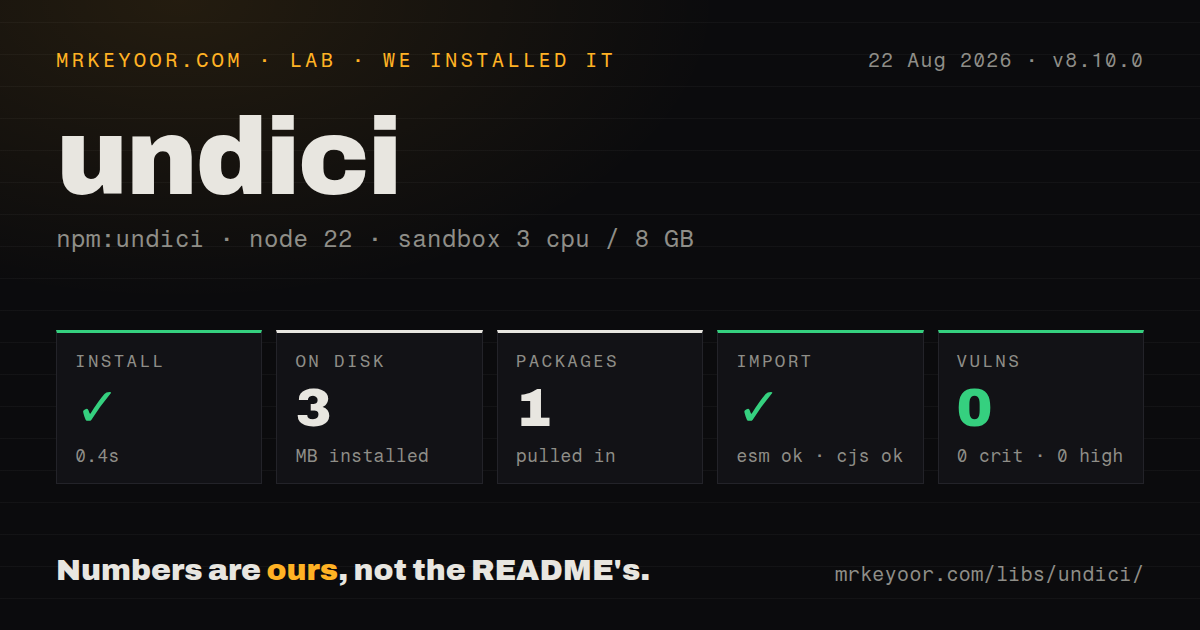
| Install | ✓ · 0.4s | 1 package on disk · 3 MB |
| Import | ✓ | ESM import works · require() works · CommonJS package |
| Browser | n/a | could not be bundled for the browser (Node-only code, most likely) |
| Types | ✓ | TypeScript types bundled |
| Known vulns | 0 | 0 critical · 0 high · 0 moderate · 0 low (npm audit) |
Answers from our run
Does undici install cleanly?
Yes. In a fresh container with an empty cache, npm install undici finished in 0.4s, leaving 1 package and 3 MB on disk. npm audit reported no known vulnerabilities.
Can undici run in a browser?
Not directly: esbuild could not bundle it for the browser in our run, which normally means it depends on Node built-ins. Use it on the server, or find a browser-targeted alternative.
Does undici work with both ESM and CommonJS?
Yes. Both import 'undici' and require('undici') worked in Node 22 in our run. The package is published as CommonJS.
Does undici include TypeScript types?
Yes, type declarations ship inside the package, so no @types install is needed.
undici or got: which should you use?
got: Choose it for higher-level retries, lifecycle hooks, pagination, and a friendlier Node request API. Undici 8.10.0 installed in 0.4 seconds as 1 dependency-free, 3 MB package with 0 audit findings in our sandbox, while its browser build failed.
When should you not use undici?
Skip the dependency when global fetch handles ordinary requests and no dispatcher control is needed.
Discussed on
Use it if
- Use it when a Node service needs explicit dispatchers, pools, pipelining, or proxy agents.
- Choose request() only after measurements show a useful advantage over the runtime's global fetch.
- Install it when tests need MockAgent and a hard block on unplanned network access.
- Adopt the package when a required Undici fix or feature is newer than the version bundled by Node.
- Skip the dependency when global fetch handles ordinary requests and no dispatcher control is needed.
- Stay on another client when the runtime is older than Node 22.19, which Undici 8.10.0 rejects.
- Do not share direct Undici code with browsers. Our esbuild browser target failed, matching its Node streams and transport internals.
- Use a service SDK when pagination, resource models, and domain authentication should be built in.
- Avoid it if callers will abandon response bodies. An unread body can retain a connection and reduce pool capacity.
Setup reality
We installed Undici 8.10.0 in 0.4 seconds in a clean Node 22 container. The result was 1 package using 3 MB; npm reports 2,428 KB unpacked. It has 0 direct dependencies and 0 peers, requires Node 22.19 or later, uses MIT, and bundles TypeScript types. npm audit found 0 vulnerabilities. The CommonJS package has no exports map. require() and ESM import worked. Our esbuild browser bundle failed, which is the expected Node-only outcome.
Global fetch already uses the Undici build shipped with Node and is enough for routine calls. The npm package makes sense for direct request performance, newer releases, explicit Agent or Pool behavior, interceptors, ProxyAgent, Socks5Agent, or MockAgent. Keep fetch and FormData from the same implementation; mixing global FormData with undici.fetch can create incompatible body handling.
Reuse a dispatcher rather than constructing one for every call. setGlobalDispatcher changes process-wide behavior, including other code using shared Undici globals, so a library should pass its own dispatcher. Tune connections and pipelining against a real origin. headersTimeout and bodyTimeout measure separate phases, not total elapsed time; use AbortSignal for the caller's overall cancellation policy.
Consume, dump, cancel, or finish every response body so its connection can return to the pool. Check status before JSON parsing. RetryAgent needs a bounded budget and a method policy that will not repeat side effects; honor Retry-After where applicable. MockAgent.disableNetConnect should be undone with global state restoration after tests. HTTP/2 is newer than the HTTP/1.1 implementation, so test negotiation and server behavior before relying on it.
Patterns
Read JSON through the request API get-json
import { request } from 'undici'

const { statusCode, headers, body } = await request('https://api.example.com/data')
if (statusCode !== 200) {
  await body.dump()
  throw new Error(`unexpected status ${statusCode}`)
}
const data = await body.json()
body.dump handles the non-200 path so that connection can return to its dispatcher pool.
Post an explicitly encoded JSON object post-json
import { request } from 'undici'

const { statusCode, body } = await request('https://api.example.com/items', {
  method: 'POST',
  headers: { 'content-type': 'application/json' },
  body: JSON.stringify({ name: 'widget', qty: 2 })
})
const created = await body.json()
request accepts the serialized string and does not turn an object into JSON. The content-type header is also the caller's responsibility.
Call the package-level fetch fetch-drop-in
import { fetch } from 'undici'

const res = await fetch('https://api.example.com/data')
if (!res.ok) throw new Error(`HTTP ${res.status}`)
const data = await res.json()
Import FormData from the same source as fetch when sending forms. Mixed implementations can disagree on body handling.
Replace the dispatcher for the whole process connection-pool
import { Agent, setGlobalDispatcher } from 'undici'

setGlobalDispatcher(new Agent({
  connections: 128,
  keepAliveTimeout: 10_000,
  pipelining: 1
}))
// every undici request/fetch in the process now uses this pool
All Undici consumers that share the global now inherit 128 connections and this keep-alive policy. Library code should pass a local dispatcher.
Retry a bounded set of response statuses http-retry
import { Agent, RetryAgent, request } from 'undici'

const agent = new RetryAgent(new Agent(), {
  maxRetries: 3,
  minTimeout: 500,
  statusCodes: [429, 500, 502, 503, 504]
})
const { statusCode, body } = await request('https://api.example.com/flaky', {
  dispatcher: agent
})
A 3-retry policy can repeat writes. Limit it to idempotent methods unless the server honors an idempotency key, and add an overall deadline.
Send one request through ProxyAgent proxy
import { ProxyAgent, request } from 'undici'

const proxy = new ProxyAgent('http://proxy.internal:8080')
const { body } = await request('https://api.example.com/data', {
  dispatcher: proxy
})
const data = await body.json()
Close proxy during application shutdown so sockets do not linger. Redact any credentials embedded in its URL from logs.
Fail tests that miss their HTTP mock mock-testing
import { MockAgent, setGlobalDispatcher, request } from 'undici'

const mockAgent = new MockAgent()
mockAgent.disableNetConnect()
setGlobalDispatcher(mockAgent)

mockAgent
  .get('https://api.example.com')
  .intercept({ path: '/users/1', method: 'GET' })
  .reply(200, { id: 1, name: 'ada' })

const { body } = await request('https://api.example.com/users/1')
console.log(await body.json()) // { id: 1, name: 'ada' }
disableNetConnect turns an unmatched request into a failure. Restore the previous global dispatcher after the case to avoid contaminating another suite.
Bound response-header wait and body inactivity timeouts
import { Agent, request } from 'undici'

const agent = new Agent({
  headersTimeout: 10_000, // ms to wait for response headers
  bodyTimeout: 30_000     // ms of body inactivity allowed
})
const { body } = await request('https://api.example.com/slow', {
  dispatcher: agent
})
The 10,000 ms and 30,000 ms limits cover separate phases. An AbortSignal is still needed for one end-to-end caller deadline.
Alternatives
| Package | Registry | Pick it when |
|---|---|---|
| got | npm | Choose it for higher-level retries, lifecycle hooks, pagination, and a friendlier Node request API. |
| axios | npm | Choose it when one browser and Node client plus interceptors matters more than dispatcher-level control. |
| node-fetch | npm | Keep it for older Node releases or an application already tied to node-fetch extensions and stream behavior. |
More web backend guides
ws · urllib3 · requests · anyio · express · httpx · the whole shelf →
How this guide is made: grounded in the library's documentation, release notes, changelog, and issue history, on a fixed rubric — not a hands-on install of every release. The 50 most-downloaded entries are additionally install-verified in clean containers. Corrections: contact the desk.