cohere review
cohere 7.0.9 is Cohere's official Python client for chat, embeddings, reranking, tool calls, and streaming. It can call Cohere directly or use Cohere models through AWS, Azure, Google Cloud, and Oracle Cloud clients supplied by the same SDK. The package contains both the older Client API and ClientV2, whose chat inputs and response objects differ. Release 7.0.9 closes streamed dataset responses correctly and omits the Authorization header when the API key is empty. In our Python 3.12 install, importing cohere took 0.07 seconds and the package supplied py.typed metadata.
Install cohere when Rerank or Cohere's cross-cloud clients are part of the design. For a provider evaluation or a tiny HTTP script, its vendor-specific surface and 58 MB environment are harder to justify.
We installed it
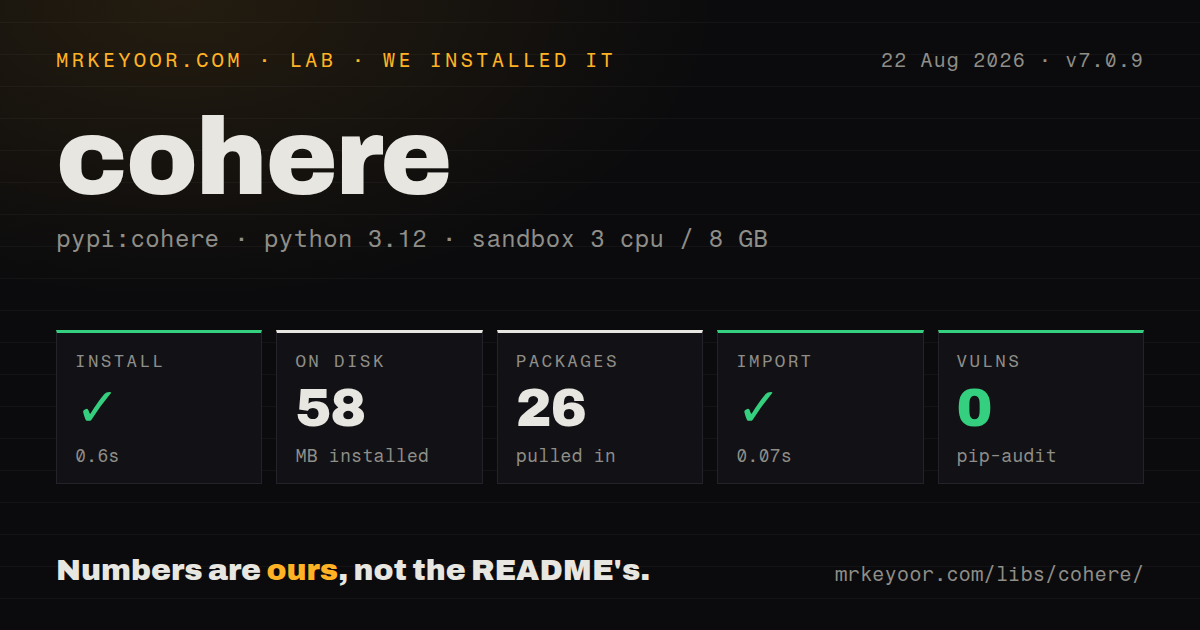
| Install | ✓ · 0.6s | 26 packages on disk · 58 MB |
| Import | ✓ | import cohere in 0.07s · pure Python · py.typed · requires Python >=3.10,<4.0 |
| Known vulns | 0 | (pip-audit) |
Answers from our run
Does cohere install cleanly?
Yes. In a fresh container with an empty cache, pip install cohere finished in 0.6s, leaving 26 packages and 58 MB on disk. pip-audit reported no known vulnerabilities.
What does cohere need to run?
Python >=3.10,<4.0, and nothing compiled: it is pure Python. In our run import cohere succeeded in 0.07s, and the package ships py.typed for type checkers.
cohere or openai: which should you use?
openai: Use it when the application is committed to OpenAI models and APIs. Install cohere when Rerank or Cohere's cross-cloud clients are part of the design.
When should you not use cohere?
Provider switching is still likely. This SDK exposes Cohere model names, request options, events, and response classes throughout your code.
Use it if
- Your search or RAG pipeline uses Cohere Rerank after keyword or vector retrieval.
- You need Cohere chat or embedding models through a named cloud platform as well as Cohere's hosted API.
- A Python service wants typed sync and async clients for chat streaming, tool calls, embeddings, and reranking.
- Your application already depends on Cohere model IDs and response shapes, so a provider-neutral wrapper would hide useful controls.
- Provider switching is still likely. This SDK exposes Cohere model names, request options, events, and response classes throughout your code.
- You are following an older Client tutorial. ClientV2 uses a messages list and different response paths, while both generations remain in the package.
- A small command line program cannot justify 26 installed packages and 58 MB for a few HTTP calls. Direct HTTP or a narrower client may be easier to audit.
- You need community patches merged directly into the client source. The README says Fern generates the SDK, so proof-of-concept pull requests must be moved into the generation source before release.
- OCI on-demand inference must provide Rerank, Generate, or several embedding encodings in one request. The README lists those as unsupported without dedicated deployment or, for encodings, separate calls.
Setup reality
We installed cohere 7.0.9 in a fresh Python 3.12 Bookworm container. The install succeeded in 0.6 seconds, placed 26 packages on disk, and used 58 MB. Cohere declares 11 direct dependencies and supports Python 3.10 through the 3.x line. It is pure Python, includes py.typed, and uses the MIT license. pip-audit found no known vulnerabilities. Importing cohere worked in 0.07 seconds.
For Cohere's API, export CO_API_KEY and construct ClientV2 or AsyncClientV2. The current README still shows both Client and ClientV2 because the v1 and v2 surfaces coexist. Check the class name before copying a sample: v2 chat accepts messages, and its reply text sits inside message content. Reuse a client so its HTTP connection pool survives across requests.
Cloud clients replace one credential with another set of platform rules. The OCI path needs the cohere[oci] extra, a region and compartment, then a config profile, security token, direct key, or instance principal. Bedrock, SageMaker, Azure, and other clients need their own cloud credentials and model deployment details. Feature availability is not identical across hosts.
Streaming returns typed events, so filter content-delta events and close a stream when the consumer stops early. Version 7.0.9 specifically fixed leaked streamed dataset responses. Set timeouts and max_retries for your latency budget, handle 429 and transient server responses, and log request identifiers without recording prompts or API keys. The generated models validate many responses, which is useful until an upstream API change reaches an older pinned SDK.
Patterns
Read the API key from the environment create-v2-client
import cohere

co = cohere.ClientV2()  # reads CO_API_KEY
Keep CO_API_KEY outside source control. ClientV2 examples cannot be pasted unchanged into the older Client class.
Send a v2 chat request chat
response = co.chat(
    model="command-r-plus-08-2024",
    messages=[{"role": "user", "content": "Explain reciprocal rank fusion."}],
)
print(response.message.content[0].text)
The README's current v2 example uses a messages list. Confirm the model ID in Cohere's model catalog before deployment.
Print chat text as it arrives stream-chat
stream = co.chat_stream(
    model="command-r-plus-08-2024",
    messages=[{"role": "user", "content": "Write a short answer."}],
)
for event in stream:
    if event.type == "content-delta":
        print(event.delta.message.content.text, end="")
The iterator also emits lifecycle and tool events. Close or fully consume it when abandoning a response early.
Carry conversation history explicitly keep-history
messages = [{"role": "system", "content": "Answer in two sentences."}]
messages.append({"role": "user", "content": "What does reranking do?"})
reply = co.chat(model=MODEL, messages=messages)
messages.append({"role": "assistant", "content": reply.message.content[0].text})
The service does not retain this list for your application. Trim or summarize it before the context and bill grow without a bound.
Embed text for an index embed-documents
result = co.embed(
    model="embed-english-v3.0",
    texts=["replace the drum unit", "clear a tray two jam"],
    input_type="search_document",
    embedding_types=["float"],
)
vectors = result.embeddings.float_
Use search_document for indexed material and search_query for queries. The float_ attribute has a trailing underscore.
Embed a retrieval query embed-query
query = co.embed(
    model="embed-english-v3.0",
    texts=["why are pages streaked?"],
    input_type="search_query",
    embedding_types=["float"],
).embeddings.float_[0]
Pair the query with documents produced by the same model and the matching retrieval input types.
Reorder retrieved documents rerank-results
documents = ["toner smearing fix", "paper jam in tray 2", "drum unit lifespan"]
ranked = co.rerank(
    model="rerank-english-v3.0",
    query="why are prints streaky?",
    documents=documents,
    top_n=2,
)
for item in ranked.results:
    print(item.relevance_score, documents[item.index])
Each result points back to the original list by index. Retrieve a bounded candidate set before reranking it.
Ask chat for a JSON object request-json
import json

reply = co.chat(
    model=MODEL,
    messages=[{"role": "user", "content": "Return a JSON object with a brands array."}],
    response_format={"type": "json_object"},
)
data = json.loads(reply.message.content[0].text)
Parseable JSON does not prove the expected keys or value types. Validate the object in application code.
Inspect requested function calls call-tool
tools = [{"type": "function", "function": {
    "name": "get_stock",
    "description": "Read stock for a part number",
    "parameters": {"type": "object", "properties": {"part": {"type": "string"}}, "required": ["part"]},
}}]
reply = co.chat(model=MODEL, messages=messages, tools=tools)
for call in reply.message.tool_calls or []:
    print(call.function.name, call.function.arguments)
Your program executes the function and checks its arguments. A normal answer can contain no tool calls.
Run chat from an async service use-async-client
import asyncio
import cohere

async def main():
    co = cohere.AsyncClientV2()
    reply = await co.chat(model=MODEL, messages=[{"role": "user", "content": "Hello"}])
    print(reply.message.content[0].text)

asyncio.run(main())
Create one async client for the service rather than rebuilding its connection pool for every request.
Bound transport retries set-retries
co = cohere.ClientV2(
    api_key=os.environ["CO_API_KEY"],
    max_retries=2,
    timeout=30.0,
)
Retries can repeat billable work after an ambiguous network failure. Keep the bound small and make application operations idempotent where possible.
Authenticate from an OCI profile use-oci
# pip install 'cohere[oci]'
co = cohere.OciClientV2(
    oci_profile="DEFAULT",
    oci_region="us-chicago-1",
    oci_compartment_id="ocid1.compartment.oc1...",
)
OCI on-demand supports chat and embeddings. The README excludes Rerank and Generate unless you fine-tune and deploy a dedicated endpoint.
Alternatives
More ai / ml guides
@modelcontextprotocol/sdk · openai · mcp · huggingface-hub · @anthropic-ai/sdk · openai · the whole shelf →
How this guide is made: grounded in the library's documentation, release notes, changelog, and issue history, on a fixed rubric — not a hands-on install of every release. The 50 most-downloaded entries are additionally install-verified in clean containers. Corrections: contact the desk.