mistralai review
mistralai 2.9.4 is Mistral AI's generated Python client for chat, embeddings, files, OCR, transcription, fine-tuning, agents, and conversations. Speakeasy builds it from the service's OpenAPI description, so endpoint coverage and typed request models arrive together, with synchronous and asynchronous methods on the same client. The current release is a regeneration against a newer API description. It requires Python 3.10 or later and imports `Mistral` from `mistralai.client`.
Use mistralai when Mistral-specific coverage and generated types outweigh the 18-package install and provider coupling. A portability layer is easier to replace when the application only needs chat or embeddings.
We installed it
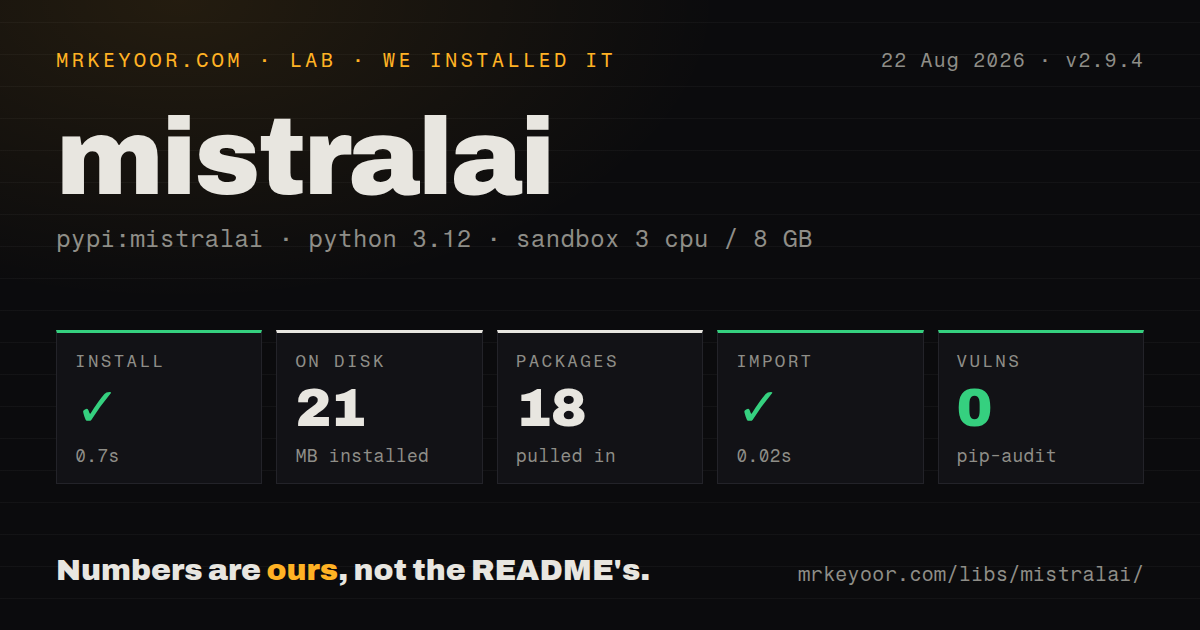
| Install | ✓ · 0.7s | 18 packages on disk · 21 MB |
| Import | ✓ | import mistralai in 0.02s · pure Python · py.typed · requires Python >=3.10 |
| Known vulns | 0 | (pip-audit) |
Answers from our run
Does mistralai install cleanly?
Yes. In a fresh container with an empty cache, pip install mistralai finished in 0.7s, leaving 18 packages and 21 MB on disk. pip-audit reported no known vulnerabilities.
What does mistralai need to run?
Python >=3.10, and nothing compiled: it is pure Python. In our run import mistralai succeeded in 0.02s, and the package ships py.typed for type checkers.
mistralai or openai: which should you use?
openai: Use an OpenAI-compatible endpoint when one familiar client shape matters more than Mistral-specific endpoints. Use mistralai when Mistral-specific coverage and generated types outweigh the 18-package install and provider coupling.
When should you not use mistralai?
Provider switching is a design requirement. LiteLLM or an OpenAI-compatible call surface keeps fewer Mistral-specific types in application code.
Use it if
- Your application depends on Mistral-only APIs such as OCR, agents, conversations, files, or fine-tuning.
- Both synchronous jobs and async web handlers should share one official client model.
- Typed generated request and response objects are preferable to hand-built HTTP payloads.
- Mistral models are deployed through La Plateforme, Azure AI, or Vertex and the matching vendor subclient is useful.
- Provider switching is a design requirement. LiteLLM or an OpenAI-compatible call surface keeps fewer Mistral-specific types in application code.
- The project still uses SDK v1 examples. Version 2 changed imports and other calls, so migration must follow the repository's migration guide.
- A small script makes one chat request. httpx against the documented endpoint avoids installing 18 packages and 21 MB in our test.
- Your framework already owns the model client. LangChain users usually want `langchain-mistralai` rather than parallel client abstractions.
- Generated signatures and frequent specification regenerations are a poor fit for a team that expects a small, hand-edited SDK surface.
Setup reality
We installed mistralai 2.9.4 in a fresh Python 3.12 Bookworm container. It completed in 0.7 seconds and left 18 packages using 21 MB on disk. The pure-Python distribution requires Python 3.10 or newer, declares 27 direct dependencies, and includes py.typed; its published license field was unknown. import mistralai completed in 0.02 seconds. pip-audit found no known vulnerabilities.
Create a Mistral account and place the API key in MISTRAL_API_KEY; do not ship it to browser code. Version 2 examples import Mistral from mistralai.client. Old articles commonly show the v1 path, and copying those calls into 2.9.4 can fail before any request is sent. Agent-related features need mistralai[agents]. Azure and Vertex use separate subclients, endpoints, and credentials.
Use with Mistral(...) or async with so the underlying HTTP connection pool closes. Async calls end in _async on the same resource objects. Streaming returns a context-managed event stream, so iterate inside its with block and read deltas from each event payload. File uploads should pass an open binary stream and be closed by your own file context.
Retries are configurable globally or per operation. Set limits for connection errors and rate-limit responses based on whether a request is safe to repeat; uploaded files and job creation need idempotency care. Beta conversations keep server-side state and can change faster than stable chat calls, so pin the SDK and record conversation IDs rather than assuming local history is complete.
Patterns
Send one chat request complete-chat
import os
from mistralai.client import Mistral

with Mistral(api_key=os.environ['MISTRAL_API_KEY']) as client:
    reply = client.chat.complete(
        model='mistral-large-latest',
        messages=[{'role': 'user', 'content': 'Explain this error.'}],
    )
    print(reply.choices[0].message.content)
The context manager closes the HTTP client. Version 2 uses the `mistralai.client` import path.
Call chat from async code complete-chat-async
import os
from mistralai.client import Mistral

async with Mistral(api_key=os.environ['MISTRAL_API_KEY']) as client:
    reply = await client.chat.complete_async(
        model='mistral-large-latest',
        messages=[{'role': 'user', 'content': 'Summarize this.'}],
    )
Async operations use an `_async` suffix on the same client resources.
Consume server-sent chat events stream-chat
with client.chat.stream(
    model='mistral-large-latest',
    messages=[{'role': 'user', 'content': 'Write a short poem.'}],
) as events:
    for event in events:
        print(event.data.choices[0].delta.content or '', end='')
Keep iteration inside the stream context so the connection closes on completion or error.
Embed several texts create-embeddings
result = client.embeddings.create(
    model='mistral-embed',
    inputs=['first document', 'second document'],
)
vectors = [row.embedding for row in result.data]
The request parameter is plural `inputs` and accepts a list.
Ask for JSON output request-json
import json

result = client.chat.complete(
    model='mistral-large-latest',
    messages=[{'role': 'user', 'content': 'Return a JSON object with a capitals array.'}],
    response_format={'type': 'json_object'},
)
data = json.loads(result.choices[0].message.content)
JSON mode checks syntax, not your business schema. Validate the decoded value before using it.
Stream a file upload upload-file
with open('training.jsonl', 'rb') as source:
    uploaded = client.files.upload(file={
        'file_name': 'training.jsonl',
        'content': source,
    })
print(uploaded.id)
The outer file context remains your responsibility even though the API client is also context managed.
Inspect an API failure handle-sdk-error
from mistralai.client import errors

try:
    result = client.chat.complete(model='mistral-large-latest', messages=messages)
except errors.MistralError as exc:
    logger.error('Mistral %s: %s', exc.status_code, exc.body)
    raise
A 429 is visible through the same base error. Configure retry policy separately.
Open a stateful conversation start-agent-conversation
result = client.beta.conversations.start(
    inputs='Plan a three-day Lisbon trip',
    model='mistral-large-latest',
)
conversation_id = result.conversation_id
Install the `agents` extra first and persist the returned identifier; conversation state lives on the service.
Alternatives
| Package | Registry | Pick it when |
|---|---|---|
| openai | PyPI | Use an OpenAI-compatible endpoint when one familiar client shape matters more than Mistral-specific endpoints. |
| litellm | PyPI | Use it to route across several model providers with shared fallbacks and accounting. |
| langchain-mistralai | PyPI | Use the integration expected by LangChain and LangGraph applications. |
| httpx | PyPI | Use direct HTTP calls for a tiny service that touches one stable endpoint. |
More ai / ml guides
@modelcontextprotocol/sdk · openai · mcp · huggingface-hub · @anthropic-ai/sdk · openai · the whole shelf →
How this guide is made: grounded in the library's documentation, release notes, changelog, and issue history, on a fixed rubric — not a hands-on install of every release. The 50 most-downloaded entries are additionally install-verified in clean containers. Corrections: contact the desk.