claude-agent-sdk review
Claude Agent SDK embeds the Claude Code agent loop in a Python application. It streams typed messages, exposes Claude Code's file and shell tools, supports MCP servers, and lets the host approve or reject tool calls. Version 0.2.144 mainly refreshes the Claude CLI bundled in the wheel. The larger recent 0.2.140 update added MCP 2.x support for in-process servers, permission callbacks for one-shot queries, forwarded subagent output, and a structured ResultError. Our clean Python 3.12 install imported successfully and included typing metadata, but every real query still launches the bundled CLI and requires Claude credentials.
Claude Agent SDK 0.2.144 installed in 1.8 seconds and imported in 1.93 seconds in our sandbox, but the resulting environment held 30 packages and occupied 359 MB. Install it for Claude Code automation with hooks and session control; use a direct API client for ordinary model calls and pin this 0.x package because patch releases replace the bundled CLI.
We installed it
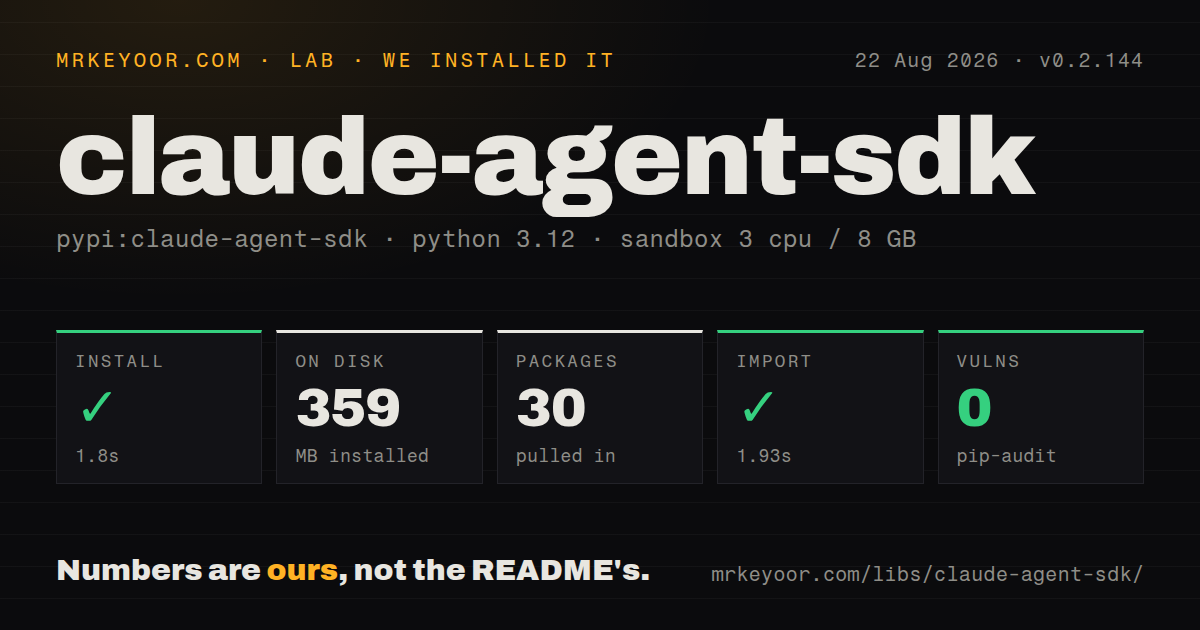
| Install | ✓ · 1.8s | 30 packages on disk · 359 MB |
| Import | ✓ | import claude_agent_sdk in 1.93s · pure Python · py.typed · requires Python >=3.10 |
| Known vulns | 0 | (pip-audit) |
Answers from our run
Does claude-agent-sdk install cleanly?
Yes. In a fresh container with an empty cache, pip install claude-agent-sdk finished in 2 seconds, leaving 30 packages and 359 MB on disk. pip-audit reported no known vulnerabilities.
What does claude-agent-sdk need to run?
Python >=3.10, and nothing compiled: it is pure Python. In our run import claude_agent_sdk succeeded in 1.93s, and the package ships py.typed for type checkers.
claude-agent-sdk or anthropic: which should you use?
anthropic: Choose it for direct Messages API calls and explicit transcript ownership without a coding-agent subprocess. Claude Agent SDK 0.2.144 installed in 1.8 seconds and imported in 1.93 seconds in our sandbox, but the resulting environment held 30 packages and occupied 359 MB.
When should you not use claude-agent-sdk?
You only need a model response. The anthropic package makes direct Messages API calls without a coding-agent subprocess
Use it if
- You are building a repository worker that needs Read, Edit, Bash, Glob, and Grep without implementing the agent loop yourself
- Your host must make explicit tool decisions through permission modes, can_use_tool, or deterministic PreToolUse hooks
- You want Python functions exposed as in-process MCP tools alongside ordinary stdio or HTTP MCP servers
- You need to resume, fork, or inspect Claude Code sessions from a Python service
- You only need a model response. The anthropic package makes direct Messages API calls without a coding-agent subprocess
- You need to switch among model providers. This package drives Claude Code and has no provider-neutral backend interface
- Your runtime forbids child processes or writable session state. The SDK communicates with a bundled CLI process and stores Claude Code session data
- You cannot keep up with a fast 0.x release line. Recent patch versions changed message types, error handling, resume controls, and the bundled CLI
- You expect an allowlist to remove tools. allowed_tools pre-approves matching calls; use disallowed_tools or an explicit tools list to restrict availability
Setup reality
In our fresh Python 3.12 container, claude-agent-sdk 0.2.144 installed in 1.8 seconds. The environment contained 30 packages and occupied 359 MB afterward. pip-audit found 0 known vulnerabilities. The package has 16 direct dependencies, requires Python 3.10 or newer, is pure Python, includes py.typed, and imported in 1.93 seconds. The wheel also contains a Claude Code CLI, so the small Python import is only the front door to a subprocess-backed runtime.
A query needs ANTHROPIC_API_KEY or credentials already available to Claude Code. The public API is asynchronous: query() yields a mixture of system, assistant, user, result, and tool messages. Applications that want text must inspect AssistantMessage content blocks. Set cwd deliberately because file and shell tools act relative to that directory. Filesystem settings are opt-in through setting_sources; do not assume a project's .claude settings were loaded.
Permissions have two separate jobs. allowed_tools approves matching calls before can_use_tool runs, while disallowed_tools removes named tools. A PreToolUse hook is the dependable place to inspect every matching call. permission_mode="bypassPermissions" can suppress callbacks, so it is a poor default for unattended jobs. In-process tools use MCP result dictionaries, and their exposed name follows mcp__server__tool.
Each query can stop on max_turns or max_budget_usd and may finish with a ResultMessage that reports an error subtype. Recent versions also raise ResultError for terminal CLI failures, preserving the structured reason. Pin the SDK in production because a patch can replace the embedded CLI even when the Python surface barely changes. Resumed sessions inherit transcript state; use fork_session when experimentation must not append to the original conversation.
Patterns
Stream a one-shot query stream-one-shot
import anyio
from claude_agent_sdk import query

async def main():
    async for message in query(prompt="Summarize pyproject.toml"):
        print(message)

anyio.run(main)
query() returns an async iterator and starts the bundled CLI. It does not return a completed text string.
Read assistant text blocks extract-text
from claude_agent_sdk import AssistantMessage, TextBlock, query

async for message in query(prompt="Explain this repository"):
    if isinstance(message, AssistantMessage):
        for block in message.content:
            if isinstance(block, TextBlock):
                print(block.text)
The stream also contains system, result, and tool messages. Filter both the message class and content block type.
Limit work to a project directory set-working-directory
from claude_agent_sdk import ClaudeAgentOptions, query

options = ClaudeAgentOptions(
    cwd="/srv/projects/widget",
    tools=["Read", "Glob", "Grep"],
    max_turns=4,
)

async for message in query(prompt="Find the config loader", options=options):
    pass
cwd controls where repository tools operate. The tools option selects availability; allowed_tools controls approval instead.
Stop a run at a budget cap-cost
from claude_agent_sdk import ClaudeAgentOptions

options = ClaudeAgentOptions(
    max_turns=8,
    max_budget_usd=1.00,
)
A budget stop returns an error_max_budget_usd result. Treat that as an incomplete job rather than a successful answer.
Keep context across prompts interactive-session
from claude_agent_sdk import ClaudeAgentOptions, ClaudeSDKClient

async with ClaudeSDKClient(options=ClaudeAgentOptions()) as client:
    await client.query("Read the test layout")
    async for message in client.receive_response():
        print(message)

    await client.query("Now run the smallest relevant test")
    async for message in client.receive_response():
        print(message)
Drain receive_response() for one turn before sending the next prompt so the two response streams do not overlap.
Approve selected tool calls approve-tools
from claude_agent_sdk import ClaudeAgentOptions

options = ClaudeAgentOptions(
    allowed_tools=["Read", "Glob", "Grep"],
    disallowed_tools=["Write", "Edit"],
    permission_mode="default",
)
allowed_tools is an approval rule. disallowed_tools is what prevents Claude from using the named write tools.
Reject a shell pattern before execution block-with-hook
from claude_agent_sdk import HookMatcher

async def inspect_bash(data, tool_use_id, context):
    command = data["tool_input"].get("command", "")
    if "rm -rf" in command:
        return {"hookSpecificOutput": {
            "hookEventName": "PreToolUse",
            "permissionDecision": "deny",
            "permissionDecisionReason": "recursive deletion is blocked",
        }}
    return {}

hooks = {"PreToolUse": [HookMatcher(matcher="Bash", hooks=[inspect_bash])]}
The hook runs in the host application and returns camelCase protocol keys. An empty dictionary leaves the decision unchanged.
Expose a Python function as an MCP tool define-custom-tool
from claude_agent_sdk import tool, create_sdk_mcp_server

@tool("lookup_order", "Read an order by id", {"order_id": str})
async def lookup_order(args):
    text = await load_order(args["order_id"])
    return {"content": [{"type": "text", "text": text}]}

server = create_sdk_mcp_server(
    name="orders", version="1.0.0", tools=[lookup_order]
)
Return an MCP content object rather than a bare string. Register the server under mcp_servers before asking Claude to use it.
Attach an external stdio server attach-mcp-server
from claude_agent_sdk import ClaudeAgentOptions

options = ClaudeAgentOptions(mcp_servers={
    "inventory": {
        "type": "stdio",
        "command": "python",
        "args": ["-m", "inventory_mcp"],
    }
})
The external server is another process. Use create_sdk_mcp_server for Python tools that should stay inside the application process.
Resume into a fork resume-session
from claude_agent_sdk import ClaudeAgentOptions

options = ClaudeAgentOptions(
    resume=session_id,
    fork_session=True,
)
fork_session creates a new session id from the saved transcript. Without it, new turns continue the original session.
Ask for schema-shaped output structured-output
from claude_agent_sdk import ClaudeAgentOptions

options = ClaudeAgentOptions(output_format={
    "type": "json_schema",
    "schema": {
        "type": "object",
        "properties": {"summary": {"type": "string"}},
        "required": ["summary"],
    },
})
Read the final structured value from the result message. Intermediate assistant blocks can still appear in the stream.
Inspect a structured CLI failure handle-terminal-error
from claude_agent_sdk import ProcessError, ResultError, query

try:
    async for message in query(prompt="Run the checks"):
        pass
except ResultError as error:
    print(error.subtype, error.errors, error.session_id)
except ProcessError as error:
    print(error.exit_code, error.stderr)
ResultError carries a terminal result payload and is a ProcessError subclass. Catch it first when the failure reason changes retry behavior.
Alternatives
| Package | Registry | Pick it when |
|---|---|---|
| anthropic | PyPI | Choose it for direct Messages API calls and explicit transcript ownership without a coding-agent subprocess. |
| @anthropic-ai/claude-agent-sdk | npm | Choose the TypeScript SDK when the surrounding service and tool implementations run on Node.js. |
| openai-agents | PyPI | Choose it when handoffs, tracing, and a general agent framework matter more than Claude Code's built-in tools. |
More ai / ml guides
@modelcontextprotocol/sdk · openai · mcp · huggingface-hub · @anthropic-ai/sdk · openai · the whole shelf →
How this guide is made: grounded in the library's documentation, release notes, changelog, and issue history, on a fixed rubric — not a hands-on install of every release. The 50 most-downloaded entries are additionally install-verified in clean containers. Corrections: contact the desk.