azure-identity review
azure-identity 1.25.3 supplies Microsoft Entra token credentials for Python Azure SDK clients. `DefaultAzureCredential` tries a documented sequence of hosted-workload identities and developer logins, while classes such as `ManagedIdentityCredential`, `WorkloadIdentityCredential`, and `ClientSecretCredential` select one flow directly. The same object can also return a bearer token for an ordinary HTTP client. Version 1.25.3 fixes an expired-token refresh bug and raises the minimum MSAL version to 1.35.1. Our wheel was pure Python, included py.typed, and imported successfully.
azure-identity 1.25.3 installed in 0.4 seconds and used 21 MB across 14 packages in our sandbox, with typed Python APIs and no audit findings. Install it for Azure SDK authentication, then pin production to one workload credential instead of trusting every developer fallback in `DefaultAzureCredential`.
We installed it
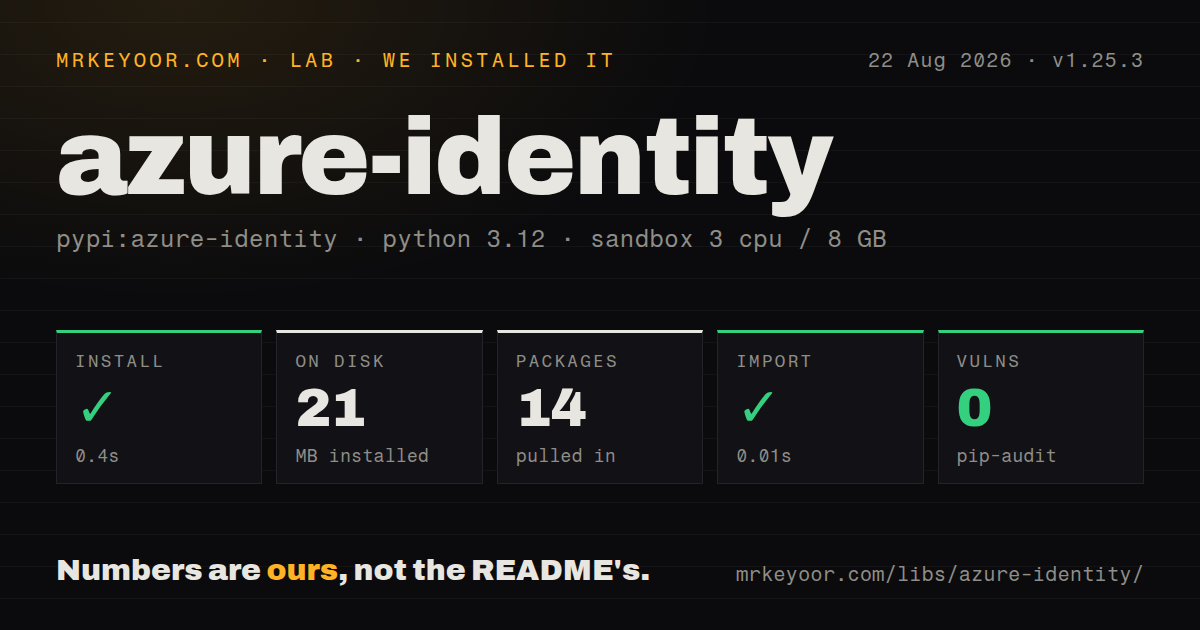
| Install | ✓ · 0.4s | 14 packages on disk · 21 MB |
| Import | ✓ | import azure in 0.01s · pure Python · py.typed · requires Python >=3.9 |
| Known vulns | 0 | (pip-audit) |
Answers from our run
Does azure-identity install cleanly?
Yes. In a fresh container with an empty cache, pip install azure-identity finished in 0.4s, leaving 14 packages and 21 MB on disk. pip-audit reported no known vulnerabilities.
What does azure-identity need to run?
Python >=3.9, and nothing compiled: it is pure Python. In our run import azure succeeded in 0.01s, and the package ships py.typed for type checkers.
azure-identity or msal: which should you use?
msal: Use it when the application owns a Microsoft identity flow directly and no Azure SDK TokenCredential is required. azure-identity 1.25.3 installed in 0.4 seconds and used 21 MB across 14 packages in our sandbox, with typed Python APIs and no audit findings.
When should you not use azure-identity?
The identity lives in Azure AD B2C. The package README explicitly lists B2C as unsupported.
Discussed on
Use it if
- A Python Azure SDK client expects the TokenCredential protocol and should refresh access tokens without application code handling OAuth responses.
- Local developers sign in with Azure CLI or VS Code while the deployed service uses managed identity or workload federation.
- The application needs an explicit Entra flow such as client certificate, device code, on-behalf-of, or Azure Pipelines federation.
- A raw HTTP client needs a renewable Entra bearer token for an Azure resource scope.
- The identity lives in Azure AD B2C. The package README explicitly lists B2C as unsupported.
- You need low-level authority, account, consent, and cache control without an Azure SDK credential contract. MSAL exposes those primitives directly.
- Production cannot tolerate developer-login fallback. The full default chain can inspect CLI, PowerShell, Azure Developer CLI, VS Code, shared cache, and broker credentials unless you restrict it.
- Async authentication must add no HTTP transport dependency. `azure.identity.aio` requires an async transport such as aiohttp and its credentials need closing.
- Your flow depends on a username and password. `UsernamePasswordCredential` is deprecated because it cannot satisfy multifactor authentication.
Setup reality
We installed azure-identity 1.25.3 in a fresh Python 3.12 Bookworm sandbox. pip completed in 0.4 seconds, leaving 14 packages and 21 MB on disk. The package declares five direct dependencies, requires Python 3.9 or later, and is pure Python. pip-audit reported zero known vulnerabilities. It ships py.typed, and import azure succeeded in 0.01 seconds. The package metadata did not state a license.
Installation does not provide an identity. Environment credentials need tenant and client IDs plus a secret, certificate, or federated token file. Managed identity needs an Azure host endpoint, and a user-assigned identity needs a selector such as its client ID. Developer credentials depend on a signed-in external tool. Sovereign-cloud deployments must set the correct authority host as well as service endpoints.
DefaultAzureCredential uses the first credential in its chain that can authenticate. For a production process, set AZURE_TOKEN_CREDENTIALS to a named credential and use require_envvar=True, or instantiate the exact workload credential. This removes laptop-only fallbacks and makes configuration failure easier to diagnose. Version 1.24 also documents that CLI and PowerShell credentials reject claims challenges, so those developer tools cannot model every production policy.
Credential instances cache access tokens in memory and should be shared across service clients. Persistent user caching is optional and uses operating-system protection through TokenCachePersistenceOptions. In 1.25.3, the library fixed a case where a recent request's retry delay could prevent an expired token from refreshing. Async credentials add an HTTP session; close them explicitly or use async with so that session does not survive application teardown.
Patterns
Give an Azure client a default credential authenticate-service-client
from azure.identity import DefaultAzureCredential
from azure.storage.blob import BlobServiceClient

credential = DefaultAzureCredential()
client = BlobServiceClient(
    account_url='https://example.blob.core.windows.net',
    credential=credential,
)

for item in client.list_containers():
    print(item['name'])
Reuse one credential instance across clients so version 1.25.3 can reuse and refresh its in-memory access tokens.
Require the deployment-selected identity lock-default-chain
# Deployment setting:
# AZURE_TOKEN_CREDENTIALS=ManagedIdentityCredential

from azure.identity import DefaultAzureCredential

credential = DefaultAzureCredential(require_envvar=True)
`require_envvar=True` rejects a missing or invalid AZURE_TOKEN_CREDENTIALS value instead of opening the full chain.
Use a user-assigned managed identity managed-identity
import os
from azure.identity import ManagedIdentityCredential

credential = ManagedIdentityCredential(
    client_id=os.environ['AZURE_CLIENT_ID']
)
token = credential.get_token('https://vault.azure.net/.default')
A user-assigned identity needs a selector. Omit the client ID only when the host has a system-assigned identity.
Authenticate a service principal with a secret client-secret
import os
from azure.identity import ClientSecretCredential

credential = ClientSecretCredential(
    tenant_id=os.environ['AZURE_TENANT_ID'],
    client_id=os.environ['AZURE_CLIENT_ID'],
    client_secret=os.environ['AZURE_CLIENT_SECRET'],
)
Keep the secret outside source control. Managed identity or workload federation removes secret rotation on supported hosts.
Authenticate with a certificate client-certificate
import os
from azure.identity import CertificateCredential

credential = CertificateCredential(
    tenant_id=os.environ['AZURE_TENANT_ID'],
    client_id=os.environ['AZURE_CLIENT_ID'],
    certificate_path='/run/secrets/identity.pem',
    send_certificate_chain=True,
)
The PEM must include its private key. Send the certificate chain only when the tenant configuration requires it.
Use an injected federation token workload-federation
import os
from azure.identity import WorkloadIdentityCredential

credential = WorkloadIdentityCredential(
    tenant_id=os.environ['AZURE_TENANT_ID'],
    client_id=os.environ['AZURE_CLIENT_ID'],
    token_file_path=os.environ['AZURE_FEDERATED_TOKEN_FILE'],
)
AKS normally injects all 3 values. Direct construction makes a missing webhook or federation setting fail at the identity boundary.
Try two identities in a fixed order custom-chain
import os
from azure.identity import (
    AzureCliCredential,
    ChainedTokenCredential,
    ManagedIdentityCredential,
)

credential = ChainedTokenCredential(
    ManagedIdentityCredential(client_id=os.getenv('AZURE_CLIENT_ID')),
    AzureCliCredential(),
)
Chain order controls which identity wins. The CLI runs only after managed identity reports that it is unavailable.
Authorize a management REST call raw-http-token
import requests
from azure.identity import DefaultAzureCredential

credential = DefaultAzureCredential()
access = credential.get_token('https://management.azure.com/.default')
response = requests.get(
    'https://management.azure.com/subscriptions?api-version=2022-12-01',
    headers={'Authorization': f'Bearer {access.token}'},
    timeout=20,
)
response.raise_for_status()
The `.default` scope must match the target resource. A token for Key Vault does not authorize Azure Resource Manager.
Build a refreshing token callback bearer-provider
from azure.identity import (
    DefaultAzureCredential,
    get_bearer_token_provider,
)

provider = get_bearer_token_provider(
    DefaultAzureCredential(),
    'https://cognitiveservices.azure.com/.default',
)
The callback obtains a current token when invoked. Azure OpenAI still requires an appropriate data-plane role assignment.
Close an async credential and client async-credential-lifecycle
from azure.identity.aio import DefaultAzureCredential
from azure.keyvault.secrets.aio import SecretClient

async def load_secret(vault_url: str):
    async with DefaultAzureCredential() as credential:
        async with SecretClient(vault_url, credential) as client:
            return await client.get_secret('api-key')
Install an async transport such as aiohttp. Both context managers close their owned HTTP sessions.
Keep an interactive login between runs persistent-user-cache
from azure.identity import (
    InteractiveBrowserCredential,
    TokenCachePersistenceOptions,
)

credential = InteractiveBrowserCredential(
    cache_persistence_options=TokenCachePersistenceOptions(
        name='inventory-cli'
    )
)
The cache uses protected OS storage. A headless Linux host needs a working secret service unless unencrypted storage is explicitly allowed.
Select the Azure Government authority sovereign-cloud
from azure.identity import AzureAuthorityHosts, DefaultAzureCredential

credential = DefaultAzureCredential(
    authority=AzureAuthorityHosts.AZURE_GOVERNMENT
)
The service endpoint and developer-tool cloud must also target Azure Government; changing only the authority leaves a split configuration.
Alternatives
| Package | Registry | Pick it when |
|---|---|---|
| msal | PyPI | Use it when the application owns a Microsoft identity flow directly and no Azure SDK TokenCredential is required. |
| azure-cli | PyPI | Use it for human-operated administration where the `az` command and its current login are the intended interface. |
| Authlib | PyPI | Use it for provider-neutral OAuth or OpenID Connect work that is not tied to Azure-hosted identities. |
More infra guides
semver · boto3 · opentelemetry-api · @opentelemetry/api · psutil · distro · the whole shelf →
How this guide is made: grounded in the library's documentation, release notes, changelog, and issue history, on a fixed rubric — not a hands-on install of every release. The 50 most-downloaded entries are additionally install-verified in clean containers. Corrections: contact the desk.