@aws-sdk/client-s3 review
@aws-sdk/client-s3 is the generated AWS JavaScript v3 client for S3. You construct an S3Client, pass it commands such as GetObjectCommand or PutObjectCommand, and receive typed service responses plus AWS request metadata. It runs in Node.js, browsers, and React Native, although credentials and response streams behave differently in each runtime. The package contains the low-level multipart operations; the managed parallel uploader lives in @aws-sdk/lib-storage, and signed URL helpers live in @aws-sdk/s3-request-presigner. Version 3.1118.0 is current. Its changelog records only package version bumps for 3.1117.0 and 3.1118.0, with no S3 client feature attached to either release.
Our @aws-sdk/client-s3 3.1116.0 install took 5.9 seconds, occupied 22 MB, and produced a 91.9 KB gzipped full import with no audit findings. Install it for typed, direct S3 API access on Node 20 or newer; choose the presigner alone for signed URLs and add lib-storage when multipart uploads are the actual requirement.
We installed it
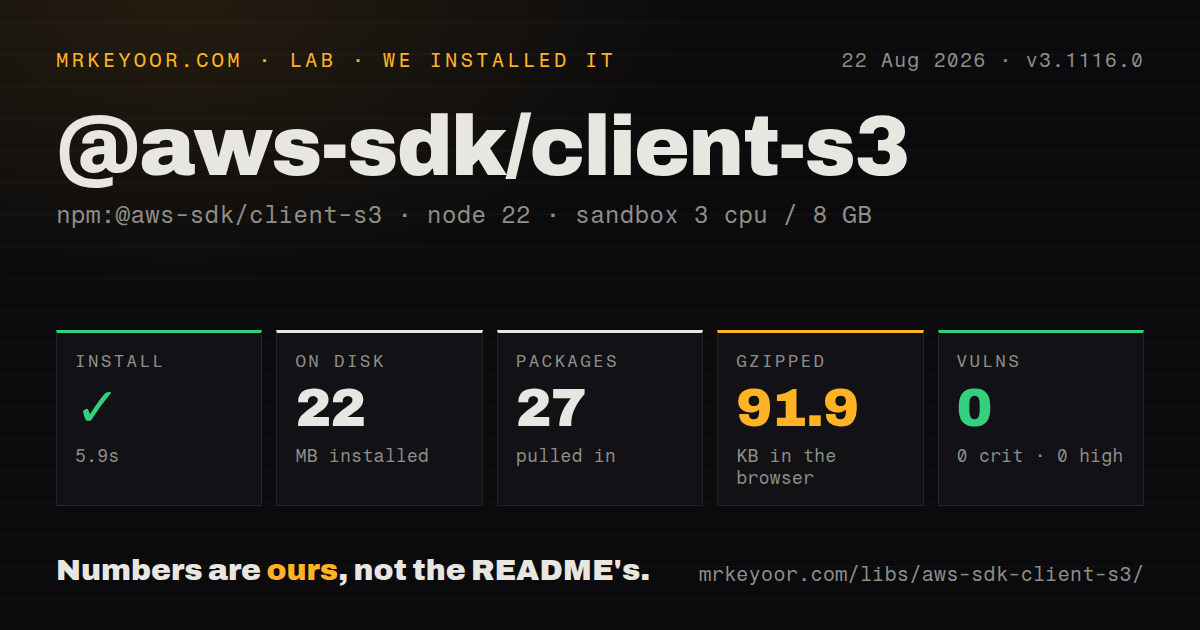
| Install | ✓ · 5.9s | 27 packages on disk · 22 MB |
| Import | ✓ | ESM import works · require() works · CommonJS package |
| Browser | 91.9 KB | gzipped (304.3 KB minified), bundled with esbuild |
| Types | ✓ | TypeScript types bundled |
| Known vulns | 0 | 0 critical · 0 high · 0 moderate · 0 low (npm audit) |
Answers from our run
Does @aws-sdk/client-s3 install cleanly?
Yes. In a fresh container with an empty cache, npm install @aws-sdk/client-s3 finished in 6 seconds, leaving 27 packages and 22 MB on disk. npm audit reported no known vulnerabilities.
How much does @aws-sdk/client-s3 add to a browser bundle?
91.9 KB gzipped (304.3 KB minified) when the whole package is bundled for the browser with esbuild. Importing only part of it is usually smaller.
Does @aws-sdk/client-s3 work with both ESM and CommonJS?
Yes. Both import '@aws-sdk/client-s3' and require('@aws-sdk/client-s3') worked in Node 22 in our run. The package is published as CommonJS.
Does @aws-sdk/client-s3 include TypeScript types?
Yes, type declarations ship inside the package, so no @types install is needed.
@aws-sdk/client-s3 or @aws-sdk/lib-storage: which should you use?
@aws-sdk/lib-storage: Use it with S3Client when uploads need managed multipart splitting, parallel parts, progress, and abort handling. Our @aws-sdk/client-s3 3.1116.0 install took 5.9 seconds, occupied 22 MB, and produced a 91.9 KB gzipped full import with no audit findings.
When should you not use @aws-sdk/client-s3?
You only need to create signed URLs on a trusted server; @aws-sdk/s3-request-presigner is the narrower package for that job
Use it if
- Your Node service needs typed access to S3 operations, waiters, and paginators with AWS credential-provider support
- A browser must upload directly to S3 using temporary credentials or a presigned request and the application already accepts the SDK bundle cost
- You need S3-specific endpoint features such as path-style addressing, access points, accelerate endpoints, or custom endpoints
- Middleware must add logging, headers, tracing, or request changes at a defined SDK lifecycle step
- You only need to create signed URLs on a trusted server; @aws-sdk/s3-request-presigner is the narrower package for that job
- Large uploads need automatic multipart splitting, parallel parts, progress events, and cleanup; those conveniences are in @aws-sdk/lib-storage rather than this client
- A 91.9 KB gzipped full-package browser bundle is too expensive for the page; keep AWS credentials and S3 calls on the server or expose a presigned URL
- You expect GetObject to return the same body type everywhere; Node receives a Node stream while browsers receive web-stream or Blob-oriented bodies
- Your runtime is Node 18 or older; the current package metadata requires Node 20 or newer
Setup reality
Our install of @aws-sdk/client-s3 3.1116.0 finished in 5.9 seconds in a clean Node 22 container. It left 27 packages and 22 MB on disk. The package itself was 4,596 KB unpacked with 11 direct dependencies and no peers. npm audit reported 0 known vulnerabilities. Bundled TypeScript declarations were present; both require() and ESM import worked even though the package metadata is CommonJS and has no exports map.
S3Client needs a region and credentials unless the target operation is anonymous. In Node, the default provider chain can read environment variables, shared AWS files, container credentials, or instance metadata. In a browser, do not ship long-lived access keys. Use temporary scoped credentials or generate a presigned request on a trusted server. Custom S3-compatible services usually need endpoint, region, and sometimes forcePathStyle because their DNS and signing expectations differ from AWS.
GetObject returns a streaming Body. Consume it once with transformToString(), transformToByteArray(), transformToWebStream(), or the runtime's stream API; the README states that the mixin consumption helpers cannot rewind the stream. Reuse one S3Client instead of constructing one per request so its HTTP connections can be reused. Service errors carry $metadata fields such as requestId and extendedRequestId, which are more useful in logs than message text alone.
A full esbuild import measured 304.3 KB minified and 91.9 KB gzipped. Import S3Client and individual commands rather than the aggregated S3 class when bundling, but still measure your actual command set. PutObject is one request and does not become a managed multipart upload by itself. For large or unknown-size bodies, use @aws-sdk/lib-storage and choose queue size, part size, and abort cleanup deliberately. Version 3.1118.0 adds no documented S3 feature beyond the measured 3.1116.0 line; both intervening changelog entries are version bumps only.
Patterns
List buckets for the current identity list-buckets
import { S3Client, ListBucketsCommand } from '@aws-sdk/client-s3';

const s3 = new S3Client({ region: 'us-east-1' });
const result = await s3.send(new ListBucketsCommand({}));
console.log(result.Buckets ?? []);
The client resolves credentials through the runtime's provider chain when credentials are not passed explicitly.
Upload one object put-object
import { PutObjectCommand } from '@aws-sdk/client-s3';

await s3.send(new PutObjectCommand({
  Bucket: 'assets-prod',
  Key: 'reports/weekly.json',
  Body: JSON.stringify(report),
  ContentType: 'application/json',
}));
PutObject sends one request. Use @aws-sdk/lib-storage when the body needs managed multipart upload behavior.
Read an object body as text read-object-text
import { GetObjectCommand } from '@aws-sdk/client-s3';

const response = await s3.send(new GetObjectCommand({
  Bucket: 'assets-prod',
  Key: 'reports/weekly.json',
}));
const text = await response.Body.transformToString();
The Body helper consumes the stream and cannot be called a second time on the same response body.
Pipe a Node response into a file download-to-file
import { createWriteStream } from 'node:fs';
import { pipeline } from 'node:stream/promises';
import { GetObjectCommand } from '@aws-sdk/client-s3';

const { Body } = await s3.send(new GetObjectCommand({ Bucket, Key }));
await pipeline(Body, createWriteStream(destination));
This Node pattern avoids collecting the complete object in memory. Browser response bodies use different stream types.
Delete one object delete-object
import { DeleteObjectCommand } from '@aws-sdk/client-s3';

await s3.send(new DeleteObjectCommand({
  Bucket: 'assets-prod',
  Key: 'reports/obsolete.json',
}));
With bucket versioning enabled, this normally creates a delete marker unless VersionId is supplied.
Page through keys under a prefix list-prefix
import { paginateListObjectsV2 } from '@aws-sdk/client-s3';

for await (const page of paginateListObjectsV2(
  { client: s3, pageSize: 500 },
  { Bucket: 'assets-prod', Prefix: 'reports/' },
)) {
  for (const item of page.Contents ?? []) console.log(item.Key);
}
S3 returns pages rather than an unbounded key list. The paginator follows continuation tokens for you.
Copy an object inside S3 copy-object
import { CopyObjectCommand } from '@aws-sdk/client-s3';

await s3.send(new CopyObjectCommand({
  Bucket: 'archive-prod',
  Key: '2026/weekly.json',
  CopySource: 'assets-prod/reports/weekly.json',
}));
CopySource is an S3 source identifier, not an arbitrary HTTP URL; encode keys that contain reserved URL characters.
Check metadata without downloading the body head-object
import { HeadObjectCommand } from '@aws-sdk/client-s3';

const meta = await s3.send(new HeadObjectCommand({ Bucket, Key }));
console.log(meta.ContentLength, meta.ContentType, meta.ETag);
HeadObject still requires permission and can fail without revealing whether the key exists to that identity.
Wait until an object exists wait-for-object
import { waitUntilObjectExists } from '@aws-sdk/client-s3';

await waitUntilObjectExists(
  { client: s3, maxWaitTime: 30 },
  { Bucket: 'assets-prod', Key: 'reports/weekly.json' },
);
The waiter polls until success or maxWaitTime. It consumes requests, so keep the timeout bounded.
Connect to an S3-compatible endpoint use-custom-endpoint
const objectStore = new S3Client({
  region: 'us-east-1',
  endpoint: 'https://objects.example.net',
  forcePathStyle: true,
  credentials: { accessKeyId, secretAccessKey },
});
forcePathStyle is commonly needed when the provider cannot resolve bucket names as subdomains. Confirm the vendor's region and signing rules.
Abort an in-flight request abort-request
const controller = new AbortController();
const pending = s3.send(
  new GetObjectCommand({ Bucket, Key }),
  { abortSignal: controller.signal },
);

controller.abort();
await pending;
Aborting stops the client request. It does not roll back a service operation that S3 has already completed.
Record AWS metadata on failure log-request-id
try {
  await s3.send(new HeadObjectCommand({ Bucket, Key }));
} catch (error) {
  console.error({
    name: error.name,
    requestId: error.$metadata?.requestId,
    extendedRequestId: error.$metadata?.extendedRequestId,
  });
  throw error;
}
AWS support can use request identifiers. Avoid logging credentials, signed headers, or sensitive object keys.
Alternatives
| Package | Registry | Pick it when |
|---|---|---|
| @aws-sdk/lib-storage | npm | Use it with S3Client when uploads need managed multipart splitting, parallel parts, progress, and abort handling |
| @aws-sdk/s3-request-presigner | npm | Use it when the server's only S3 job is producing time-limited GET or PUT URLs for another client |
| minio | npm | Use it for a client centered on MinIO and S3-compatible object stores rather than the full AWS S3 model |
More infra guides
semver · boto3 · opentelemetry-api · @opentelemetry/api · psutil · distro · the whole shelf →
How this guide is made: grounded in the library's documentation, release notes, changelog, and issue history, on a fixed rubric — not a hands-on install of every release. The 50 most-downloaded entries are additionally install-verified in clean containers. Corrections: contact the desk.