msal review
MSAL for Python obtains Microsoft identity platform tokens for user-facing apps, web apps, daemon services, middle-tier APIs, and Azure managed identities. It implements authorization code with PKCE, device code, client credentials, on-behalf-of exchange, silent cache lookup, claims challenges, and optional broker flows. Current version 1.38.0 validates regional authority strings, uses the IMDS `/compute` endpoint for region discovery, supports forwarded client claims, changes extended cache-key hashing to avoid component collisions, and deprecates direct ID-token decoding and validation. Our measured install was version 1.37.0, the immediately preceding release.
MSAL 1.37.0 installed in 0.4 seconds and used 19 MB across 10 packages in our sandbox with 0 audit findings; current 1.38.0 adds regional, managed-identity, forwarded-claims, and cache-key changes. Install MSAL for Microsoft identity flows, but budget for Entra registration, per-user cache protection, and untyped imports.
We installed it
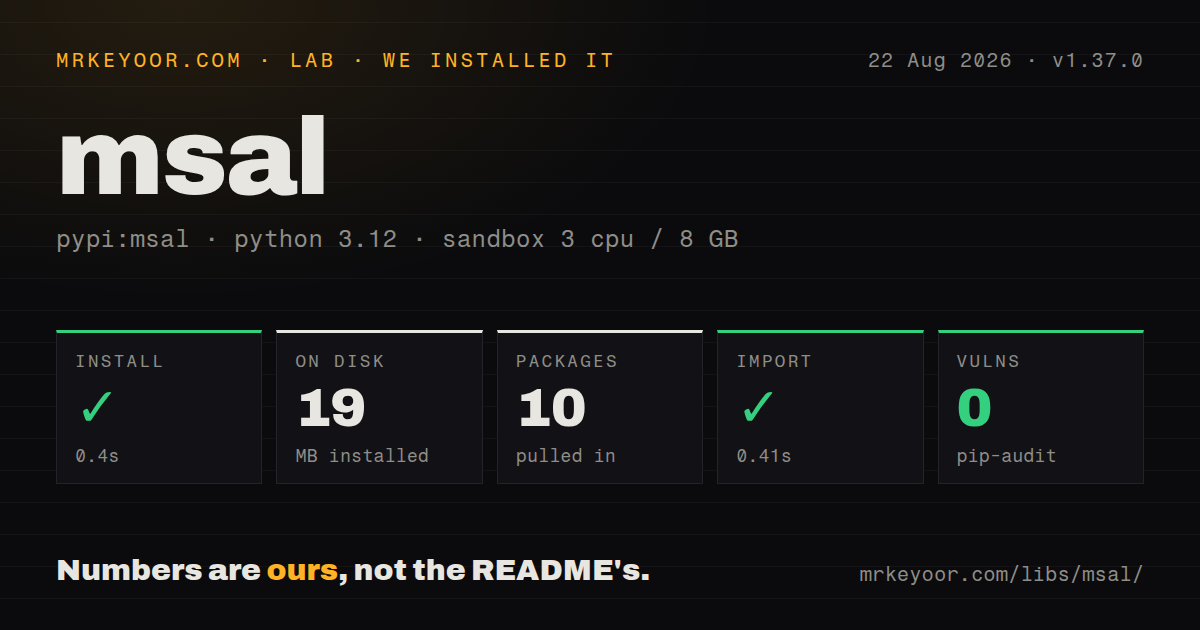
| Install | ✓ · 0.4s | 10 packages on disk · 19 MB |
| Import | ✓ | import msal in 0.41s · pure Python · requires Python >=3.9 |
| Known vulns | 0 | (pip-audit) |
Answers from our run
Does msal install cleanly?
Yes. In a fresh container with an empty cache, pip install msal finished in 0.4s, leaving 10 packages and 19 MB on disk. pip-audit reported no known vulnerabilities.
What does msal need to run?
Python >=3.9, and nothing compiled: it is pure Python. In our run import msal succeeded in 0.41s.
msal or azure-identity: which should you use?
azure-identity: Use it for Azure SDK clients and a credential chain that covers local tools, workload identity, and managed identity. MSAL 1.37.0 installed in 0.4 seconds and used 19 MB across 10 packages in our sandbox with 0 audit findings; current 1.38.0 adds regional, managed-identity, forwarded-claims, and cache-key changes.
When should you not use msal?
The identity provider is not Microsoft Entra, External ID, Azure AD B2C, or Microsoft Accounts. Authlib is a better fit for provider-neutral OAuth and OpenID Connect work.
Use it if
- A Python service or web app calls Microsoft Graph or an API protected by Microsoft Entra ID.
- The application needs a Microsoft-supported client for authorization code, device code, client credentials, or on-behalf-of flows.
- Token acquisition should reuse and refresh cached credentials instead of hand-coding OAuth requests.
- Azure-hosted code must obtain managed-identity tokens and MSAL-specific options are worth the lower-level interface.
- The identity provider is not Microsoft Entra, External ID, Azure AD B2C, or Microsoft Accounts. Authlib is a better fit for provider-neutral OAuth and OpenID Connect work.
- You want one credential chain spanning local developer login, workload identity, Azure CLI, and managed identity. `azure-identity` provides that Azure SDK-oriented abstraction.
- Your project requires typed Python package markers. Our install found no `py.typed`, so strict checkers may treat imports as untyped despite documented annotations.
- The server cannot protect refresh-token cache material or coordinate concurrent writes. The default cache is memory-only, and serialized caches can contain long-lived credentials.
- You plan to decode an ID token and accept its claims as authorization. Version 1.38.0 deprecates `decode_id_token` and stops validating ID tokens; application authorization belongs behind verified tokens and resource-side checks.
Setup reality
We installed msal 1.37.0 in a fresh Python 3.12 Bookworm sandbox in 0.4 seconds. The environment contained 10 packages using 19 MB, and import msal finished in 0.41 seconds. pip-audit reported 0 known vulnerabilities. The measured distribution was pure Python, declared 6 direct dependencies, required Python 3.9 or newer, and did not ship py.typed. PyPI now serves 1.38.0, so the release changes described here landed after that lab run.
Installation alone cannot produce a token. Register an application in Microsoft Entra, record its client ID and tenant authority, add exact redirect URIs, configure delegated or application permissions, and grant consent where required. Confidential clients also need a secret, certificate, or client assertion. Keep those credentials in a secret store. Client-credential requests normally ask for the resource's /.default scope rather than a list of delegated permissions.
MSAL's default token cache lives in memory and disappears with the process. Web apps should give each signed-in user a separate SerializableTokenCache, encrypt the serialized bytes, and use locking or version checks around read-modify-write updates. Call acquire_token_silent before an interactive method so refresh tokens can be used. Reuse the application object; constructing it per request throws away discovery metadata and in-memory cache benefits.
Most acquisition methods return a dictionary for both success and protocol failure. Check for access_token, then log only the error name, description, and correlation ID. Never log the full result. Device-code acquisition blocks while polling, so keep it away from an async event-loop thread. Managed identity requires the Azure endpoint environment to exist; version 1.38.0 also tightens regional authority validation and pins Service Fabric managed-identity TLS behavior.
Patterns
Request a daemon token acquire-client-token
import os
import msal

app = msal.ConfidentialClientApplication(
    os.environ['ENTRA_CLIENT_ID'],
    authority=f"https://login.microsoftonline.com/{os.environ['ENTRA_TENANT_ID']}",
    client_credential=os.environ['ENTRA_CLIENT_SECRET'],
)
result = app.acquire_token_for_client(
    scopes=['https://graph.microsoft.com/.default'],
)
if 'access_token' not in result:
    raise RuntimeError(result.get('error_description'))
Application permissions require tenant consent, and client-credential requests use the resource's 1 `/.default` scope.
Check the user cache first load-token-silently
accounts = app.get_accounts(username=username)
result = (
    app.acquire_token_silent(['User.Read'], account=accounts[0])
    if accounts else None
)
if result is None:
    result = app.acquire_token_interactive(scopes=['User.Read'])
`acquire_token_silent` returns `None` for a cache miss; use `acquire_token_silent_with_error` when the hidden failure detail matters.
Sign in from a terminal start-device-flow
flow = app.initiate_device_flow(scopes=['User.Read'])
if 'user_code' not in flow:
    raise RuntimeError(str(flow))

print(flow['message'])
result = app.acquire_token_by_device_flow(flow)
The final call polls until completion or expiry and blocks 1 thread, so do not run it directly on an async event loop.
Keep authorization state in the session complete-auth-code-flow
# Login route
flow = app.initiate_auth_code_flow(
    scopes=['User.Read'],
    redirect_uri='https://app.example/auth/callback',
)
session['msal_flow'] = flow
return redirect(flow['auth_uri'])

# Callback route
flow = session.pop('msal_flow')
result = app.acquire_token_by_auth_code_flow(flow, request.args)
The stored flow holds state and PKCE data; bind it to 1 protected user session and consume it once.
Save a changed token cache persist-user-cache
cache = msal.SerializableTokenCache()
stored = cache_store.load(user_id)
if stored:
    cache.deserialize(stored)

app = msal.ConfidentialClientApplication(
    CLIENT_ID, authority=AUTHORITY, client_credential=SECRET, token_cache=cache,
)
# acquire a token
if cache.has_state_changed:
    cache_store.save(user_id, cache.serialize())
A serialized cache may hold refresh tokens; encrypt it, isolate it per user, and coordinate concurrent updates.
Use an application certificate authenticate-with-certificate
credential = {
    'private_key': secret_store.read('client-private-key'),
    'thumbprint': CERT_THUMBPRINT,
    'public_certificate': PUBLIC_CERTIFICATE,
}
app = msal.ConfidentialClientApplication(
    CLIENT_ID, authority=AUTHORITY, client_credential=credential,
)
Register the public certificate on the Entra application and keep the 1 private key outside the repository.
Call a downstream API for a user exchange-on-behalf-of
result = app.acquire_token_on_behalf_of(
    user_assertion=incoming_access_token,
    scopes=['https://graph.microsoft.com/User.Read'],
)
if 'access_token' not in result:
    report_token_error(result)
On-behalf-of belongs in a confidential middle tier, and the downstream delegated permission must be configured and consented.
Pass a Conditional Access challenge retry-claims-challenge
result = app.acquire_token_silent(
    SCOPES, account=account, claims_challenge=claims_json,
)
if not result:
    result = app.acquire_token_interactive(
        scopes=SCOPES, claims_challenge=claims_json,
    )
Pass the exact JSON challenge from the resource's `WWW-Authenticate` response into the next token request.
Request a managed-identity token use-managed-identity
import requests
from msal import ManagedIdentityClient, UserAssignedManagedIdentity

client = ManagedIdentityClient(
    UserAssignedManagedIdentity(client_id=IDENTITY_CLIENT_ID),
    http_client=requests.Session(),
)
result = client.acquire_token_for_client(
    resource='https://vault.azure.net',
)
Managed identity uses a resource rather than delegated scopes and works only where an Azure identity endpoint is available.
Log a failed acquisition safely handle-token-error
def report_token_error(result):
    logger.error(
        'token acquisition failed',
        extra={
            'error': result.get('error'),
            'description': result.get('error_description'),
            'correlation_id': result.get('correlation_id'),
        },
    )
Never log the complete result because 1 dictionary can contain access tokens, refresh tokens, or assertions.
Store stable tenant and object ids identify-user
claims = result['id_token_claims']
user_key = (claims['tid'], claims['oid'])
display_name = claims.get('preferred_username')
Use the 2-part tenant and object identifier for application records; email-like display claims can change.
Create one client per process configuration reuse-client-instance
from functools import lru_cache
import msal

@lru_cache(maxsize=1)
def identity_client():
    return msal.ConfidentialClientApplication(
        CLIENT_ID, authority=AUTHORITY, client_credential=SECRET,
        token_cache=shared_cache,
    )
Reusing 1 application object preserves its discovery metadata and in-memory token-cache access across requests.
Alternatives
| Package | Registry | Pick it when |
|---|---|---|
| azure-identity | PyPI | Use it for Azure SDK clients and a credential chain that covers local tools, workload identity, and managed identity. |
| authlib | PyPI | Use it for provider-neutral OAuth 2.0 and OpenID Connect clients or servers. |
| requests-oauthlib | PyPI | Use it for a smaller Requests-based OAuth client when Microsoft-specific flows and cache behavior are unnecessary. |
| oauthlib | PyPI | Use it when protocol primitives are needed below an HTTP-client integration. |
More security guides
cryptography · jose · pyjwt · dompurify · jsonwebtoken · requests-oauthlib · the whole shelf →
How this guide is made: grounded in the library's documentation, release notes, changelog, and issue history, on a fixed rubric — not a hands-on install of every release. The 50 most-downloaded entries are additionally install-verified in clean containers. Corrections: contact the desk.