authlib review
Authlib 1.7.2 supplies the protocol machinery for OAuth 1, OAuth 2, and OpenID Connect in Python. It can act as a client through requests or HTTPX, connect login flows to Flask, Django, Starlette, and FastAPI, or provide the grant and token pieces for an authorization server. It does not supply your user database, consent screen, client administration, or token store. The current release repairs RFC 7523 signatures made with non-RSA keys, validates BCP 47 language tags, and allows an explicitly chosen non-recommended algorithm for JWT client authentication. Our Python 3.12 sandbox found a pure-Python install with two direct dependencies and no `py.typed` marker.
Authlib 1.7.2 installed in 0.3 seconds, occupied 18 MB across five packages, and produced no pip-audit findings in our sandbox; that is a reasonable cost for an application that truly needs OAuth or OIDC flows. JWT-only services should install `joserfc` or PyJWT instead.
We installed it
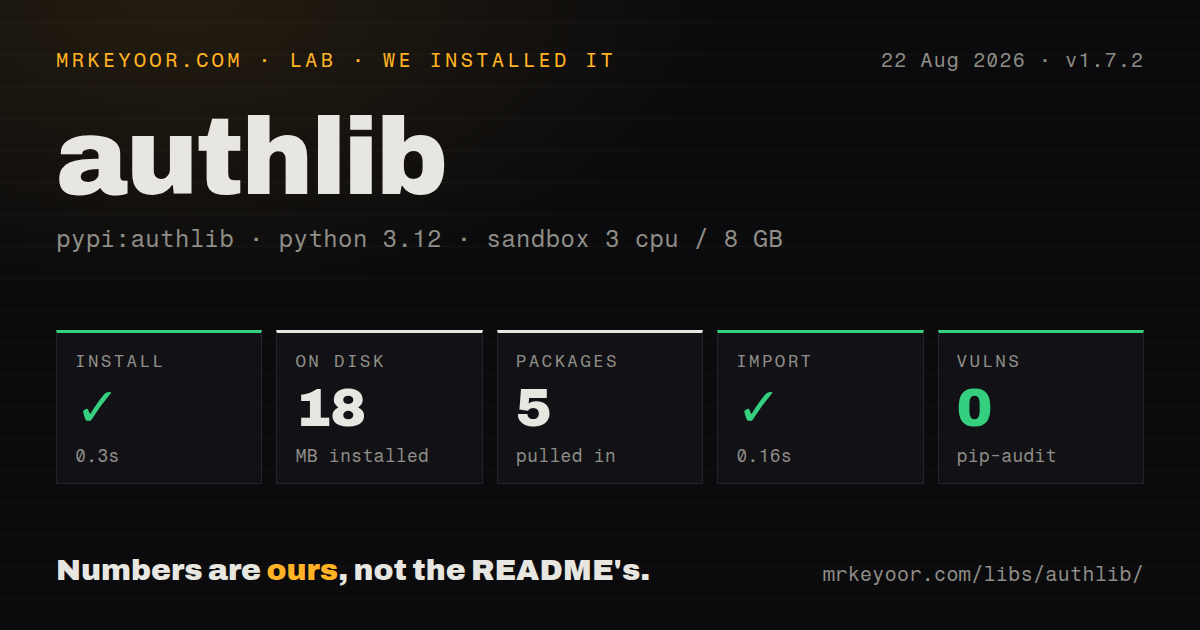
| Install | ✓ · 0.3s | 5 packages on disk · 18 MB |
| Import | ✓ | import authlib in 0.16s · pure Python · requires Python >=3.10 |
| Known vulns | 0 | (pip-audit) |
Answers from our run
Does authlib install cleanly?
Yes. In a fresh container with an empty cache, pip install authlib finished in 0.3s, leaving 5 packages and 18 MB on disk. pip-audit reported no known vulnerabilities.
What does authlib need to run?
Python >=3.10, and nothing compiled: it is pure Python. In our run import authlib succeeded in 0.16s.
authlib or joserfc: which should you use?
Pick joserfc when the work is limited to JWT, JWS, JWE, or JWK operations and no OAuth flow is needed. Authlib 1.7.2 installed in 0.3 seconds, occupied 18 MB across five packages, and produced no pip-audit findings in our sandbox; that is a reasonable cost for an application that truly needs OAuth or OIDC flows.
When should you not use authlib?
The task begins and ends with JWT, JWS, JWE, or JWK handling. Authlib's README says authlib.jose will be deprecated and provides a migration path to joserfc.
Discussed on
- hnAuthlib: Python Authentication125 points
Use it if
- A Flask, Django, Starlette, or FastAPI application needs an OAuth or OIDC login flow with state, nonce, discovery, token exchange, and ID-token handling in one integration.
- You are writing an OAuth provider and need concrete grant implementations for PKCE, device authorization, introspection, revocation, or dynamic client registration.
- One codebase must support a synchronous requests client and an asynchronous HTTPX client without inventing two token-refresh systems.
- Your token endpoint requires `private_key_jwt`, `client_secret_jwt`, or an RFC 7523 assertion instead of HTTP Basic authentication.
- The task begins and ends with JWT, JWS, JWE, or JWK handling. Authlib's README says `authlib.jose` will be deprecated and provides a migration path to `joserfc`.
- You expect an authorization server to include accounts, database tables, login pages, consent UI, and client-management screens. Authlib leaves all of those application decisions to you.
- Production is pinned to Python 3.9 or older. Authlib 1.7.2 requires Python 3.10 or later.
- You want a Django-specific OAuth provider whose models and views already exist. Django OAuth Toolkit is narrower and asks for less provider plumbing.
- Nobody on the team can track protocol and security releases. Version 1.7.1 fixed an unvalidated redirect in two OIDC grants, which is a concrete reason not to freeze an old pin.
Setup reality
We installed Authlib 1.7.2 in an unprivileged Python 3.12 Bookworm sandbox. Installation finished in 0.3 seconds and left five packages using 18 MB. import authlib completed in 0.16 seconds. The distribution is pure Python, declares two direct dependencies, requires Python 3.10+, and does not include py.typed. pip-audit found zero known vulnerabilities in that resolved environment.
An OIDC client starts with a client ID, secret, callback URI, and provider metadata URL. Request the openid scope if you expect an ID token and verified userinfo. Flask keeps state in its session. Starlette and FastAPI need SessionMiddleware and a secret before Authlib can retain state and nonce. Providers compare callback URLs exactly, including the scheme and trailing slash.
Token refresh becomes durable only when you persist the replacement. Store expires_at, configure the token endpoint, and pass update_token so Authlib can write the refreshed token back. A refresh without that callback may save the request and still leave another worker holding stale credentials. With a standalone OAuth2Session, your code must also retain and compare the authorization state.
Building a provider means implementing client lookup, user authentication, consent, grant registration, and token storage around AuthorizationServer. Protected APIs need a ResourceProtector plus a validator that understands your token records and scopes. Version 1.7.2 fixed RFC 7523 signing for non-RSA keys, so test the exact key type and algorithm used by your identity system. New JOSE-only code should use joserfc, following the project's published migration direction.
Patterns
Register an OIDC provider with Flask register-flask-oidc-client
from authlib.integrations.flask_client import OAuth

oauth = OAuth(app)
oauth.register(
    name="company",
    client_id=app.config["OIDC_CLIENT_ID"],
    client_secret=app.config["OIDC_CLIENT_SECRET"],
    server_metadata_url=app.config["OIDC_METADATA_URL"],
    client_kwargs={"scope": "openid profile email"},
)
The discovery document provides issuer, authorization, token, and JWKS locations. `openid` is required when the callback expects an ID token.
Send a Flask user to the identity provider begin-flask-authorization
from flask import url_for

@app.get("/login")
def login():
    callback = url_for("oidc_callback", _external=True)
    return oauth.company.authorize_redirect(callback)
The callback string must match the provider registration exactly. A changed scheme, port, path, or trailing slash can reject the request.
Exchange an OIDC callback code complete-flask-authorization
from flask import redirect, session

@app.get("/oidc/callback")
def oidc_callback():
    token = oauth.company.authorize_access_token()
    claims = token["userinfo"]
    session["user"] = {"sub": claims["sub"], "email": claims.get("email")}
    return redirect("/")
`userinfo` comes from verified OIDC claims when the authorization request included `openid` and the provider returned an ID token.
Give Starlette a signed session add-starlette-session
from authlib.integrations.starlette_client import OAuth
from starlette.middleware.sessions import SessionMiddleware

app.add_middleware(SessionMiddleware, secret_key=settings.session_secret)
oauth = OAuth()
The Starlette adapter stores state and nonce in the session. Without this middleware, callback validation cannot recover those values.
Use the asynchronous web adapter run-async-oidc-flow
@app.get("/login")
async def login(request):
    callback = request.url_for("oidc_callback")
    return await oauth.company.authorize_redirect(request, callback)

@app.get("/oidc/callback")
async def oidc_callback(request):
    token = await oauth.company.authorize_access_token(request)
    return {"subject": token["userinfo"]["sub"]}
Starlette and FastAPI use the HTTPX-based async integration, so redirect preparation and the callback exchange are both awaited.
Get a service token with client credentials fetch-client-credentials-token
from authlib.integrations.requests_client import OAuth2Session

with OAuth2Session(client_id, client_secret, scope="jobs:write") as client:
    client.fetch_token(
        "https://id.example.com/oauth/token",
        grant_type="client_credentials",
    )
    response = client.post("https://api.example.com/jobs", json={"kind": "sync"})
    response.raise_for_status()
Authlib defaults to `client_secret_basic` for this token call. Configure the authentication method when the provider expects credentials in another form.
Persist a replacement access token save-refreshed-token
def save_token(token, refresh_token=None, access_token=None):
    token_store.replace(refresh_token or access_token, token)

client = OAuth2Session(
    client_id,
    client_secret,
    token=stored_token,
    token_endpoint="https://id.example.com/oauth/token",
    update_token=save_token,
)
Automatic refresh needs `expires_at` in the stored token. The callback writes the new value so another worker does not reload an expired credential.
Create a public client with PKCE enable-pkce
client = OAuth2Session(
    client_id,
    redirect_uri=callback_url,
    scope="openid profile",
    code_challenge_method="S256",
    token_endpoint_auth_method="none",
)
Public clients have no secret. Keep the generated verifier and state until the authorization callback is exchanged.
Authenticate a token request with a private key use-private-key-jwt
from authlib.integrations.requests_client import OAuth2Session
from authlib.oauth2.rfc7523 import PrivateKeyJWT

token_url = "https://id.example.com/oauth/token"
client = OAuth2Session(
    client_id,
    private_key_pem,
    token_endpoint_auth_method=PrivateKeyJWT(token_url),
)
token = client.fetch_token(token_url)
This constructor places the private key in the client-secret argument. Authlib 1.7.2 repaired RFC 7523 signing when that key is not RSA.
Require a scoped bearer token protect-flask-endpoint
from authlib.integrations.flask_oauth2 import ResourceProtector, current_token
from authlib.oauth2.rfc6750 import BearerTokenValidator

class DatabaseTokenValidator(BearerTokenValidator):
    def authenticate_token(self, token_string):
        return Token.find_active(token_string)

require_oauth = ResourceProtector()
require_oauth.register_token_validator(DatabaseTokenValidator())

@app.get("/profile")
@require_oauth("profile")
def profile():
    return {"user_id": current_token.user_id}
`ResourceProtector` delegates token lookup to your validator. Authlib does not create or maintain the backing token table.
Add an authorization-code grant register-provider-grant
from authlib.integrations.flask_oauth2 import AuthorizationServer
from authlib.oauth2.rfc6749 import grants

server = AuthorizationServer(app, query_client=query_client, save_token=save_token)
server.register_grant(grants.AuthorizationCodeGrant)
The grant class covers protocol behavior. Your provider still needs code storage, client authentication, consent handling, and token persistence.
Check issuer and audience with joserfc validate-jwt-claims
from joserfc import jwt
from joserfc.jwt import JWTClaimsRegistry

token = jwt.decode(encoded_token, public_key)
claims = JWTClaimsRegistry(
    iss={"essential": True, "value": expected_issuer},
    aud={"essential": True, "value": expected_audience},
)
claims.validate(token.claims)
A valid signature does not prove the expected issuer or audience. Authlib's README directs standalone JOSE work to `joserfc`.
Alternatives
| Package | Registry | Pick it when |
|---|---|---|
| joserfc | PyPI | Pick it when the work is limited to JWT, JWS, JWE, or JWK operations and no OAuth flow is needed. |
| PyJWT | PyPI | Pick it for a small service that only creates and checks signed JWTs. |
| requests-oauthlib | PyPI | Pick it when an existing synchronous client already uses requests and oauthlib conventions. |
| django-oauth-toolkit | PyPI | Pick it for a Django authorization server that should come with framework models and views. |
More security guides
cryptography · jose · pyjwt · dompurify · jsonwebtoken · requests-oauthlib · the whole shelf →
How this guide is made: grounded in the library's documentation, release notes, changelog, and issue history, on a fixed rubric — not a hands-on install of every release. The 50 most-downloaded entries are additionally install-verified in clean containers. Corrections: contact the desk.