ag-charts-types review
Our sandbox showed what the package name hides: ag-charts-types 14.1.0 is AG Charts' shared TypeScript surface, not a chart renderer. Its declarations cover chart options, series, axes, themes, events, callbacks, state, and chart instances used by the Community and Enterprise products. The install added 864 KB of package data and its browser entry bundled to 0.4 KB minified because almost everything disappears after type checking. You still need ag-charts-community or ag-charts-enterprise for AgCharts.create, canvas rendering, and framework integrations.
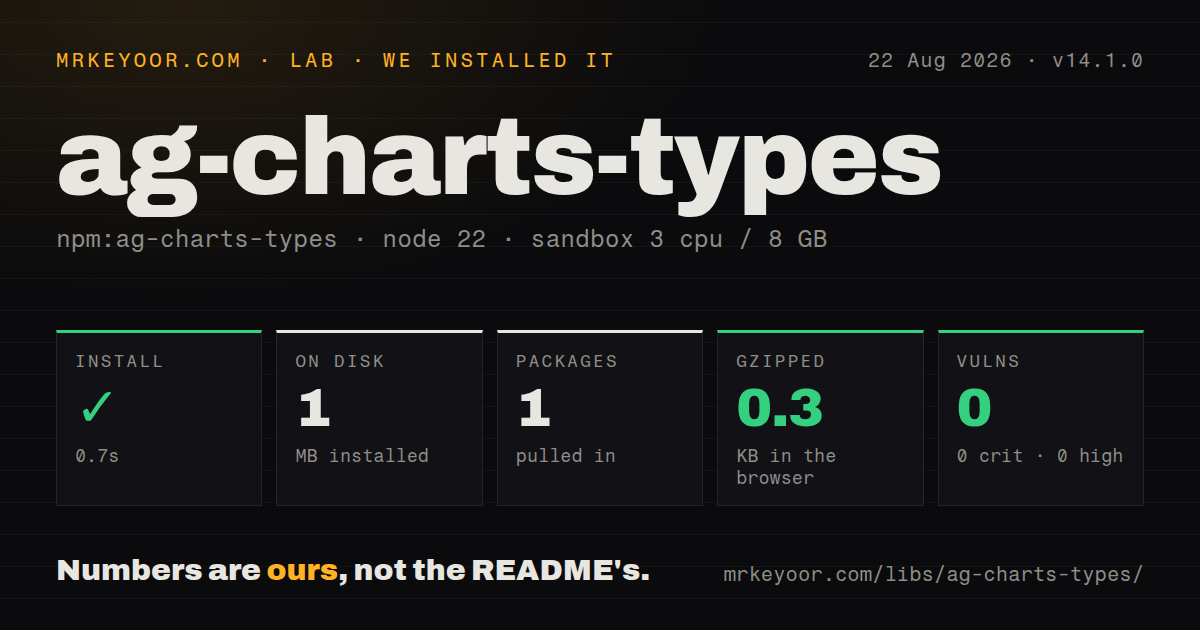
ag-charts-types 14.1.0 installed in 0.7 seconds and bundled to 0.4 KB minified in our sandbox because it supplies contracts, not charts. Add it directly for wrapper boundaries; ordinary apps should install the matching AG Charts renderer and receive these types through that dependency.
We installed it
| Install | ✓ · 0.7s | 1 package on disk · 1 MB |
| Import | ✓ | ESM import works · require() works · CommonJS package with exports map |
| Browser | 0.3 KB | gzipped (0.4 KB minified), bundled with esbuild |
| Types | ✓ | TypeScript types bundled |
| Known vulns | 0 | 0 critical · 0 high · 0 moderate · 0 low (npm audit) |
Answers from our run
Does ag-charts-types install cleanly?
Yes. In a fresh container with an empty cache, npm install ag-charts-types finished in 0.7s, leaving 1 package and 1 MB on disk. npm audit reported no known vulnerabilities.
How much does ag-charts-types add to a browser bundle?
0.3 KB gzipped (0.4 KB minified) when the whole package is bundled for the browser with esbuild. Importing only part of it is usually smaller.
Does ag-charts-types work with both ESM and CommonJS?
Yes. Both import 'ag-charts-types' and require('ag-charts-types') worked in Node 22 in our run. The package is published as CommonJS with an exports map.
Does ag-charts-types include TypeScript types?
Yes, type declarations ship inside the package, so no @types install is needed.
ag-charts-types or ag-charts-community: which should you use?
ag-charts-community: Choose it when the application must render MIT-licensed AG Charts series and should receive matching declarations transitively. ag-charts-types 14.1.0 installed in 0.7 seconds and bundled to 0.4 KB minified in our sandbox because it supplies contracts, not charts.
When should you not use ag-charts-types?
You want a chart on screen: version 14.1.0 exposes declarations and two tooltip enums, but no AgCharts.create implementation or canvas renderer
Use it if
- You maintain a TypeScript wrapper that exposes AG Charts option types while leaving the renderer to the consuming application
- Your shared package needs typed chart data, event payloads, callback context, themes, or chart-instance contracts
- You are building an AG Grid or AG Charts integration that must speak the same type language as both runtime editions
- You can pin this package to the exact version of the AG Charts runtime used by the final application
- You want a chart on screen: version 14.1.0 exposes declarations and two tooltip enums, but no AgCharts.create implementation or canvas renderer
- Your application already depends on ag-charts-community 14.1.0, which pulls ag-charts-types 14.1.0 as an exact dependency
- You cannot coordinate package versions across workspaces: AG Charts publishes its core, locale, type, Community, and Enterprise packages in lockstep
- You assume every declared series is MIT licensed: the type tree includes Sankey, financial, map, and other features assigned to the commercial Enterprise package
- You need compatibility with older axes examples: version 14 types cartesian axes as a keyed object, so the axes arrays shown for earlier majors no longer type-check
Setup reality
Our clean Node 22 install of ag-charts-types 14.1.0 finished in 0.7 seconds. It left 1 package and 1 MB on disk, with 0 direct dependencies, 0 peer dependencies, and 0 audit findings. The published tarball is 864 KB unpacked, carries an MIT license, and includes TypeScript declarations. Both require() and ESM import worked through the package's exports map.
No credentials, stylesheet, native compiler, code generator, or configuration file is involved. For an application, install ag-charts-community instead because it already requests the matching type package. A wrapper can depend on ag-charts-types directly, but it should make the renderer version an explicit compatibility decision. Version 14.1.0 types paired with an older runtime can accept an option that the installed renderer does not implement.
Use import type for declarations. Our esbuild probe produced only 0.4 KB minified and 0.3 KB gzipped when importing the whole package, yet the JavaScript is not completely empty: AgTooltipAnchorToType and AgTooltipPlacementType are runtime enum values and need an ordinary import. The separate ag-charts-types/scene export exposes lower-level scene contracts through the same exports map.
The first visible failure is usually a blank expectation, not an exception: this package has no rendering API. Version 14 also changed cartesian axes to an object keyed by x, y, or custom IDs, so an axes: [] example from an older major fails during type checking. Enterprise-only declarations compile here, but the corresponding runtime behavior still requires ag-charts-enterprise and its commercial terms.
Patterns
Install one coordinated 14.1.0 pair install-matching-runtime
npm install ag-charts-community@14.1.0 ag-charts-types@14.1.0ag-charts-community 14.1.0 already requests this exact types release. Declare both only when your package boundary imports these names itself.
Check options here and render elsewhere type-basic-chart
import { AgCharts } from 'ag-charts-community';
import type { AgChartOptions } from 'ag-charts-types';

type Sale = { month: string; revenue: number };

const options: AgChartOptions<Sale> = {
  container: document.querySelector('#chart'),
  data: [
    { month: 'Jan', revenue: 42 },
    { month: 'Feb', revenue: 57 },
  ],
  series: [{ type: 'line', xKey: 'month', yKey: 'revenue' }],
};

AgCharts.create(options);
AgChartOptions validates the object at compile time. The AgCharts.create function in this example is provided by ag-charts-community.
Keep the line discriminator narrow preserve-series-literals
import type { AgLineSeriesOptions } from 'ag-charts-types';

type Sale = { month: string; revenue: number };

const revenueSeries = {
  type: 'line',
  xKey: 'month',
  yKey: 'revenue',
  yName: 'Revenue',
  marker: { enabled: true },
} satisfies AgLineSeriesOptions<Sale>;
The satisfies check preserves type: 'line' as a literal while verifying that xKey and yKey name fields on Sale.
Define axes with the version 14 object form configure-v14-axes
import type { AgCartesianChartOptions } from 'ag-charts-types';

type Sale = { month: string; revenue: number };

const axes: AgCartesianChartOptions<Sale>['axes'] = {
  x: { type: 'category', position: 'bottom' },
  y: {
    type: 'number',
    position: 'left',
    label: { format: '$,.0f' },
  },
};
The 14.1.0 declaration expects axes keyed by x, y, or a custom ID. An array copied from older documentation is rejected.
Describe one member of a stacked bar type-bar-series
import type { AgBarSeriesOptions } from 'ag-charts-types';

type Quarter = { quarter: string; product: number; services: number };

const product: AgBarSeriesOptions<Quarter> = {
  type: 'bar',
  xKey: 'quarter',
  yKey: 'product',
  yName: 'Product',
  stacked: true,
  stackGroup: 'revenue',
};
In 14.1.0, stacked and stackGroup place this series in a stack. The declaration says normalizedTo does nothing when grouped is true.
Return structured line-tooltip data type-tooltip-renderer
import type {
  AgLineSeriesOptions,
  AgLineSeriesTooltipRendererParams,
} from 'ag-charts-types';

type Sale = { month: string; revenue: number };

const renderer = ({ datum }: AgLineSeriesTooltipRendererParams<Sale>) => ({
  title: datum.month,
  data: [{ label: 'Revenue', value: `$${datum.revenue}` }],
});

const series: AgLineSeriesOptions<Sale> = {
  type: 'line', xKey: 'month', yKey: 'revenue',
  tooltip: { renderer },
};
The line renderer result accepts a title and data rows in version 14. Returning a DOM element does not match this series result type.
Carry the row type into click events type-chart-listener
import type { AgNodeClickEvent } from 'ag-charts-types';

type Sale = { id: string; month: string; revenue: number };

function onSaleClick(
  event: AgNodeClickEvent<'seriesNodeClick', Sale>,
) {
  console.log(event.datum.id, event.seriesId, event.itemId);
}
AgNodeClickEvent exposes the typed datum plus seriesId and itemId. Set dataIdKey when item identity must survive chart updates.
Type application state passed to callbacks type-callback-context
import type { AgChartOptions } from 'ag-charts-types';

type Sale = { month: string; revenue: number };
type AppContext = { currency: string };

const options: AgChartOptions<Sale, AppContext> = {
  data: [{ month: 'Jan', revenue: 42 }],
  context: { currency: 'USD' },
  series: [{
    type: 'line', xKey: 'month', yKey: 'revenue',
    tooltip: {
      renderer: ({ datum, context }) =>
        `${context?.currency} ${datum.revenue}`,
    },
  }],
};
The second AgChartOptions generic controls callback context. The callback still sees context as optional, even when this options object supplies it.
Validate a custom palette before runtime type-custom-theme
import type { AgChartTheme } from 'ag-charts-types';

const theme: AgChartTheme = {
  baseTheme: 'ag-default-dark',
  palette: {
    fills: ['#5b8ff9', '#61d9a5', '#f6bd16'],
    strokes: ['#ffffff'],
  },
};
A supplied palette replaces the base palette entries. Include enough fill colors for the number of concurrent series you expect.
Type the owner of an AG Charts instance type-chart-instance
import type {
  AgChartOptions,
  AgTypedChartInstance,
} from 'ag-charts-types';

type Sale = { month: string; revenue: number };
type SaleOptions = AgChartOptions<Sale>;
type SaleChart = AgTypedChartInstance<Sale, unknown, SaleOptions>;

async function replaceChart(chart: SaleChart, options: SaleOptions) {
  await chart.update(options);
  await chart.waitForUpdate();
}
update consumes a complete options object and returns a promise. Use updateDelta for partial changes and waitForUpdate before code that depends on the redraw.
Import the two values that survive compilation use-runtime-enums
import {
  AgTooltipAnchorToType,
  AgTooltipPlacementType,
} from 'ag-charts-types';
import type { AgChartTooltipOptions } from 'ag-charts-types';

const tooltip: AgChartTooltipOptions = {
  position: {
    anchorTo: AgTooltipAnchorToType.NODE,
    placement: [
      AgTooltipPlacementType.TOP,
      AgTooltipPlacementType.BOTTOM,
    ],
  },
};
AgTooltipAnchorToType and AgTooltipPlacementType are real JavaScript exports in 14.1.0. import type would erase them.
Compile a Sankey contract without granting a license recognize-enterprise-types
import type { AgSankeySeriesOptions } from 'ag-charts-types';

type Link = { from: string; to: string; amount: number };

const flow: AgSankeySeriesOptions<Link> = {
  type: 'sankey',
  fromKey: 'from',
  toKey: 'to',
  sizeKey: 'amount',
};
AgSankeySeriesOptions exists in the shared declarations, while the repository's feature table assigns Sankey rendering to ag-charts-enterprise.
Alternatives
| Package | Registry | Pick it when |
|---|---|---|
| ag-charts-community | npm | Choose it when the application must render MIT-licensed AG Charts series and should receive matching declarations transitively |
| chart.js | npm | Choose it when you want a canvas renderer and its TypeScript contract in one widely used package |
| echarts | npm | Choose it for a broader built-in chart catalog without separating the public types from the rendering package |
| recharts | npm | Choose it when a React component API fits the codebase better than a framework-neutral options object |
More web frontend guides
postcss · react · react-dom · tailwindcss · clsx · htmlparser2 · the whole shelf →
How this guide is made: grounded in the library's documentation, release notes, changelog, and issue history, on a fixed rubric — not a hands-on install of every release. The 50 most-downloaded entries are additionally install-verified in clean containers. Corrections: contact the desk.