Woodpecker separates coordination from execution
Woodpecker is worth evaluating if your team intends to keep its Git host and operate its own CI components. The server provides the interface, handles webhooks and analyzes YAML pipeline configurations. Agents execute workflows. This gives operators a choice of execution backend while leaving them responsible for connecting and maintaining those components.
The administration guide lists Docker, Kubernetes and local execution backends. Multiple agents can coexist with different backend choices and agent settings. These are documented capabilities; the recorded sandbox run did not compare backends or verify isolation between jobs.
What happened when we ran it
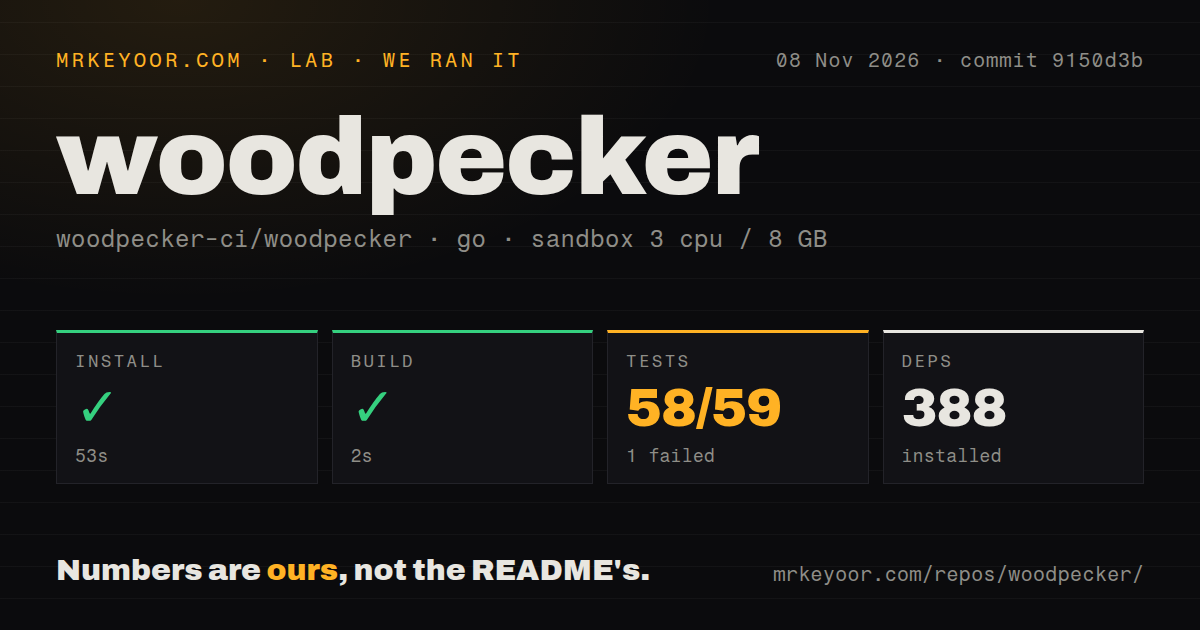
The November 8, 2026 sandbox run used commit 9150d3b. Dependency installation succeeded in 53 seconds, with 388 dependencies recorded. The repository built successfully in 2 seconds.
The Go test command failed with exit 1 after 306 seconds. The recorded summary reports 58 passed and 1 failed out of 59. The supplied evidence does not establish that these totals count individual assertions.
The log tail contains successful package results, including datastore migration and the Woodpecker Go client, followed by FAIL. It does not name the failing package, assertion or underlying exception. The cause remains unresolved; diagnosing it requires the missing part of the full log.
The checkout contained 1,727 files, approximately 168,544 source lines and 41 MB. The configured sandbox had 3 CPUs, 8 GB RAM and image label golang:1.24-bookworm. Actual runtime and operating-system versions require raw toolchain logs. The scan found zero CI workflow files, no Dockerfile and no tests directory. Those discovery results do not establish that upstream container images or Go tests are absent.
These results cover repository commands. No connected forge, server-agent exchange, representative pipeline, loaded-service resource use, upgrade or database restore was verified. The two-second build does not measure CI job throughput.
The supplied administration pages are labeled 3.20.x. They describe the documented operating model, but do not establish release-specific behavior for the measured commit.
Your Git host supplies the user accounts
The server configuration documentation says Woodpecker has no user registration system of its own. Users come from the forge through OAuth2, and registration is closed by default. Check that your intended CI users can authenticate through the chosen forge before evaluating execution backends.
Forge events such as pushes and pull requests start pipelines, and Woodpecker reports pipeline status back to the forge. A useful trial should follow that whole path: trigger a repository event, execute the workflow on the intended agent and confirm the result at the Git host.
Also review the documented administrator and organization settings against your access policy. Those controls were not tested in the recorded run.
Database recovery remains an operator responsibility
Woodpecker uses SQLite by default. The administration guide recommends PostgreSQL or MariaDB for larger instances. The server guide says operators must create an external database themselves, while Woodpecker handles schema migrations, including initial tables and indexes.
Woodpecker does not perform database backups or data archival. The documentation also warns that stored logs can increase database size considerably. Before relying on an installation, decide how to persist its state and rehearse recovery. The supplied measurements contain no restore result that supports recommending a particular backup arrangement.
Container guidance also needs attention. The general guide says no latest tag exists to prevent accidental major upgrades and describes specific SemVer tags and rolling tags instead. However, the supplied server page includes a Traefik example using latest. These pages conflict on that detail. Choose an explicitly documented version tag and verify its availability before deployment; the source build did not verify a published image.
Jenkins and Gitea answer different selection questions
Jenkins is a Java automation server with a plugin model. Evaluate it when existing Jenkins jobs or required plugins shape your decision. The supplied evidence does not compare migration compatibility or maintenance effort with Woodpecker.
Gitea includes Git hosting and CI/CD. Its README describes CI/CD that can reuse GitHub Actions. Evaluate it when you are choosing a development service as well as CI, and verify the workflows you need. That README statement does not establish universal compatibility.
What the documentation score means
Documentation receives 3/5 on this review's rubric: 1 means no identifiable deployment route, 3 means concrete instructions with material verification gaps, and 5 means documented routes independently verified within the review. The supplied pages explain components, forge identity and database responsibilities. The deployment remains unverified, and the container-tag inconsistency needs checking. This score assesses the supplied guidance and its verification here, rather than compatibility or adoption.
Setup ease, support quality and production maturity remain unassessed. Before migrating CI, resolve the recorded test failure, run a representative repository through the intended forge and agent, confirm the reported result and rehearse recovery of stored state.