KubeVirt is worth evaluating when your team already operates Kubernetes and wants to manage virtual machines through the same API. The adoption decision depends on whether that integration justifies operating its additional controllers and agents.
Our recorded build step succeeded, but its command and coverage were not supplied. The test command failed, and the record contains no verified guest boot. This review separates those findings from the documented deployment route and the checks a platform team still needs to perform.
VM management runs through the Kubernetes API
KubeVirt is a virtual machine management add-on for Kubernetes. Its README explains that it adds virtualization resource types through Custom Resource Definitions. Additional controllers and agents supply the behavior needed to launch and manage guests; resource definitions alone are insufficient.
The documented operations include creating, scheduling, launching, stopping and deleting VMs. This gives teams already managing Kubernetes resources a way to include applications that need a guest operating system. The team still needs to operate the guest and the underlying cluster.
That shared API is the reason to consider KubeVirt. If your organization wants a packaged virtualization appliance, compare the operational responsibilities before selecting an add-on to an existing cluster.
What happened when we ran it
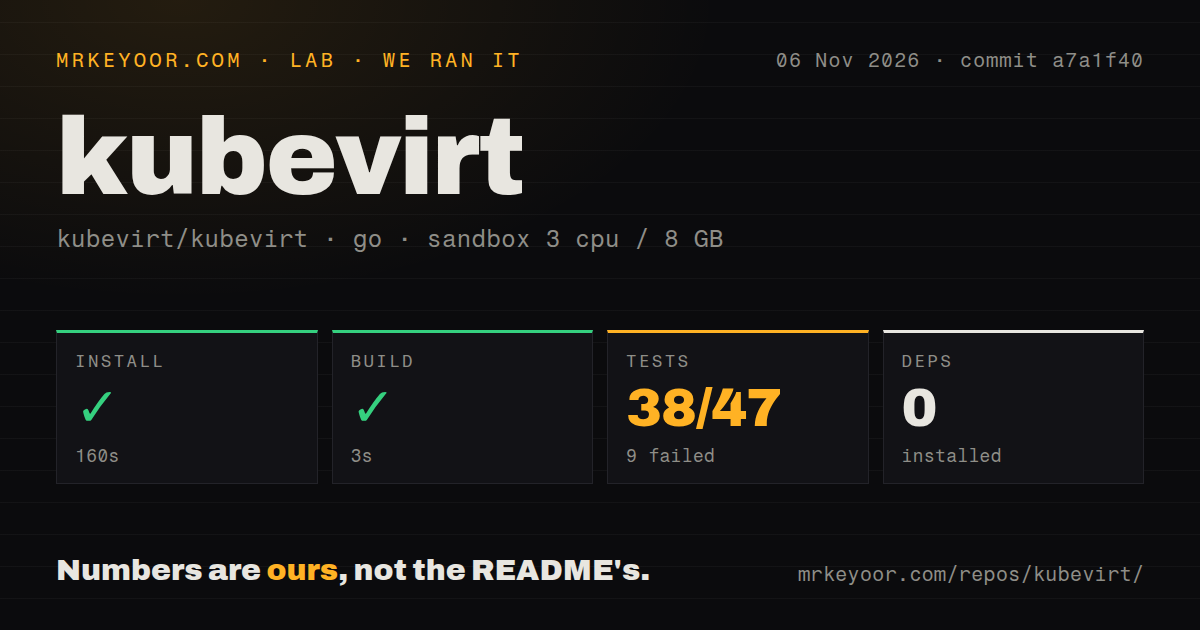
Our November 6, 2026 sandbox run at commit a7a1f40 recorded a successful install step in 160 seconds. The recorded build step succeeded in 3 seconds. Its command and coverage were not supplied, so the result does not establish verified repository compilation.
The test command exited 1 after 833 seconds. The supplied Go summary reports 38 passed and 9 failed out of 47. These are recorded summary counts; the packet does not establish that they enumerate individual test cases.
The failing tail names tests/storage, tests/testsuite and tests/watcher as package build failures. It also includes successful package entries, including tests/operator/version and tools/manifest-templator. The excerpt omits the compiler diagnostics needed to explain the failures. It cannot support a diagnosis involving missing libraries, a Go mismatch or cluster configuration.
The failed command is a finding about this run. It does not establish whether a guest can boot on your hardware. No cluster deployment, guest boot, console access, storage persistence or application-connectivity result was supplied.
The checkout contained 3,916 files, approximately 684,184 source lines and 38.1 MB. The sandbox configuration specified 3 CPUs, 8 GB RAM and image golang:1.24-bookworm. Actual runtime and operating-system versions require toolchain logs. The scan recorded zero dependencies, one CI workflow file, a tests directory and no Dockerfile detected. These scan results do not establish that the project has no dependencies or no other build infrastructure. No vulnerability-audit result was supplied.
Check the host and networking before a guest trial
The Minikube quickstart says KubeVirt needs Linux/KVM on the host kernel and labels macOS and Windows hosts unsupported for that route. It points Mac users toward a devcontainer or cloud-provider quickstart. This is a limitation of the documented host route, rather than evidence from our sandbox.
For a cluster running inside a VM, the guide discusses nested virtualization and an emulation option when nesting cannot be enabled. Neither path was established by our run. The sandbox image label proves neither KVM availability nor use of emulation.
The guide configures a CNI for VM networking and explains why multiple nodes need a shared network. It documents operator deployment, component checks and virtctl access to VM consoles. These are documentation findings, not instructions we executed. Before choosing a Kubernetes and KubeVirt version pair, consult the support matrix linked from the README; compatibility with your intended pair was not assessed here.
Verify persistent data and application access
The quickstart describes a separate CDI lab for importing a VM image into a Persistent Volume Claim and attaching it to a VM as a block device. Operator readiness alone would not establish that this storage path works for your guest.
For an adoption trial, use a disposable guest to write data, stop it, start it again and check that the data survived. Open its console and verify access to the application destinations it needs. These are proposed acceptance checks and were not performed in our sandbox. If live migration matters, plan a trial with more than one node: the quickstart explicitly requires that to demonstrate the operation.
The supplied GitHub metadata records a last push on November 6, 2026. Release v1.9.1 was published on October 12, 2026. The release page identifies the git tree as the primary release artifact. These records show repository and release activity, but they do not establish support response times or compatibility with a particular cluster. The sandbox checkout at a7a1f40 should not be treated as a test of the v1.9.1 release tag.
Compare the operating model
Harvester runs on bare metal servers and provides integrated virtualization and distributed storage capabilities. Its README describes a bootable appliance image and hardware requirements. Evaluate it when you want a packaged infrastructure platform and can provide suitable hardware.
Incus provides a unified experience for running and managing full Linux systems inside containers or virtual machines. Its README describes a REST API. Consider it when system management is the requirement and Kubernetes resource integration is unnecessary.
Neither alternative was measured against KubeVirt here. This comparison concerns their documented roles, not relative speed, reliability or setup effort.
How the documentation rating works
Documentation receives 3/5 under this editorial rubric: 1 means no usable documented route, 3 means concrete instructions whose execution remains unverified, and 5 requires independent verification across the assessed route. The README explains the resource and controller model; the Minikube quickstart covers host limits, networking, operator deployment and component checks. Those details support a documented evaluation path, while the absence of an executed deployment limits the rating.
Setup ease, community support quality and operational maturity remain unassessed. The next useful result is a guest boot with persistent data and working application connectivity on the cluster you intend to operate.