LocalThings can move Samsung appliance commands onto your home network while the appliance keeps its own Samsung connection. Blocking that connection is a separate decision: the README identifies washer and dryer boards whose energy totals stop increasing without SmartThings access.
For a Home Assistant owner, the useful question is whether the local controls cover a particular automation. Check authentication, command restrictions and the sensors you depend on before replacing it. Our sandbox provides repository setup evidence; it did not control an appliance.
What happened when we ran it
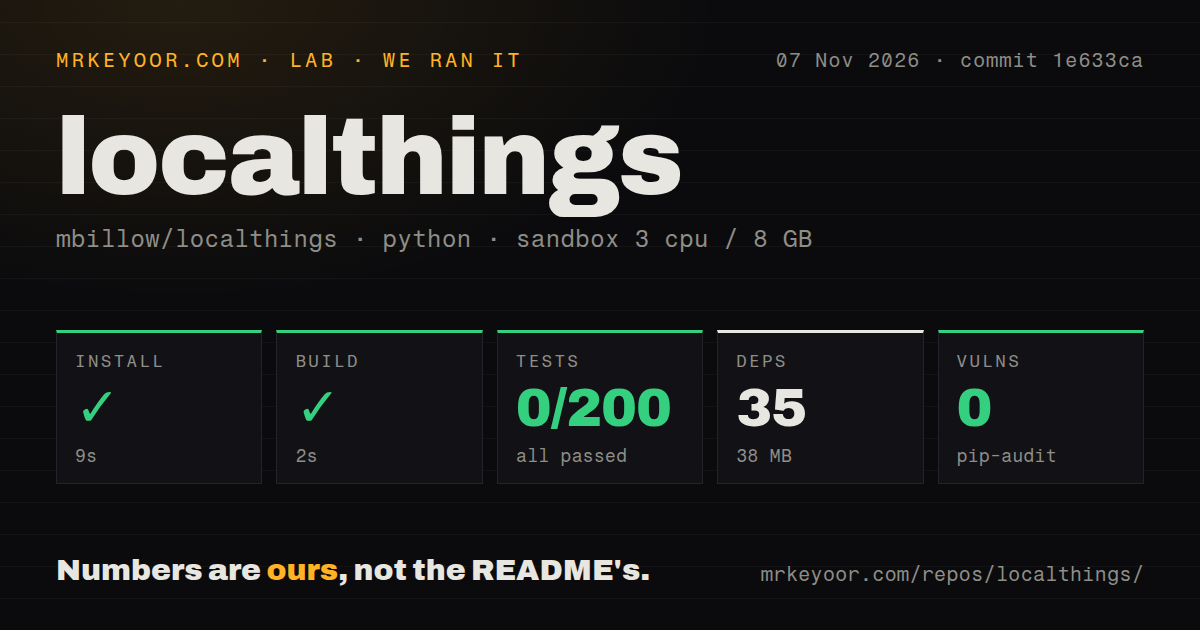
At commit 1e633ca on November 7, 2026, installation succeeded in 9 seconds and the build succeeded in 2 seconds. The run recorded 35 dependencies and a 38 MB installed footprint. Tests exited 1 after 9 seconds, with pytest recording 0 passed, 0 failed and 200 collection/setup errors out of 200.
The supplied log tail repeats a fragment about real-network waits and ends with one warning and 200 errors in pytest's own 7.20 seconds. The recorded outer test step took 9 seconds. The tail does not expose the underlying exception, so it cannot establish a fixture, dependency, network or environment cause.
These were collection/setup errors rather than failed product assertions. The test command still failed, and the run supplies no passing-suite evidence. A full traceback is needed to diagnose the failure.
The checkout contained 598 files, approximately 89,144 source lines and 7.3 MB. The scan found one CI workflow, a Dockerfile, a Compose file and a tests directory. pip-audit reported 0 known vulnerabilities. That audit result does not verify appliance security or operational reliability.
The configured sandbox had 3 CPUs, 8 GB RAM and image ghcr.io/astral-sh/uv:python3.12-bookworm. The image name does not establish the actual runtime or operating-system version. Repository installation also does not establish a working Home Assistant deployment.
Local commands and appliance internet access
The LocalThings README says first-appliance setup contacts Samsung once to read a public identifier without an account login. Later appliances reuse it. The documentation says LocalThings does not contact Samsung after setup, while the appliance keeps its own connection. These are documented behaviors, not traffic observations from our sandbox.
The README advises keeping appliances registered in SmartThings. It says removing one can cause it to reset its network settings when it next reaches Samsung, leaving it off Wi-Fi until app setup is repeated.
It also identifies the DA_WM_TP2_20_COMMON board, including the WW80T654ALX and DV80T6220LX examples, as a case where energy totals stop increasing while SmartThings is unreachable. LocalThings can report only what the appliance records. If energy history matters to your automation, verify it before changing internet access.
Pairing and command limits
The documented installation uses HACS or a custom-component copy, followed by a Home Assistant restart and setup by appliance IP address. These instructions were not executed in our sandbox.
Some appliances reject the automatic certificate. Setup then offers to import a pre-shared key, which LocalThings cannot obtain for you. The README also says no appliance that refused the automatic certificate has been reported to accept the offered public fallback certificate. Treat certificate acceptance as a prerequisite to check, rather than assuming an IP address is sufficient.
Older TCP 8888 devices use a device-token flow. The documented callback requires the appliance to reach Home Assistant on port 8889, and pairing steps vary by model. The README says this interface requires TLS 1.0 and a certificate LocalThings cannot verify; that exception applies to this connection. We did not execute that flow.
Remote operation remains subject to appliance restrictions. The documentation says ovens report which modes a remote may start and their temperature and time limits. LocalThings follows those limits, and Remote Control must be enabled at the appliance. Verify the action your automation needs, including whether the command takes effect, before relying on it.
Release scope and documentation rating
Release v0.36.0, published November 2, 2026, describes soundbar support and startup changes. Its DONGLE_0281 refrigerator controls are not yet confirmed on hardware. It separately gives the same qualification for four-way cassette air-conditioner vane selects. These release notes distinguish implemented support from hardware confirmation.
Documentation receives an editorial 3/5. The rubric is: 1 for missing essential setup guidance, 2 for a partial setup path, 3 for a documented main path with explicit exceptions, 4 for that guidance plus independently reproduced installation and pairing, and 5 for independently checked guidance across the relevant authentication paths. The README explains installation, certificate refusal, older token flows and appliance-specific restrictions. Our run did not reproduce Home Assistant pairing, so it does not support the higher levels. This is a documentation assessment, not a compatibility score. Setup ease, community support and operating maturity remain unassessed numerically.
Which route to evaluate
The Home Assistant SmartThings integration requires Samsung account credentials and maps SmartThings capabilities to entities. Its documentation warns that free SmartThings API access is being phased out starting in October 2026, with a paid Personal Plan required afterward. That warning affects its suitability as a fallback. Confirm the applicable terms and whether the API exposes your required capability; this review did not verify subscription access.
SmartThings-Local is the Python protocol library used by LocalThings and includes a reference MQTT bridge demo. Its README directs ordinary Home Assistant appliance-control users to LocalThings. Evaluate the library for protocol work or a custom client, with authentication and deployment still your responsibility.
For a LocalThings trial, start with one appliance and one existing automation. Check pairing, state updates and the command's effect before replacing the original. If you also plan to block Samsung access, verify the sensors you need under that condition separately.