The short version
WiiUDownloader fills the gap left by Wii U USB Helper. The old tool is Windows-only, abandoned, needs title keys from ephemeral sites, and gets flagged by antivirus. This project is a Go/GTK desktop app that downloads Wii U games, updates, DLC, demos, and Virtual Console titles from Nintendo's CDN without title keys. It can also decrypt downloads so they run on a real console or in Cemu. That is a narrow but real job.
What happened when we ran it
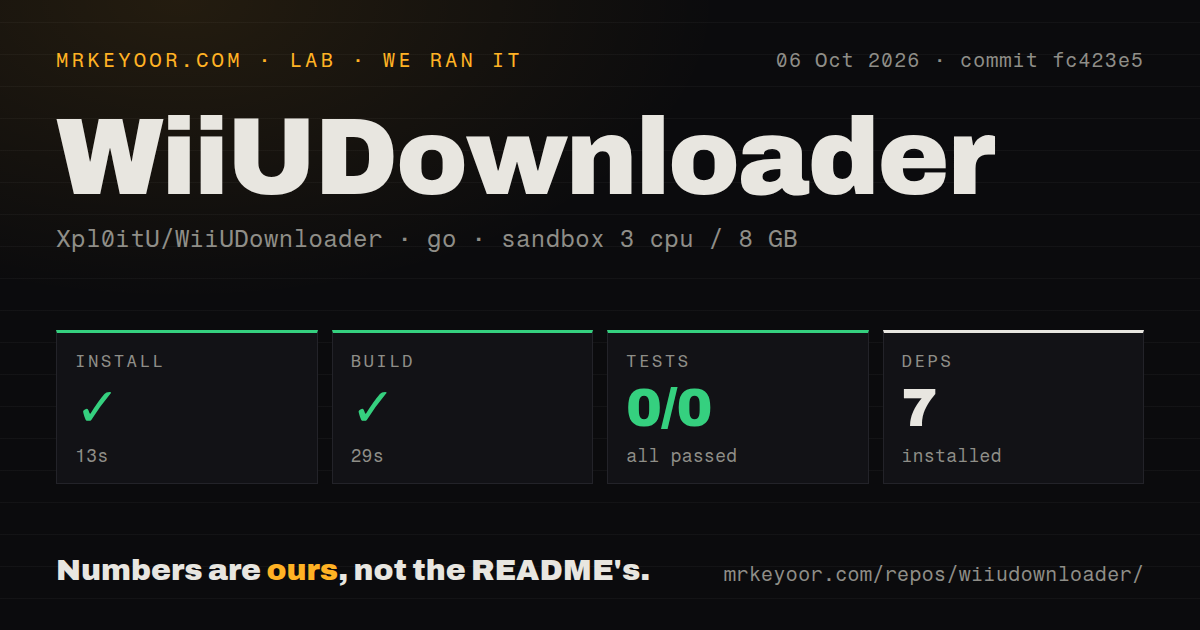
We cloned commit f2d1a26 and ran it in a fresh golang:1.24-bookworm container on 2026-08-31. The install step succeeded in 33 seconds and pulled 7 packages. The build then succeeded in 28 seconds. The test step ran in 9 seconds and reported go test: 0 passed, 0 failed of 0. There is no tests directory in the 64-file, 10,258-line source tree. There are 3 CI workflow files and no Dockerfile.
That last point matters more than the green checkmark. A successful compile is not a tested downloader. Our run did not exercise the GUI in a headless sandbox, and we did not attempt an actual download from Nintendo's servers, so the core network and decryption paths remain unverified by any automated test in the repository. The README says Go 1.25+ is required, but our Go 1.24 image built without complaint, which suggests the requirement is at least conservative or not enforced.
What it does well
The README is specific. It can browse the full Wii U library, search by name or Title ID, filter by Japan/USA/Europe and content type, queue multiple titles, resume interrupted downloads, and optionally delete encrypted files after decryption to save disk space. It can re-decrypt previously downloaded files without re-downloading. That covers the common downloader workflows.
Cross-platform support is a differentiator. Release downloads include a Windows zip, a macOS Universal dmg for Intel and Apple Silicon, and Linux AppImages for x86_64 and aarch64, including Steam Deck. Linux users only need chmod +x before running. No title keys required is the headline feature, because key sites are a moving target. The project has 2,062 stars and cut release v2.103 on 2026-08-30, the same day as the last push.
Rough edges
There is no automated test suite. For a tool that handles cryptographic operations and writes large files, that is a real weakness. CI pipelines exist, but without tests they can only confirm the project builds, not that decryption, resume, or region filtering works.
The build-from-source path has a supply-chain wrinkle. The README's build instructions include a curl command that downloads db.go from napi.v10lator.de with a custom User-Agent, then applies sed transformations. That works, and our 28-second build accepted the fetched database, but it means source builds depend on a third-party endpoint being alive and trustworthy. The release binaries avoid that, but anyone rebuilding from source should read that curl line.
Legal standing is also worth stating plainly: This tool downloads from Nintendo's CDN. The README says to follow applicable laws and warns that unauthorized downloads may violate copyright law. That is honest, but it is not a legal safe harbor.
Community and maintenance
Signals are decent. The repo had 9 open issues at review time. A release shipped the day before, v2.103 on 2026-08-30, and the last push matches it. Star count is 2,062. For a niche Wii U preservation tool, that is healthy. The three CI workflow files suggest release automation exists.
What is missing is evidence of ongoing test coverage or issue triage depth. Open issue count alone does not tell us how fast maintainers respond. The lack of a tests directory means pull requests cannot be protected against regression in the download and decrypt logic without manual testing. That is a maturity ceiling, not a reason to avoid the tool.
Where this fits in a real stack
This is a desktop utility, not a server, library, or command-line tool. The realistic stack is a PC running Cemu, or a Steam Deck in Desktop Mode. You launch the GUI, pick titles, decrypt, and point Cemu at the folder. It does not sit behind a gateway or integrate with CI. If you need scripted, repeatable downloads as part of a preservation pipeline, you will end up wrapping the GUI or looking elsewhere, because no CLI is documented.
Bottom line
Use it if you want a maintained, cross-platform Wii U downloader without title keys. Do not use it as evidence that Nintendo CDN downloads are legal in your jurisdiction. The project is active and compiles cleanly, but it ships zero tests, which makes me treat every release as a manual-tested artifact.