WhatsApp Web gives broad access without an official contract
whatsapp-web.js wraps WhatsApp Web in a Node.js client. Puppeteer opens a managed browser, the library injects code into the page, and your application receives events for messages and account activity. The published feature table covers text, media, locations, contacts, replies, group administration, reactions, polls, channels, and blocking. Buttons and lists are marked deprecated, while communities are shown only as a future aspiration.
The attraction is obvious for a developer who already uses WhatsApp on a phone. A short example scans a QR code, waits for ready, and replies to !ping. There is no Meta app review in that path. The cost is equally plain in the README: this project is neither affiliated with nor authorized by WhatsApp, bots and unofficial clients are disallowed, and the maintainers cannot guarantee that an account will avoid blocking.
QR authentication needs storage that survives restarts
The default authentication strategy saves nothing, so every restart requires another QR scan. LocalAuth stores a Chromium user directory, including session state, beneath .wwebjs_auth unless you choose another path. It is the easiest documented option for one durable host. The guide explicitly says it does not work out of the box on platforms with ephemeral filesystems. Back up and restrict that directory because it represents a linked account session.
RemoteAuth moves session archives into a separate store. The guide documents MongoDB and S3 adapters, each adding packages, credentials, and recovery behavior. A remote session may take about 1 minute to save after initial pairing, and the ready event does not prove that backup has finished. Multiple clients also need distinct identifiers. These details turn a demo bot into a stateful service that needs storage monitoring and restore tests.
What happened when we ran it
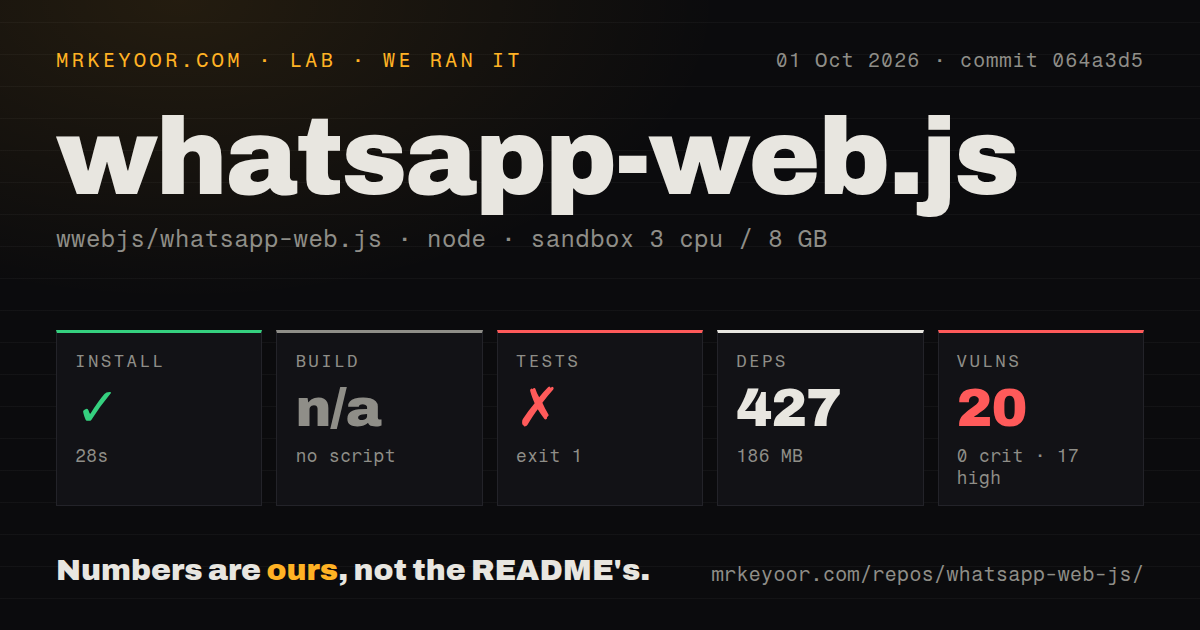
Our sandbox installed commit 942d236 in 36 seconds. Npm added 427 packages and used 186 MB on disk. There is no build script or target in the package, so the lab skipped that step. The checkout itself had 186 files, about 15,222 lines of source, and a 2.6 MB repository footprint. Nine CI workflow files and a tests directory were present; no Dockerfile was present.
The test command failed with exit code 1 after 9 seconds. The supplied log tail contains Node module loading, dynamic import, and Mocha loadFilesAsync frames, followed by no summary lines. It does not show the originating error message, failed assertion, or test count. We can say the suite did not start or finish successfully in that fresh Node 22 container. The log does not support a claim about why.
Npm audit found 20 known vulnerabilities in the installed tree: 17 high, 2 moderate, 1 low, and 0 critical. That result belongs to our measured commit and dependency resolution. It is enough to require an advisory review before deployment, especially because Puppeteer and its browser-facing dependencies process content controlled by incoming messages and WhatsApp Web.
Chromium is part of the production footprint
Puppeteer is a direct dependency, currently pinned in the measured package alongside media and fetch helpers. A headless Linux host needs the browser's system libraries. The installation guide supplies a long Debian package command for that case. It also suggests --no-sandbox and --disable-setuid-sandbox for some no-GUI or root launches. Those flags reduce browser isolation, so a production service should use an unprivileged container or host design that avoids them where possible.
Bundled Chromium also lacks licensed AAC and H.264 support. The attachment guide says video and GIF sending with those codecs requires Google Chrome and an explicit executable path. Incoming files arrive as base64 data and may be missing or unavailable, so handlers must accept an undefined download result, set size limits, catch rejected promises, and keep untrusted media away from unsafe decoders.
WhatsApp Web changes can break media between releases
Open issue #201833 reports that downloadMedia() throws an opaque r: r error for incoming images and PDFs on whatsapp-web.js 1.34.7. The reporter reproduced it with live WhatsApp Web and a strict archived snapshot, while text reception continued. The issue was updated on August 25, 2026. That is a specific warning for archiving, support inboxes, and document workflows that depend on every attachment arriving.
Other current reports and pull requests discuss renamed internal fields, empty chat results, session persistence, and media compatibility. This failure pattern follows the architecture: code injected into a web client depends on internal structures that WhatsApp can change without maintaining a public contract for this library. Pinning npm dependencies helps reproduce your side, but it cannot freeze the remote page unless you also operate and test a compatible web-version cache.
August code activity is newer than the April release
GitHub recorded the last repository push on August 23, 2026 and showed 98 combined issues and pull requests. The latest release, v1.34.7, was published on April 24, 2026. Its notes contain fixes for authentication timeouts, disconnect events, group metadata, media captions, reactions, contacts, and session storage. The newer push and active issue work argue against calling the project abandoned; they also show how much maintenance tracks WhatsApp's moving internals.
Apache 2.0 covers the library code, and 22,474 GitHub stars indicate a large audience. Neither fact changes WhatsApp's platform policy. Adopt whatsapp-web.js only with a disposable test account first, explicit reconnect handling, durable session backups, dependency remediation, and alarms around message or media failures. For an account tied to paid customer service, an official business integration is the safer purchasing decision.