Download Warp to try its terminal and agent workflow
Warp's source build timed out after 900 seconds in our sandbox, which makes downloading the app the sensible way to try it. The product brings a coding agent into the same desktop environment as your shell and code editor. You can also run an existing CLI agent, including Claude Code or Gemini CLI. Choose Warp because you want those activities together.
Warp's command blocks keep a command and its output together so you can copy or revisit the result without hunting through scrollback. That is useful even without its agent. The source checkout we measured contained 6,336 files. Its engineering guide describes a graphical desktop client and a console interface sharing core code, a much broader project than a command launcher.
What happened when we ran it
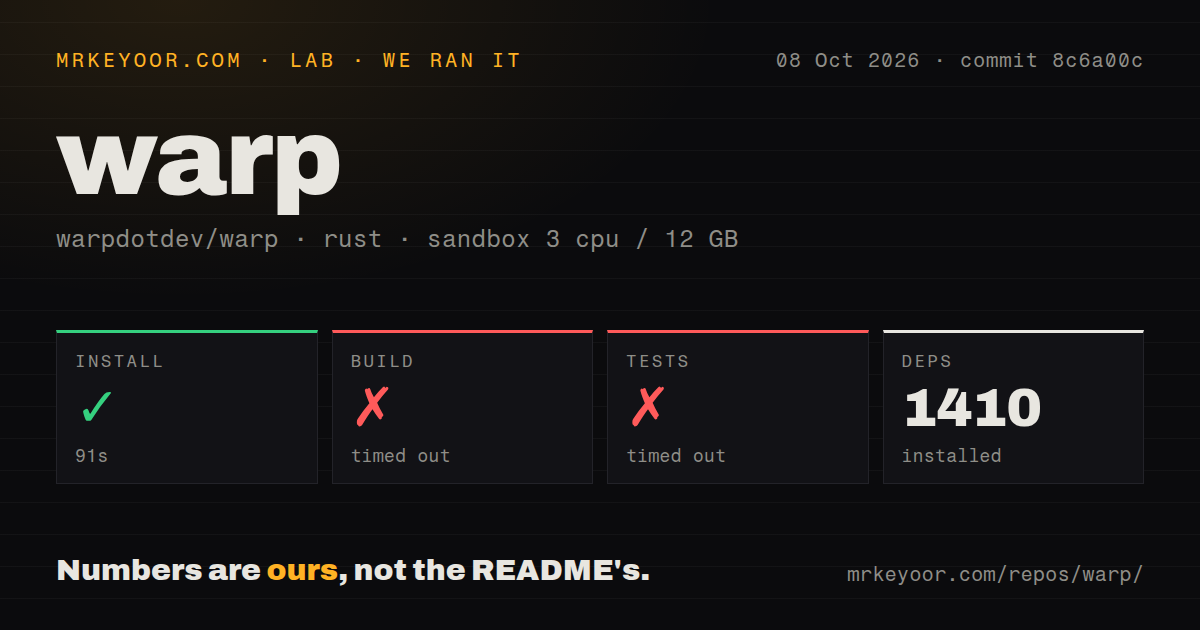
Our run installed 1,410 packages in 91 seconds, but the build and test steps each timed out at 900 seconds. We cloned commit 8c6a00c on October 8, 2026, in a fresh Debian container with 3 CPUs and 12 GB of RAM, using image lab-rust:1. The container had no secrets or elevated privileges. Installation succeeded. Neither later step produced a completed successful result within its time limit.
The supplied test-log tail contains a truncated compiler invocation referencing internal libraries including warp_editor, warp_errors, and warp_files. It ends with a warning that compilation failed while other jobs were still finishing. The 900-second test timeout gives us no passing-test count, and the tail names no failed assertion or underlying compiler diagnostic. Missing system packages, insufficient memory, and a source defect would all be guesses. We cannot prescribe a fix from this fragment.
The client connects to a separate Warp server
The repository README explicitly identifies this as Warp's client codebase. Its engineering guide documents connecting to a separate warp-server using HTTP and WebSocket endpoints through SERVER_ROOT_URL and WS_SERVER_URL. For a private deployment, having the desktop source does not establish that this checkout can reproduce every hosted agent or collaboration service. Local-server connection settings presume that you already have the server.
Our 309.8 MB checkout also comes with platform setup scripts. The Linux bootstrap describes apt packages and linuxdeploy, and it checks Google Cloud authentication unless you skip that check. Common agent skills can install locally or globally, with an explicit target required for noninteractive use. Read the bootstrap options before running it on a workstation. The supplied lab results do not establish which of these setup paths ran or explain the later timeouts.
Most of the client uses AGPL, and feature patches need approval
Warp assigns MIT licensing to the warpui_core and warpui UI crates and AGPL v3 to the remaining repository. If your organization requires a permissive license for its entire desktop fork, that split is a reason to walk away. Reusing the UI framework and adopting the full client are different decisions. Read the license files before committing to a modified distribution.
At roughly 1,791,128 source lines in our checkout, maintaining a private fork deserves a named owner. Upstream contributions also have a specific process: feature requests need readiness labels and approved specifications before implementation. Actionable bug fixes can go directly to code review. The contribution guide says Oz performs initial review before a Warp specialist follows up. That is worth knowing before spending time on a feature the project has not accepted.
Shell support and MCP connections need a desktop trial
Warp's documented shells are bash, fish, zsh, and PowerShell. The setup page says an unsupported login shell, such as Nushell, falls back to zsh. If Nushell is central to your daily work, assess that mismatch before migrating. Login is optional, and ordinary terminal use can work offline after the first launch, while AI and live collaboration require a connection. Public source does not remove those service requirements.
Our 3-CPU container run provides no evidence about desktop responsiveness or connector reliability. In open issue 16403, a Linux user reports repeated authorization followed by a failed GitHub MCP connection. The attached log receives an initialization response, then reports a closed transport while sending the initialized notification. That supports a specific interoperability concern, not a claim that every MCP server fails. Try your actual authenticated connectors before replacing a working terminal setup.
October activity outweighs the June release badge
GitHub recorded a push on October 10, 2026, alongside freshly updated issues and pull requests. GitHub's repository API listed 65,409 stars and 5,376 open issues and PRs combined. Those are signs of attention and ongoing work, not a count of confirmed bugs. The latest-release endpoint returned a June 3 stable tag with a short description. That older tag does not cancel out the current source and issue activity.
The lab scan found 21 CI workflow files, no Dockerfile, and no tests directory. A directory scan cannot establish whether checks pass or whether coverage lives beside source modules. The engineering guide describes separate GUI and console verification paths. Warp has documentation for working on both surfaces, but our build and test timeouts leave their execution unverified in this sandbox.
Choose a focused terminal if agents add no daily value
Alacritty is the alternative for a focused terminal emulator. WezTerm adds multiplexing and extensive terminal configuration. Ghostty emphasizes native desktop integration. Pick according to the terminal behavior you need. Running an external coding agent does not by itself require moving into Warp's editor, contribution workflow, or hosted automation products.
Warp earns a trial when command blocks and integrated agent work solve a daily annoyance. Start with the official desktop setup and exercise your shell and MCP connections. Budget source contribution separately: 1,410 packages arrived successfully in our run, but a usable source build never followed within the limit. Before assigning someone to maintain a fork, ask them to produce the working binary our sandbox could not.