The short answer: choose it for wideband experiments
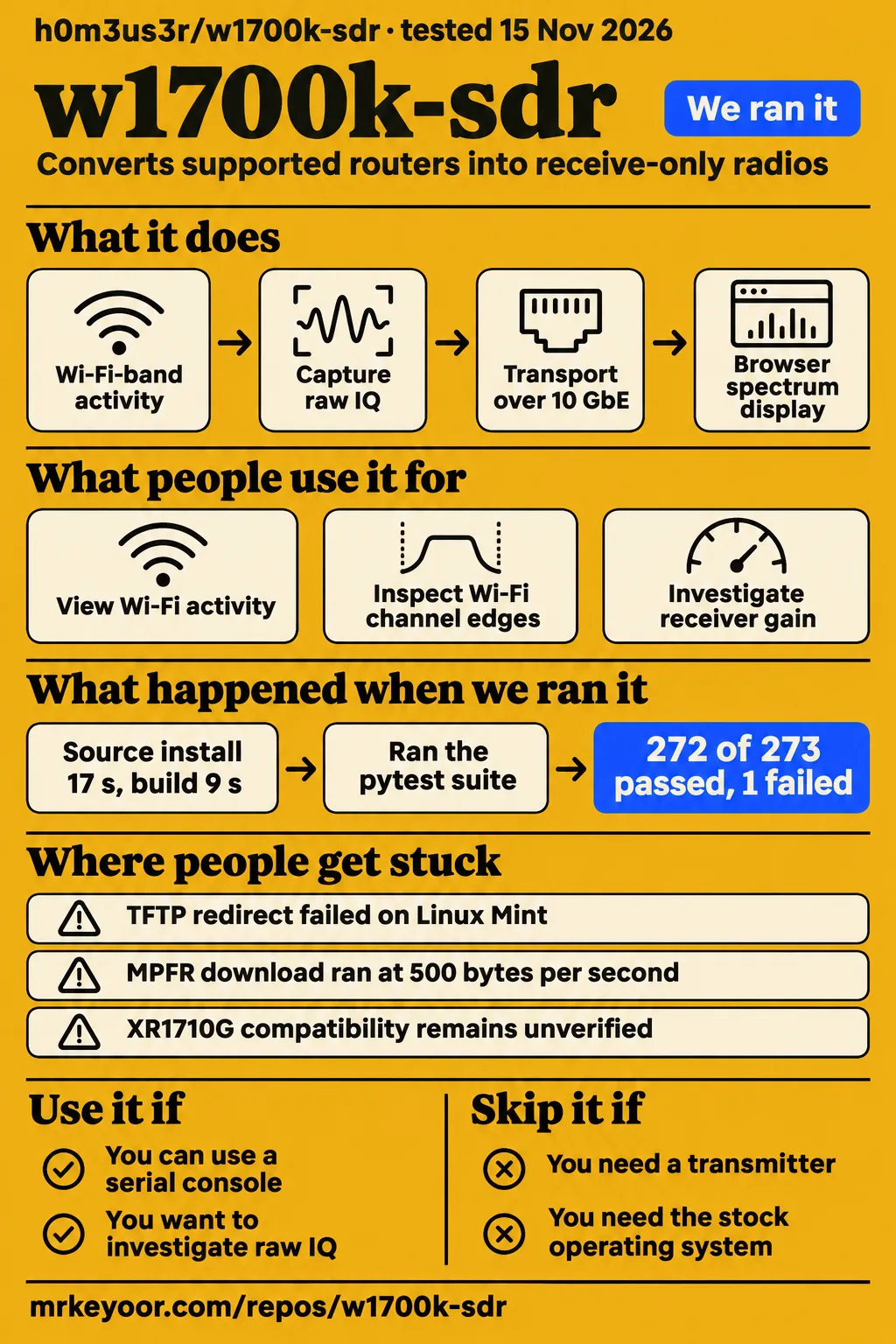
Choose w1700k-sdr for receive-only Wi-Fi-band experiments if you can handle serial flashing and a Linux host with 10 GbE; skip it if you need transmission or a drop-in router conversion. The project documents raw 14-bit IQ capture at up to 320 MSps, which gives the purchase a specific purpose: observing and processing a wide span of radio activity. Its README hardware requirements make the serial adapter and streaming connection part of that decision.
Our software run produced a successful build and a failed test command at commit 0b0413e. The detailed outcomes appear in the run section below. For a prospective owner, the useful distinction is between getting host software through a sandbox workflow and assembling the documented receiver. This review follows the hardware revisions, installation reports and stream formats that affect that choice, rather than treating the router's original role as evidence that conversion will be simple.
What people use w1700k-sdr for
JamesMcPherson reports running a W1700K HW 2.1 receiver at 320 MSps and streaming to a DGX Spark. The author also demonstrates Wi-Fi activity across 2.4 GHz and two busy 80 MHz channels at 5 GHz. These examples give readers concrete applications to compare with their own work: a broad live display, closer inspection of channel edges, and a raw stream that other host applications can consume.
| User or source | Use case | Reported outcome |
|---|---|---|
| JamesMcPherson | Stream a W1700K HW 2.1 receiver to a DGX Spark | Reports a working 320 MSps setup with a 3.3 V UART and a computer with 10 GbE. Receiver setup report |
| JamesMcPherson | Integrate the receiver with other SDR applications | Reports building a working SoapySDR module and names SDR++ as a destination. SoapySDR integration report |
| Project author | View 2.4 GHz Wi-Fi frames and shorter hopping bursts | README demonstration uses flattening and shows a 9.75 Gbit/s stream. Author's spectrum demonstration |
| Project author | Inspect two busy 80 MHz Wi-Fi channels | README screenshots show the channel edges and guard gap with 1.22 kHz bins. Author's channel screenshots |
The SoapySDR report gives existing SDR++ users a specific integration to examine alongside the project's browser interface. In issue #4, the author describes another use: feeding the receiver with a USRP B205mini, controlling that source with Python scripts and sweeping bandwidth, gain and filter parameters with logging. That account describes a method for investigating receiver behavior, while the demonstration screenshots show what the project's own display presents.
What happened when we ran it
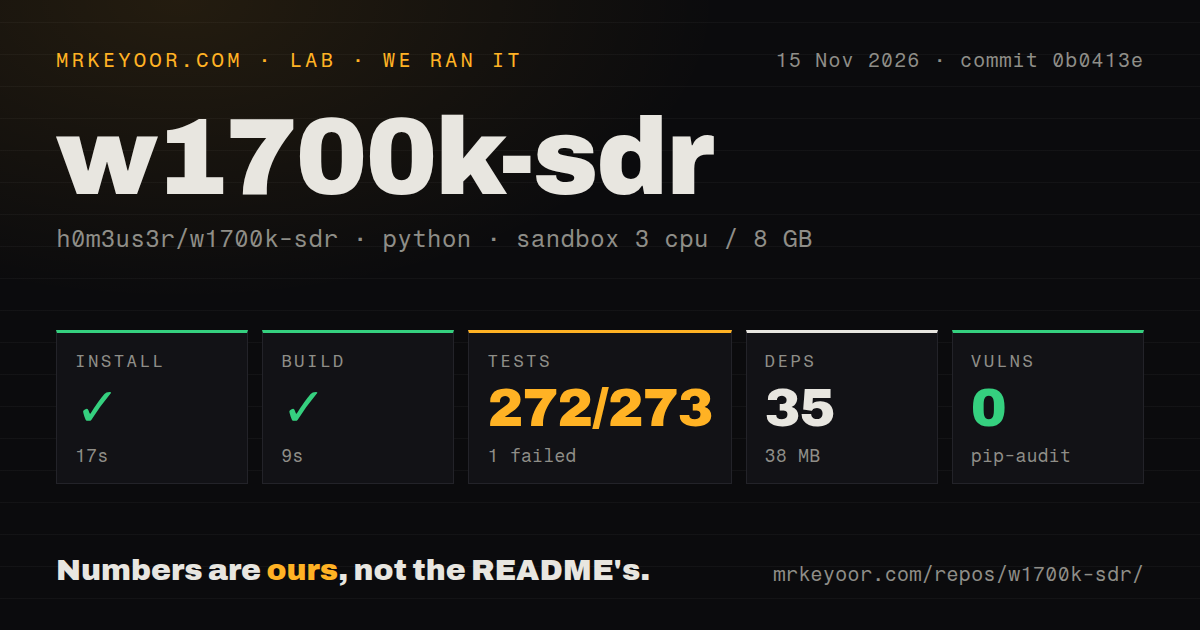
Our November 15, 2026 sandbox run at commit 0b0413e installed in 17 seconds, built in 9 seconds and exited its test step with status 1 after 79 seconds. The recorded configuration was 3 CPUs, 8 GB RAM and image label ghcr.io/astral-sh/uv:python3.12-bookworm. We measured the software workflow with that configuration; the table separates completed steps from the failed test and the separate deployment attempt.
| Question or recorded check | Answer | Verdict | Why |
|---|---|---|---|
| Did installation complete? | 17 seconds; 35 dependencies; 38 MB on disk | Succeeded | The recorded install step exited 0 |
| Did the build complete? | 9 seconds | Succeeded | The recorded build step exited 0 |
| Did the test command pass? | 79 seconds; 272 passed, 1 failed, 35 skipped | Failed | The command exited 1 during SSH-key conversion |
| What did the dependency audit report? | pip-audit reported 0 known vulnerabilities | Completed | This is the audit result for the recorded dependency set |
| How large was the checkout? | 375 files, approximately 66,079 source lines, 15.5 MB | Recorded | These figures describe the measured repository checkout |
| What automation files were recorded? | 0 CI workflow files, no Dockerfile, tests directory present | Recorded | These are repository signals from the harness |
| Did the separate Compose safety check pass? | No Compose file existed | Failed | That harness required a Compose file before proceeding |
| What did the separate run summary say? | Claimed deployment with its own Docker Compose and every port bound to 127.0.0.1 | Conflicting record | The preceding safety step failed |
| What did teardown report? | Cleanup was okay | Recorded | The teardown record says "teardown: ok" |
The failing case was tests/test_init_install.py::Keys::test_an_openssh_key_converts_to_dropbear. It invoked ssh-keygen to create an Ed25519 key; that subprocess returned exit status 255 and printed "No user exists for uid 1000". The pytest tail also records 144 subtests passed and an internal duration of 71.42 seconds. The outer 79-second duration measures the complete test step, so both durations belong in the account without substituting one for the other.
The parser summary includes "of 273" alongside 35 skipped tests. The table therefore preserves the individual outcomes instead of presenting that denominator as the complete collected total. The separate failed Compose safety step names compose.yaml, compose.yml, docker-compose.yaml and docker-compose.yml as absent. Its deployment summary conflicts with that failure; the teardown record records successful cleanup.
Where people get stuck: flashing and host tooling
Issue #10 reports a TFTP redirect failure on Linux Mint, and issue #9 describes a build waiting on an MPFR download running at about 500 bytes per second or less. Those are different failure paths: one concerns installation networking, while the other concerns fetching build inputs. Reading the relevant log before changing the setup helps distinguish a permissions error, a slow transfer and a hardware-support problem.
| Report | Reported problem | Action or outcome in the discussion |
|---|---|---|
| HW 2.1 support, issue #2 | Revision 2.1 needed explicit support | Author reports adding support in commit 8fd9e932818ee3090fd9c167a8b4bf82b8d6f8c9 and checking it on a unit |
| TFTP redirect, issue #10 | nftables was installed but disabled or improperly configured on Mint | jstockdale reports branch-based iptables support and serial Kermit flashing |
| MPFR download, issue #9 | Download ran at about 500 bytes per second or less | Reporter asks for another download source |
| Host tar rebuild, issue #11 | User asks why the build rebuilds tar | jstockdale says this happens when host tar is older than 1.35 |
The Mint reporter says a non-root status command failed internally because it could not access nftables configuration, then displayed a message saying the rule was absent. Read the underlying permissions error before responding to that status message. jstockdale describes the iptables work as part of his branch linked from PR #13, and says serial Kermit flashing can avoid root and UDP port 69. Those details identify the proposed paths and where to find them.
Setup needs two Ethernet roles and a NAND backup
The README lists W1700K HW 1.x and W1700K2 HW 2.1, a 3.3 V USB serial adapter, installation Ethernet and a host NIC with 10 GbE. Installation connects to lan3; IQ streaming connects to the wan 10GBASE-T port. Buying a suitable serial adapter and providing both network roles are practical prerequisites, even when the router itself is already available. The getting-started instructions describe both connections.
The source build requires a C/C++ compiler, make, git, Python 3.10+, Buildroot prerequisites, clang, ld.lld, llvm-objcopy, llvm-readobj, OpenSSL, FFTW development files and zlib. This is a firmware, kernel and host-software project. The documented sequence builds the components, runs the test suite, configures the installation link, enables TFTP forwarding and invokes init/install. The stream-link example uses address 10.77.0.10/24 and MTU 9216 before starting the host receiver and spectrum server.
Installation replaces the stock operating system. The installer first copies NAND data to the host, and the README documents init/restore for writing that saved data back. Preserve the backup when moving the receiver workflow to another workstation. In the XR1710G discussion, the owner proposes sharing a dump privately because it may contain device-specific credentials. That gives a concrete reason to arrange private handling rather than attach a complete dump to a public issue.
Full-rate streaming puts the host in the signal path
The architecture calculates 320 MSps at 32 bits per complex sample as 1.28 GB/s, above the approximately 1.24 GB/s payload of one 10 GbE link. The radio therefore losslessly packs half the chunks from 8 KiB to 7 KiB, bringing link use to about 97 percent. These figures explain why the documented receiver uses a dedicated high-speed connection and why host processing belongs in the equipment decision. Transport architecture
On the host, w1700k-stream receives the UDP export, unpacks it and serves gap-tagged complex int16 samples through shared memory. w1700k-spectrum performs the FFT and supplies the browser display; sdr-recv records the served stream. The architecture places the FFT workers on the host. It also describes integrity checking and a 1 GiB router-side ring that absorbs short stalls, approximately 0.8 seconds at full rate.
Contributor jstockdale reports 320 MSps at 14-bit and 160 MSps at 28-bit fully packed over 5 Gbit/s, while explicitly retaining 10 GbE for 320 MSps at 28-bit packed. Keep those formats attached to the rates when comparing network requirements. The host can change frequency, gain, filter and selected band during streaming; changing the sample rate requires stopping and restarting the stream. Contributor's format reports and stream-control description explain the distinction.
Safety starts with the console and listen address
The README describes receive-only firmware with its transmit path disabled and still instructs users to place attenuation between an antenna port and sensitive instruments. Follow that instruction when connecting a signal source or measurement equipment. The same warning section says undocumented MT7996 or AN7581 register access can hang the SoC or wedge the radio until a power cycle, and points to register headers that mark known hazards. Project safety instructions
The published spectrum-server example uses --listen 0.0.0.0:8073, which selects all interfaces. Choose the listening address and network access deliberately on a shared host before opening the browser interface. The README's first-start description loads the radio firmware and brings up the radio in about 2 seconds. Its command-line interface also exposes load, start, band, tune, gain, filter, stop and status operations, giving the host a direct role in receiver control.
w1700k-sdr vs alternatives
bk99 recommends RTL-SDR for getting started and describes HackRF One's 20 MHz view, while CNX contrasts ESP-WebSDR snapshots with W1700K's continuous IQ stream. These attributed comparisons help identify which equipment to examine for a particular reception task. The OpenWrt One report adds a user's lower-rate experiment on hardware already at hand, giving the table a concrete alternative to buying and converting a W1700K.
| Alternative | Supplied comparison or report | When to consider it |
|---|---|---|
| RTL-SDR | bk99 recommends an RTL-SDR stick for getting started | A first SDR experiment whose reception requirements fit the selected device. bk99's recommendation |
| HackRF One | bk99 describes a 20 MHz view | A task that fits the narrower view described in that comparison. bk99's bandwidth comparison |
| ESP-WebSDR / ESP-SDR | CNX contrasts snapshot capture with continuous W1700K streaming | Experiments using ESP32 hardware where the chosen capture mode fits the task. CNX's capture comparison |
| OpenWrt One SDR | cemaxecuter reports 40 MSps at 2.4 GHz over 2.5 GbE | Experiments using an OpenWrt One already available to the reader. OpenWrt One receiver report |
Similar MediaTek hardware also appears in the discussions. A user proposes the Gemtek W1701K, whose two Ethernet ports are 2.5 Gbit/s, and the author replies that changes would be needed. Issue #8 proposes AsiaRF PCIe modules using MT7991/MT7995 chips. Those discussions point toward porting work; the documented purchase path remains the W1700K revisions named in the README. W1701K discussion and AsiaRF suggestion identify the proposals.
What the other reviews get wrong
The current README documents init/restore, which writes the saved NAND data back and returns the router to stock firmware. That conflicts with bk99's blanket NAND-programmer requirement. The useful purchase consequence is to preserve the installer's backup and read the documented restoration path. The same article describes installation on a second unit as pending; the author's HW 2.1 support report and JamesMcPherson's working setup add subsequent installation evidence.
CNX's caption puts the 262k-point FFT in the browser, but the project architecture places FFT workers in w1700k-spectrum on the host. The browser displays their output. A separate blanket availability statement in issue #8 also conflicts with jstockdale's later report of receiving working new-in-box HW 2.1 units and having extras. Treat those sourcing reports as dated leads and ask a seller for the hardware revision and NAND identification before purchase.
FAQ
The README lists W1700K HW 1.x and W1700K2 HW 2.1 as the receiver hardware, with a 3.3 V serial adapter and a host connection using 10 GbE. Hardware selection is the recurring practical question across the supplied compatibility and sourcing discussions. The answers below keep the reported hardware differences, contributor proposals and author-described investigation methods attached to their sources, so readers can identify the relevant path before spending money or flashing a unit.
What does w1700k-sdr do, why does it matter, and what parts do I need to reproduce it?
w1700k-sdr supplies a continuous wideband receive stream and a browser spectrum display from supported Gemtek router hardware. The README names W1700K HW 1.x or W1700K2 HW 2.1, a 3.3 V USB serial adapter, an installation Ethernet cable and a Linux host with a 10 GbE NIC. The broad capture is useful for viewing Wi-Fi-band activity together and retaining IQ for further processing. Receiver description and requirements
Which router model and hardware revision should I buy for w1700k-sdr?
The README's supported list is W1700K HW 1.x and W1700K2 HW 2.1, and the author reports adding HW 2.1 support in commit 8fd9e932818ee3090fd9c167a8b4bf82b8d6f8c9. Ask for the exact revision and NAND identification before choosing a unit. The XR1710G discussion begins with the author's expectation that it should work, followed by jstockdale's different-memory-layout warning and probable need for another build. Supported hardware, HW 2.1 report, XR1710G discussion
What scripts or reverse-engineering tools did the author use to investigate firmware and tuning limits?
The author describes Python scripts controlling a USRP B205mini, sweeping parameters and logging results during bandwidth, gain and filter investigations. That is the concrete tooling account supplied for this question. It gives a reader interested in receiver characterization a signal-source method to study alongside the project's architecture and register reference. The attribution belongs to the author rather than to our sandbox run. Author's investigation account
How can owners of W25N04LV NAND units help test support?
The README asks for a raw dump through init/rawdump and identifies W25N04LV as ID ef 8b 23. The installer stops on that chip by default and exposes an explicit corruption-risk override named --i-dont-care-about-nand-corruption. Supplying the requested dump and opting into installation are separate actions. Owners can use the chip identification to make the request specific and arrange private handling of device data with the maintainers. NAND instructions
Can the built-in GNSS receiver extend SDR reception down to 1 GHz?
Contributor jstockdale describes the GNSS connection as serial only, without PPS, and doubts its usefulness beyond basic time support. The discussion therefore identifies a board connection rather than another documented raw-IQ capture path. Readers seeking a different reception range should compare their required frequencies with the project's radio bands and tuning information instead of treating the presence of GNSS hardware as an additional SDR front end. GNSS discussion
What we have not tested yet
Our sandbox covered software installation, build, tests and dependency auditing, rather than RF reception on a physical router. It supplies no sensitivity, noise figure, dynamic range, absolute-level accuracy, sustained packet-loss, recording-throughput or thermal measurements. The architecture documents decimation roll-off and aliasing in band 2's 640/2 mode; calibrated signal-source work would be needed to assess their practical effect and the flatten correction. The image label also does not establish actual runtime or operating-system versions.
Physical serial flashing, stock restoration, the third-party SoapySDR module, experimental 5 Gbit/s formats and branch-based iptables or Kermit installation are outside our execution coverage. The supplied issue #10 discussion gives no merge outcome or reporter confirmation. The conflicting Compose summary supplies no successful deployment result. The supplied material gives no successful XR1710G installation or completed model-specific recipe, and the README says W25N04LV support has never been run on a unit. Restoration documentation supplies a recovery path, rather than proof that every damaged device is recoverable.
The supplied comparisons are secondary editorial accounts or individual user reports, rather than our comparative RF tests. Current stock, worldwide shipping and present purchase prices are outside those dated sourcing reports. The author reports unsuccessful attempts to extend tuning into the requested 3 GHz region and notes physical bandpass filters; a cellular-looking sweep in that discussion belongs to a different device. Other-chipset ports, an offered unstripped firmware image, GNSS range extension, drone reception and satellite reception have no demonstrated application outcome in this evidence.
The video records add no attributable W1700K setup result, and there are no hands-on screenshot records to show a successful lab receiver session. The latest-release lookup returned null, which may reflect lookup failure; the recorded last push is October 13, 2026. These facts do not establish abandonment. The supplied discovery record identifies an existing transport-focused article, but supplies no evidence of search volume, ranking or demand. Rendered layout, asset rendering, recommendation modules and template behavior are outside this text revision.
Documentation retains a 4/5 editorial assessment on the stated scale: 1 means no usable operating path, 3 means an operating path with major omissions, and 5 means relevant paths are independently corroborated. Hardware requirements, component roles and restoration instructions support the assessment; our physical execution coverage stops short of the top criterion. Setup ease, community capacity and operational maturity remain unassessed because this evidence does not measure physical setup effort, representative support capacity or sustained receiver reliability.