Five UI variants share one Vue 3 foundation
Vben Admin is a system for building administration interfaces, rather than a single finished dashboard. The monorepo contains apps for Ant Design Vue, Antdv Next, Element Plus, Naive UI, and TDesign. Shared workspace packages provide layouts, access control, preferences, requests, stores, icons, localization, and common components. A team can choose a visual library without rebuilding the surrounding application shell from zero.
That breadth carries weight. Our checkout had 1,949 files and about 119,642 lines of source before dependencies. The workspace also includes a mock backend, documentation, scripts, internal tooling, and a playground. This makes sense for a team standardizing several internal applications. It is excessive for a small settings page or a dashboard with a handful of routes, where stripping unused packages may take longer than assembling a narrower starter.
Permissions and layouts are ready, while business rules are yours
The template covers recurring admin work: dynamic route permissions, multiple themes, internationalization, tabs, navigation, forms, and dashboard layouts. Each UI variant consumes the same Vben workspace packages, so permission and preference behavior can remain consistent across products. The MIT license permits commercial use and modification without a paid runtime license.
A mock backend proves the screens can talk to an API, but it is not your production identity system. Teams must connect login, token handling, route data, API errors, and authorization checks to their own services. Front-end route hiding cannot replace server-side permission enforcement. Issue 8112, which requests HttpOnly and Secure cookie storage for tokens, is a useful reminder to decide the real session model rather than inherit demo behavior unchanged.
What happened when we ran it
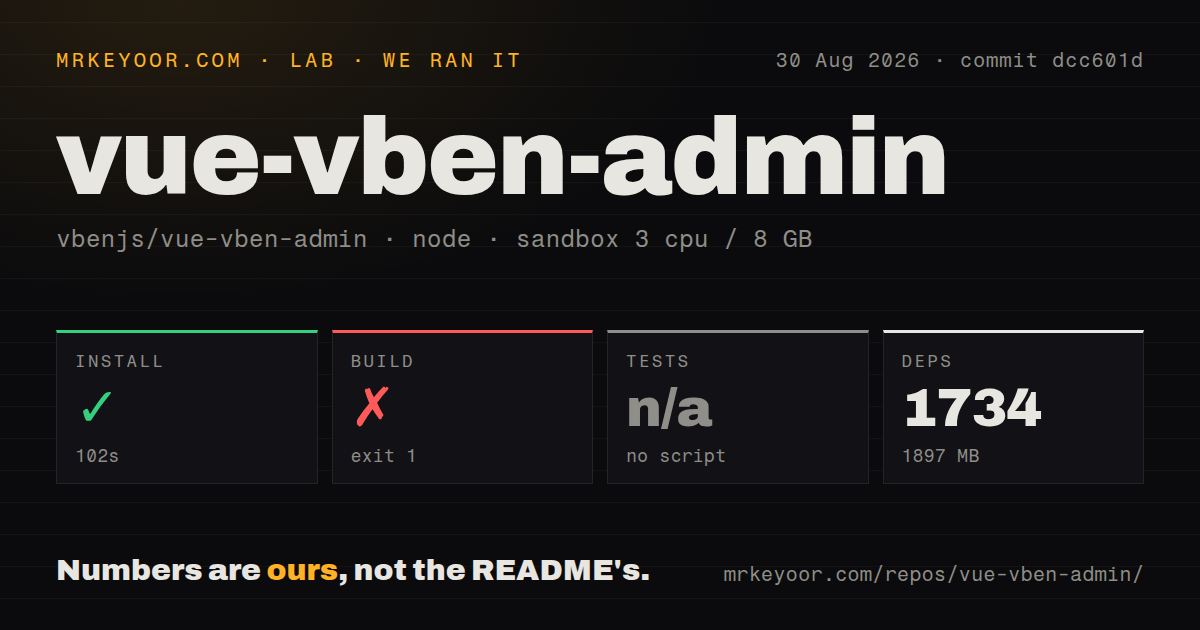
Our sandbox installed 1,734 pnpm packages in 102 seconds and consumed 1,897 MB on disk. The source checkout itself was 9.9 MB. That gap is the practical cost of the workspace: the repository is compact, while its installed toolchain and app variants are large. The scan found 13 CI workflow files, no root Dockerfile, no tests directory, and monorepo workspaces.
The full build exited 1 after 57 seconds. Turbo completed 11 of 18 tasks, with 0 cached, before naming @vben/web-naive#build as the failed task. The tail also listed failed lifecycle commands for web-naive, web-ele, web-antd, the playground, and web-antdv-next. It did not include the earlier compiler message that caused the first failure, so assigning a dependency or memory cause would be guesswork. The harness found no test script or target and skipped tests.
The monorepo is part of the dependency model
Each app package points at many workspace:* dependencies, including Vben layouts, stores, preferences, access control, request handling, styles, icons, and types. Issue 8248 asks whether apps/web-antd can run outside the large repository and requests installation guidance. The open question matches the package manifests: copying one app directory alone will leave its shared Vben imports unresolved.
The root scripts do allow focused development and builds for individual variants. That is the sensible route after choosing a UI library, especially given our 18-task aggregate failure. Keep the workspace until the application is stable, remove unused apps deliberately, and verify that deployment automation calls the selected build. Treating the repository as a bag of copyable pages misses the package boundaries its maintainers chose.
V5 breaks with v2 and drops old browsers
The README states that version 5.0 is incompatible with earlier versions and directs users who need the old code to the v2 branch. This is a clean boundary for new projects and a migration warning for established ones. An existing v2 application should compare routes, component APIs, permissions, themes, and build tooling before assuming it can move page by page.
Browser support is similarly direct. Tailwind CSS 4 sets the floor at Safari 16.4, Chrome 111, and Firefox 128, while the compatibility table targets the last 2 versions of Edge, Firefox, Chrome, and Safari. Internet Explorer is excluded. Internal enterprise software sometimes serves managed, slow-moving browsers, so checking the actual fleet belongs near the start of evaluation.
Current v5 reports touch interactions users notice
Issue 8274 reports that shrinking and then maximizing a Chrome window leaves the left menu collapsed. A related pull request was active on August 30, 2026, which shows the report is receiving code attention. Issue 8096 describes cached routes and vxe-table headers retaining the old language after an i18n switch. Both cases sit in areas the template is meant to save teams from rebuilding.
Issue 8052 is more severe for affected code: the reporter says common confirm() and alert() dialogs accept Enter or Escape but ignore mouse clicks across major browsers. It was still open when fetched. These reports do not establish that every UI variant has each fault. They do justify a short acceptance suite covering resizing, dialogs, language changes, table headers, theme switching, and route caching in the exact variant you plan to ship.
August pushes matter more than the May release tag
GitHub recorded 33,316 stars, 66 combined issues and pull requests, and a last push on August 30, 2026. Pull requests and bug discussion were active that same day. The latest GitHub release was v5.7.0 from May 21, but continued pushes show the repository is not dormant. Consumers should decide whether to follow tagged releases or a moving main branch and pin that choice in their own lockfile.
Vben Admin is worth adopting when its shared packages replace months of repeated admin-shell work across a serious Vue product. Our 1,897 MB install and failed aggregate build make a casual copy-and-customize approach hard to recommend. Choose one UI variant, connect a real backend, build only the intended app, and run interaction checks on supported browsers. If that sounds like normal platform work, Vben offers a substantial head start. If it sounds too expensive, a smaller Vue starter is the better purchase.