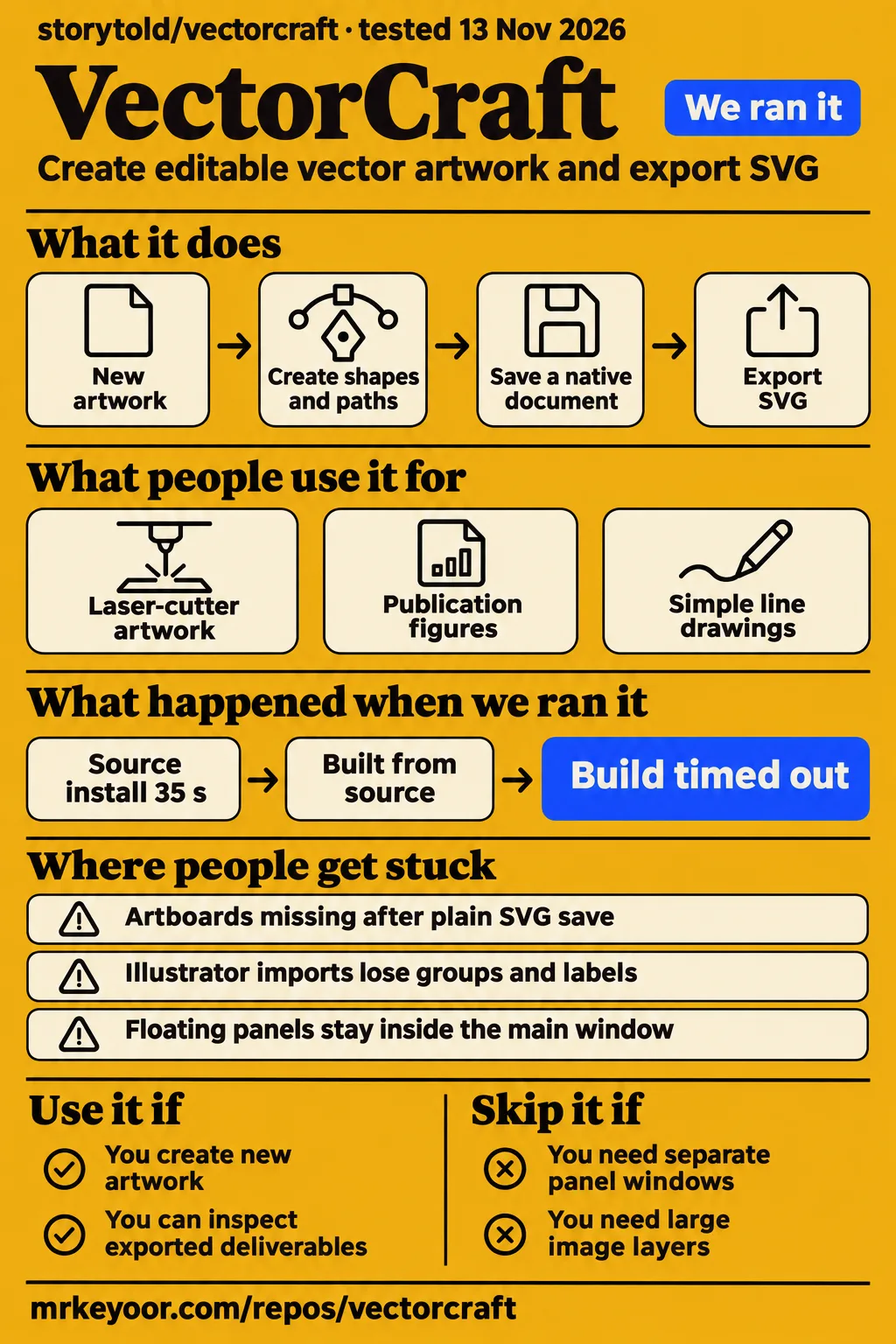
VectorCraft has a completed Linux laser-cutter project behind it, alongside reports of Illustrator imports losing organization and embedded images. The practical choice is between starting new artwork and moving an existing archive. Our VectorCraft source install succeeded in 35 seconds, but build and test steps each timed out at 900 seconds. For a first project, keep a native working copy and inspect the exported deliverable in the application that will receive it.
What people use VectorCraft for
A Linux contributor completed a project entirely in VectorCraft and reported a 4.8 MB SVG output. Other supplied accounts describe publication figures, simple line drawings and a poster. These examples give readers concrete workloads to compare with their own: creating shapes for a cutter, preparing figures for a document, or combining paths and effects before export. The table keeps each outcome attached to the person who reported it.
| Person and source | Work attempted | Reported outcome |
|---|---|---|
| Asmordean's Linux project | Laser-cutter artwork | Completed the project entirely in VectorCraft and produced a 4.8 MB SVG. Preferred the experience to Affinity through Wine. |
| david115599's publication figures | Vector figures for an ongoing publication | Reported good progress; updating usually resolved encountered bugs. |
| Alberto García's poster review | Paths, effects, radial repetition and image tracing | Exported SVG and prepared a second PNG export at another size; wanted better organization for large documents. |
| I_suck_at_Blender's line-drawing account | Simple CAD-like lines and templates | Found it adequate for quickly drawing lines and simple templates. |
Asmordean described mixed results running Affinity through Wine and returning to Windows for complex projects. The fresh VectorCraft project removed that detour, despite issues the contributor worked around or considered small enough to tolerate. The useful question for a Linux reader is whether their next project follows a similar path: create new artwork, retain an editable working document, and deliver an SVG to another tool.
The project also supplies posters, blends and repetitions created through its command API. The README says the MCP server exposes that same API to agents and that VectorCraft's renderer exported the examples. Those are developer-created demonstrations with source files in the repository. They help explain the intended automation workflow alongside the independent drawing accounts. Official README example descriptions.
What happened when we ran it
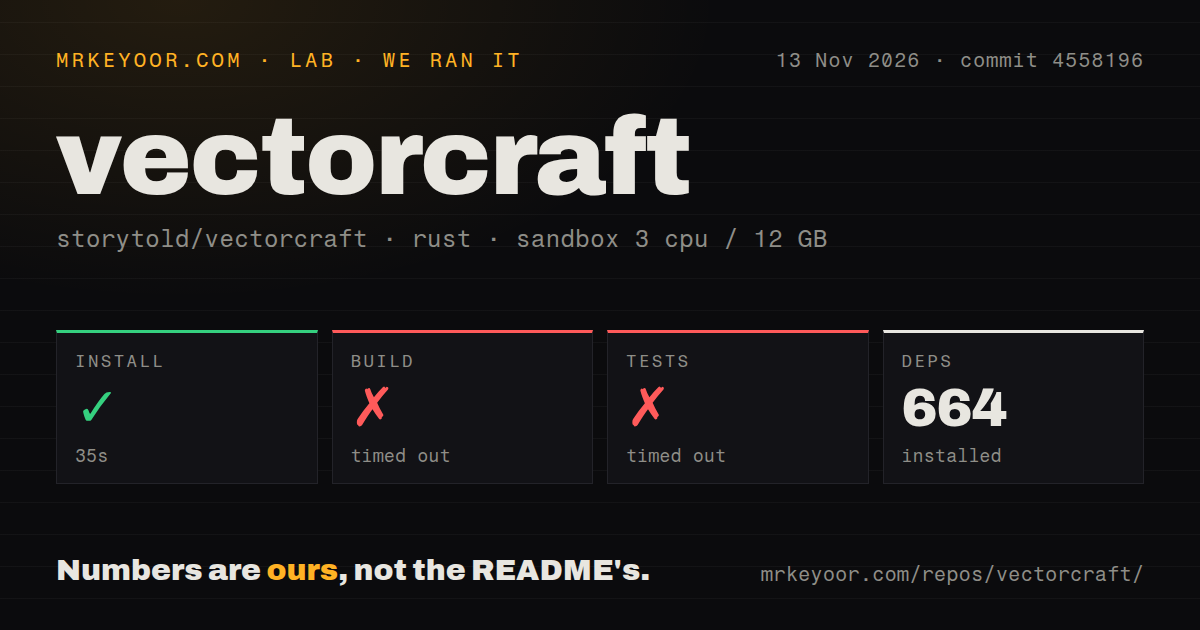
Our November 13 source install took 35 seconds; the build and tests each reached a 900-second timeout. A separate November 14 hands-on attempt failed its Compose safety step. Its summary claimed the repository had been deployed with its own Docker Compose, but the step record explicitly reported that no supported Compose file existed. We treat that contradiction as a blocked attempt.
| Recorded step or question | Answer | Verdict | Why |
|---|---|---|---|
| Could the November 14 Compose route pass its safety check? | No: compose.yaml, compose.yml, docker-compose.yaml and docker-compose.yml were absent. | Failed | The required Compose file did not exist. |
| Did the November 14 summary demonstrate deployment? | The summary claimed deployment, while the step record reported failure. | Contradictory record | The failed safety step supports a blocked attempt. |
| Did November 14 cleanup finish? | Teardown reported ok. | Recorded cleanup success | The teardown record supplies that outcome separately. |
| Did November 13 dependency setup complete? | Yes, in 35 seconds, with 664 dependencies recorded. | Succeeded | The install step completed. |
| Did the November 13 source build finish? | It timed out after 900 seconds. | Timed out | The build exceeded the recorded time cap. |
| Did the November 13 test step finish? | It timed out after 900 seconds. | Timed out | The test-log tail still contained compilation messages. |
Our run used commit 4558196, with a recorded configuration of 3 CPUs, 12 GB RAM and image label lab-rust:1. The checkout contained 2,883 files, approximately 1,217,356 source lines and 93.4 MB. The scan found 10 CI workflow files, no Dockerfile and no tests directory. The separate hands-on teardown record says teardown: ok. These observations describe the recorded checkout and steps.
The final test-log lines include Compiling wgpu v30.0.1, Compiling rustls-webpki v0.103.16, Compiling bytes v1.12.1 and Compiling ureq-proto v0.6.5. They show compilation continuing when the step stopped. The recorded outcome is a timeout, with no assertion failure shown in that tail. The source workflow therefore produced one completed dependency step and two unfinished compilation-related steps, rather than a completed build or test result.
Where people get stuck: saving artwork and keeping artboards
Issue #2091 describes artwork surviving an SVG save while the artboard definitions disappeared. The maintainer explained that the separate artboard positions had not been written, and the reporter recovered the artboards after saving as .vectorcraft. For ongoing work, retain that native document or use Preserve Editing Capabilities when saving SVG. The distinction matters when several icons still look correctly arranged even though their individual artboards have disappeared. Artboard save report, #2091.
| Problem and source | Action supported by the discussion | Recorded outcome |
|---|---|---|
| Artboards missing after plain SVG save, #2091 | Save as .vectorcraft or enable Preserve Editing Capabilities. |
The reporter recovered the artboards; a save-warning PR was opened. |
| Font-preview flicker in 0.7.0, #716 | Update to 0.8.0. | Affected users confirmed the fix. |
| Panel dragging in 0.6.0, #829 | Update to 0.7.0 and use the panel's drag area. | The Mac reporter confirmed that palettes became draggable. |
| Windows installation confusion | Look for the application in the Start menu. | The discussion describes an installation without the expected desktop icon. |
These reports concern different parts of an editing session: saving document structure, choosing a font, arranging panels and finding an installed application. Their version numbers and recovery steps make them useful troubleshooting references. A reader encountering the same symptom can start with the corresponding action instead of treating every problem as a failed installation or damaged drawing. Keep the native working document while preparing separate files for delivery.
Illustrator archives need checks beyond opening
A Reddit contributor reported Illustrator imports losing groups and labels, with individual paths, objects and shapes placed on separate layers. That directly affects an archive organized for later editing: a recognizable image can still require substantial work before someone can revise it. The contributor described thousands of hours spent organizing client files. For that workload, compare the imported layer hierarchy with the original before adopting a new working format. Client-archive organization report.
Issue #1479 records a versioned missing-image problem. The supplied history describes missing large halftone images in 0.10.0, a successful opening in 0.11.0, and the original problem returning in 0.12.0. The reporter still saw missing large image layers in 0.23.0 after another announced patch, while Inkscape displayed them. The sequence makes the reporter's later result more useful than an earlier fix announcement for choosing an editor for that file. Missing image layers, #1479.
The office-document corpus separates file operations from fidelity. KNUFFIXX's original 0.12.0 report covered 186 documents and reported successful opening, exporting and reopening alongside visual and text losses. The November 11 comparison on 0.24.0 used a changed corpus of 181 files and still reported fidelity failures. The documents came from a German property-management office and included PDF, metafile and DXF files. Office-document corpus, #2676.
The current README describes a limited Illustrator editing-copy writer and still lists reliable .ai exchange among unfinished work. Its supported live effects depend on object type and appearance restrictions. For an archive decision, use separate checks for opening, appearance and editability. Select copies containing the text, clipping, embedded images and effects used in actual client work, then inspect the exported result in the receiving application. Current README file-format status.
Linux input and tablet drawing have documented workarounds
The README directs native Wayland users to File › Open for SVG files and XWayland for drag-and-drop. It also describes tablet-input problems on native Wayland and an XWayland route that reads pressure. These instructions give a Linux user a specific response when a file drop or pen interaction fails: use the menu command or the documented display-server setting before changing the artwork itself. README platform instructions.
Issue #852's reporter said brush pressure felt good after the Mac implementation, then described path wiggle, subtle faceting and nubs left after scissor cuts. The excerpt also begins a report about abruptly stopping a stroke, but cuts off before its outcome. For someone drawing freehand, the recorded wiggle, facets and cut artifacts deserve separate attention from whether pressure arrives at the application. Pressure and brush-quality discussion, #852.
Issue #829 separates movable panels from separate windows. The reporter confirmed palette dragging in 0.7.0, then asked about a second monitor. The maintainer replied that floating panels were drawn inside the main window and placed separate panel windows on the roadmap. A workspace built around a second screen therefore has a different requirement from simply undocking a palette. Panel movement and second-screen discussion, #829.
MCP registration includes project file roots
The README documents registering vectorcraft-cli mcp with Claude Code and passing separate read and write roots. Its command API supports the project's agent workflow, and the example artwork shows what contributors produced through that interface. For a developer evaluating this route, the supplied primary text supports registration and project-folder configuration. The following command is copied from the README as documentation, with an executable-path placeholder. Official MCP registration instructions.
claude mcp add vectorcraft -- /path/to/vectorcraft-cli mcp --automation-read-root /work/project --automation-write-root /work/project
The two root flags express the folders the agent should read and write. Replace the executable placeholder and project directory with the intended local paths. The README also lists a source command for starting the MCP server and a headless batch export command. Its status section separately lists generative AI features as unfinished work, so the supported description here is an external agent operating vector-editing commands. README quick start and status.
Multilingual handoffs include text-language settings
Issue #4948 requests preserving each text run's language on Illustrator import and export, including formats carrying that information such as PDF and SVG. The request connects language settings to hyphenation, spelling dictionaries, language-specific glyph forms and the settings seen by a client or printer. It names Turkish dotted i and Marathi forms of Devanagari letters as examples. These are document properties with consequences beyond which language the interface displays. Text-language handoff request, #4948.
For a multilingual delivery, include text-language settings alongside fonts, appearance and editable structure in the handoff checklist. A visual comparison addresses the rendered page; reopening the document's language settings addresses another part of the requested workflow. The issue asks for reading Illustrator's per-range language into VectorCraft and writing it back on export. That provides a concrete acceptance question for a client document containing several languages.
VectorCraft vs Illustrator, Inkscape, Affinity and PhotoCraft
VectorCraft's reported Linux project and Illustrator import problems point to different choices for new artwork and existing archives. The comparison below uses the supplied user accounts and project descriptions to match an editor to a task. It treats the affected file, platform and document requirements as the deciding facts, which is more useful here than assigning an overall winner across applications with different roles.
| Choice | Supplied evidence | Pick when |
|---|---|---|
| VectorCraft vs Illustrator | A contributor reports lost grouping and labels on Illustrator import. Client-archive report. | Keep Illustrator for an organized client archive; consider VectorCraft for fresh artwork with inspected exports. |
| VectorCraft vs Inkscape | Issue #1479's reporter says Inkscape shows image layers missing in VectorCraft 0.23.0. Affected import. | Choose Inkscape for that affected file. |
| VectorCraft vs Affinity Designer | A Linux contributor preferred VectorCraft to Affinity through Wine after completing an SVG project. Linux workflow. | Consider VectorCraft when the next project resembles that native Linux workflow. |
| VectorCraft vs PhotoCraft | The official README describes vector illustration and image editing as separate application roles. Crafting Apps descriptions. | Choose VectorCraft for vector illustration and PhotoCraft for image editing. |
The supplied beginner discussion records a different choice: someone considering VectorCraft for learning logo design ultimately chose Affinity. The workspace discussion also includes readers who miss Affinity's StudioLink and others who prefer separate applications. Those accounts make learning workflow and application organization relevant alongside file compatibility. For a beginner, a small project that can be saved, reopened and revised is a useful first step. Beginner discussion, workspace discussion.
What the other reviews get wrong
The current README lists Windows installers, which supersedes the early Facebook review's general instruction to install Rust because VectorCraft lacked an installer. Readers can use the official download page or repository releases for desktop packages; source compilation is another route. Our source-run results belong to that latter route. Keeping these installation paths distinct prevents an early review from turning an optional build workflow into a prerequisite. Early review, official downloads.
VectorCraft Online's page names 0.11.0, while the supplied corpus discussion reaches 0.24.0 on November 11. Its tutorial also explains that browsers reserve shortcuts such as new window and close tab, despite the broader statement that browser and desktop work the same. Use menu commands for those browser actions. The host describes itself as independent of ArtCraft. Online host, browser shortcut instructions.
The older README snapshot says Illustrator editing data is not written. The current target README instead describes a limited editing-copy writer while retaining reliable .ai exchange as unfinished work. A file-format checkbox misses that distinction. Use storytold/vectorcraft as the reviewed repository identity, and keep the independent online host and older fork snapshot attached to their own statements. Older snapshot, current target repository.
Questions people ask
Use VectorCraft for new artwork whose exports you can inspect; keep your established editor for client archives that must preserve Illustrator organization. The completed Linux SVG project supports the first choice, and the grouping and missing-image reports explain the second. These answers connect the supplied search questions to installation, saving and file-handoff decisions, with the comparison table above providing the application-specific evidence.
What is VectorCraft, and where is its GitHub repository?
VectorCraft is ArtCraft's Rust vector illustration application, and the reviewed repository is storytold/vectorcraft. The official README describes native desktop applications and a browser build through WebAssembly. Use the full repository identity when following downloads or source instructions, and distinguish it from the independent VectorCraft Online host. The README also links the native document examples and the command interface discussed in this review. VectorCraft source repository.
Is VectorCraft free and open source?
VectorCraft's code is dual-licensed under MIT or Apache-2.0, at the user's option. The README separately lists licenses for bundled assets and restrictions for the ArtCraft name, wordmark and logos. For someone evaluating the editor, that supports the free, open-source description. For someone distributing a fork or reusing artwork, the relevant asset notices and brand terms are separate parts of the licensing information. License and credits.
Can I use VectorCraft online without installing the app?
VectorCraft Online describes an independently hosted browser editor, and its tutorial says File › Save downloads a .vectorcraft file to the computer's Downloads folder. Keep that downloaded file to continue through File › Open. The same tutorial directs users to menu commands for browser-reserved shortcuts such as new window and close tab. Those instructions explain the host's saving and keyboard workflow. Online host, save and shortcut instructions.
How do VectorCraft's AI and MCP features work?
The README describes an MCP server that exposes VectorCraft commands to an external agent. It provides a Claude Code registration command and flags for project read and write roots, while the repository's example artwork was created through the same command API. Start with those documented commands and the example source documents when evaluating automation. The README lists generative AI features separately among unfinished work. README automation instructions and examples.
Can VectorCraft replace Illustrator for professional client work?
The supplied client-archive report describes lost grouping and labels when importing Illustrator files. For professional work, make those properties explicit acceptance criteria alongside appearance and text. Keep the existing archive and compare copies before changing the working format. A new illustration with an inspected SVG deliverable presents a different decision from returning an organized client document for further editing. Illustrator organization report.
Is VectorCraft a good long-term tool for a beginner learning logo design?
The beginner who asked about committing to VectorCraft ultimately chose Affinity, while another contributor found VectorCraft adequate for simple line drawing. A useful first exercise is a small logo that you can save, reopen and revise, keeping the native document as you work. That gives the beginner a concrete workflow to assess rather than making the decision from toolbar familiarity alone. Beginner and line-drawing discussion.
How does VectorCraft compare with Inkscape?
Issue #1479 supplies a concrete import difference: the reporter said Inkscape displayed large image layers still missing in VectorCraft 0.23.0. For that document, Inkscape is the supported choice in these records. A reader with similar embedded-image files can use that report to choose representative documents for an import comparison, then check the visible artwork and exported result against the original. Missing-image comparison.
Should I choose VectorCraft or Affinity Designer?
A Linux contributor preferred VectorCraft after completing a project that produced a 4.8 MB SVG, following mixed results with Affinity through Wine. The relevant starting point is platform and file workflow: native Linux creation resembles that account, while an established Affinity document workflow has different requirements. Keep the existing originals and compare the next project's creation, saving and delivery steps. Linux project account.
What is the difference between VectorCraft and PhotoCraft?
The official README assigns vector illustration to VectorCraft and image editing to PhotoCraft. The supplied workspace discussion asks about combining raster, vector and layout work, and includes disagreement about that approach. Choose based on the material being edited and the application workflow you need. The README presents them as separate Crafting Apps, each able to stand on its own. Official application roles, workspace discussion.
Will my Illustrator archive retain its layers, groups and embedded images?
The supplied reports describe both lost grouping and a separate missing-image case. Use copies of representative archive documents and compare their hierarchy, text, images and exports with the originals. This makes the acceptance decision specific to the work you need to retain. Keep the original files available throughout that process, especially when another person will continue editing them in Illustrator. Grouping report, image report.
Why does VectorCraft seem not to install on Windows?
The Windows discussion describes an installation that completed without the desktop icon users expected. The supplied synthesis points to finding the application through the Start menu. For that symptom, look for the installed application before repeating the installer. The current README provides Windows MSI and portable download options, so the early instruction to install Rust belongs to a different installation route. Installation discussion, Windows downloads.
Can I move VectorCraft panels onto a second monitor?
Issue #829 says floating panels stay inside the main window. The reporter confirmed that updating to 0.7.0 enabled palette dragging, then asked about moving them to another screen. The maintainer distinguished those two behaviors and placed separate panel windows on the roadmap. If a second-monitor palette arrangement is central to your workspace, use that requirement explicitly when evaluating the editor. Panel and second-screen discussion.
What we have not tested yet
Our lab evidence covers dependency setup, two source-step timeouts and the blocked Compose attempt. It does not include a completed drawing session, desktop installer exercise, document-memory measurement or rendering-speed comparison. The image label lab-rust:1 supplies neither the executed Rust version nor the operating-system version. The missing tests directory says nothing about tests located elsewhere in the workspace, and the timeouts do not assess the downloadable desktop packages.
The supplied MCP guide retrieval contains GitHub navigation and file metadata, without substantive operating instructions. It therefore supplies no support here for an in-process CPU renderer, UI-only tool restrictions, automatic live-app-to-headless fallback or a default closed control port. The README registration command above was not executed in our run. MCP performance, permissions enforcement, security properties and automated editing outcomes remain outside the completed lab work.
The supplied online page's served build, shipment of the proposed save warning, present-day separate panel windows and multilingual round trips need direct checks. The office corpus is a contributor's compatibility exercise with a changing document set and no .ai files. It cannot answer Illustrator archive compatibility. The browser host's local-file statements are its own descriptions; our records include no packet capture. Printing and CMYK output also lack an independent assessment here.
The supplied community material includes a CMYK color complaint, an oversaturated P3 preview complaint and a live-tracing accuracy complaint without a supplied resolution. The brush excerpt cuts off during the abruptly stopped-stroke report. These boundaries prevent a broader color, tracing or stroke-quality conclusion. Community capacity, adoption and dependable operation across professional workloads are also unassessed. Documentation has no numerical score because the substantive MCP guide was unavailable and its workflows were not reproduced.