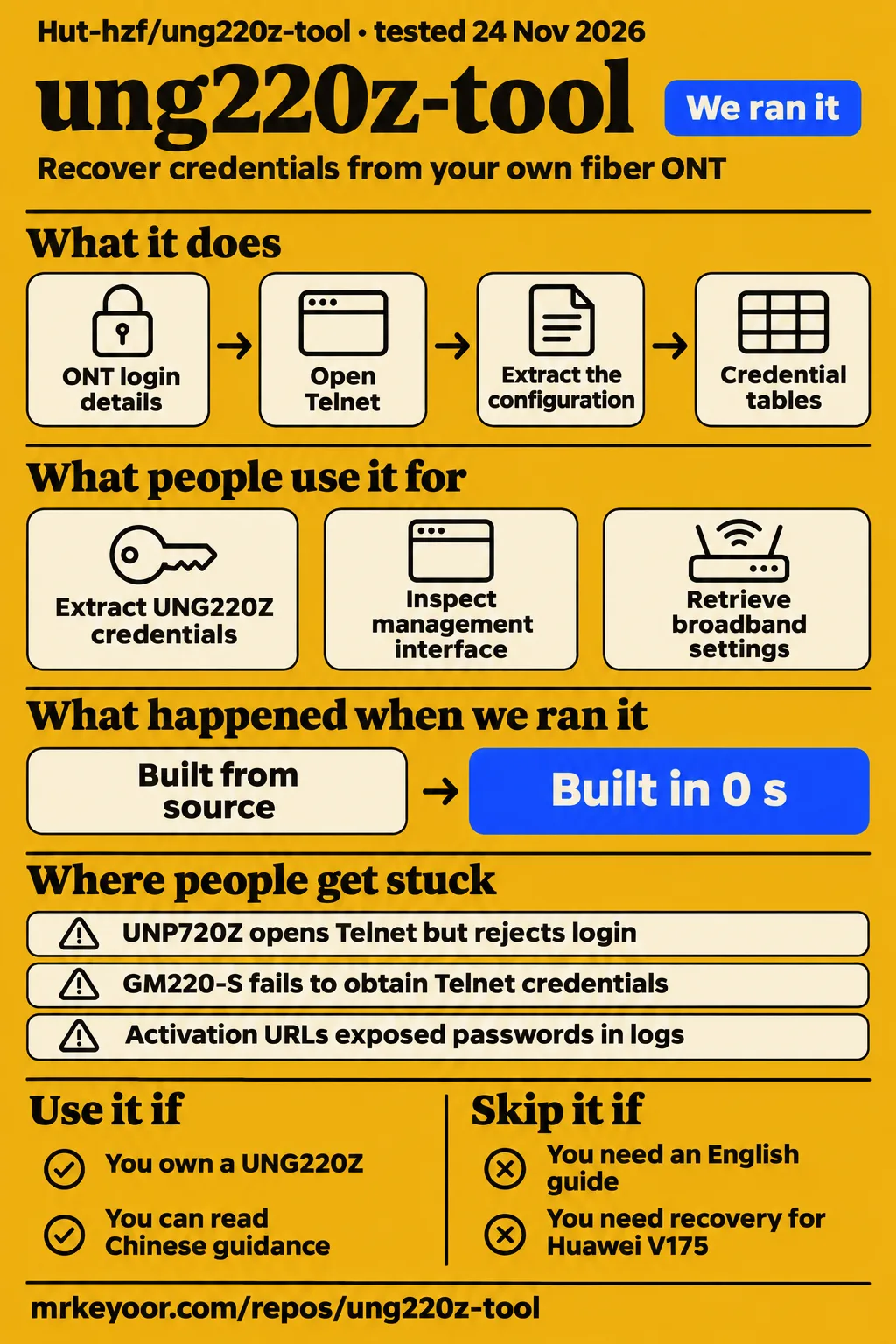
Our sandbox installed ung220z-tool in 4 seconds, but recovering a password still depends on the ONT in front of you. Use it if you own a UNG220Z and can work through a Chinese command-line guide. Skip it if you need a demonstrated recovery path for a different model: the author's compatibility statement names only UNG220Z as tested on physical hardware.
An ONT, or optical network terminal, is the box that connects your home's fiber connection to your network. This project reads credentials from that box so you can recover management access or retrieve broadband settings. Its most useful distinction is also the easiest to lose in a short video: opening Telnet, logging in, and extracting the configuration are separate outcomes.
Recent activity answers a different question from compatibility
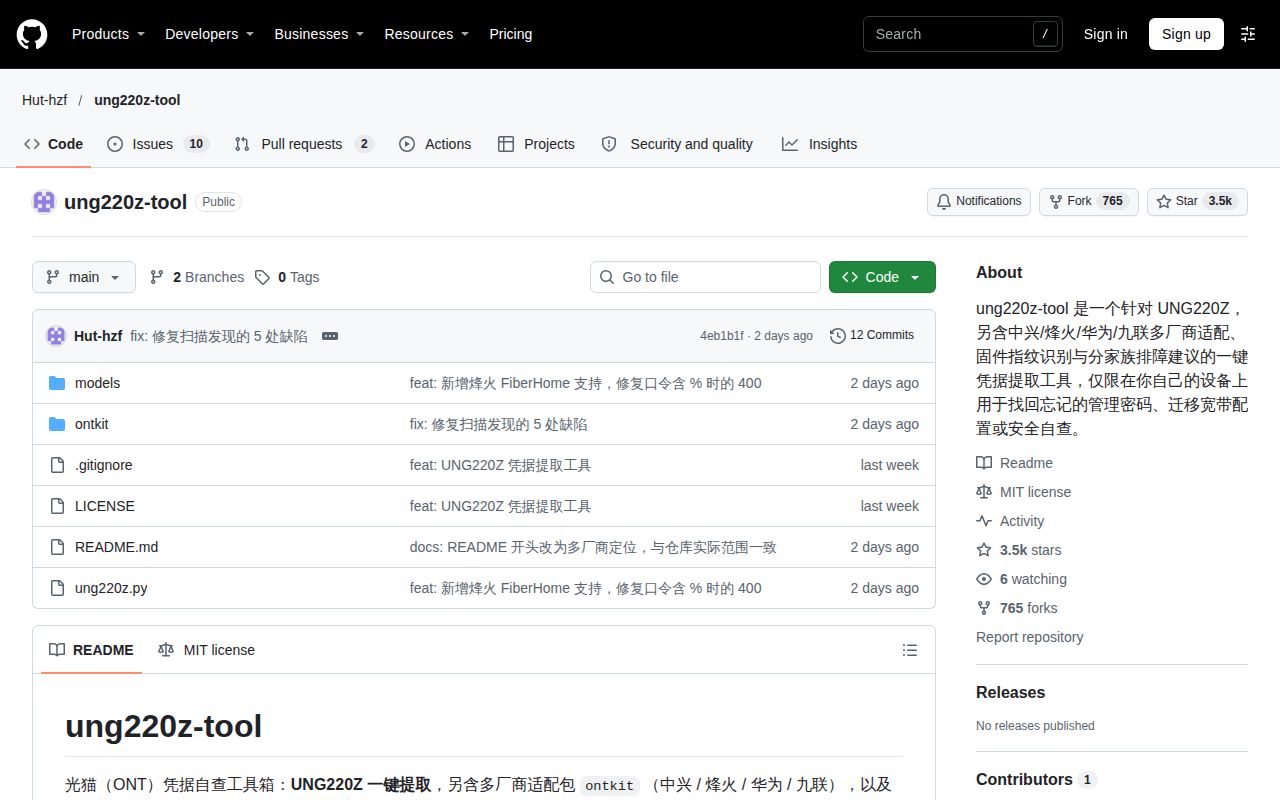
The public GitHub API reported 3,439 stars and a last push on November 22, 2026 when checked on November 24; those are attention and activity signals, rather than completed device recoveries.
The upstream repository metadata also listed 12 open issues and PRs combined. The HN8546X6N-20 thread contains a November 23 attempt, so recent activity and unresolved hardware problems coexist. The README's repair history gives a more specific account of maintenance than the star count: it names URL-encoding, configuration-parsing and session-decoding changes, while the issue threads show which device reports prompted further work.
What people use ung220z-tool for
The project author reports physical-hardware validation on UNG220Z; the other recovery accounts describe different devices and procedures.
| Who used it | What they wanted | What the account actually says |
|---|---|---|
| Hut-hzf, the project author | Extract credentials from UNG220Z | The README identifies UNG220Z as the only physically tested model. |
| The Zhihu walkthrough author | Recover access to a sibling UNG953H-S and inspect it | An AI agent modified the incompatible script before the author obtained administrator access, opened the Web interface and logged in through Telnet. |
| X user zlexhk | Recover home ONT credentials with an AI agent | The user reports retrieving the superadministrator account and broadband account credentials. |
The UNG953H-S account describes where the original approach stopped fitting the hardware. The author had a spare sibling device, asked an AI agent to run the project, and received a changed script called ung953h_tool.py. After that change, the account describes successful credential retrieval and management access. The mao.fan article reproduces that same walkthrough, so these two pages describe one recovery account. The modification is part of the reported procedure, alongside entering the password printed on the device label.
What happened when we ran it
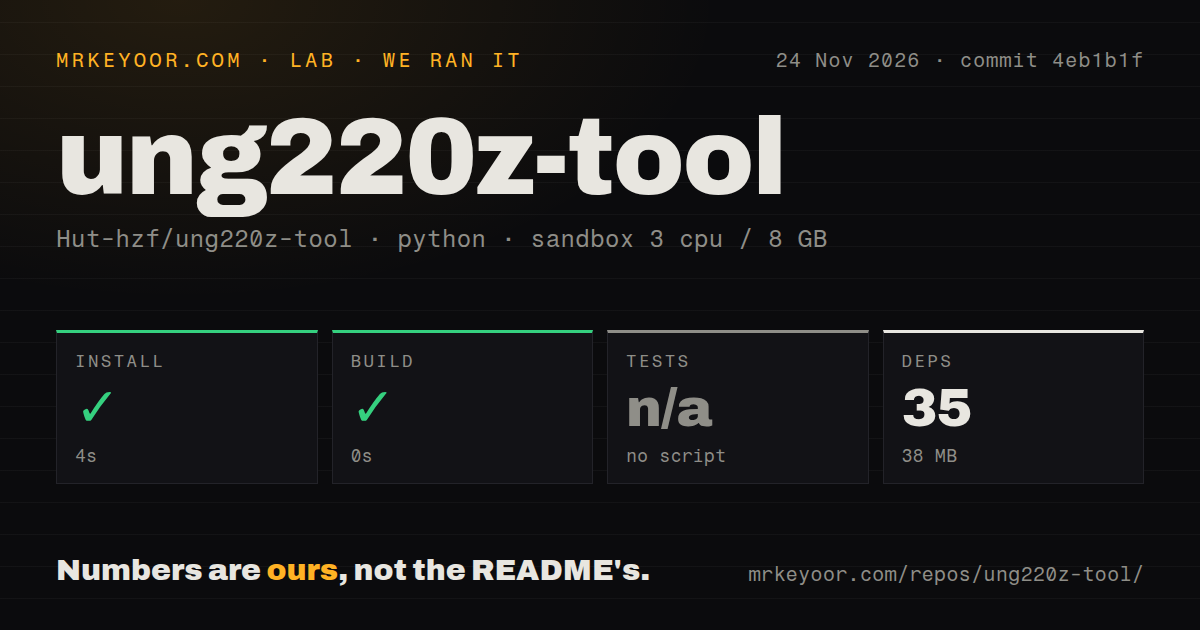
Our November 24, 2026 sandbox run at commit 4eb1b1f recorded a successful install in 4 seconds and a successful build step in 0 seconds; tests were skipped because there was no test script or target.
| Sandbox observation | Recorded result |
|---|---|
| Install | Succeeded in 4 seconds; 35 dependencies recorded |
| Installed footprint | 38 MB on disk |
| Build | Succeeded in 0 seconds |
| Tests | No tests script or target; skipped |
| Checkout | 21 files, approximately 1,910 source lines, 0.1 MB |
| Automation signals | No CI workflow files, Dockerfile or tests directory detected |
These are our sandbox setup measurements, on a configuration with 3 CPUs and 8 GB RAM. The configured image was ghcr.io/astral-sh/uv:python3.12-bookworm. The install result, dependency inventory and checkout size describe the sandbox setup at 4eb1b1f. The build result records the harness step as successful in 0 seconds; the test result records a skipped step. Neither result supplies a count of passing tests or a timing for extracting a password.
A separate hands-on attempt stopped at its safety step because none of the accepted Compose filenames existed. The harness required a Compose file. The run summary nevertheless describes deployment with the project's own Compose, with every port bound to 127.0.0.1, so those entries conflict. The failed step takes precedence when describing what completed. The teardown step returned a result of "ok". The recorded sequence therefore contains a failed prerequisite, a conflicting deployment summary and a successful teardown result.
Where people get stuck: activation, login and extraction
A successful Telnet activation response can still end in a failed login, as the UNP720Z reporter describes in issue #9.
Telnet is the remote command-line connection used by this workflow. The README explains that Web and Telnet accounts live in separate account databases. That distinction explains why a management-page password is not automatically the right password for the next stage. The last completed stage gives an error its context: reaching a port, authenticating, decrypting the configuration and printing useful credentials each answer a different question. The issue reports below stop at different points in that sequence.
| Symptom or model | What the reporter or maintainer says | Resolution shown |
|---|---|---|
400 Bad Request |
Issue #3 includes activation failures; the README documents special characters in activation URLs | The v1.2 changelog reports percent-encoded URLs for affected passwords |
ZXHN G7611V2, telnet.gch returns 404 |
Issue #7 reports a missing activation interface and closed Telnet port | Firmware fingerprinting and family-specific suggestions were added |
| UNP720Z opens Telnet but rejects login | Issue #9 reports activation success followed by authentication failure | Alternate credentials and Web-side retrieval are documented; the compatibility table labels this model unvalidated |
| SK-D740L | The README records issue #3's closed-port report | The compatibility table lists only the closed-port finding |
| HN8546X6N-20 | Issue #12 ends with an unexpected timeout keyword argument | The thread is open |
| GM220-S | Issue #11 recognizes ZTE-family firmware but fails to obtain Telnet credentials | Factory-mode and subsequent retrieval attempts fail |
The GM220-S report shows why intermediate results need their stage labels. The probe identifies a firmware family. A factory-mode attempt then fails to parse Telnet credentials, another port returns 404, and a later command produces a malformed host with two ports. The thread also records a Web login followed by zero enumerated pages. The distinction is concrete: detection returned a family name, while the credential-retrieval steps returned errors or empty results.
Some parsing problems have documented fixes. The v1.1 changelog says configuration tables are separated locally, addressing single-line XML that mixed PPPoE and Wi-Fi entries into Web accounts. PPPoE is the broadband login used by some connections. The same changelog describes charset-aware decoding with UTF-8, GBK and GB18030 fallbacks for Chinese management pages that defeated session-lock detection. It also replaces an ls-based decryption check that could mistake stderr output for a successful decrypted file.
Credential output deserves the same care as a backup
The README says the workflow prints credential tables and writes a local log, so finishing the script also creates sensitive output you need to control.
The v1.1 cleanup changes include removal of the temporary decrypted configuration, log permissions of 0600 and masking the activation-URL password. The changelog names the earlier problems: a dropped connection could leave plaintext configuration on the device, and activation URLs exposed passwords in logs. Its cleanup uses a finally block to remove the temporary file and close Telnet and the log when execution leaves the protected operation.
Treat the credential table itself as a secret. Masking an activation URL leaves a separate handling decision for the recovered account values. Keep the local log private, redact credentials before posting an error report, and exclude them from screen recordings. After saving the recovery information you need, decide whether to retain the log. These recommendations follow from the README's documented output: a credential summary and a timestamped local log file.
Root-password matching calls an external openssl executable, and the source warns when that executable is missing. The warning says root-password comparison is skipped. That names the affected operation precisely: matching password candidates against the root hash. The README's broader output list includes Web accounts, Telnet credentials, PPPoE settings and Wi-Fi keys as well as root information, so a root-matching warning needs to remain attached to that particular stage.
Chinese documentation is part of the setup effort
The upstream README, interactive prompts and troubleshooting examples are Chinese-first; the README contains no English guide.
The documented entry point is python3 ung220z.py, followed by prompts for the gateway address, username and password. It points readers to the device label for ordinary login details. The example output uses technical stage labels alongside Chinese descriptions, including PROBE, AUTH, SHELL and DATA. Those labels give a reader a way to locate the failed stage while translating the surrounding explanation.
The README organizes troubleshooting around the exact model and firmware family. It describes ontkit as the separate family-oriented toolkit and documents python3 -m ontkit probe -H 192.168.1.1 for identifying firmware. Its directory description labels the Huawei route experimental. Model entry scripts sit under models/, while the compatibility table separately labels physical validation, public accounts and issue reports. These commands are documented entry points; the executed sandbox results are recorded in the run section above.
ung220z-tool vs ISP help, RouterPassView and adapted scripts
RouterPassView is a model-specific supporting route in the README, while an adapted script is the path the UNG953H-S author reports using.
| Option | Why someone would choose it | Evidence to keep in view |
|---|---|---|
| ung220z-tool main script | Recover credentials using the author's UNG220Z workflow | UNG220Z is the author's physical-hardware reference |
| Ask the ISP installation technician | Request administrator access and help with service configuration | The YouTube bridge-mode walkthrough recommends calling the technician |
| RouterPassView | Inspect a GM232 configuration backup for its Telnet password | The README cites this community route using config.bin |
| Model-specific adaptation | Change the script to suit different hardware | The Zhihu author reports success after an AI-assisted UNG953H-S adaptation |
| TTL serial access or an online decryption service | Consider another access or configuration-decoding method | X user fishjar prefers the local script to soldering or uploading configuration |
In the bridge-mode YouTube walkthrough, the presenter shows the Internet-service settings, with broadband credentials blurred, and describes changing Route Mode to Bridge Mode. The presenter recommends the installation technician for obtaining access, then introduces the Python tool as another option for particular hardware. These are different routes to the configuration task: requesting access, recovering credentials locally, or changing a script for a device that requires adaptation.
A browser-breakpoint method also appears in issue #1's China Telecom discussion. One commenter proposes intercepting a request to enter the filesystem root. Another reports following the steps repeatedly without reaching that directory. The exchange gives a specific outcome for that attempt, alongside the technician recommendation and the README's GM232 backup route. Each account describes its own method rather than a comparative success rate.
Outdated claims, corrected
GithubFinds' Facebook description calls the design free of external dependencies, but root-password matching invokes an external executable.
The GithubFinds post says "Zero external dependency design". The README makes a narrower statement: the main script needs no pip installation. The source separately calls OpenSSL for root matching and emits a warning if it is missing. Our harness's inventory of 35 dependencies describes the sandbox environment. Those three statements concern different scopes: Python package installation, an external executable and the measured environment.
The scrollearahora Instagram description calls it a Chinese mobile router tool. China Mobile is the operator in the project's description, and the target is a Unionman ONT. The Like Do terms-explorer page describes the project as explicitly limited to administrator-password recovery. The upstream workflow instead lists Web accounts, Telnet credentials, PPPoE, Wi-Fi keys and root information, which gives readers a fuller account of the intended output.
The privacy explanations disagree about bridge mode. The YouTube presenter recommends bridging as a direct response to surveillance concerns. The SMZDM reverse-engineering summary disputes that conclusion because traffic still crosses the ONT. Credential recovery and a bridge-mode configuration change are concrete operations; the privacy effects require their own evidence. The disagreement belongs beside the claim being corrected rather than being turned into a promise about this tool.
FAQ
The README starts ung220z-tool with python3 ung220z.py, then asks for the gateway address, username and password.
How do I set up and use ung220z-tool?
Run python3 ung220z.py and answer the interactive gateway, username and password prompts documented in the upstream README. The default gateway prompt is 192.168.1.1, and the username default is user. The password prompt hides input. The README points to the label on the ONT for ordinary login details and gives ontkit probe as the firmware-family identification entry point.
Is ung220z-tool free, and what do I need to install?
The public repository lists the MIT license, and the README asks for Python 3.8 or later. It says the main script uses the standard library and needs no pip installation. Root-password matching additionally calls an external OpenSSL executable. The sandbox's dependency inventory records its environment rather than a required package list for the main command.
Does ung220z-tool only support UNG220Z?
UNG220Z is the only model the author identifies as tested on physical hardware. The README also includes family adapters and community model reports with different status labels. Its compatibility table distinguishes the author's hardware result from public cases for UNG953h1-S, HG6042A1 and GM232. The separate Zhihu UNG953H-S account reports success after modifying the script.
Can ung220z-tool work with China Telecom ONTs?
The China Telecom issue contains a proposed browser method and a failed attempt to follow it. The proposed method intercepts a browser request to reach the filesystem root; a respondent says repeated attempts did not reach that directory. The discussion also asks whether IPTV is affected by bridge mode. The recorded outcomes concern those steps and questions, rather than an operator-wide compatibility result.
Can ung220z-tool work with China Unicom ONTs?
The general China Unicom question has no replies. A separate issue requests adaptation for the Skyworth SK-D849N-C and records its hardware and software versions. These are support questions about an operator and a specific device. The README's compatibility table organizes its results by model, which is the more specific reference for matching a reader's ONT to a documented procedure.
Does ung220z-tool work with Huawei V175?
A user in issue #5 says their V175 attempt appears not to work. The open thread contains the model question and that response. The README separately describes its Huawei ssmp route as experimental. The V175 comment is a report about that user's attempt, while the experimental label describes the adapter's status in the project documentation.
Can ung220z-tool support the HN8546X6N-20?
The HN8546X6N-20 report stops at TypeError: enable_telnet() got an unexpected keyword argument 'timeout'. Its device details name software version V5R024C00S500 and hardware version 4109.A. The log reaches an open HTTP port and skips Web-session release before reporting the exception. That sequence identifies the actual failure more precisely than the model name or a firmware-family label alone.
Is there a working adaptation for GM220-S?
The GM220-S report shows detection followed by failed credential retrieval. The probe identifies ZTE-family firmware, and the factory-mode attempt on port 8080 reaches authentication before reporting that it could not parse Telnet credentials. A subsequent port-80 attempt returns 404. Later attempts include malformed host-and-port handling and a Web login with zero enumerated pages, giving several distinct debugging points.
Can ung220z-tool support the China Unicom Skyworth SK-D849N-C?
The SK-D849N-C issue is an unanswered adaptation request. It identifies hardware version V1.0 and software version V03.00.R2_0_4. Those details describe the device for which support was requested. They give a reader concrete model and firmware strings to compare with their own unit, while the thread itself records a request rather than a completed recovery procedure.
Is there an equivalent tool for the ZTE ZXHN F4010C?
A commenter on the Zhihu walkthrough asks for a ZXHN F4010C project. The comment names that model and requests a project; the walkthrough's reported recovery concerns an adapted UNG953H-S script. These are separate devices in the same discussion. The named implementation in the article is ung953h_tool.py, created after the original script did not fit the author's sibling ONT.
Why does ung220z-tool return 400 Bad Request?
The README identifies unescaped special characters in passwords as one cause and describes the v1.2 encoding change. It says affected characters include %, &, #, ?, + and spaces. Issue #3 contains activation-error reports, including 400 and 404 responses. The changelog's fix concerns encoding the password in the activation URL, so the relevant details are the URL-building step and the characters involved.
Why does telnet.gch return 404 while port 23 remains closed?
The README says firmware without the telnet.gch interface needs a different family-specific route. The G7611V2 reporter's issue #7 records repeated 404 responses and a port-23 timeout. The documented troubleshooting sequence starts with firmware fingerprinting and then points to the corresponding ontkit family. That connects the HTTP error to the missing activation interface rather than treating it as a successful Telnet login.
What we have not tested yet
Our measurements cover sandbox installation and a stopped deployment attempt, not credential extraction on an ONT. We did not measure an extraction success rate, reproduce the author's physical-hardware result, reproduce the UNG953H-S adaptation, or establish a compatibility matrix across firmware revisions. The image label also does not establish the actual runtime or operating-system version; those require raw toolchain logs. The latest-release lookup returned null, which does not prove that the project has no release.
The hardware reports have specific limits: zlexhk's recovery post names no ONT model; the G7611V2, Huawei V175, HN8546X6N-20 and GM220-S threads show no completed fix or successful retry; and the SK-D849N-C request supplies no recovery result. The ZXHN F4010C comment supplies no equivalent tool. The documented URL-encoding fix does not establish a common cause for every 400 response, and the comparison accounts supply no comparative success rate.
IPTV after bridging, bridge-mode privacy effects and later operator configuration changes are outside our measured results. The IPTV question in issue #1 has no completed test behind it. The conflicting privacy explanations are accounts rather than our network-capture findings. A clxymox X post claims 100% lab success without a sample size, model inventory or procedure, so it supplies no usable extraction success rate.
Repeated recovery, session lockouts, Windows operation, log access controls and cleanup after an interrupted process also remain outside our tests. The security and Actions pages returned in searches belong to the prince90s and dwgx forks; they do not establish upstream security practices or CI results. For another device, the useful next evidence is a complete recovery on its exact model and firmware, with credentials redacted and activation, authentication and extraction reported separately.