What our sandbox established
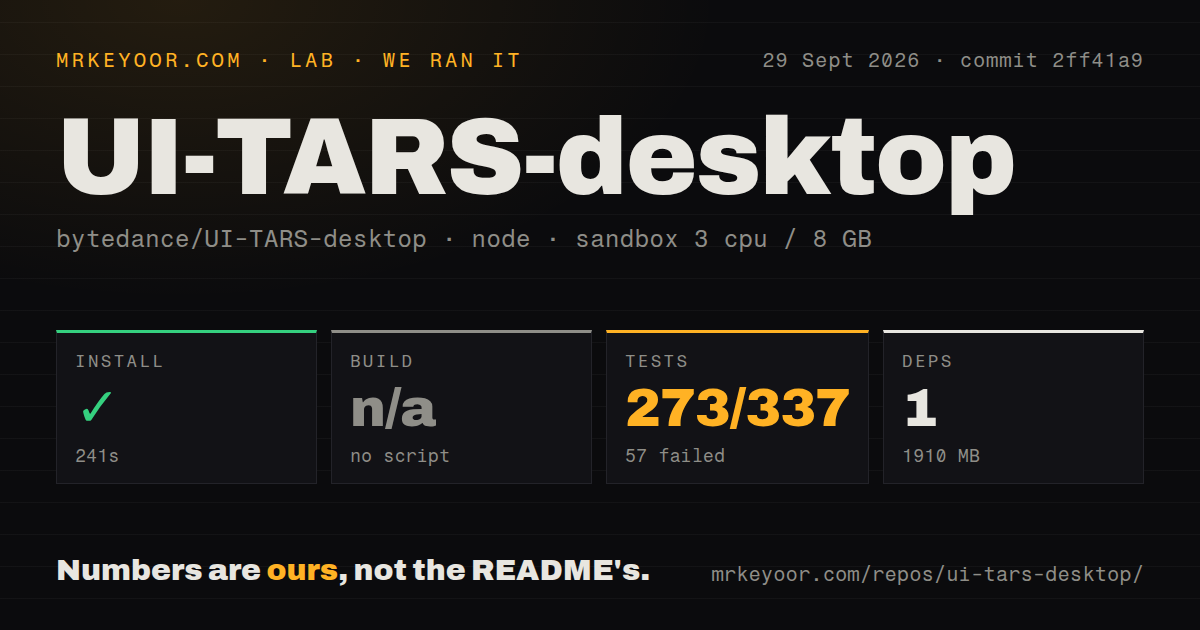
Our run was recorded on September 29, 2026, at commit 2ff41a9. In our sandbox, installation completed in 241 seconds. The recorded environment had 3 CPUs, 8 GB of memory and the lab-node:22 image. The stored dependency footprint was 1,910 MB.
The harness records command outcomes through success flags, exit codes, elapsed wall-clock time and retained log tails, with parsed test counts stored separately. Installation returned exit code 0; the test command returned exit code 1 after 21 seconds. Neither outcome demonstrates that a model-backed CLI task or desktop workload completed.
The separate root build step was skipped because no build script was detected. That does not mean nothing compiled: the installation tail includes preparation builds for workspace packages. It also does not establish that the desktop application was built or launched.
The testing methodology explains how MrKeyoor records command results and the limits of a sandbox run. That page supplies provenance context; it does not establish which current procedures applied to this older run. This review uses the attached stored record, without a new execution.
Why the test result needs its environment attached
The attached stored parser summaries record 273 passed, 57 failed and 7 skipped, with a total of 337. These are recorded parser summaries, not verified exhaustive counts of unique tests. No complete-log reconciliation was performed, and skipped tests are separate from failures.
The retained browser-test output includes an assertion that expected 'Tab Management Test Home' but received 'Unable to find any browser.' A separate tab-error-handling assertion expected a false error flag and received true. These observations explain concrete failures visible in the tail; they do not establish that every failure had the same cause.
The practical next step for a source contributor is to provide the documented browser prerequisite and rerun the relevant tests. Our result cannot predict whether that resolves the remaining failures. It also cannot rank UI-TARS-desktop against alternatives that we did not test under the same conditions.
We did not test desktop task accuracy, model quality, unattended operation, provider deployment or completed browser workflows. The audit field is null, so this record supplies no advisory result or known scan coverage.
Choose the product before configuring it
The repository README separates Agent TARS from UI-TARS Desktop. Agent TARS supplies a CLI and Web UI, browser control through GUI, DOM or hybrid strategies, and MCP integration. UI-TARS Desktop is a native GUI agent for your local computer. Its documented controls include screenshots, mouse input and keyboard input.
For a browser-and-tools agent, start by evaluating Agent TARS. For an experiment that specifically requires operating a desktop interface visually, evaluate UI-TARS Desktop. These are choices within the same repository, rather than evidence that one has better task reliability.
Check the desktop prerequisites first
The quick start at the tested commit requires Chrome, Edge or Firefox for Browser Operator. UI-TARS-desktop currently supports only a single-monitor setup, according to the tested quick start. The guide warns that multiple monitors may cause task failures.
Local operator setup still requires a model endpoint. The Hugging Face instructions ask for a base URL, API key and model name obtained through separate deployment instructions. Installing repository dependencies therefore does not complete model setup. On macOS, the application also requires Accessibility and Screen Recording permissions.
The same guide says the Remote Operator service would be discontinued on August 20, 2025. Treat that notice as the setup constraint rather than relying on the README's older announcement of free remote operators. We did not test a replacement remote service.
When browser-focused alternatives fit
Browser Use supports running its open-source browser agent locally from Python. Consider it when your application needs browser automation and you want to run the agent from your own code. Its documented browser-agent path is an alternative for that scope; it does not establish a replacement for native desktop control or a better result on your tasks.
Skyvern provides a Playwright-compatible SDK and a no-code workflow builder for browser automation. Consider it when those interfaces match how you intend to build web workflows. Its SDK can complement existing Playwright code. That role differs from choosing a native computer operator, and our sandbox supplies no comparative reliability measurement.
How to read the retained ratings
The ratings use a five-point editorial rubric: 1 means substantial obstacles, 2 means material limitations, 3 means usable evidence with qualifications, 4 means strong evidence within the named dimension, and 5 requires broad corroboration. They are judgments, not benchmark results.
Setup ease remains 2/5 because the source install completed but model configuration and an unsuccessful test command remained. Documentation remains 3/5 because the guide provides concrete prerequisites, while its remote-service notice must be read alongside an older promotional announcement. Community remains 4/5 as a limited historical assessment of contributor participation visible in the supplied release record; it does not measure adoption, support responsiveness or current maintenance. Maturity remains 2/5 because the supplied release documents a substantial implementation, while our run leaves application operation and task reliability unverified.