
Moving panels keeps editor views mounted
Trellis keeps a view's content mounted while a user docks, floats, or hides its panel. The documentation says it repositions the existing content container with CSS, and the React adapter uses a portal whose container stays put. That is a useful reason to choose a layout engine for an editor: rearranging the workspace shouldn't casually discard the state inside a canvas, iframe, or document view.
Our checkout contained 223 files and roughly 24,885 source lines in 2.5 MB. The project has a framework-independent core, a React adapter, and a custom element. Its scope is the workspace around your application content. You still provide the editor, terminal, or document renderer. I would evaluate Trellis when nested panels and zoom navigation solve a recurring problem for users, rather than adding it to make a simple dashboard look busier.
What happened when we ran it
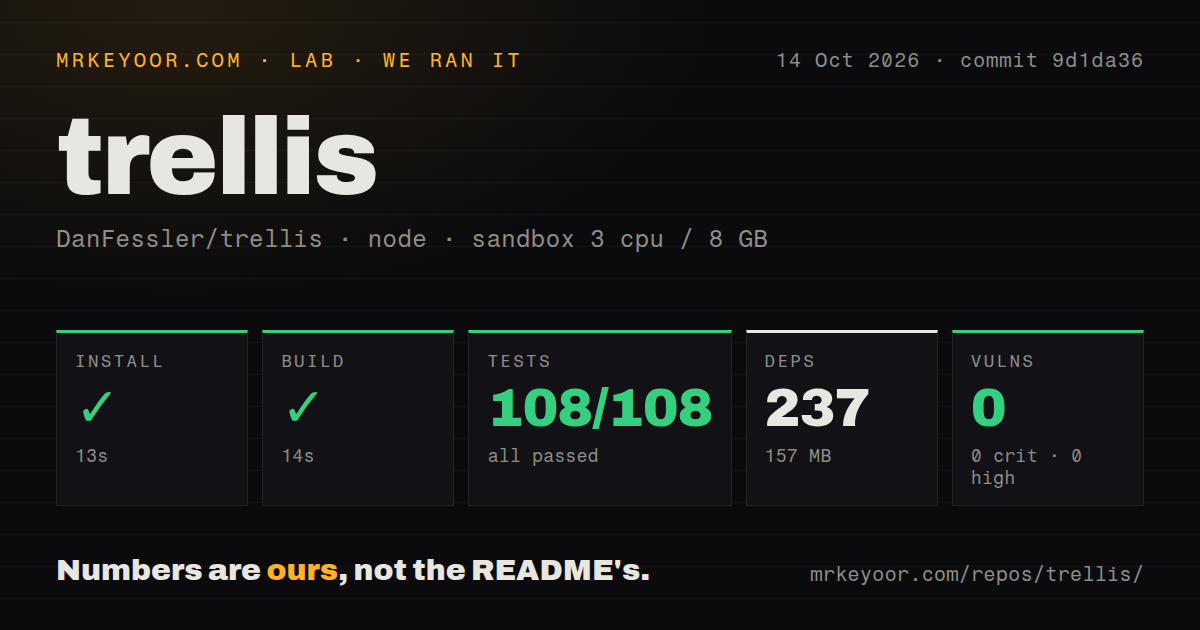
Our sandbox installed Trellis commit 9d1da36 in 13 seconds, adding 237 packages and occupying 157 MB. The October 14, 2026 run used a fresh Debian container with 3 CPUs, 8 GB of RAM, image lab-node:22, no secrets, and no elevated privileges. The build succeeded in 14 seconds, and Vitest completed in 8 seconds with 108 passed and 0 failed.
Npm audit reported 0 known vulnerabilities. Our scan found 3 CI workflow files and workspace configuration for a monorepo, without a Dockerfile or a tests directory. The absence of that directory doesn't contradict the passing Vitest result. These are observations from the measured checkout, not a promise about all dependency revisions or every application that embeds the library.
Those 108 passing tests make Trellis easier to recommend for a trial, but they don't measure your editor's behavior during a drag. Our supplied results contain no frame-rate, memory, or browser interaction benchmark. Check whether a real document retains its state when moved, whether the saved workspace returns correctly, and whether the gestures fit your application's own pointer handling. That's where a layout library earns its place.
React layout declarations are initial state
The Trellis FAQ says layout JSX is read once. After initialization, users own the layout, and code changes it through methods such as open, dock, or setDocument. This can surprise a React developer accustomed to treating rendered declarations as the current source of truth. A new default arrangement also has to contend with a previously persisted workspace.
The 14-second build tells us compilation worked, while this state model determines integration effort. The README's React example gives Workspace a storageKey and version, and the FAQ says to bump the version when persistence gets in the way. Decide how your app handles changed defaults before users accumulate carefully arranged panels. Replacing everyone's saved workspace may be technically convenient and still be the wrong product behavior.
An empty host needs explicit sizing and client hydration
Trellis fills its host instead of sizing itself to its contents. The FAQ names missing host height as the usual explanation for a blank workspace. It also says the React adapter renders an empty host on the server and creates the workspace after hydration. That is reasonable for a browser editor, but it rules out expecting server-rendered panels to carry your initial page content.
A 157 MB local environment is manageable for experimentation, and the README supplies paint, IDE, desktop, and vanilla examples. Start with the one closest to your application and replace a view with actual content. Include a slow or stateful renderer in that experiment. A workspace full of placeholder boxes won't reveal whether your canvas sizing or iframe update strategy cooperates with the layout engine.
Floating panels and iframes have documented limits
The FAQ says a floating window cannot be maximized directly because floating windows aren't camera targets. The documented route is to dock it first and then maximize the docked panel. That behavior may fit a workspace organized around a main stage. If your users expect every floating window to behave like an operating-system window, evaluate the difference before designing controls around it.
The iframe guidance is equally concrete: changing computed iframe options reloads the frame, while a fixed URL with messages can support live preview updates. Pinch events inside an iframe don't reach the outer workspace. These details matter more than our 8-second test duration when your product embeds an existing web application. The library preserves mounting through rearrangement, but it cannot erase browser boundaries around embedded content.
Commercial use requires an ongoing license arrangement
The license overview makes non-commercial use free. Commercial organizations with 10 or fewer developers need an active GitHub Sponsorship at the required tier, while larger organizations need an enterprise license. The FAQ calls Trellis source-available. Treat it that way in procurement, even though you can read and modify the code. A prototype's licensing conditions may change when it becomes a commercial product.
FlexLayout is worth comparing if MIT terms and React docking satisfy the job. Dockview is another relevant comparison for tabs and split layouts. Trellis earns its trial through the combination of retained views and navigation across nested workspaces. Pay for that distinction only if it helps your users work, and obtain the applicable terms before it becomes expensive to replace.
October pushes include work that is still proposed
GitHub recorded a push on October 2, 2026, with 232 stars and 2 open issues and PRs when checked. Both open entries are pull requests, including an experimental camera renderer. There is no latest GitHub release entry. The push date and current proposals show development activity, but an open proposal is insufficient evidence that an improvement ships in the version you're using.
The experimental renderer PR discusses trade-offs during camera motion. Keep that discussion separate from the 108 passing tests in our measured checkout. I would adopt Trellis only after a representative document survives rearrangement and restoration in the target browser. That gives the commercial conversation a concrete basis: a workspace behavior your users need.