Short answer: use it for generated maps you can inspect
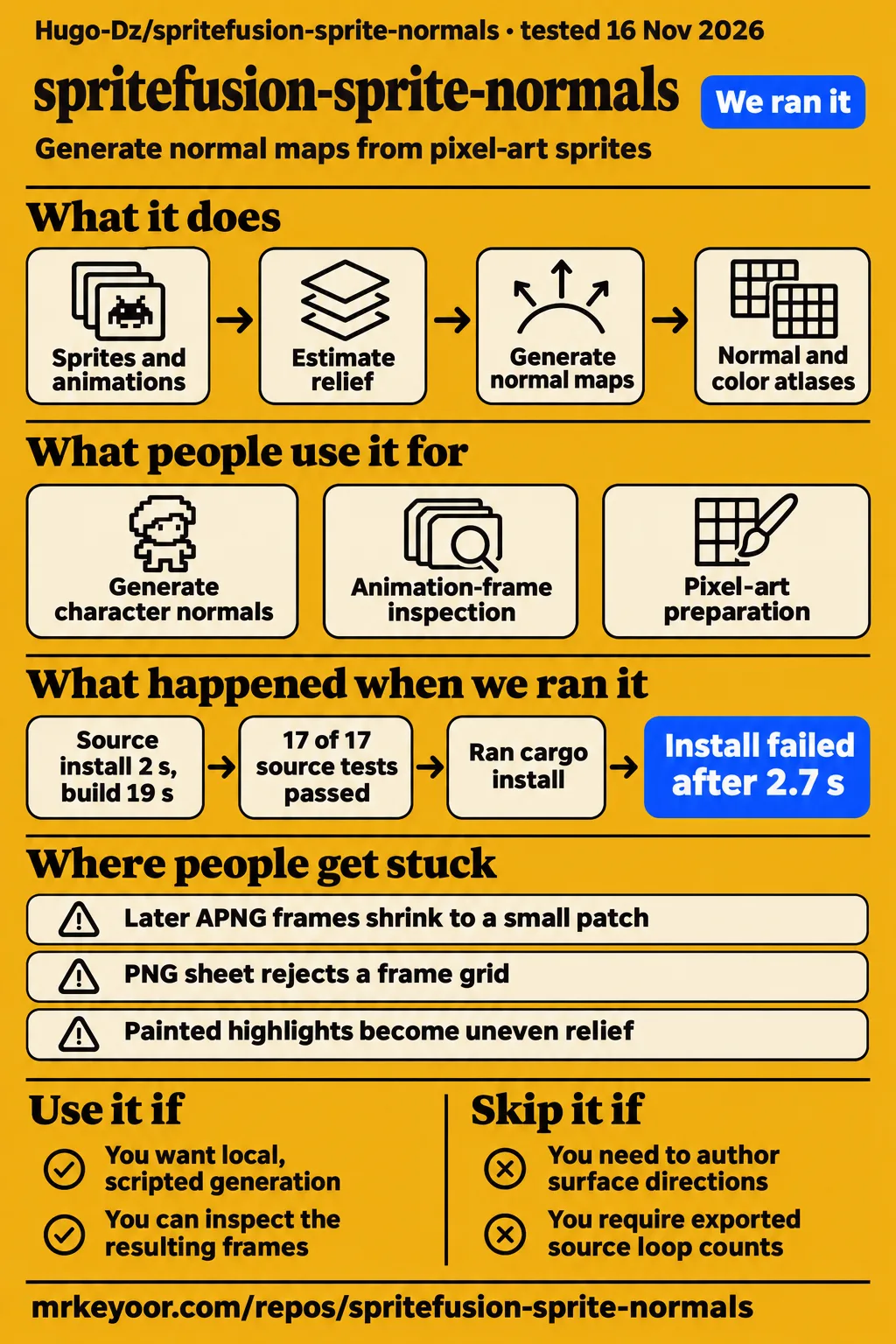
Sprite Fusion Sprite Normals suits developers who want local, scripted normal-map generation and can inspect the resulting frames and lighting. Artists who need to specify surface directions directly should choose painting or geometry-based baking. For animation pipelines, issue #1 supplies a concrete acceptance concern: an optimized APNG can produce an incomplete color frame and a tiny normal-map blob. Inspecting the matching color atlas is therefore a useful first step before adjusting relief.
A normal map stores a surface direction for each pixel so moving lights can shade a flat sprite as though it had volume. Sprite Normals estimates that surface from the outline and existing shading. Its project README describes separate controls for silhouette volume and painted detail, plus matching color and normal atlases for animations. Missing artwork in the color atlas points to a frame-decoding problem before the generated surface directions enter the picture.
What people use spritefusion-sprite-normals for
Assembled-character normal generation, animation-frame inspection and pixel-art preparation appear in the developer reports; Dice Ark uses an inspired implementation rather than confirmed library integration. These uses put normal generation at different points in asset preparation. One starts after character parts have been combined, another checks decoded animation frames, and a third combines pixel cleanup with adding lighting information. The distinction matters when choosing where generation belongs in an existing pipeline.
- Dice Ark developer Konoyo_Wowari describes generating normals from the assembled character image, caching the result and reusing mirrored maps by reversing their horizontal direction. The developer reports softer HD-2D-style shading after retaining silhouette volume and dropping brightness-derived detail. Konoyo_Wowari's Japanese-language development post credits Sprite Normals as inspiration.
- The reporter of APNG issue #1 inspected matching color and normal atlases. The reported third frame retained a 2x2 patch, or four opaque pixels, rather than the expected 240.
- Kristopher Dunham reports testing Sprite Normals alongside pixel cleanup and building an agent workflow for AI-generated pixel art. Dunham's article excerpt places pixel cleanup before adding lighting information.
The Dice Ark account suggests a practical scheduling choice for modular characters: generate from the finished composite instead of preparing a map for every possible part combination. Its caching and mirrored reuse belong to that developer's implementation. A team following that approach would need to decide when an appearance changes and how to identify its cached result. The CLI's batch conversion serves a different purpose: processing multiple input files through the same generation tool.
What happened when we ran it
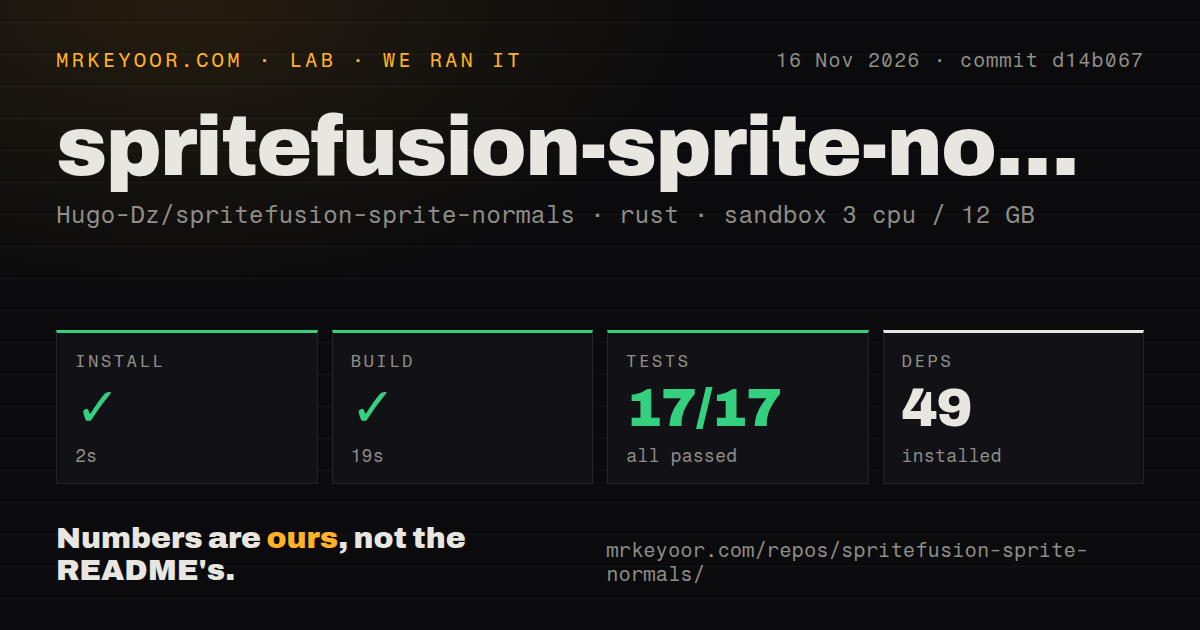
Our November 16, 2026 sandbox run installed the checkout in 2 seconds, built it in 19 seconds, and completed cargo test in 5 seconds with 17 passed and zero failed. The harness recorded commit d14b067, 3 CPUs, 12 GB RAM and image lab-rust:1. Its repository scan found 20 files, approximately 1,643 source lines and 0.8 MB checked out. These are our measurements of the checkout and its recorded setup steps.
| Recorded step | Result | Meaning for an evaluator |
|---|---|---|
| Install | Succeeded in 2 seconds; 49 dependencies recorded | Checkout setup completed |
| Build | Succeeded in 19 seconds | The measured source compiled |
| Tests | Succeeded in 5 seconds; 17 passed, 0 failed of 17 | The recorded cargo test suite passed |
| Repository scan | 20 files, approximately 1,643 source lines, 0.8 MB checked out | The recorded checkout was small |
| Automation signals | Zero CI workflow files, no Dockerfile, a tests directory | Tests were present in the scanned snapshot |
A separate hands-on run used recipe quickstart-lib at commit d14b06726cab in a fresh unprivileged lab-rust:1 container with 2 CPUs, 4 GB RAM, no published ports and no secrets. Its summary describes a latest-version crates.io installation, but its explicit installation step failed. The step log supplies the outcome: cargo add could not find the crate in the registry index. The hands-on run record identifies the recipe and configuration.
| Separate hands-on step | Result | Meaning for an evaluator |
|---|---|---|
| Clone | quickstart-lib step recorded in 1 second | The recipe reached its installation step |
| Registry installation | cargo add spritefusion-sprite-normals failed in 2.7 seconds, exit 101 | The registry index could not find the named crate |
| Finding | install-failed; stopped at install | The recipe stopped before a library call |
| Teardown | ok | Cleanup completed |
The clone record, failed installation log, finding record and teardown record preserve that sequence. A successful source build and a failed fresh-crate attempt can coexist because they exercise different installation routes. For the local CLI, the README's installation route starts inside the source checkout and uses cargo install --path . --locked.
Where people get stuck: decoding, grids and painted highlights
Issue #1 reports incomplete optimized APNG frames after BACKGROUND disposal on a sub-region. The reporter attributes the result to the image 0.24 decoder clearing the whole canvas instead of the previous frame's region. In the reproduction, the third color-atlas frame contains only a 2x2 patch with four opaque pixels; the expected frame contains 240 opaque pixels. The normal map for that cell becomes a tiny blob because most of its input silhouette has disappeared.
| Symptom | Evidence-backed explanation | Action and status |
|---|---|---|
| Later APNG frames shrink to a small patch | Issue #1 attributes the result to whole-canvas clearing in image 0.24 | Reporter proposes image 0.25 and reports a regression test on a branch; the supplied issue is open |
| PNG sheet rejects a frame grid | Source requires dimensions to be exact multiples of frame size | Export uniform cells that divide the sheet dimensions exactly |
| Painted highlights become uneven relief | README says painted highlights can become surface detail | Adjust detail strength and smoothing, then inspect the lighting |
| Source looping disappears | README says source loop counts are not exported | Set looping in the consuming engine |
| PNG sheet uses generic timing | README assigns a default 100 ms frame delay | Supply the intended timing in the consuming pipeline |
The APNG report, generator dimension check and README export instructions support a simple troubleshooting order: inspect decoded color frames, check the grid and playback metadata, then adjust relief. Increasing normal strength cannot restore missing input pixels. For uneven surface detail, the relevant controls are different: detail strength changes relief from painted shading, while detail scale controls its smoothing.
Local batches and browser embedding use the same generator
The CLI and WASM module use the same generator and animation decoder. The README presents the CLI for local files and batches, and WebAssembly for embedding in a browser project. Source builds require Rust 1.85 or newer. The documented WASM build uses the wasm32-unknown-unknown target and wasm-bindgen CLI 0.2.126. The choice between these routes is primarily about where the conversion belongs in the application or asset pipeline.
The README documents this command for a uniform sheet with 32x32 cells:
spritefusion-sprite-normals sheet.png --frame-size 32x32 -o sheet_n.png
Animation conversion produces a normal atlas, a matching color atlas and JSON metadata. The JSON includes atlas dimensions, frame dimensions, columns, frame count and timing. Frames use row-major order, while delays_ms stores numerator/denominator pairs in milliseconds. Keeping the files together gives an importer the layout and timing information alongside the pixels. The README's CLI and animation instructions supply the command and describe these outputs.
Large animations hit explicit resource limits
The README limits inputs to 64 MiB and 4,194,304 pixels including processing padding. Animated inputs also have limits of 256 frames and 4,194,304 total decoded pixels. An export pipeline therefore needs to count expanded frame pixels as well as compressed file bytes. A small animation file can still represent many decoded frames, and processing padding contributes to the image pixel budget described by the generator.
The README resource limits give concrete input boundaries for adding conversion to an asset build. Repeated character appearances raise another question: when should generation run again? The Dice Ark developer's reported caching approach reuses a completed appearance, including mirrored normals. Batch conversion processes a collection of files, while caching avoids regenerating a result that the application already has. Those choices address different sources of repeated work.
Local output paths and import settings are explicit
The CLI saves maps beside their inputs as name_n.png when no output path is supplied. Its --output-dir option directs a batch to another directory, and --force replaces existing outputs while protecting input files. These rules make output placement predictable for scripts. The README filesystem options also distinguish a single output path from a batch output directory, so a conversion step can keep generated files together.
Normal PNGs are data textures, and the README instructs users to disable sRGB sampling in the engine. The default normal convention is OpenGL; --normal-format directx reverses the green channel. Import settings and convention selection belong alongside the atlas layout and timing in an asset pipeline. Using the documented convention gives the consuming renderer the expected surface-direction encoding, while the color atlas remains available for inspecting the decoded artwork.
Sprite Normals vs hand-painted normals, SpriteIlluminator and Blender
Sprite Normals estimates relief from artwork, SpriteIlluminator provides painting tools, and Blender can bake normals from geometry. The useful comparison is the source of the desired surface: an existing drawing, an artist-authored normal map or a mesh. Choose Sprite Normals when scripted generation fits the workflow. Choose direct editing or baking when the surface needs to come from explicit artistic decisions or existing geometry.
| Route | Why choose it | Decision boundary |
|---|---|---|
| Sprite Normals | Local scripted conversion and matching animation atlases | Relief is estimated from silhouette and painted shading |
| Hand-painted normals | Assign surface directions directly | Artist time goes into authoring the map |
| SpriteIlluminator | Generate maps and refine them with painting tools | You want a dedicated visual editor |
| Blender normal baking | Bake surface normals to an RGB image | Your workflow includes mesh geometry and UV preparation |
SpriteIlluminator's official page documents brushes for refining maps. Its normal-map editor description names AngleBrush, Smooth and HeightBrush among the tools for modelling a sprite's shape. Blender's baking manual documents normal baking to an RGB image. Its baking setup instructions require a mesh UV map and either a Color Attribute or an Image Texture node with an image as the baking target.
Repository attention and issue status answer different questions
GitHub's November 16, 2026 snapshot records 831 stars and a last push on October 20, 2026. The research pack also records APNG issue #1 as open. Stars describe repository attention; the issue describes a specific input and output problem. For an asset pipeline, the latter supplies a concrete case to include when deciding whether generated animation frames are acceptable. The GitHub repository snapshot supplies the dated metadata.
A retained checkout and a small collection of accepted outputs would give a team a practical comparison point for tool updates. That collection could include a still sprite, a uniform sheet and an animation from the team's exporter. Comparing the same inputs would make changes in decoding, timing and relief easier to identify. The recorded commit also provides a more precise reference for the measured build than the repository's current star count or a third-party listing.
What the other reviews get wrong
Git Homed's zero-open-issue listing conflicts with the pack's open issue #1 record. Its listing reports 692 stars, 53 forks and zero open issues, while the issue contains a specific APNG reproduction. Git Homed's listing and the APNG issue therefore describe different snapshots. Broad APNG-support wording needs the reported disposal case beside it: the issue identifies a particular failure rather than showing that every APNG fails.
HotRepo's audience boundary also differs from the hosted product scope described in the research synthesis. HotRepo's overview places high-resolution painted or 3D-rendered art outside its target audience. The synthesis attributes a broader texture audience to the hosted product. The usable local instructions here remain the README's PNG, GIF, APNG and uniform-sheet workflows; a product-scope disagreement is not a reason to infer additional CLI controls.
FAQ
Issue #1 attributes disappearing optimized APNG frames to whole-canvas clearing in the image 0.24 decoder after sub-region BACKGROUND disposal. Checking the matching color atlas helps distinguish that symptom from an unwanted relief setting. The other questions below concern documented inputs, installation routes, controls and imports. Together they cover the decisions a first-time user needs before moving generated maps into an asset pipeline.
Why do optimized APNG frames lose most of the sprite after BACKGROUND disposal?
The reporter attributes the loss to whole-canvas clearing in image 0.24 and proposes upgrading to image 0.25. Inspect the matching color atlas for missing sprite pixels before changing relief settings. The APNG issue report describes the expected third frame, the four-pixel result and the resulting tiny normal-map blob. That diagnosis concerns decoding the animation, so normal-strength adjustments address a different part of the conversion.
Can Sprite Normals generate matching normal maps for animated GIFs, APNGs, and sprite sheets?
The README documents GIF, APNG and uniform PNG-sheet inputs producing matching normal and color atlases plus JSON metadata. A PNG sheet uses --frame-size to isolate its cells and keeps its layout. The metadata supplies frame dimensions, frame count, columns and timing, allowing the consuming pipeline to associate corresponding color and normal frames. The animation documentation describes these files and their row-major arrangement.
How do I generate a normal map from a pixel-art sprite sheet?
Use --frame-size with uniform cells, such as the README's 32x32 example, and choose dimensions that divide the sheet exactly. The generator rejects dimensions that fail this rule. Preparing a uniform grid gives each cell an explicit frame boundary instead of treating the sheet as one undivided image. The README example and source dimension error establish the documented command and grid requirement.
Should I use the local CLI, embed WebAssembly, or use the hosted browser version?
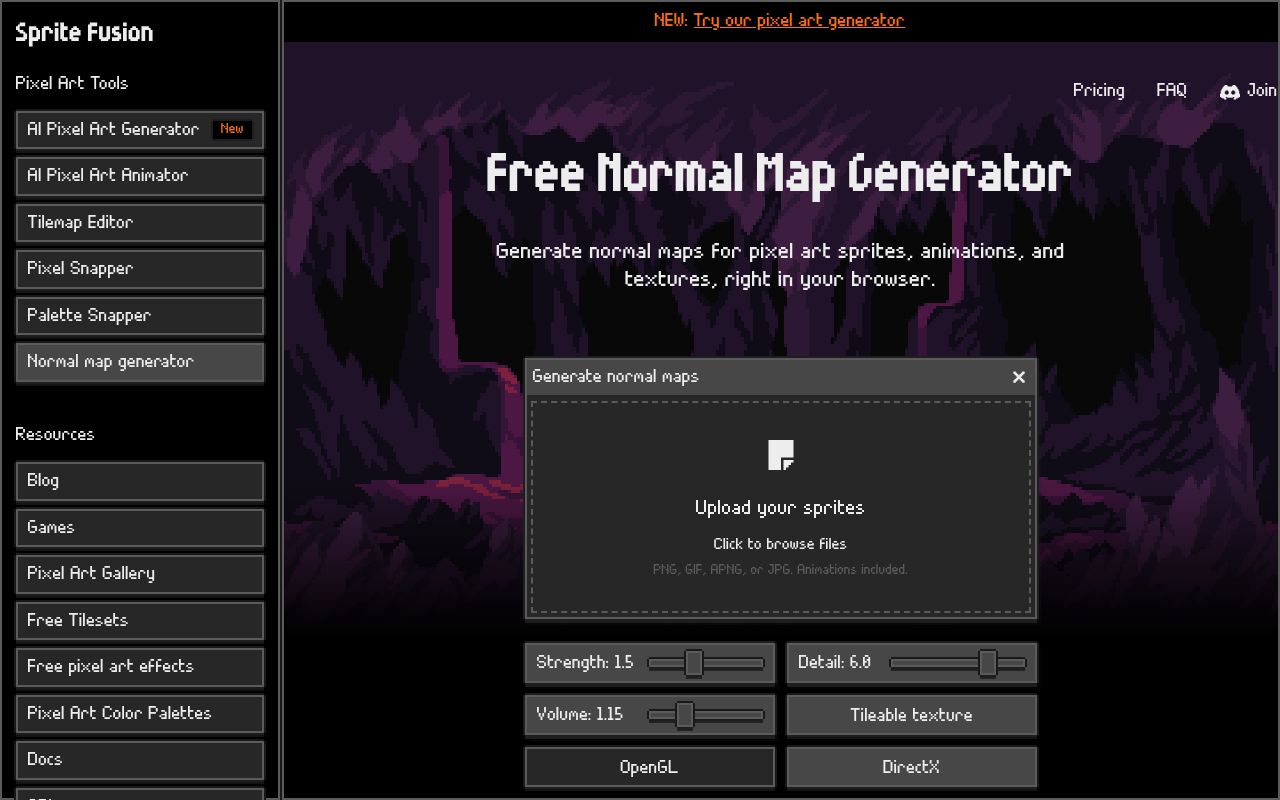
Choose the CLI for files and batches, WebAssembly for embedding the generator in your browser project, or the hosted page for its browser interface. The CLI and WASM module share their generator and decoder. Source installation starts inside the checkout with cargo install --path . --locked. The local and WASM documentation describes those integration routes, while the hosted generator presents an upload interface.
What do Strength, Detail, and Volume change?
The README separates overall strength, relief from painted shading and silhouette volume through --normal-strength, --detail-strength and --shape-strength. Their defaults are 1.5, 6 and 1.15 respectively. It also provides --detail-scale for shading smoothing, with a default of 0.6 pixels. The CLI control descriptions give these meanings and defaults. Painted highlights can become surface detail, so the detail controls are relevant when that shading produces unwanted relief.
Which game engines support the generated maps?
The normal maps target rendering workflows that use surface-direction textures; the dedicated guide names Godot and Unity among its examples. The README supplies OpenGL normals by default and a DirectX option that reverses the green channel. Choose the convention required by the consuming renderer. The normal-map guide names the engine examples, and the CLI options define the available convention setting.
Should I disable sRGB when importing the normal maps?
Yes. The README calls normal PNGs data textures and instructs users to disable sRGB sampling in the engine. Their pixel values encode surface directions rather than display colors. Keep this import setting with the selected normal convention and animation metadata so the consuming project has the information needed to interpret the generated files. The README import instruction supplies the setting directly.
Are automatically generated normal maps as good as hand-painted ones?
Sprite Normals estimates relief from color and shape, whereas hand painting lets an artist assign surface directions directly. The documentation-based AI Game Dev Labs review recommends treating generated output as a first pass. Its attributed recommendation fits the README's explanation that painted highlights can become surface detail. Choose according to whether estimated relief or direct surface authoring better matches the artwork's intended shape.
Can I use Sprite Normals for tileable 3D textures?
The local README documents PNG sprites and sheets, GIFs and APNGs, with controls for relief, frame size and normal convention. Those instructions provide a concrete route for image conversion. For a texture workflow, start with that documented input and output behavior rather than assuming a named tileability control exists in the CLI. The README option list is the reference for the local command used in this review.
Can I generate normal maps through an API or an AI agent?
The dedicated guide names a create_normal_map agent tool and POST /normal-maps for scripts and CI. It says the agent can select relief strength and the OpenGL or DirectX convention, and describes saving maps beside their sprites. The normal-map integration guide supplies those operation names. The local CLI remains another documented way to put generation into a scripted asset workflow.
Is Sprite Normals free and open source?
The repository carries an MIT licence, and the dedicated normal-map guide says normal maps are free. The README provides source-build instructions for the CLI and WebAssembly library, allowing integration into a local toolchain or browser project. The repository licence description and normal-map guide support those answers. Licensing, build requirements and the chosen integration route are separate decisions when planning adoption.
What we have not tested yet
Our run covers checkout setup, compilation and the recorded test suite; rendered asset quality, conversion throughput and production reliability remain untested. We did not reproduce issue #1, compare output against hand-painted references, run an engine lighting scene or profile application memory. Assigned CPUs and RAM are configuration facts rather than measured application consumption. The image label leaves actual compiler and operating-system versions unresolved. The registry recipe stopped at installation before exercising a library call.
The APNG issue supplies a proposed dependency change rather than evidence of a merged project fix. The accessible Medium excerpt ends before reproducible test details, and the video and Bilibili records supply no attributable conversion result. Dice Ark describes an inspired implementation. The null latest-release field supplies neither an HTTP response status nor proof that no release exists. The README command above is a documented example; this revision adds no execution result.
The page-7 extract does not support account requirements, a no-upload promise, a Tileable control, detailed engine-to-convention mappings or instructions to disable compression and filtering. Hosted texture capabilities and parity with the checkout consequently lack sufficient primary-source detail here. The general API extract and dedicated guide also leave a complete authenticated request, response behavior and service limits unresolved. Browser network behavior, malicious-input handling, decoder security and WASM packaging fall outside the recorded work.
Numerical product ratings remain unassessed because the records do not support complete judgments across setup routes, documentation coverage, support capacity and production maturity. A useful next acceptance task would use artwork with strong painted highlights and an animation from the team's actual exporter. Inspect the color atlas, import the normal map with the documented convention and sRGB setting, then move a light around the subject. Compare the visible shapes with the artist's intention and retain the timing metadata. This procedure is a proposed next step, not another experiment performed for this review.