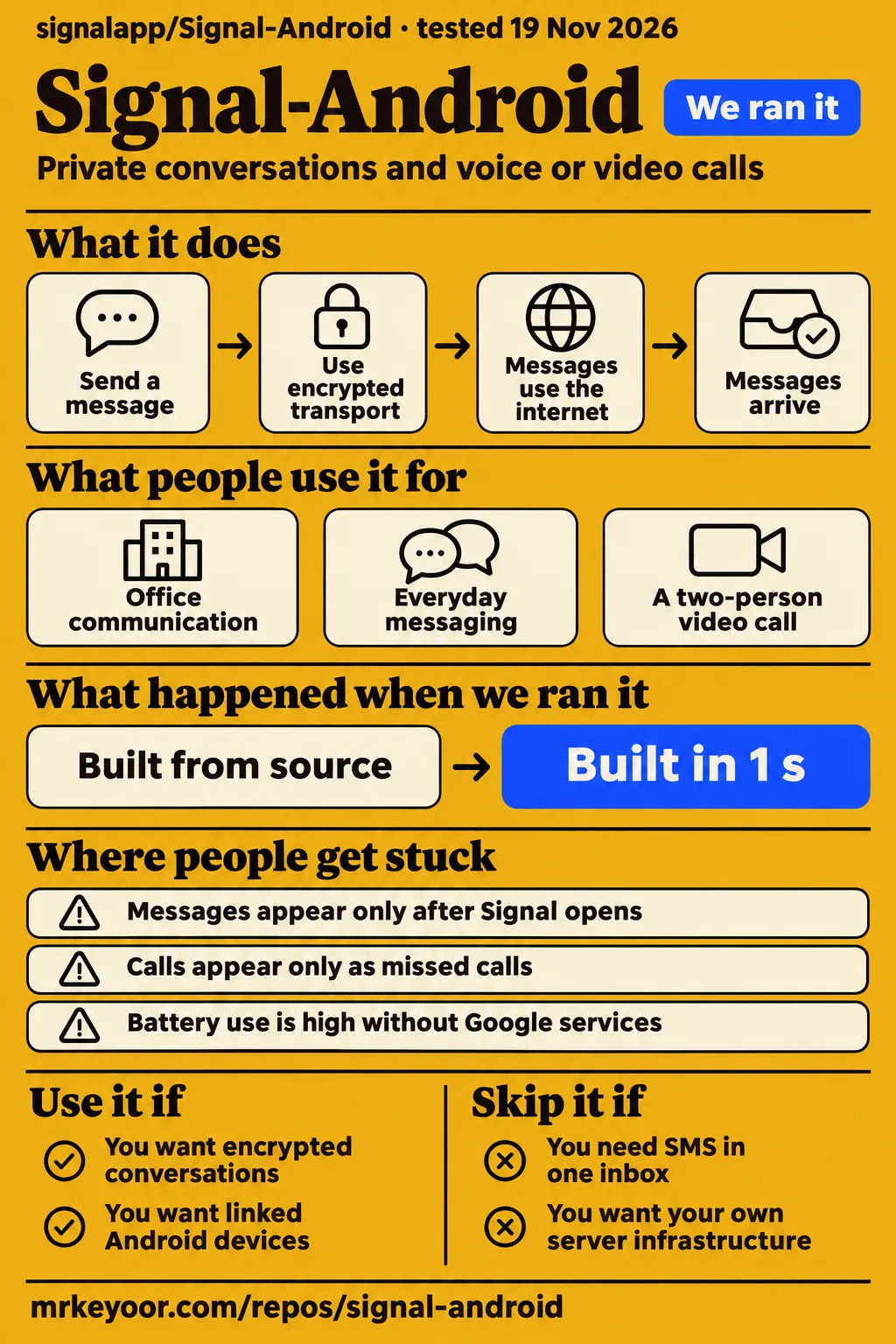
Signal-Android is the official open-source Android client for Signal's private messenger. Use it if your friends, family or colleagues will use Signal with you and you want encrypted conversations across devices. Skip it if you need one inbox for Signal and ordinary carrier texts: Signal messages do not use traditional SMS/MMS. Explain that requirement before helping someone move their conversations, particularly if you also manage their phone.
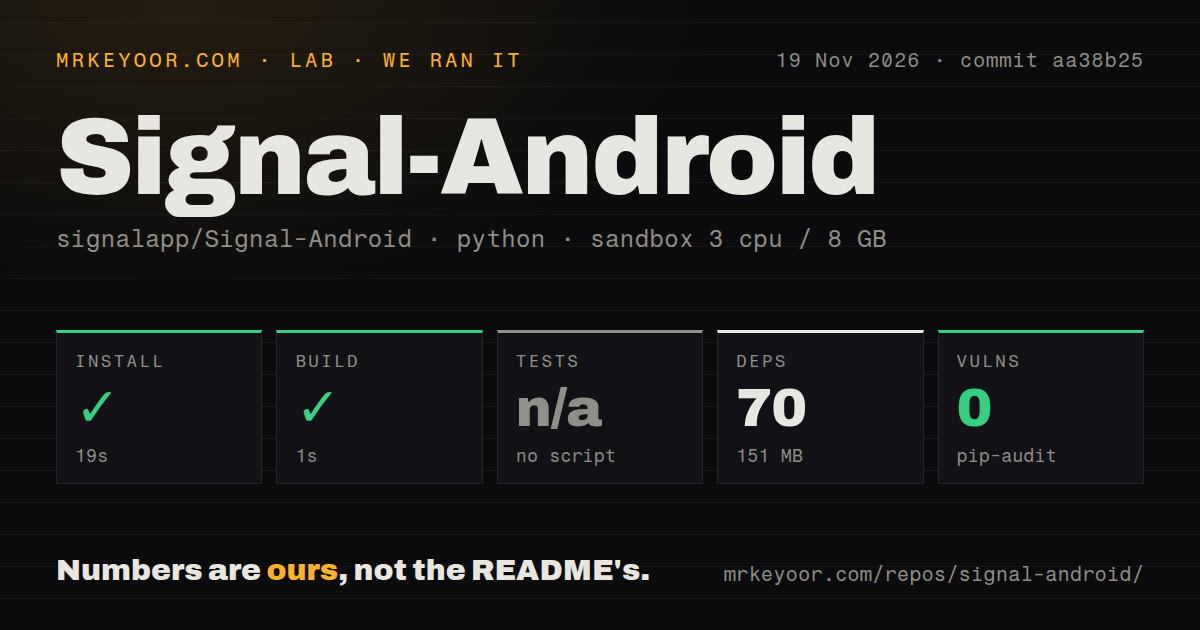
Our November 19, 2026 run installed the repository's Python APK-comparison tooling in 19 seconds and completed its build step in 1 second at commit aa38b25. The selected project was reproducible-builds/apkdiff/. A later Compose deployment attempt stopped at a missing-file check. This review combines those recorded outcomes with Signal's documentation and attributed user reports to answer a practical question: does Signal fit the people you need to reach and the devices on which you want to keep conversations?
What people use Signal-Android for
April 2021 reviewers describe office communication and use across Android, Windows and Linux; a January 2023 family account describes disruption after SMS removal. These accounts cover communicating with colleagues, keeping conversations available across computers and a phone, and helping relatives manage messaging. Their dates matter because the family example describes a capability that upstream Signal subsequently removed. They are individual accounts rather than measurements of how often people use Signal for each purpose.
| Who used it | What they did | What happened |
|---|---|---|
| Anonymous Spotsaas reviewer, April 27, 2021 | Used Signal for office communication during the pandemic | Reported improved office communication and called it reliable. |
| Anonymous Spotsaas reviewer, April 24, 2021 | Used an Android phone, Windows laptop and Linux workstation | Reported a similar experience across those platforms. |
| Hacker News commenter matxip, January 2023 | Set up nontechnical relatives with SMS and encrypted messaging in one app | Changed their apps after SMS removal and reported greater hesitation about future recommendations. |
| GitHub commenter dlemire60 | Used everyday messaging and a two-person video call | Praised the call quality but reconsidered continued use because of late messages. |
Matxip's account gives family recommenders a concrete lesson: introduce Signal as a separate messenger. The commenter had made it part of relatives' daily routine, then had to explain why their apps needed rearranging. In Nelson's tutorial, a group is configured with a five-minute disappearing-message timer. That demonstration gives another everyday use for the app: choosing how long messages stay in a conversation while creating the group.
What happened when we ran it
Our November 23 deployment attempt stopped because none of the runner's required Compose files existed. The failed prerequisite named compose.yaml, compose.yml, docker-compose.yaml and docker-compose.yml, then returned hands-on step safety: FAILED; unsafe repo. Here, "unsafe repo" is the runner's label for failing its Compose requirement. Its stated reason is the missing file, so that label is not evidence of malicious Signal code.
The run summary described deployment with the repository's own Docker Compose, contradicting the failed prerequisite. We record the attempt as blocked before deployment. The cleanup result was "teardown: ok". The prerequisite failure is the concrete execution result; the summary does not override it. The earlier November 19 harness run reached the Python helper project and recorded the following outcomes.
| Recorded check | Result | What you can conclude |
|---|---|---|
| Selected project | Python, ./reproducible-builds/apkdiff/ |
The harness selected tooling within the Android repository. |
| Install | Succeeded in 19 seconds | Dependencies installed for that selected project. |
| Dependency inventory | 70 dependencies; 151 MB on disk | This is the recorded tooling footprint. |
| Build | Succeeded in 1 second | The selected build step completed. |
| Tests | No tests script/target; skipped | The harness recorded a skipped test step. |
| pip-audit | 0 known vulnerabilities; 69 packages scanned; one package skipped | This is the recorded Python audit outcome and coverage. |
| Repository scan | 11,295 files; approximately 962,249 source lines; 144.2 MB checked out | These figures describe the checkout. |
| Scan signals | 6 CI workflow files; no Dockerfile; no tests directory detected | These are the harness's scan observations. |
The 19-second install and 1-second build belong to our run of the Python subproject at aa38b25. Its configured sandbox had 3 CPUs, 8 GB RAM and image label ghcr.io/astral-sh/uv:python3.12-bookworm. The repository snapshot separately lists release v8.36.3, dated November 17, 2026, and a last push on November 20. Those release and repository dates are distinct from the November 19 harness execution and the November 23 deployment attempt.
Where people get stuck: late delivery, silent calls and battery use
Issues #8692, #7733 and #12341 respectively report delayed messages, calls appearing only as missed calls, and excessive battery use. Each is open in the reviewed issue snapshot. Signal's OS troubleshooting page says Android settings can suppress notifications until the app opens and recommends excluding Signal from battery optimization. The discussions add device and network circumstances that help distinguish one reported failure from another.
| Symptom | What the discussion says | Response recorded in the discussion |
|---|---|---|
| Messages appear after opening Signal | The author of #8692 describes the phone catching up with desktop messages from several minutes earlier. | Official guidance covers background data and battery optimization; the discussion also includes reports with optimization disabled. |
| Calls appear only as missed | The author of #7733 reports reproduction across three Wi-Fi networks. | Moxie asks about VPN use; cegg1 reports the problem without VPN or Tor. |
| Battery use is high without Google services | Commenters in #12341 identify a GrapheneOS Pixel 5 and Pixel 6a. | A maintainer requested an Android Bug Report and suggested Battery Historian. |
| Historical push delivery fails | Certhas identifies restricted background data for Google services in #970. | The commenter attributes that particular case to a configuration setting. |
The OS troubleshooting instructions cover permissions, battery optimization and background data. These give a starting sequence for a phone that receives messages only after Signal opens. A useful report also identifies the phone, Android and Signal versions, network and VPN state. Issue #7733's comparison across three Wi-Fi networks illustrates what such detail contributes: the author reports the symptom after changing networks, while another commenter explicitly rules out VPN and Tor use in their setup.
Long conversations have a dated fix
The reporter of issue #9930 marks the historical slowdown solved in 5.20.4. The version history lists earlier affected releases and the explicit resolution, which gives readers a firmer reference than a closed label alone. Another participant describes sending delays in long conversations, while a commenter reports a friend's improvement after limiting each conversation to 5,000 messages. That history explains the origin of the workaround without making deletion the first recommendation.
The report concerns sending, downloading media and operating a long chat. Issue #8692 instead describes the phone catching up with messages already exchanged on desktop. Someone collecting a new report can identify the action that is slow, such as opening a conversation, sending a message or receiving its notification. Include the app version with that action: the explicit 5.20.4 resolution belongs to the historical long-conversation report, while #8692 records a different delivery symptom.
Privacy settings reach beyond encrypted transport
Signal's feature index lists disappearing messages, screen lock and screen security alongside backup and transfer options. The screen-security entry names blocking Google Gemini and Siri AI, while Nelson demonstrates a five-minute disappearing-message timer. A conversation timer and a device's notification settings affect different places where someone encounters a message. Signal's permissions page also documents Android notification controls and local storage, with the testing status collected in the final section.
TheHackersNews reported on November 21, 2026 that default screenshot restrictions aimed to limit OS-level AI access. That is an attributed report about the protection. Signal's own feature index directs readers to screen security, while its permissions page describes suggested replies and lock-screen notifications. Someone choosing privacy settings therefore has several named controls to examine, rather than a single setting that covers conversation history, notifications and screen access together.
Keep your old phone until you have chosen a recovery route
Signal's registration help says a fresh installation does not restore previous message history and directs people with their old device to transfer it. The registration troubleshooting page states both points together. Before changing devices, decide whether you are replacing a phone, adding another device or arranging a backup method. Registering the account alone is not the history-transfer step described by the help page.
| Your situation | What the documentation supports | Decision before changing devices |
|---|---|---|
| You still have the old phone | Registration help directs you to device transfer. | Keep that device available while arranging the transfer. |
| You want a second Android phone or tablet | The August announcement supports linking and optional history transfer. | Decide whether to transfer history to the extra device. |
| You are choosing a backup method | The feature index lists on-device backups and Signal Secure Backups separately. | Choose the particular method whose recovery instructions you need. |
| You are reinstalling | Registration help says new installs do not restore old history. | Treat registration and history recovery as separate tasks. |
Signal's August 4, 2026 announcement says linking a new phone or Android tablet can optionally transfer complete message history and the last 45 days of saved media. The announcement identifies Signal Android v8.20 as the rollout version. Text history and saved attachments therefore have different stated transfer coverage. Someone looking for an older photograph needs to consider its availability separately from seeing the conversation's text on the additional device.
Signal-Android vs WhatsApp, Telegram, Google Messages and Element
Telegram distinguishes Cloud Chats from Secret Chats, while Element X Android identifies itself as a Matrix client. Those are documented product differences; the WhatsApp and separate-SMS examples below come from attributed users describing their contacts and app choices. The comparison turns on whom you need to reach, whether you need carrier texts and whether you are choosing a messaging network or server infrastructure.
| Alternative | Why you would choose it | Evidence behind that choice |
|---|---|---|
| Your contacts already use it and will not add Signal. | WhoRoger reports acquaintances returning to WhatsApp after Signal removed SMS. | |
| Telegram | You want channels or bots and accept its distinction between chat modes. | Telegram's FAQ distinguishes server-client encryption in Cloud Chats from an additional client-client layer in Secret Chats. |
| Google Messages or a built-in SMS app | You need an inbox for ordinary carrier texts and SMS verification codes. | RGBchocolate describes moving verification texts to Lineage's built-in messaging app. |
| Element X / Matrix | You want an Android client for Matrix. | Element X Android describes itself as Element's Matrix client; unsubbed.co recommends Matrix/Element for server ownership. |
WhoRoger's account gives a practical reason for choosing WhatsApp: acquaintances were already reachable there. RGBchocolate's choice answers a different problem by moving carrier texts into another app. A January 2023 Hacker News announcement offers an SMS-retaining fork based on Signal 5.38, with upstream improvements described as future plans. Readers following that announcement would be evaluating the author's fork rather than the official distribution linked by signalapp/Signal-Android.
Outdated claims, corrected
Signal's August 2026 linked-device announcement supersedes unsubbed.co's April 2026 claim that only one phone can be used at a time. Older SMS descriptions also belong to their dates or forks. The corrections below name the originating page rather than treating every Signal-related README, directory entry and review as a description of the same current application. The official linked-device announcement and permissions documentation supply the corrections to those two product claims.
| Page or claim | Correction |
|---|---|
| Unsubbed.co: one phone at a time | Signal announced linking another Android phone or tablet in August 2026. |
| Unsubbed.co: a dead phone means waiting because there is no web client | The August announcement adds linked Android phones and tablets, an access route through another app. |
| EFF's older guide: Signal can replace the default SMS app | The guide was reviewed May 20, 2021; current permissions documentation says Signal messages do not use SMS/MMS. |
| Pascaldragon's README: optional plain SMS/MMS | That wording describes the pascaldragon fork, rather than current upstream Signal. |
| Phone-number registration described as universal across Android channels | Signal's support index lists "Phone Numberless Registration for Android beta". |
| Enlisted.directory's no-self-hosting wording read as technical impossibility | Jtof-dev describes an older modified Android client working with a forked Signal server. |
Jtof-dev's custom-server description explicitly concerns an older fork working with another fork. Signal's registration index explicitly labels its phone-numberless entry as Android beta. Those names identify the project and channel each statement describes. Usernames answer a separate contact-sharing question: Signal's guide describes optionally sharing a username instead of a phone number. A username description therefore should not substitute for the registration instructions of a particular Android release channel.
Questions people ask
Signal messages use the internet rather than traditional SMS/MMS, so carrier verification texts need a separate SMS inbox. That answers the SMS question raised in the Reddit discussion and Signal's permissions documentation. Other reader questions concern installation, calls, delayed delivery and battery use. The answers below name the official installation route or the relevant issue, including the historical version where a reporter explicitly records a fix.
What is Signal-Android, and is it the official Signal app or an SMS-supporting fork?
The signalapp/Signal-Android repository is the official Android client; the SMS-retaining fork is a separate project. The official README links the Play Store and signal.org distributions, while the Hacker News fork announcement explicitly advertises retained SMS support. The announcement describes its starting point as Signal 5.38 with a couple of lines commented out and says upstream security and interface improvements are future plans.
How do I install and set up Signal on an Android phone or tablet?
Signal recommends Google Play for ordinary Android installation and offers a direct APK for advanced users with special needs. Its APK distribution page states that recommendation. For an additional Android phone or tablet, the August announcement describes linking the device and optionally transferring history. For a replacement phone, registration help directs people who still have the old device to the message-history transfer instructions.
Why should I use Signal instead of another messaging app?
Signal's README describes messaging and voice or video calls with privacy protections always enabled. The official repository also links its iOS and Desktop clients. That suits people who want Signal conversations across devices and whose contacts also use it. Contact availability affects the choice: WhoRoger describes acquaintances becoming unreachable through Signal after moving their messaging back to WhatsApp.
Does Signal still support SMS and MMS, and what should I use for verification texts?
Signal messages do not use traditional SMS/MMS, according to its permissions documentation. RGBchocolate reports using Lineage's built-in messaging app for verification codes, illustrating the separate-inbox arrangement. Explain that arrangement when helping someone who remembers Signal as a combined SMS and encrypted messenger: the carrier code goes to the SMS app, while their Signal conversations stay in Signal. The older EFF guide describes the historical combined arrangement.
Can I install and use Signal without Google Play or Google services?
Signal offers a direct APK, and GrapheneOS users in issue #12341 describe running it without Google Play Services. The official download page includes signing-certificate information, while the issue identifies Pixel 5 and Pixel 6a configurations. Signal recommends Google Play for most users and labels the direct download for advanced users with special needs. The GrapheneOS commenters report battery concerns after installation.
Why do Signal calls appear as missed calls without ringing?
Issue #7733 reports no incoming-call indication followed by a missed-call notification, including reproduction across three Wi-Fi networks. Moxie asks about VPN use, and another commenter reports the symptom without VPN or Tor. Those circumstances belong in a troubleshooting report alongside the phone and app versions. The issue snapshot is open and includes both the network question and the response describing phones without either VPN or Tor enabled.
Why do Signal messages arrive late, in batches or only after I open the app?
Signal's troubleshooting page says Android settings can limit notifications until the app opens and gives battery and background-data checks. Issue #8692 describes a phone receiving a flood of earlier desktop messages. The discussion also includes reports with battery optimization disabled. A useful report identifies whether the message or its notification arrives late, together with the device, app version and network circumstances described in the affected setup.
Can Signal avoid playing a notification sound for every delayed message?
Flibbles asks for that behavior in issue #8692 after describing a separate chime for each delayed message. The comment explicitly requests a way to stop repeated sounds when delayed messages arrive. It is a feature request within the delivery discussion, alongside reports of notifications arriving only after the app opens. The request concerns the sounds accompanying the batch, rather than an explanation for the original delivery delay.
Why does Signal use so much battery without Google Play Services, and how can I investigate it?
Issue #12341 includes battery complaints from GrapheneOS users on Pixel devices, and a maintainer requested an Android Bug Report. The Pixel 5 commenter identifies Signal 5.44.3 and disabled battery optimization. Device, version and background settings make the complaint concrete. The maintainer suggested Battery Historian and explained that the ordinary Signal debug log lacked enough information for this investigation; an Android Bug Report includes extensive information about the device.
Can Signal check for messages periodically to reduce battery drain?
Furai proposes interval polling in issue #12341 and describes wanting checks every 1-5 minutes. The comment frames the connection mechanism as an assumption and polling as a requested option. The commenter wants less immediate delivery in exchange for lower power use. That proposed interval belongs to the user's request, alongside other participants' reports about battery consumption without Google Play Services on their devices.
Has the slowdown in long Signal conversations been fixed?
The reporter's history in issue #9930 says the reported slowdown was solved in 5.20.4. The same passage lists the earlier affected Signal versions. Another commenter reports improvement after limiting a friend's conversations to 5,000 messages. The version-specific resolution concerns the historical long-conversation problem; issue #8692 instead describes a phone catching up with messages already exchanged on desktop. Include the affected action and app version in a new report.
Can I send pictures with readable small text or choose their compression level?
Issue #672 records small text becoming unreadable after sending and includes a request for a picture-size option like Threema's. The closed discussion describes an original image whose text became obscured in the received copy. Another participant describes an event poster becoming unreadable to the recipient. For posters or scanned text, compare the recipient's copy with the original: the reported problem was received legibility after compression.
What we have not tested yet
Our successful install and build observations cover the Python APK-comparison subproject at aa38b25; the November 23 Compose attempt stopped before deployment. We have no first-hand Android build, emulator, physical-phone, messaging, ringing, battery, image-quality or recovery result. That attempt produced no application screenshots or known-answer application tasks. The sandbox image label also does not establish actual runtime or operating-system versions, and the Python audit is not an Android dependency or cryptography assessment.
We have not measured delivery failure rates, background power draw, long-history performance or alternatives on matching devices. Historical reports and open issue labels do not determine which symptoms reproduce in v8.36.3. The image-compression discussion gives no shipped fix version or current quality-selector walkthrough. The delayed-chime and interval-polling requests supply no confirmed shipped controls. The old SMS-retaining fork announcement supplies no current maintenance or security assessment, and the custom-server fork supplies no official-support or public-network compatibility result.
The feature index names on-device backups and Signal Secure Backups without their complete recovery conditions. We have not tested those methods, device transfer, additional Android devices or older-media availability. August's announcement identified Settings, the in-app camera and complete keyboard shortcuts as unfinished; later completion and the separately claimed five-device limit are unresolved here. The phone-numberless beta listing leaves eligibility, rollout and stable availability unresolved. The AI-access report lacks a primary implementation examination or adversarial testing.
Signal documents Android 14 suggested-reply and lock-screen notification settings and says its encrypted database and received media are stored locally; we have not independently tested those documented behaviors. The permissions page describes Android settings paths for suggested replies and lock-screen notifications, then explains local storage under Photos/Media/Files and Storage. These are documented behaviors, separate from the Python helper installation and build that produced our measurements.
Before moving conversations, keep the old phone and compare the received history and attachments on the new device. Before depending on incoming calls, arrange a call with the screen locked on the phone and network you intend to use. Those are proposed acceptance checks, not tests performed for this review. They address the practical decisions that the recorded Python install and build leave open: timely alerts and continuity of conversation history.