One framework covers 5 scraping layers
Scrapling puts HTTP fetching, browser automation, parsing, crawling, and agent access behind one Python project. Fetcher handles ordinary requests, DynamicFetcher drives Chromium or Chrome, and StealthyFetcher adds fingerprint controls and Cloudflare handling. Responses expose CSS, XPath, text, regex, and tree navigation methods. The spider layer then adds concurrency, multiple sessions, throttling, checkpoints, proxy rotation, streaming, and exporters. That breadth is the reason to consider Scrapling: a script can become a crawler without changing its response model.
The same breadth raises the cost of trust. Our b11da90 checkout contained 263 files, about 29,842 lines of source, and occupied 4.6 MB before installation. A team using only stable HTML parsing would take on browser processes, optional dependency groups, session state, and crawl policy it does not need. Start with the cheapest fetcher that gets the right page. Promote a target to a browser only after a saved fixture proves direct HTTP is insufficient.
What happened when we ran it
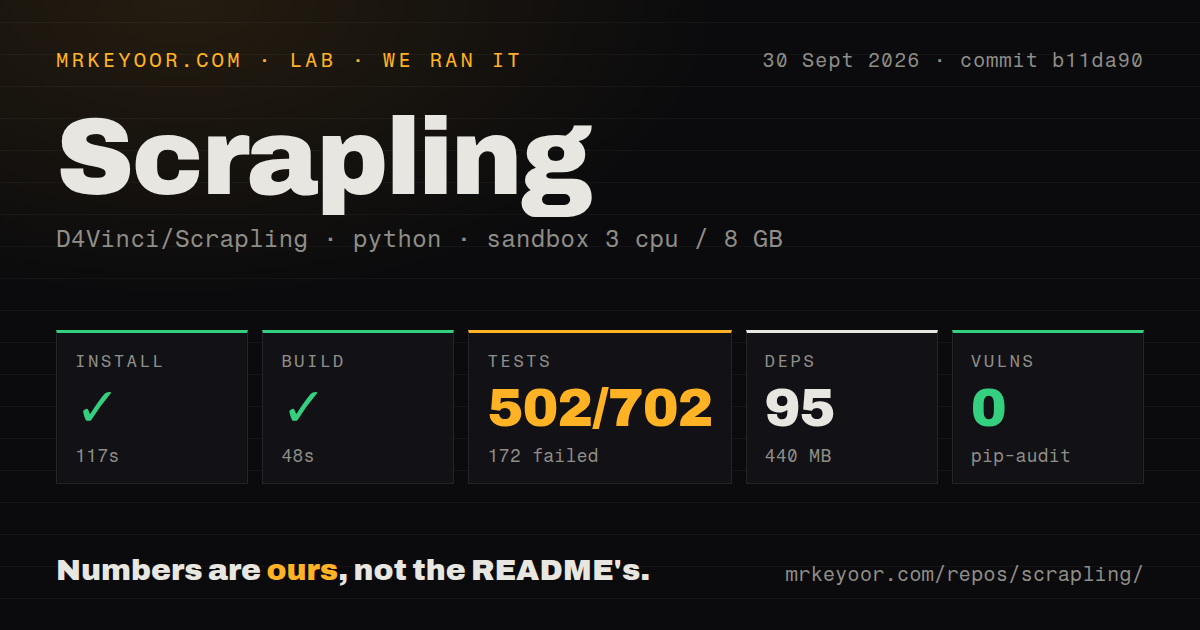
Our sandbox installed 95 packages in 117 seconds and occupied 440 MB on disk. The build completed in 48 seconds. We ran commit b11da90 in an unprivileged Debian container with 3 CPUs, 8 GB of RAM, Python 3.12, and no secrets. Pip-audit reported 0 known vulnerabilities. Those results cover repository setup, compilation, and the installed Python environment. They do not measure crawl speed, bypass success, memory use under load, or extraction accuracy.
Pytest failed with exit code 1 after 41 seconds. The summary reported 502 passed, 172 failed, and 28 collection or setup errors out of 702 tests. The log tail names failures across scheduler, session, robots.txt, and Shopify spider cases. Its repeated message is plain: async test functions are not natively supported. The supplied tail does not show why the needed async test support was unavailable.
That distinction matters. The result does not prove that Scrapling's async code is broken, and it does not permit us to blame a missing Debian package. It proves that commit b11da90 did not deliver a green full-suite run in our fresh container, despite 502 passing tests. Before adopting the spider layer, reproduce the relevant groups in the exact image you will ship and treat any unexplained setup error as an open release gate.
The base install does not include the fetchers shown up top
Python 3.10 or newer is the documented floor, and pip install scrapling installs the parser rather than the fetcher stack used in the README examples. Fetchers require the fetchers extra followed by scrapling install, which downloads browsers, system dependencies, and fingerprint tooling. Separate extras cover the shell, RAG conversion, MCP, or the whole package. The warning is documented clearly, but it is easy to miss after reading the browser examples first.
Our full environment reached 95 packages and 440 MB before any production crawl data or cache. Basic parsing and ordinary HTTP requests do not need a hosted service credential. A real deployment may still need proxy credentials, a remote CDP browser, persistent crawl storage, and an MCP bearer token. Release v0.4.15 made the MCP HTTP transport bind to localhost and require authentication by default, which is the correct starting posture for a tool that can fetch arbitrary pages.
Adaptive lookup can return plausible data from the wrong element
Scrapling 0.4.15 can save information about a selected element and relocate it after a site changes. That is useful when a product card moves or its classes change. Similarity also creates an awkward failure mode: the replacement can be syntactically valid and semantically wrong. A nearby old price, sponsored result, or mobile-only title may satisfy the selector while corrupting the record. Validate required labels, types, ranges, and item counts after every adaptive match.
The spider framework adds useful controls around that parser. It can pause and resume through checkpoints, tune per-domain delay, obey robots.txt when configured, cache responses for development, and export JSON, JSONL, CSV, or XML. A 10-request concurrency setting is still a policy choice, not evidence that a target permits it. Scrapling's README tells users to respect site terms, robots rules, privacy law, and local scraping law. Put those decisions in shared configuration rather than leaving them to each spider.
Anti-bot support does not cover every protected page
Version 0.4.15 advertises Cloudflare Turnstile handling, yet the current tracker shows concrete boundaries. In issue 468, a user reports that one solver path took 74.4 seconds even with a 15-second fetch timeout. The page eventually loaded, so the problem is an unbounded wall clock rather than a failed fetch. If job deadlines matter, enforce a process-level limit until that path is resolved.
Issue 472 reports a public permit page returning an Imperva incident response in plain HTTP, Playwright, and stealth modes. The reporter had not tried every available fingerprint, proxy, or headful option, so the issue does not establish a universal failure. It does establish that the headline anti-bot capability is not a service guarantee. Test the exact targets you own or are allowed to access, save blocked responses, and keep a manual fallback for sources that change defenses.
The MCP server is secure by default, but v0.4.15 broke compatibility
Release v0.4.15 split 13 MCP tools into one-shot and session modes, renamed get to make_request, and added persistent HTTP sessions. The release calls the change breaking. It also added localhost binding and bearer authentication to the HTTP transport unless an operator explicitly disables them. Existing agent configurations therefore need a reviewed migration rather than an unattended package bump.
GitHub showed 84,951 stars, 6 open issues, and 5 open pull requests on October 1, 2026. The repository was pushed on September 30, while issues 447 and 459 were closed in September. That combination shows current maintenance even though the latest tagged release, v0.4.15, dates to August 23. Scrapling merits a pilot for teams that need its full stack. The pilot should end only when your targets, deadlines, extraction assertions, and selected test groups all pass in the image you will operate.