Six graph types turn a prompt into an extraction job
The README documents 6 named pipelines. SmartScraper handles one page, SearchGraph works from search results, SpeechGraph adds audio, ScriptCreator produces Python, and multi-page variants accept several sources. Websites are only part of the input surface: local XML, HTML, JSON, and Markdown documents are also supported. This makes ScrapeGraphAI useful when the requested fields are clear but page structures vary enough that maintaining selectors across sources becomes the expensive part.
A language model remains in the loop. The examples use local Ollama or a provider configuration, and the README names OpenAI, Groq, Azure, Gemini, and other options. Our checkout had 389 files, roughly 29,974 source lines, and occupied 5.5 MB before installation. The source tree is modest; the operating path expands once LangChain integrations, browser automation, model access, and document-processing packages enter the environment.
The install adds 125 packages before browser binaries or model weights
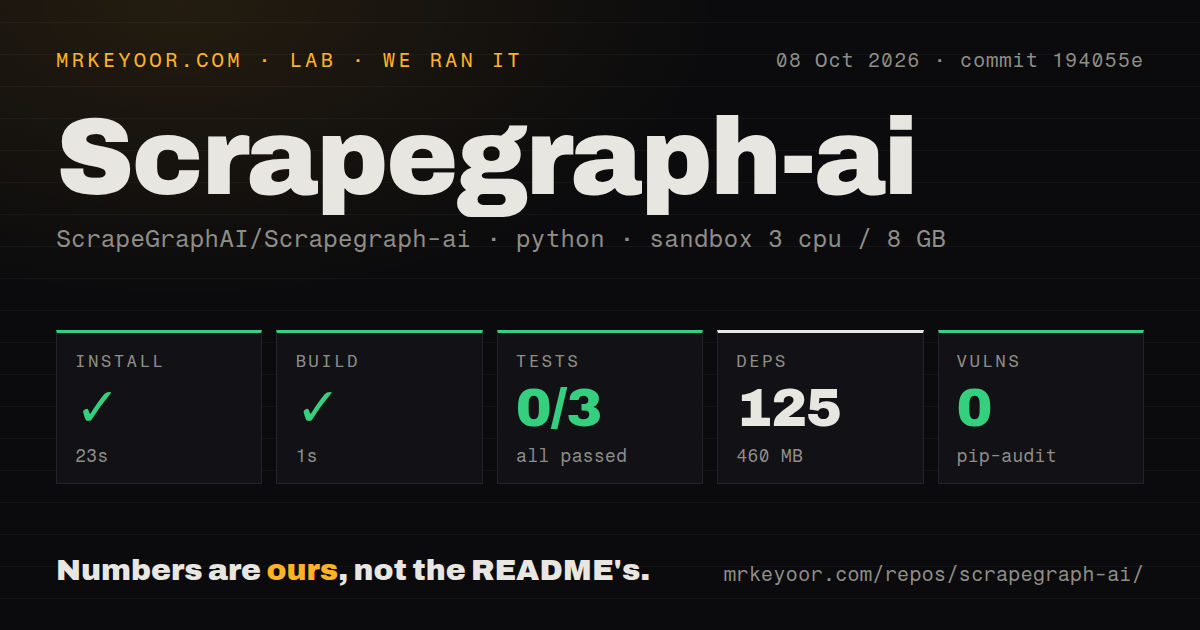
Our sandbox installed 125 packages in 36 seconds and used 447 MB. The package build succeeded in another 8 seconds. That is a manageable trial for an AI-oriented Python library, yet it does not include the work of installing Playwright's browser, downloading a local Ollama model, or configuring a hosted provider. A simple prompt still sits on top of several moving parts: page retrieval, content conversion, token handling, model output, and schema parsing.
Python 3.12 or newer is required by the current project metadata. Hosted providers need their own API credentials, while Ollama needs a running local service and a pulled model. The README explicitly assigns browser configuration, proxies, anti-bot handling, scaling, and maintenance to the open-source user. The measured 447 MB environment is therefore a starting point rather than the full production footprint of a browser, model, proxy layer, and job queue.
What happened when we ran it
Our run used commit 532dfff in a fresh unprivileged Debian container with 3 CPUs and 8 GB of RAM. Installation completed in 36 seconds with 125 packages and 447 MB on disk. The build passed in 8 seconds. Pip-audit reported 0 known vulnerabilities in the installed Python dependencies, and the repository scan found 4 CI workflow files, a Dockerfile, a compose file, and a tests directory.
Pytest exited with code 4 after 19 seconds. It collected 254 items, then reported 3 setup or collection errors, 0 passed, and 0 failed. Two errors said asyncio was not found in the markers configuration; the third was attached to tests/test_generate_answer_node.py without a cause in the supplied log tail. The same tail showed 8 warnings, including a Pydantic notice about the older @validator style. The log does not prove why the marker was unavailable.
An untrusted URL can cross the server boundary in v2.1.3
Open issue 1115 concerns FetchNode in v2.1.3 and current main. Its report traces user-supplied HTTP sources into server-side requests without filtering private, loopback, link-local, or cloud-metadata destinations. A public scraping endpoint could therefore become a path to internal services unless the surrounding application validates destinations and constrains network egress. The issue remained open on August 30, 2026, with a follow-up discussing both direct requests and browser subrequests.
Dependency scanning does not answer that application-level problem. Pip-audit found 0 known vulnerabilities in our 125-package environment, while the SSRF report concerns how valid dependencies are used. Operators accepting URLs from other users should allow only HTTP and HTTPS, resolve and reject non-public destinations, check redirects and browser subrequests, and enforce outbound network policy outside the Python process. Those are deployment controls, not options the README's short SmartScraper example provides.
Telemetry can contain page content, prompts, and responses
The README calls its telemetry anonymous usage metrics and recommends SCRAPEGRAPHAI_TELEMETRY_ENABLED=false for opting out. The current telemetry module builds a payload containing the user prompt, JSON schema, website content, LLM response, model name, and URL when all required values are present. Pull request 1141 reproduces version 2.2.2 reading the environment variable's existence but taking its value from the config file, leaving telemetry enabled on a fresh config.
Privacy-sensitive users should verify the effective flag in process before sending real pages. The source also exposes a direct disable_telemetry() function and reads ~/.scrapegraphai.conf, but the advertised environment-only path has an open correction. Our 36-second install and 8-second build say nothing about which runtime data leaves the host. Review the telemetry call path, block its endpoint if policy requires, and use test content until the effective behavior matches the deployment's rules.
The Dockerfile installs PyPI on 3.11 instead of this checkout
The repository includes container files, although they do not form a ready source-development stack. Its Dockerfile starts from Python 3.11, runs pip install scrapegraphai, installs a burr extra, and downloads Playwright dependencies and browsers. It never copies the checked-out 389 files into the image. The current pyproject.toml requires Python 3.12 or newer, so that Dockerfile should be read as a published-package image recipe rather than proof that current source builds inside it.
The compose file defines 1 service, Ollama, with its standard port and a persistent model volume. It does not start ScrapeGraphAI, a worker, an API, a proxy, or a browser service. Users still design that application layer and decide how prompts, URLs, credentials, results, retries, and rate limits move through it. The 4 CI workflows show project automation, but our own test command did not get beyond collection on the measured commit.
v2.2.2 fixed blank results while newer reports remain open
Release v2.2.2 was published on August 23, 2026, and changed fetching so HTTP failures and missing content surface as errors instead of blank or NA fields. The repository was pushed on August 27. GitHub listed 30,389 stars and 14 open issues and pull requests, with new issue and pull-request activity on September 1. That is current maintenance, although the open SSRF and telemetry work affect adoption more than the small queue suggests.