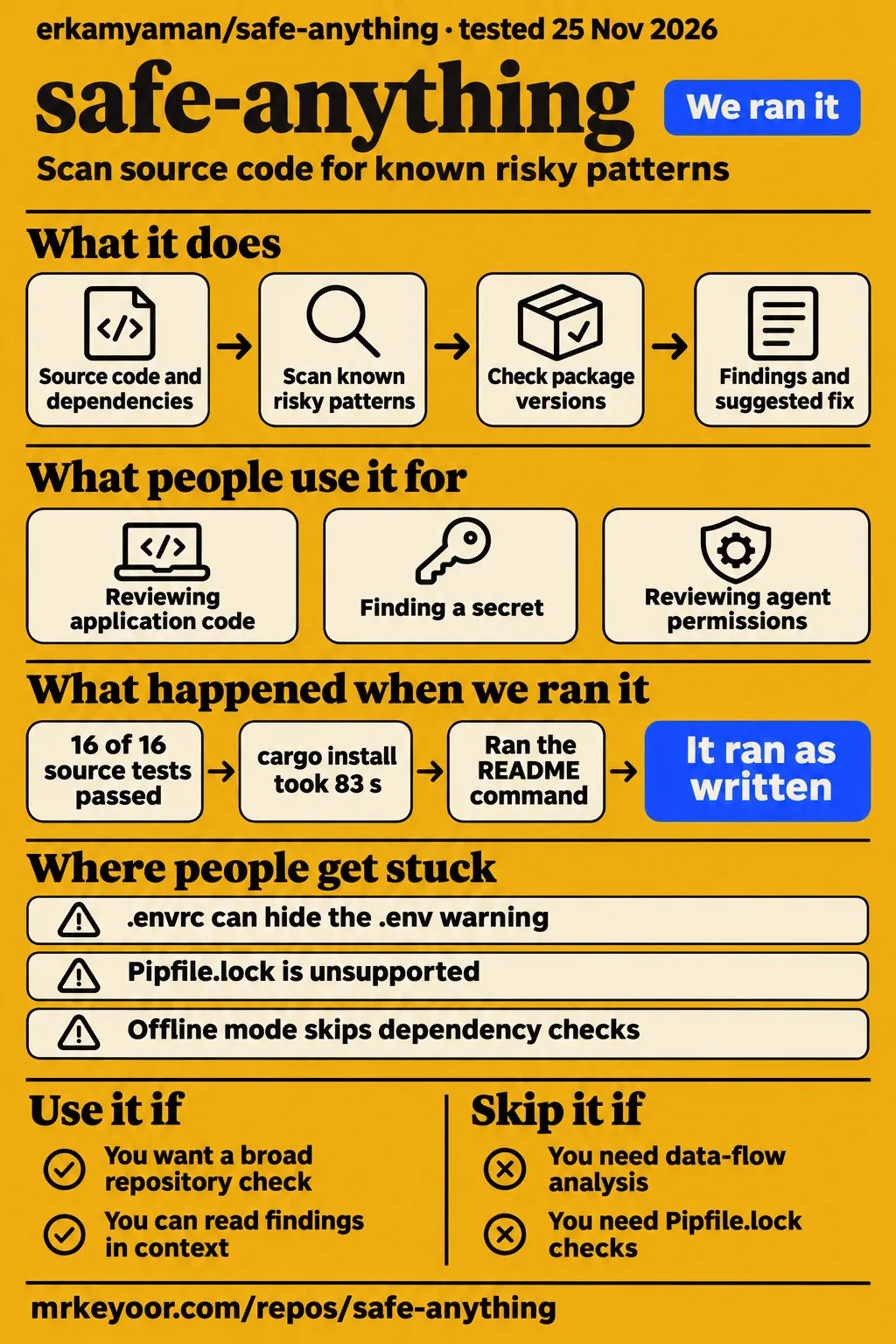
The verdict: use it for repository triage
Our CLI run returned "No problems found" after scanning zero files. Use safe-anything for a broad first pass if you can review both findings and coverage totals; avoid relying on it for security sign-off or data-flow analysis. The distinction comes directly from our quick-start result and the README's description of known-pattern detection. Pipenv maintainers also have a specific selection problem: issue #22 reports no Pipfile.lock dependency check.
A scanner's successful exit and its coverage count answer different questions. In our run, the command completed, but its own report counted no examined files or packages. Read those totals before interpreting the findings list. For a maintainer reviewing application code, workflow permissions and agent configuration together, safe-anything's documented scope offers a useful starting point. The report still needs to identify the files and dependencies that formed that review.
What people use safe-anything for
The author reports scans of vulnerable applications, framework code, Next.js environment files and coding-agent setups. The README's results distinguish useful detections from false positives rather than presenting every match as an exploitable vulnerability. Its source checks cover patterns such as SQL injection, where input changes a database query, and cross-site scripting, where untrusted content becomes executable page script. Findings include a location, explanation and suggested fix.
| Who ran it and on what | Reported outcome | What the example demonstrates |
|---|---|---|
| The author, on OWASP Juice Shop and DVWA | Known injection flaws, eval and seeded passwords, with false positives acknowledged | Reviewing recognisable security patterns in deliberately vulnerable applications. Author's application scans |
| The author, on Express and Flask | No findings in Express; both Flask findings judged false positives in practice | Reading findings against the code's actual input and purpose. Author's framework scans |
| The author, on 73 Next.js examples with environment files | One project flagged for a password behind NEXT_PUBLIC_ | Finding a secret assigned a browser-visible environment prefix. Author's environment checks |
| The author, on anthropics/skills, vercel-labs/agent-skills and a local Claude setup | No remaining prompt-injection hits on skills warning against injection | Distinguishing warnings about hostile instructions from the instructions themselves. Author's agent checks |
The Next.js result connects configuration review to application behavior: the public prefix ships a value into the client bundle. The Flask examples require a different reading. The author describes evaluation of the user's own shell startup file and SHA-1 key derivation as false positives in practice. Those examples give a maintainer something concrete to inspect after a match: the value's destination, the input's origin and the operation's purpose.
The author also reports infrastructure findings in real repositories, including open ingress, pull_request_target and unpinned actions in the validation status document. A separate dependency fixture queried live OSV.dev for 13 packages across six ecosystems and returned advisories with nearest fixed versions. These are different uses of the same command: source-pattern review, configuration review and advisory lookup each produce a different kind of finding.
What happened when we ran it
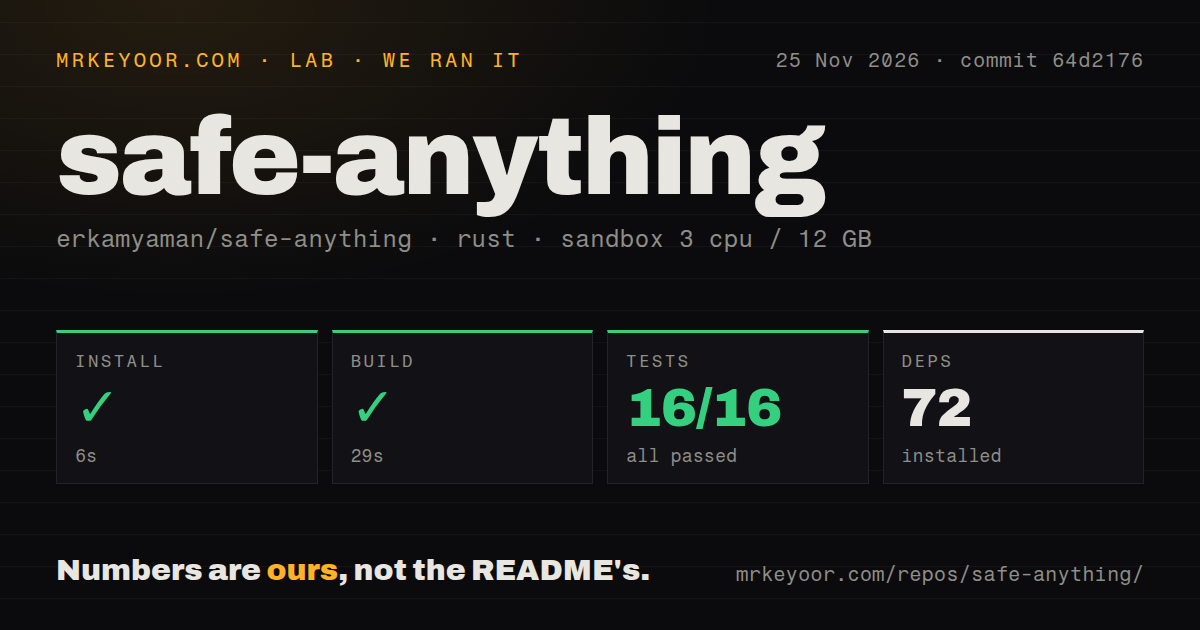
Our November 25, 2026 CLI run identified safe-anything 1.0.2 and completed its quick-start scan with zero files examined. The run record identifies commit 64d2176c4992 and an unprivileged lab-rust:1 container configured with 2 CPUs, 4 GB RAM, no published ports and no secrets. Separate source checks used commit 64d2176 with 3 CPUs, 12 GB RAM and the same image label.
The CLI sequence recorded cloning in 1 second, followed by Cargo installation of 4.5 MB in 82.9 seconds. The version command exited 0 in 0.1 seconds. The help command also exited 0 in 0.1 seconds, listing JSON output and SARIF 2.1.0, a report format used by GitHub code scanning.
| Recorded check | Answer | Verdict | Why |
|---|---|---|---|
| Did source-check installation complete? | Succeeded in 6 seconds; 72 dependencies recorded | Passed | The source-check installation completed. |
| Did the source checkout build? | Succeeded in 29 seconds | Passed | The recorded build exited successfully. |
| Did its recorded tests pass? | cargo test: 16 passed, 0 failed of 16, in 4 seconds | Passed | All tests counted by this run passed. |
| Did the CLI quick-start scan examine files? | Exit 0; zero files scanned and zero packages checked | Empty scan | The report counted no application files or dependency packages. |
The scan command, safe-anything ., exited 0 in 0.1 seconds; its output reported 0.00 seconds for scanning. It said "No problems found. Scanned 0 files" and "Dependencies: 0 packages checked against OSV.dev" in our recorded result. The sequence ended with successful teardown. None of the recorded steps reports a command failure; the consequential outcome is the empty coverage count.
Our source-check measurement recorded 135 repository files, about 4,194 source lines and a 2.3 MB checkout. It also recorded two CI workflow files, a tests directory and no Dockerfile. Those checkout totals describe the source tree, while the CLI's zero counts describe its scan report. We measured installation, build and test completion in the source-check environment; the separate CLI installation has its own timing and installed-size record.
Where people get stuck: environment files and package identity
Issue #32 reports that .envrc or .env.local in .gitignore can suppress a warning about an unignored .env file. The reporter's reproduction places DEBUG=1 in .env and only .envrc in .gitignore, producing "No problems found". Replacing that ignore entry with node_modules produces the expected medium finding. The requested correction is to match patterns that actually cover .env, with a regression test for the mistaken prefix match.
| Problem reported | Recorded status | Practical response |
|---|---|---|
| .env ignore check accepts unrelated prefixes | Issue #32 is open | Inspect the patterns that actually ignore .env. |
| Pipenv dependencies receive no dependency check | Issue #22 is open | Use a checker that reads Pipfile.lock. |
| Local Yarn packages can match unrelated public packages | Issue #9 is closed | Compare the advisory's package identity with the local descriptor. |
| Trusted HTML construction is flagged | The README names innerHTML noise | Read the variable's input path before suppressing the line. |
The Yarn report describes a workspace entry read as the public npm package my-app and sent to OSV. Its requested change skips workspace, link, portal and file descriptors. That is an identity problem: an advisory may be genuine for the public package while being irrelevant to the local workspace. For HTML findings, the README documents safe-anything:ignore comments that silence the current or next line after review.
Offline mode skips the dependency lookup
Offline mode skips dependency checks, while ordinary scans send package names and versions to OSV.dev. The README's network explanation calls that dependency lookup the only network request and says scanned code is not executed. Its --offline option therefore changes the work performed, rather than replacing the advisory service with a local database. Teams with restrictions on outgoing dependency metadata need a separate approved route for those checks.
The README lists package-lock.json, npm-shrinkwrap.json, yarn.lock, pnpm-lock.yaml, Cargo.lock, requirements files, poetry.lock, uv.lock, pdm.lock, go.mod, Gemfile.lock, composer.lock and pubspec.lock for dependency processing. That list is more useful than the phrase "every locked dependency": it names the formats a maintainer can compare with the repository. Pipfile.lock's absence is the specific concern raised by issue #22, rather than a claim that Python dependency checking is absent altogether.
Excluded paths determine the scan's file count
The README excludes generated and dependency directories, files over 2 MB, binaries and several file types. Its exclusion list names .git, node_modules, target, vendor, dist, build, .next, .venv, venv, pycache, Pods, .gradle and .claude/worktrees. Minified JavaScript, source maps, JSONL and log files are also skipped. A lockfile over 2 MB receives no dependency check, so file size affects dependency coverage as well as source scanning.
Adding paths to .safe-anything-ignore excludes more content; it cannot restore built-in exclusions. Ordinary lockfiles receive dependency checking without code rules. Tests, specs and fixtures normally report only real provider keys and private keys unless --include-tests is used. These settings explain why the scanned-file total belongs beside the findings list: a repository's checkout size and the scanner's examined-file count describe different sets of files.
safe-anything vs gitleaks, Opengrep, AgentSec and DepSafe
Issues #24 and #25 identify gitleaks patterns for SendGrid and PyPI credentials that their reporters say safe-anything misses. The SendGrid report and PyPI report support that specific comparison. The other alternatives below come from attributed descriptions in OSRepos and FuturPulse. They organise the choice around the review question: credential formats, custom source rules, agent permissions or proposed dependency changes.
| Alternative | Attributed comparison | Selection question |
|---|---|---|
| gitleaks | Issues #24 and #25 identify patterns for the missing SendGrid and PyPI formats. SendGrid issue, PyPI issue | Are those credential formats required? |
| Opengrep | OSRepos describes customizable, Semgrep-compatible source rules. OSRepos comparison | Do you need custom source-code rules? |
| AgentSec | OSRepos describes permissions and untrusted-input paths in supported agent workflows. OSRepos comparison | Are agent permissions the main review target? |
| DepSafe | FuturPulse describes dependency-update review, including new scripts and JavaScript changes. FuturPulse comparison | Are you reviewing a proposed dependency update? |
What the other reviews get wrong
FuturPulse describes 74 total rules and 16 secret rules; the README lists 77, and the generated inventory lists 19 secret rules. Compare FuturPulse's article with the README and generated inventory. These are document counts, separate from our 16 passing tests. Rule totals describe the inventory; the README's measured-results discussion explains what individual matches meant in the repositories the author scanned.
The explain.aii Instagram post says the scanner handed back "every hole" and urges readers to stop paying for security scanners. The post's wording exceeds the project's own description. The status document says commands assembled in one statement and executed in another are missed, while the README acknowledges false positives. The author's recorded detections support named examples, rather than the post's exhaustive claim.
FuturPulse also excludes Kotlin, following the status document, while the README includes Kotlin in source-rule coverage. Those documents disagree. The README's quick-start phrase "no upload" needs a different correction: its later network explanation explicitly describes sending package names and versions to OSV.dev. That documented request concerns dependency metadata. It does not turn the quick-start phrase into evidence that source code is uploaded.
Questions people ask
Issue #32 reports that a .gitignore containing only .envrc can hide the missing-.env warning. That reported reproduction answers why a clean result can accompany an unignored environment file. Other issue questions concern named credential formats and dependency files. The answers below distinguish open requests, closed reports and additions visible in current documentation, so a reader can find the relevant format without inferring coverage from a general category name.
Why can safe-anything report no problems when .env is not actually ignored?
Issue #32 reports a prefix-matching problem: .envrc, .env.local or .env.example can count as covering .env. Its reproduction uses an .env file containing DEBUG=1 and a .gitignore containing only .envrc. The open issue requests matching patterns that actually ignore .env. The immediate review task is to read the ignore entry itself and determine which file it covers.
Can safe-anything detect Discord webhook URLs?
Issue #30 reports no dedicated Discord webhook rule and requests one. The open request distinguishes Discord URLs from the separate Slack webhook work. It proposes a high-severity rule with generated test values and fixtures. Those requested implementation steps describe the contribution being sought; they are not reported results from our CLI run or an addition listed in the generated inventory.
Can safe-anything detect Twilio API keys?
Issue #29 reports that an SK-prefixed Twilio API key gives no finding. The open request asks for a critical-severity rule, generated test values and documentation. Its description concerns a specific provider credential, rather than every string beginning with SK. A team selecting a scanner for Twilio credentials should treat that named format as a requirement when comparing coverage.
Does safe-anything detect SendGrid API keys and PyPI upload tokens?
Open issues report both formats as missed: issue #24 covers SendGrid, and issue #25 covers PyPI upload tokens. Both identify gitleaks patterns for comparison and request new critical-severity rules. Their evidence supports checking these particular credentials with another detector. It does not provide a whole-scanner accuracy ranking or a report that users migrated between the tools.
Does safe-anything now detect Mailgun API keys and Telegram bot tokens?
The generated inventory lists secret.mailgun-key as critical and secret.telegram-bot-token as high. The inventory entries accompany closed issues #34 and #35, whose original descriptions reported missing detections. The inventory therefore gives a current documentation answer beyond the issue status: these two named rules are listed, with their severities and explanations.
Can safe-anything check dependencies in Pipfile.lock?
Issue #22 reports that Pipfile.lock is unsupported, leaving Pipenv projects without that dependency check. The open parser request describes its default and develop package maps and asks for PyPI parsing that removes the leading == from versions. Other Python formats appear in the README's dependency list, so the reported gap belongs to this lockfile format rather than to Python as a whole.
Does safe-anything support pubspec.lock for Dart and Flutter projects?
The README lists pubspec.lock among supported dependency files, and issue #28 is closed. The README's dependency list describes checking package versions against OSV.dev. This answers the lockfile question for Dart and Flutter projects. Source-language analysis is a separate capability from parsing their dependency file, and the README presents pubspec.lock in the dependency category.
Does safe-anything skip local Yarn workspace, link and portal dependencies?
Issue #9 is closed and requests skipping workspace, link, portal and file descriptors. The issue's original example explains how a local my-app workspace entry could become an OSV query for an unrelated public npm package. Its requested fixture keeps that workspace entry from changing the package count. This is why package origin matters when reading an advisory attached to a local dependency.
What does safe-anything scan in a repository?
The README groups checks into code, secrets, agent setups, mobile settings, infrastructure configuration and dependencies. Its documented scope includes terminal, JSON and SARIF reports, plus MCP and Claude Code interfaces. MCP is the protocol through which an assistant can call external tools. Those interfaces expose scanning and rule listing; the categories describe the files and risky patterns those operations inspect.
Which AI-agent risks can safe-anything flag?
The agent documentation lists unsafe permissions, unrestricted shell access, unpinned MCP launches, plaintext tokens, HTTP endpoints, remote scripts, suspicious instructions, sensitive-file access and hidden Unicode. Its file map names Claude, Codex, Cursor, VS Code, Gemini and OpenCode configuration paths. These checks focus on files that determine agent permissions and instructions, including settings, hooks, rules and skills.
What files and directories does safe-anything deliberately skip?
The README excludes generated and dependency directories, files over 2 MB, binaries, minified JavaScript, source maps, JSONL and logs. Its exclusion rules also give lockfiles and test fixtures special treatment. Additional entries in .safe-anything-ignore expand the skipped set. The report counts files it actually scanned, making that total the relevant number when interpreting a result for a particular path.
Can a clean safe-anything scan prove a GitHub repository is safe?
No. The README says safe-anything finds known patterns and does not trace data through the program. Its definition of a clean scan is that none of its listed problems were found in the examined files. That definition gives a maintainer a concrete way to read the report: identified patterns and coverage totals belong together, rather than treating an empty findings list as certification.
What we have not tested yet
Our quick-start scan examined zero files, so it provides no detection-quality or repository-scale performance result. The log gives no reason for that count. We have not tested a representative application corpus, false-negative rates, sustained memory use or the issue reproductions. The source checks identify commit 64d2176; the CLI reports version 1.0.2. The lab-rust:1 label supplies neither the actual Rust version nor the operating-system version, and those runtime logs are absent.
The author's status document describes mobile checks as fixture-tested and MCP configuration checks as fixture-only. It records SARIF shape checks without a GitHub upload and MCP protocol checks without an in-agent session. Our runs add no end-to-end GitHub Action, SARIF upload, in-agent session or native release-asset test. The v1.0.2 release assets establish downloadable files, not a completed integration run.
Kotlin coverage needs reconciliation between the README and status document. Local Yarn skipping, Mailgun and Telegram detection, and pubspec.lock processing also lack matching independent execution results here. Issue closure and current inventory entries remain distinct evidence types. The comparison sources describe tool positioning and two specific credential patterns; they provide no comparative benchmark. The exact timing of the rule-count changes reported differently by FuturPulse and the project documents is absent.
The YouTube records contain no usable transcript, while the Reddit and Bilibili results concern unrelated products or support questions. They establish no scanner experience to attribute to those communities. GitHub's November 25 activity and the sampled open and closed issues establish repository activity, rather than adoption or support capacity. Rendered layout, related links, recommendation modules and template behavior also fall outside this text review. The practical next step is a scan of a path containing the application, followed by accounting for its examined files and packages.