What our run establishes
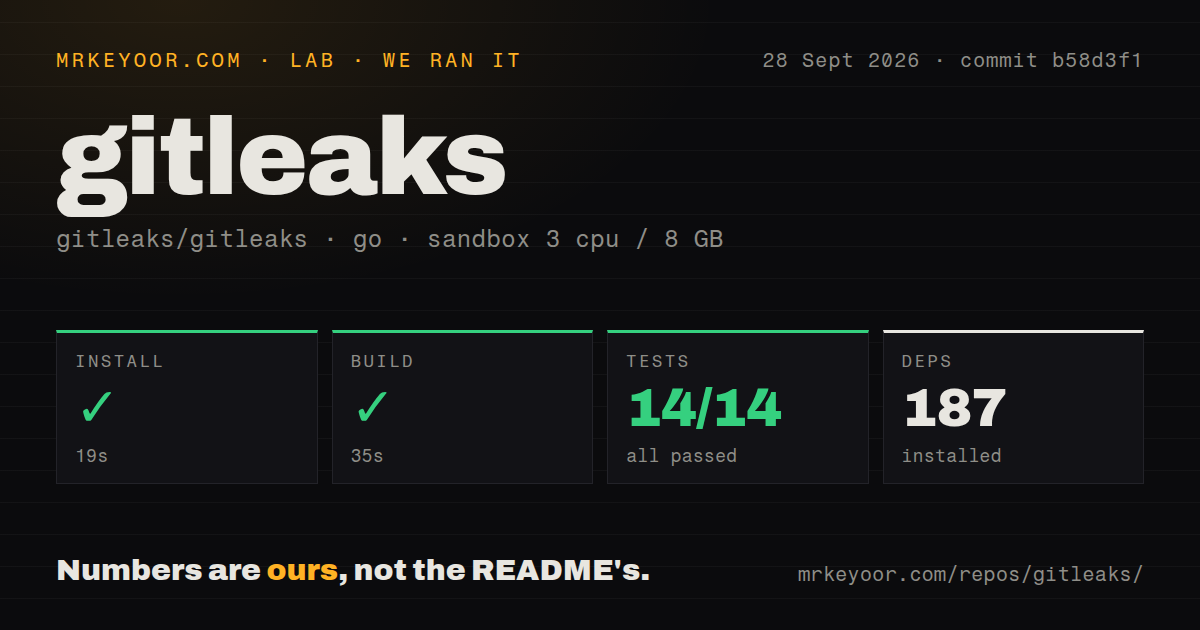
Our run on September 28, 2026, at commit b58d3f1 recorded a 19-second install, a 35-second build step and a 14-second test step in our sandbox. This was a checkout of that commit, not a fresh execution of the v8.30.1 release tag.
The stored parser summaries report 14 passed and 0 failed. They do not establish an exhaustive count of individual tests. The retained Go output contains package outcomes and repeats successful package lines beneath a summary marker. We have not reconciled a complete log, so neither the stored totals nor the repeated output justify saying that all 14 individual tests passed.
The build step's stored status is successful with exit code 0, while its output reports that a cancel function is not used on all paths in detect/detect_test.go, followed by vet-exit:1. This is a vet diagnostic about a possible context leak in test code. It is separate from the stored test summary and is not evidence of a credential leak.
We did not test a deployment, a working pre-commit integration, detection accuracy against an independent credential set, or coverage of a reader's repository. No dependency audit result was recorded; scan coverage is unknown. The MrKeyoor testing methodology explains how command outcomes and parsed counts reach reviews. That page was fetched on October 31, 2026; it does not establish which procedure version governed this September run.
Choose the input you need to inspect
The Gitleaks README documents three scan modes: Git repositories, directories or files, and stdin. Git mode reads patches through git log -p; directory mode checks files on disk. Choose the mode according to whether your concern is historical changes, current files or text produced by another process.
Archive traversal and recursive decoding default to depth 0, which disables those paths. If archives or encoded content matter, enable the relevant depth setting and check the intended inputs. The documented timeout also defaults to 0, meaning no timeout is set.
Gitleaks supports JSON, CSV, JUnit, SARIF and template reports. Its default exit code 1 covers both detected leaks and errors. Read the logs alongside the status so a pipeline can distinguish a finding from an execution problem.
Review ignored locations before trusting a clean result
Issue #2239 reports that replacing an ignored secret with another secret on the same file, rule and line can still produce no finding. A commenter reports reproducing the behavior against commit b58d3f1. These are observations from the issue discussion, not an experiment performed in our sandbox.
The issue discussion also separates location-based ignore entries from baseline comparison under redaction. It describes unresolved migration choices for existing ignore entries. Do not assume a proposed stricter token format fixes legacy suppressions.
Before making Gitleaks a required check, review existing ignore entries and baselines, then use a synthetic credential fixture to confirm that your actual hook or CI command detects an expected finding. Repeat that check when changing suppressions. This is a recommended validation step, not a workload completed by our run.
Decide whether maintenance and alternatives fit
The Gitleaks README says future releases will contain security patches only. It points the maintainer's new focus to Betterleaks. The supplied evidence does not establish Betterleaks' compatibility or capabilities, so this review does not recommend it as a drop-in replacement.
TruffleHog documents API testing to confirm whether a credential is valid. Evaluate it as an alternative when live credential verification is a selection requirement. It can also complement a local Gitleaks check when you need a separate verification workflow; we did not compare their detection results.
detect-secrets provides separate tools to scan into a baseline, flag new secrets and audit baseline findings. Evaluate it when reviewing existing findings and preventing additions is your main workflow. Its documentation says it avoids digging through all Git history, so it can complement a history scan rather than replace that task.
How to read the ratings
These are editorial ratings, not benchmark results. The rubric is: 1 means major documented obstacles; 2 means substantial extra work; 3 means usable with material constraints; 4 means strong evidence with specific limitations; 5 means especially favorable evidence for the dimension's stated scope.
Setup considers the recorded installation and documented installation choices. Documentation considers whether the supplied README explains modes, configuration and operational limits. Community considers the substance of the supplied public issue discussion, not adoption, response guarantees or popularity. Maturity considers documented operational controls alongside unresolved behavior. The community score therefore describes visible technical participation in this narrow evidence set; it does not rate support reliability.