It automates 20 searches on an account Microsoft may penalize
Rewards Farmer drives Edge through Selenium to complete Microsoft Rewards work. Its default word list supplies seeds for 20 Bing searches, while the script also visits Rewards dashboard activities and uploads an image for visual search. Search phrases can come from Ollama's gemma4:cloud or a credential-free mix of Google Trends, Wikipedia, and Bing suggestions. If all public feeds fail, it returns to nouns.txt rather than ending the run.
The risk belongs in the first decision, because the README puts it there too. Microsoft may take action against an account for using automated scripts to obtain points. This repository discusses techniques intended to avoid detection, but it cannot grant permission or protect an account. A competent developer may understand every one of the roughly 2,877 source lines and still decide that the possible loss of a Microsoft identity, purchases, or stored data is a poor exchange for automated points.
Python 3.12 is the easy prerequisite; the Edge profile is the work
The documented direct setup starts with Python 3.12 or newer and Poetry, then adds Microsoft Edge and a matching WebDriver. You run main.py once, stop it, and sign in manually to Bing and rewards.bing.com inside the profile the bot created. European users may also need to accept consent screens once. Every Edge window using that profile must then be closed before automation starts.
That sequence is more involved than the 35-second package install in our container. Browser profiles carry the login, account selection, consent state, and Chromium locking rules. The README warns that an open window blocks another Chromium process from using the directory; a browser killed at the wrong moment can leave a SingletonLock that looks like another live session. Multi-account mode repeats the sign-in work for each comma-separated account and runs those profiles one after another.
What happened when we ran it
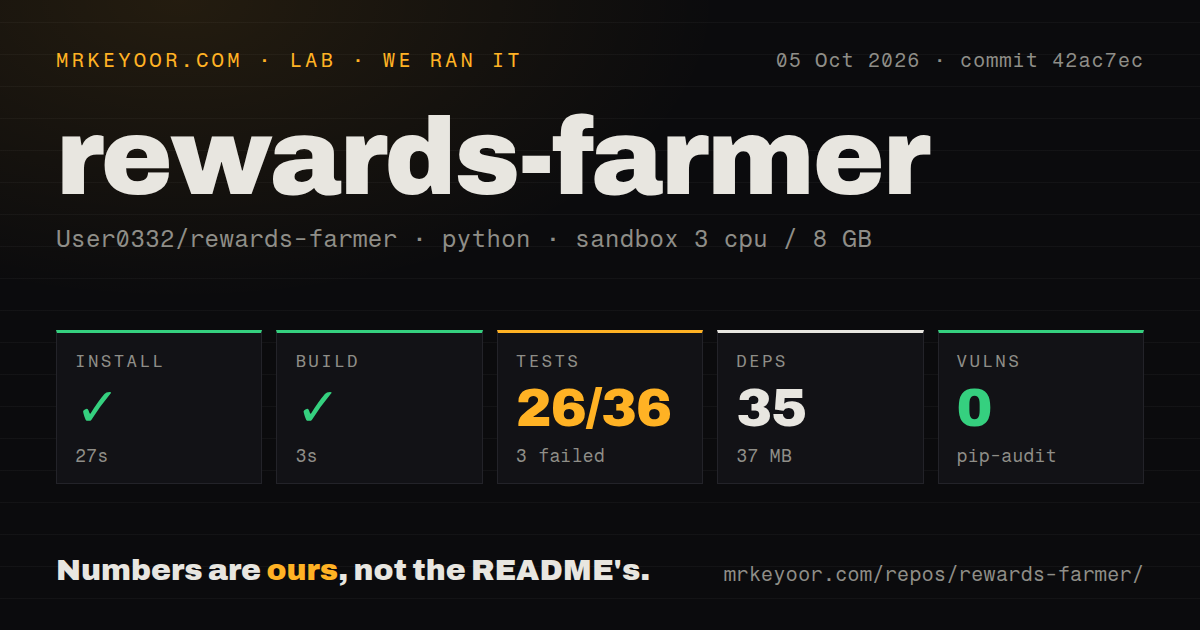
Our sandbox installed commit 619b282 in 35 seconds, pulled 35 Python packages, and occupied 37 MB on disk. The build completed in 9 seconds. The checkout itself contained 24 files and roughly 2,877 lines of source in 0.5 MB, so this is a small codebase to audit before giving it control of a signed-in browser. Pip-audit reported 0 known vulnerabilities in the installed dependency set.
The test step failed with exit code 1 after 7 seconds. Pytest completed 0 tests because collection of tests/test_element_selectors.py raised ModuleNotFoundError: No module named 'selenium'. The log proves only that Selenium was unavailable to the test process in our fresh environment; it does not identify why. The measured commit had a tests directory, no CI workflow files, and no Dockerfile, leaving no visible automated check that reproduces a clean setup on every change.
A failed task can leave every later task on the wrong page
Open issue 63 describes a concrete state-management flaw. When a visual or Bing search task fails, the browser may remain on that search page. Later tasks expect rewards.bing.com and can skip because their elements are absent. The owner proposes returning to a known address after every failure or skip, which is a sensible fix, but the open issue means current users should read logs task by task instead of treating one completed process as proof that all activities ran.
Issue 53 supplies a second warning from a different angle: a user reports Bing searches timing out before completion. Issue 61 reports the bot choosing the wrong Rewards account when multiple Edge profiles exist. Those reports are especially relevant because a 7-second collection failure prevented our lab from exercising selectors at all. Before using multiple accounts, verify the account shown in the dashboard and confirm that the point change belongs to the intended profile.
The current Docker route does not carry a Windows login into Linux
The current README now has Docker Compose instructions, although commit 619b282 had no Dockerfile in our scan. The container defaults to the trends backend, sets headless mode, and removes the need to install Python or Edge on a Linux host. It still needs visual_search.jpg mounted from the project and a profile signed in where the container can read its cookies. This is packaging around the browser, not a credential-free service.
Windows is the hard boundary in the documented route. The README says Windows protects Edge cookies with DPAPI tied to the Windows account, so Linux in the container cannot decrypt the host profile. In the project's recorded check, Edge inside the container could read 19 of 73 cookies, while the login cookies were absent. Linux without a keyring worked in its test. macOS is described as expected to fail similarly, but the README plainly says that case was not tested.
A 12-day-old project has fast activity and no release anchor
GitHub says the repository was created on August 19, 2026 and pushed on August 31, 2026. It had 675 stars plus 31 open issues and pull requests combined when fetched. Search results separated that queue into 26 issues and 5 pull requests, several updated the same day. That is live development and live breakage on a project less than 2 weeks old, not evidence of settled browser behavior.
GitHub's latest-release endpoint returned no release. Users therefore track a moving branch or pin a commit themselves. Rewards Farmer is readable enough to experiment with, and the trends backend removes the Ollama requirement, but the best candidate is a disposable, separately profiled account on a machine you can watch. The 0 completed tests in our run and the open wrong-page failure are enough reason to keep it away from unattended account infrastructure.