reveal.js treats a presentation as a web application
A reveal.js deck is HTML rendered full-screen in a browser. Slides are usually section elements, with nested sections creating a vertical branch beneath a horizontal slide. Authors can write content directly in HTML or load Markdown through a plugin. That model makes links, video, interactive examples, custom fonts, and ordinary web layout available without waiting for a presentation application to support them. It also means the browser is part of the runtime.
The built-in range is unusually broad for a 6.6 MB source checkout. The README points to nested slides, Markdown, Auto-Animate, speaker notes, LaTeX typesetting, highlighted code, PDF export, and an API. Those pieces cover most technical talks without a plugin hunt. The API remains the escape route when a deck needs to react to navigation, synchronize another display, or control embedded content.
Version 6.0.1 is current, with 909 issues and pull requests open
GitHub recorded 72,199 stars and a last push on August 24, 2026. The latest release, 6.0.1, shipped on April 11, 2026 with Vite 8, TypeScript 6, a postMessage hardening change, and a PDF media-control fix. The 909 open items combine issues and pull requests, so that number is backlog size rather than a bug count. Fresh pushes plus actively updated reports show ongoing work.
Long history helps with browser edge cases, but it cannot make live HTML and printed output identical by definition. Issue 3924 reports that a deck configured to show current and total slide numbers displays the full format interactively, then prints only the current number in PDF output. An older report describes headings disappearing from later pages when printing through Firefox. Anyone distributing a PDF should inspect the exported file, not assume the live deck is the proof.
What happened when we ran it
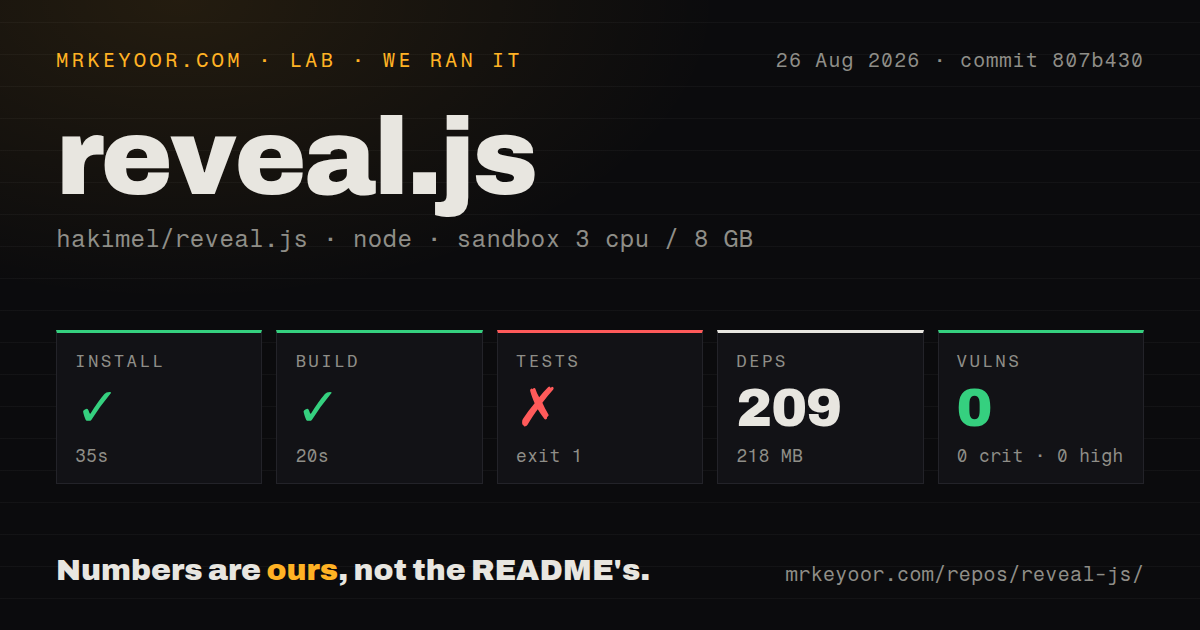
Our sandbox installed 209 npm packages in 35 seconds and occupied 218 MB. The production build completed successfully in 20 seconds. Npm audit reported 0 known vulnerabilities across critical, high, moderate, and low severities. For a project that bundles TypeScript, Vite, Sass, Puppeteer, Markdown parsing, code highlighting, and ZIP packaging in its development tree, that is an easy first build.
The test command ended with exit code 1 after 13 seconds. Its summary said 52 of 52 tests passed, 0 failed, and 14 errors. Chromium logged pthread_create: Resource temporarily unavailable, then Puppeteer's launcher closed. The log also showed two individual HTML test pages completing. We cannot turn that into a passing suite: the assertions that ran passed, while the browser-backed runner still reported errors and a failed process.
Our fresh Debian container had 3 CPUs and 8 GB of RAM and ran without privileges or secrets. The repository had 184 files, about 18,034 lines of source, 2 CI workflow files, and a tests directory. It had no Dockerfile. That absence is reasonable for browser assets, though teams standardizing builds in containers will have to supply their own image and make browser requirements explicit for tests.
Speaker notes and PDF export need target-browser rehearsal
Speaker view is one of reveal.js's best practical features because it separates the audience display from notes, time, and navigation controls. The open CSP report in issue 3375 says this view includes an inline style block, which a strict policy can block. If a deck runs on a corporate domain with a locked policy, load speaker view there before event day and decide whether a policy exception or a code change is acceptable.
PDF export is similarly useful and similarly browser-shaped. A static PDF is often the artifact conference organizers and attendees keep, while the browser deck contains transitions and interactive material that paper cannot reproduce. Test page breaks, slide numbers, fonts, code overflow, videos, and SVGs in the export path you will use. One successful live rehearsal does not cover that second output.
Markdown is convenient until the deck becomes an application
Markdown keeps ordinary decks readable in a repository and reduces repetitive markup. Syntax highlighting and math plugins suit engineering and academic talks, while Auto-Animate can move matching elements between slides. Once a deck needs custom components, state, or framework integration, direct HTML and the reveal.js API become more important. The abstraction is intentionally close to the DOM rather than hiding it.
That choice can surprise React teams. Issue 3466 reports a minimal React setup where the Markdown plugin did not work as expected. The repository now includes a React area, but a buyer should test the exact mix of framework lifecycle and reveal.js plugins it needs. For a presentation with ordinary Markdown and a few code examples, adding a component framework may create more lifecycle work than value.
Choose reveal.js when the browser is an advantage
The strongest reason to pick reveal.js is control. A web developer can inspect every slide, version the source, publish it on static hosting, and add behavior with the same tools used for a website. MIT licensing keeps the framework easy to adopt. The 20-second build in our run makes experimentation cheap, while the browser errors show why CI and rehearsal still need a realistic host.
Choose Marp when the document and exported files matter most. Choose Slidev when Vue components and its authoring conventions are already desirable. reveal.js is the better fit when the live deck itself is a small web application. Keep a tested browser available, verify speaker view under the real CSP, and inspect the PDF separately before sending it out.