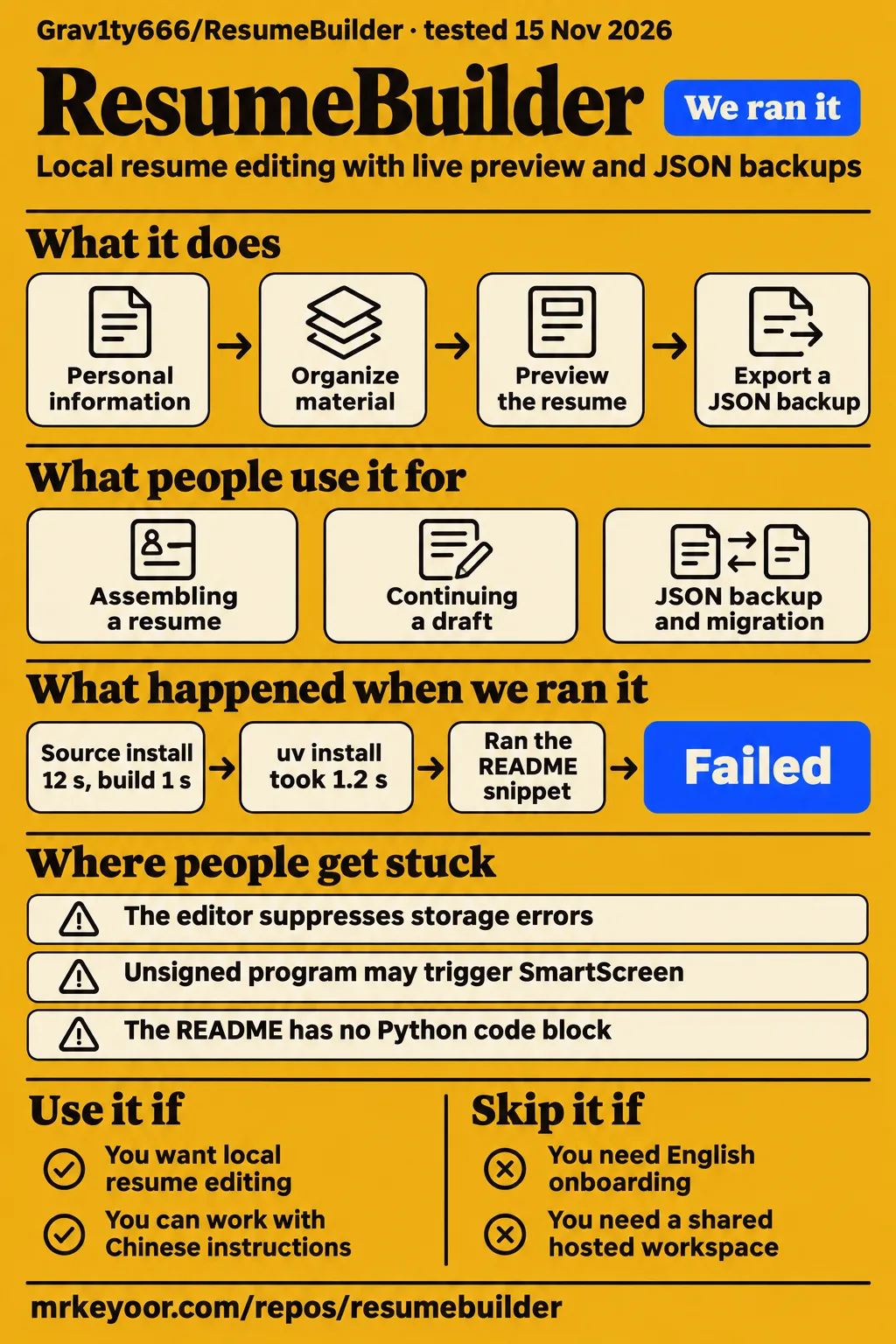
Our sandbox installed Grav1ty666/ResumeBuilder in 12 seconds and built it in 1 second. The adoption decision turns on its Chinese instructions and browser-local drafts: the launcher can select a different port at startup, and the storage helper suppresses localStorage errors. Use it to explore local resume editing if that workflow suits you. Start with disposable content and an exported JSON backup before entering a complete employment history.
What people use ResumeBuilder for
The README describes eight editing sections, live preview and JSON backups for a locally edited resume. Its sections cover personal information, education, internships, projects, practical experience, skills, hobbies and custom content. Someone assembling a resume can use those categories to organize material while seeing the page develop. The custom section also gives the documented form a place for content outside the named categories. ResumeBuilder README.
Continuing a draft in the same browser is another documented use. The README says editing content is saved automatically in browser localStorage and survives refreshes. It separately describes JSON import and export for backup and migration. Those are different ways of retaining work: browser state supports continued editing, while an exported file gives you a separate copy. Make the file backup part of a writing session rather than treating the open editor as your only copy. Saving and backup documentation.
Windows desktop packaging is the third documented route. The README directs users to ResumeBuilder_Setup.exe or a standalone ResumeBuilder.exe and describes a tray menu for opening or exiting the application. Developers get a repackaging sequence using Python tools and Inno Setup. This makes the project relevant to someone inspecting a browser editor delivered through a desktop launcher, as well as someone interested in its resume form. Windows distribution and packaging instructions.
What happened when we ran it
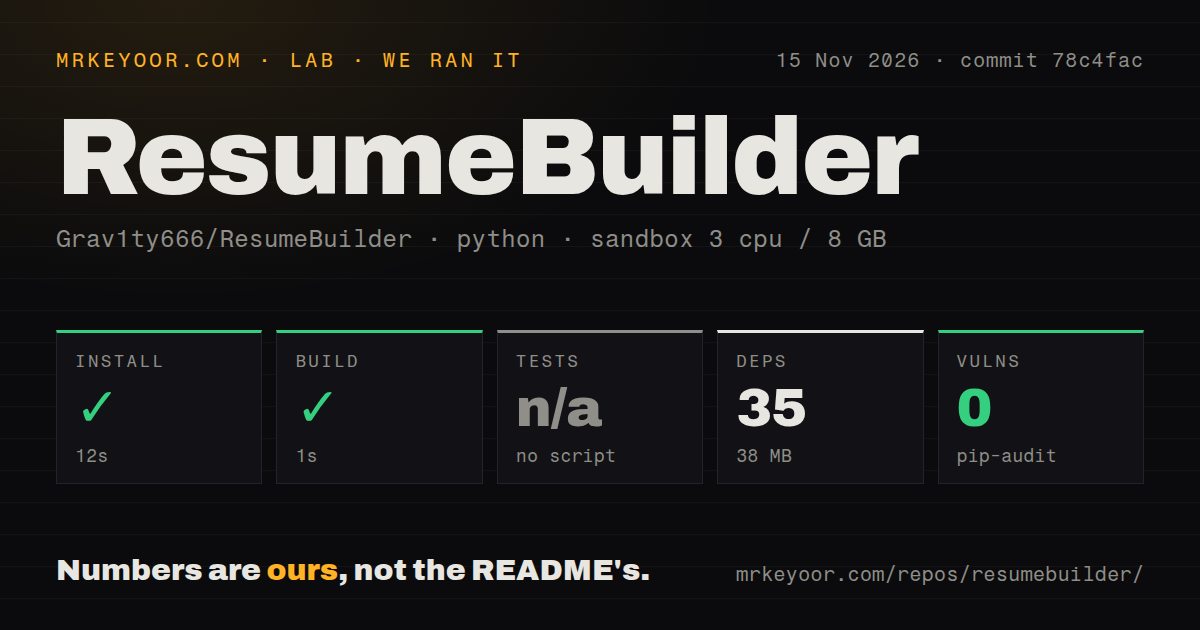
Our November 15, 2026 sandbox run at commit 78c4fac recorded a successful 12-second install and 1-second build. The configured environment had 3 CPUs and 8 GB RAM, with image label ghcr.io/astral-sh/uv:python3.12-bookworm. The checkout contained 10 files, approximately 122 source lines and 2 MB on disk. These measurements describe the recorded source setup and provide a concrete starting point for a developer inspecting this checkout.
| Question | Answer | Verdict | Why |
|---|---|---|---|
| Did the main install complete? | Yes, in 12 seconds | Passed | The harness recorded a successful dependency step |
| What dependency footprint did it record? | 35 dependencies and 38 MB on disk | Recorded | These figures belong to the main sandbox environment |
| Did the build complete? | Yes, in 1 second | Passed | The harness recorded a successful build step |
| Did a test suite pass? | No test script or target existed; tests were skipped | Skipped | There is no passing test-suite count |
| What did pip-audit report? | 0 known vulnerabilities | Recorded | This is the dependency audit result |
| What delivery checks did the scan find? | 0 CI workflows, no Dockerfile and no tests directory | Recorded | These files and directories were absent from the scan |
| Did the separate quickstart recipe run a Python example? | No; the README had no Python code block | Failed at snippet step | The record identifies no-snippet |
| Did the separate attempt finish teardown? | Yes, teardown was recorded as ok | Completed | The pack includes a teardown record |
The research pack also contains a separate quickstart-lib attempt at commit 78c4fac1ade2 on November 15, 2026. Its recorded configuration was an unprivileged container with 2 CPUs, 4 GB RAM, no published ports and no secrets, using the same image label. The clone step took 2 seconds. This attempt used a fresh virtual environment for the README's packaging dependencies.
That attempt ran uv pip install pyinstaller pystray pillow in a fresh virtual environment and recorded pyinstaller 6.22.3 installed in 1.2 seconds. It measured 32.2 MB in the environment's site-packages and 8 packages besides pyinstaller. The main sandbox recorded 35 dependencies and 38 MB; the quickstart figures belong to its separate installation of packaging tools.
The quickstart stopped when its recipe expected a Python snippet: the README contains no Python code block to run. The pack names the finding no-snippet and records successful teardown. The README instead supplies shell commands for preparing assets and packaging the launcher. The failed step identifies a mismatch between the selected recipe and the documentation.
Where people get stuck: browser storage and the desktop wrapper
The launcher can select a new port at startup, and the editor's storage helper silently catches localStorage errors. Those source details make reopening a draft and retaining a JSON backup useful acceptance checks. The launcher reads RB_PORT, defaults to 0 and then uses the server's assigned port. It opens the resulting 127.0.0.1 address in a browser and runs a tray menu with open and exit actions. Desktop launcher source.
A developer can see where the port choice occurs: the launcher passes its selected value into the local server and replaces PORT with the server address's port. Record the browser address during a restart check so that the two launches can be compared. RB_PORT supplies an explicit port setting in the source. Exporting JSON before closing the editor gives the user a separate recovery file during that exercise.
The editor's LS helper returns null after a localStorage read exception and catches write exceptions without displaying an error from that helper. A responsive form and a recovered saved draft are different outcomes. With disposable content, export a JSON file, close the application, reopen it and try the import route. This is a proposed acceptance procedure based on the documented backup mechanism and supplied source. Editor storage implementation.
| Situation | Supplied evidence | Useful next step |
|---|---|---|
| A recipe expects a Python snippet | The quickstart record reports no Python code block | Use the README's packaging instructions for that task |
| A draft seems absent after reopening | The launcher permits an automatically assigned port | Compare the browser address and use the JSON backup |
| Editing continues after a storage problem | The storage helper catches storage exceptions | Check reopening and importing disposable content |
| Windows displays an executable warning | The README describes unsigned-program warnings | Assess the downloaded artifact before running it |
The instructions and interface start in Chinese
The supplied README is Chinese, and the editor declares zh-CN as its page language. The launcher also uses Chinese labels for opening and exiting the application. These are concrete onboarding choices for an English-speaking reader to consider before downloading the desktop package. Someone comfortable with Chinese instructions has a more direct route through the documented workflow; someone expecting English onboarding has a reason to choose another editor. README, launcher labels.
The editor source includes PingFang SC and Microsoft YaHei in its font choices, alongside other fonts. For a developer, inspecting the page and launcher together explains the application's division of work: the page contains editing and storage behavior, while the Python file supplies the local server and tray lifecycle. The README's packaging sequence brings those pieces into the Windows executable workflow. Editor source and font definitions.
The README describes themes and offline backgrounds
The README documents light and dark themes, built-in aurora animation, built-in gradients and custom background images. It describes these background options as usable offline. These are interface customization choices alongside the resume editor's content sections and preview. Someone interested in the desktop presentation can start with the documented built-in options before choosing a custom image. Theme and background documentation.
The supplied editor source defines light and dark color variables and includes CSS for an animated aurora background. It also defines a preview sheet with a white background and dark text, separate from the surrounding interface colors. That distinction helps explain the source's presentation choices: the application chrome has theme styling, while the resume preview has its own sheet styling. Editor theme and preview styles.
ResumeBuilder vs Reactive Resume and RenderCV
Reactive Resume documents a broader browser workflow, while RenderCV documents a YAML-to-PDF workflow. Grav1ty666's README emphasizes local editing, browser storage, JSON backup and Windows packaging. Start with the form in which you want to maintain your resume, then consider the surrounding features you need. A browser form, a document library with application tracking and a versioned YAML file serve different writing habits.
| Project | Documented workflow | Choose it when |
|---|---|---|
| Grav1ty666/ResumeBuilder | Local editing, browser storage, JSON backup and Windows packaging | You want a local editor with Chinese instructions |
| Reactive Resume | Resumes, cover letters, downloads and application tracking | You want a broader browser application |
| RenderCV | YAML resume source rendered as PDF | You want a text file you can version |
Reactive Resume's README describes writing resumes and cover letters and tracking job applications. It lists PDF, Word, Markdown and JSON downloads, public sharing and running the application on your own infrastructure. Those documented features make it relevant when the task extends beyond editing one locally stored resume. The choice follows the workflow you need rather than the similarity of the projects' names. Reactive Resume README.
RenderCV's README tells readers to write a CV or resume as YAML, then render it as a PDF. It explicitly presents version control as a benefit of keeping the CV as text. A developer who already maintains writing in Git has a concrete reason to consider that route. Someone who prefers entering content through browser forms has a different editing preference to weigh. RenderCV README.
Search results cover different products
The supplied search records include ResumeBuilder.com, a WordPress plugin, ApplyDeck and Resume Grill. ResumeBuilder.com's about-page extract lists BOLD LLC; the WordPress discussion identifies plugin author Justin Scheetz. The X result promotes ApplyDeck, and the Bilibili result names Resume Grill. Check the product name and owner before applying advice from these results to a downloaded application. Commercial about-page record, WordPress discussion, ApplyDeck result, Resume Grill result.
Simon W's WordPress post reports that clicking Save created no resume, and Scheetz replies with a suggestion to investigate plugin and theme conflicts. Amber C.'s commercial-service review reports a subscription charge and partial refund. A YouTube comparison creator says they paid for and tested 10 resume builders. Each report concerns its named subject; the local editor's setup results appear in the run section above. WordPress save report, Amber C.'s review, comparison transcript.
FAQ
ResumeBuilder.com's supplied pricing excerpt gives cancellation directions and lists (800) 301-9082 as a contact number. Those account-support details concern the commercial service. Grav1ty666's README instead describes downloading a Windows executable, editing locally and exporting JSON backups. The questions below distinguish the two workflows so that readers can choose the relevant instructions before taking action with an account or downloaded application.
How do I cancel my ResumeBuilder.com subscription?
ResumeBuilder.com's pricing page says to log in, open Settings, choose Subscription and select Cancel Subscription. It also gives phone cancellation as an option. These directions belong to the commercial account workflow. For the GitHub repository, the relevant starting points are its Releases download and README packaging instructions. Published cancellation directions, local project README.
What is ResumeBuilder.com's customer support phone number?
ResumeBuilder.com's supplied pricing and about-page extracts list (800) 301-9082. That is the contact associated with the commercial service in these records. The GitHub README instead provides the author's email contacts and release-download instructions. Use the contact attached to the entity you are using, especially when the question concerns an account or a downloaded executable. Commercial support record, project README.
Will ResumeBuilder.com automatically charge me when the trial ends?
ResumeBuilder.com's pricing excerpt says its 14-day trial transitions to a subscription billed every four weeks when the trial ends. The same excerpt describes an annual plan and says users can cancel a subscription. These terms concern that commercial service. The local GitHub editor's README directs users to Windows release downloads and JSON backups. Commercial trial and renewal terms, local editor documentation.
How do I install Grav1ty666/ResumeBuilder on Windows?
The README directs Windows users to download ResumeBuilder_Setup.exe from Releases or run the standalone ResumeBuilder.exe. It says the installer creates desktop and Start menu shortcuts and includes an uninstaller. It also warns that the unsigned program may trigger SmartScreen or antivirus prompts. Developers looking to build their own package get a separate sequence using PyInstaller, asset generation and Inno Setup. Windows installation instructions.
How do I back up a draft in the local editor?
The README documents JSON export for backup and JSON import for migration. It also describes automatic browser-local saving, so the two mechanisms serve different parts of the workflow. Export a file when making substantial edits, then use disposable content for the proposed reopening and import exercise described above. That gives the next check a concrete input and an expected recovery outcome. Backup documentation.
What we have not tested yet
The recorded checks cover source setup at 78c4fac, not a completed resume exported from the Windows application. The installer, SmartScreen behavior, repeated desktop launches, JSON recovery, observed offline network behavior, English resume layout, browser print output and applicant-tracking-system parsing remain outside the recorded checks. The dynamic-port storage concern is source analysis rather than an observed lost draft. The supplied excerpts do not establish an external wallpaper request, image-loading function, fallback implementation or complete account of network traffic and resume-data handling.
The documented version is v1.0.0, with supplied release metadata dated October 13, 2026; the measured checkout is identified by commit 78c4fac. The supplied source extracts use main-branch URLs and do not demonstrate that every inspected line matches the release artifact. The harness also supplies no complete toolchain logs or explanation of the build command's exact coverage. Its image label identifies configuration rather than proving actual runtime or operating-system versions.
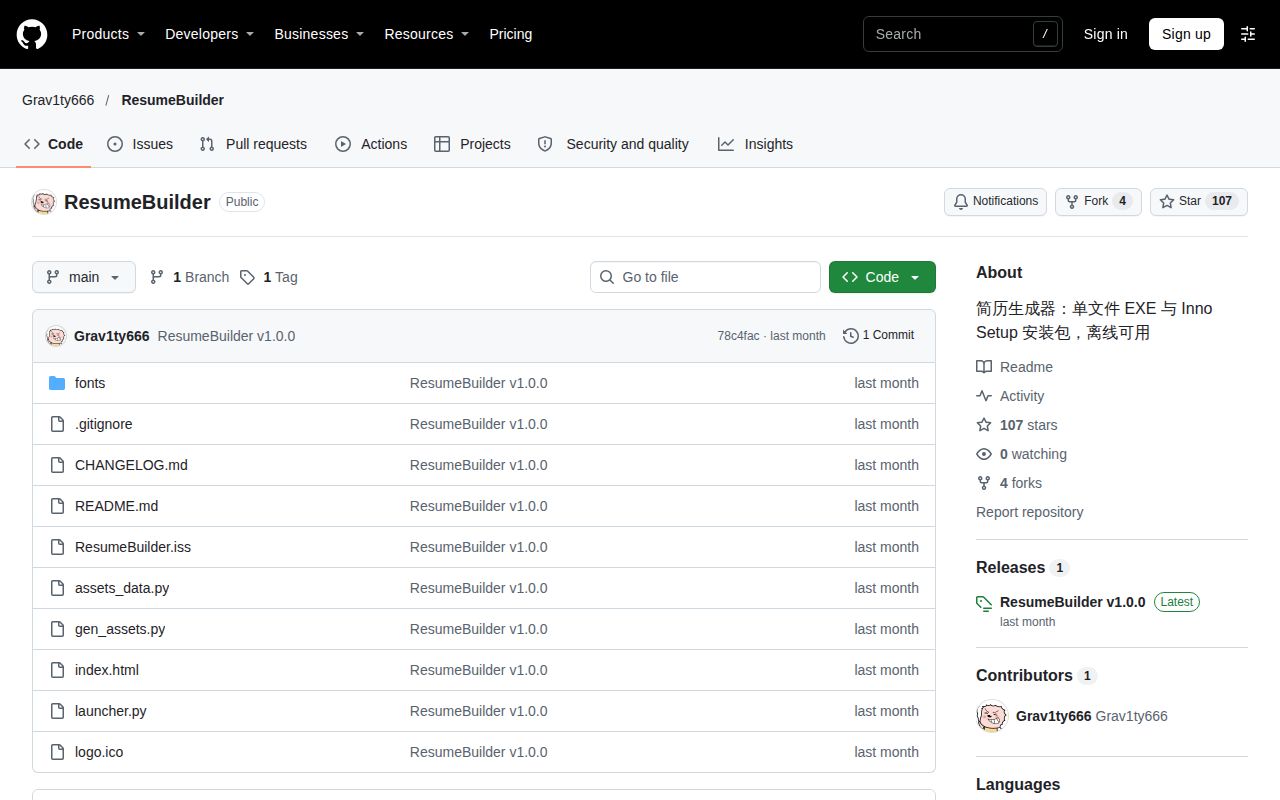
The metadata snapshot records 107 stars, zero open issues and PRs combined, and a last push on October 13, 2026. It contains no detected license, and the harness likewise records a null license signal. These observations leave reuse permission, support responsiveness and operating reliability unresolved. The supplied evidence establishes no measured search demand for this repository or complete free-versus-paid download-format comparison for ResumeBuilder.com. No screenshot records or known-answer resume tasks accompany the pack. The next useful check is a disposable resume that survives closing, reopening and restoring its JSON backup.