iOS 26 and Android share an API, not identical behavior
react-native-continued-task 0.1.0 handles one narrow job: work the user starts now that should continue when the app moves to the background. Examples include exporting a library or uploading a large file. On iOS 26 it wraps BGContinuedProcessingTask and its system Live Activity. On Android, starting at minSdk 24, it uses a WorkManager worker promoted to a foreground service with an ongoing notification.
Version 0.1.0 gives both platforms the same submission, title, progress, completion, cancellation, and stop-listener shape. It also keeps the differences visible in types such as supportsReattach and the raw native stop detail. That is the right compromise. Shared JavaScript reduces application code, while a caller can still tell whether Android reported a quota stop or iOS delivered its argument-free expiration callback.
The 998 MB workspace comes before native configuration
The package requires React Native 0.75 or newer and Nitro Modules 0.37.1. Expo Go cannot load it because the module includes Swift and Kotlin code. An Expo app needs a development build, identifier prefixes in the config plugin, and a prebuild. A bare app must add the permitted iOS identifiers and Android foreground-service entries itself. No account, API key, or remote service sits in the execution path.
Platform tooling narrows the audience further. iOS continued processing starts at iOS 26, while the library builds against iOS 15 and reports the feature as unsupported on older phones. The README calls for Xcode 16.4 or newer with an SDK capable of building the iOS 26 API. Android needs compileSdk 34 or newer and NDK 27 or newer. Those requirements are reasonable for a native module this new, but they rule out a quick JavaScript-only trial.
What happened when we ran it
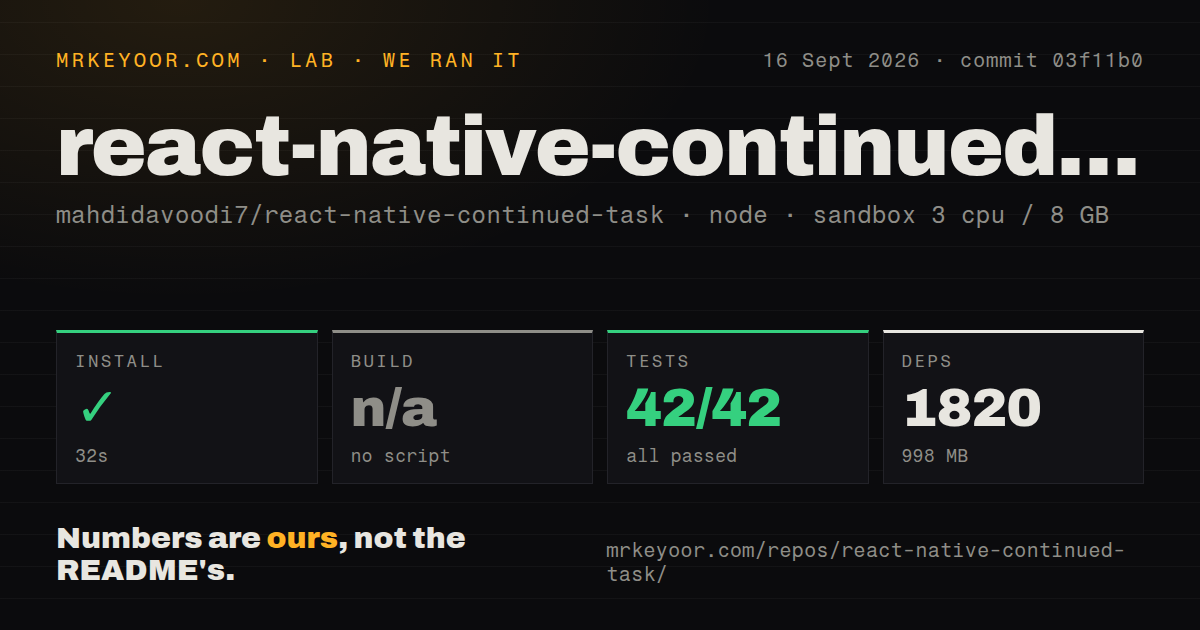
Our sandbox installed 1,820 packages in 32 seconds and used 998 MB on disk. The repository at commit 03f11b0 was 5.8 MB before installation, with 232 files and about 11,596 lines of source. Jest then passed all 42 tests in 5 seconds, with 0 failures. That is a clean result for the JavaScript layer and config plugin in the supplied Node 22 environment.
The harness found no build script or target, so it skipped the build step. Our run did not compile Swift, Kotlin, an example app, or the generated Nitro bridge. It also did not boot a simulator or physical phone. The repository has one CI workflow and workspace-based example code, but the lab result supports only the 42 Jest tests we ran. Native compilation and background execution remain checks for your own toolchain and devices.
iOS 26 requires a physical device and foreground submission
The iOS 26 scheduler is unavailable in the Simulator, according to the project documentation. A submission must happen while the app is in front of the user and must follow a direct action such as tapping a button. A timer, launch hook, push handler, or already-backgrounded call is the wrong entry point. This makes the library suitable for visible exports and uploads, while periodic sync belongs to a background-fetch tool.
Progress is also part of the contract in version 0.1.0. The caller supplies a total unit count and updates completed units as work proceeds because iOS can expire a task that appears stalled. The system owns the progress surface and gives the user a cancel control. If product design requires a hidden job with no progress, continued processing is a poor fit even when the native API is technically available.
Force-quit recovery splits at the platform boundary
On iOS 26, swiping away the app cancels continued processing without delivering a stop callback. The library writes a task record when work is submitted, so the next launch can return an app-terminated record through getKnownTasks(). Your app must inspect that record, repair partial output, and explicitly forget it when reconciliation is finished. A live iOS task cannot be reattached after process death.
Android behaves differently in version 0.1.0. WorkManager can keep its worker alive after the React Native process ends, and attachToTask() can restore a JavaScript handle when the app returns. Android 13 and newer also require the app to request notification permission at runtime. Without that grant, the work may continue while the foreground notification stays hidden, leaving the user unable to see or cancel it from the notification shade.
Android 15 imposes a 6-hour shared dataSync budget
Android 15 and newer give an app's dataSync foreground services a shared 6-hour allowance in each 24-hour period. The library maps the timeout into fgs-timeout; Android 16 can also report a JobScheduler quota stop. For unusually long user transfers, the README points to Android's user-initiated data transfer job as the closer native match, but WorkManager does not expose that path through this library.
Cancellation needs another platform branch. Android can report a user tapping the notification's cancel action. On iOS 26, user cancellation and system expiration reach the same callback without a reason, so the library reports expired instead of guessing. An app should save partial state for either case. The shared API reduces boilerplate, but product behavior still needs explicit iOS and Android decisions.
Version 0.1.0 is suitable for a device-backed pilot
GitHub showed 224 stars and 0 combined open issues and pull requests on 2026-09-24. The repository was created and last pushed on 2026-09-01, when its first release, v0.1.0, also appeared. That is recent activity, yet one release and an empty public issue queue reveal little about upgrade discipline or field failures across the many React Native, iOS, and Android combinations.
The 42 passing Jest tests and candid platform documentation justify a prototype on the exact phones your users carry. The 998 MB install, native build requirements, and physical iOS 26 testing make adoption more involved than the small JavaScript API suggests. Choose this library when the task is immediate, user initiated, and visible. Choose a scheduler when the operating system may run the job later without a progress surface.