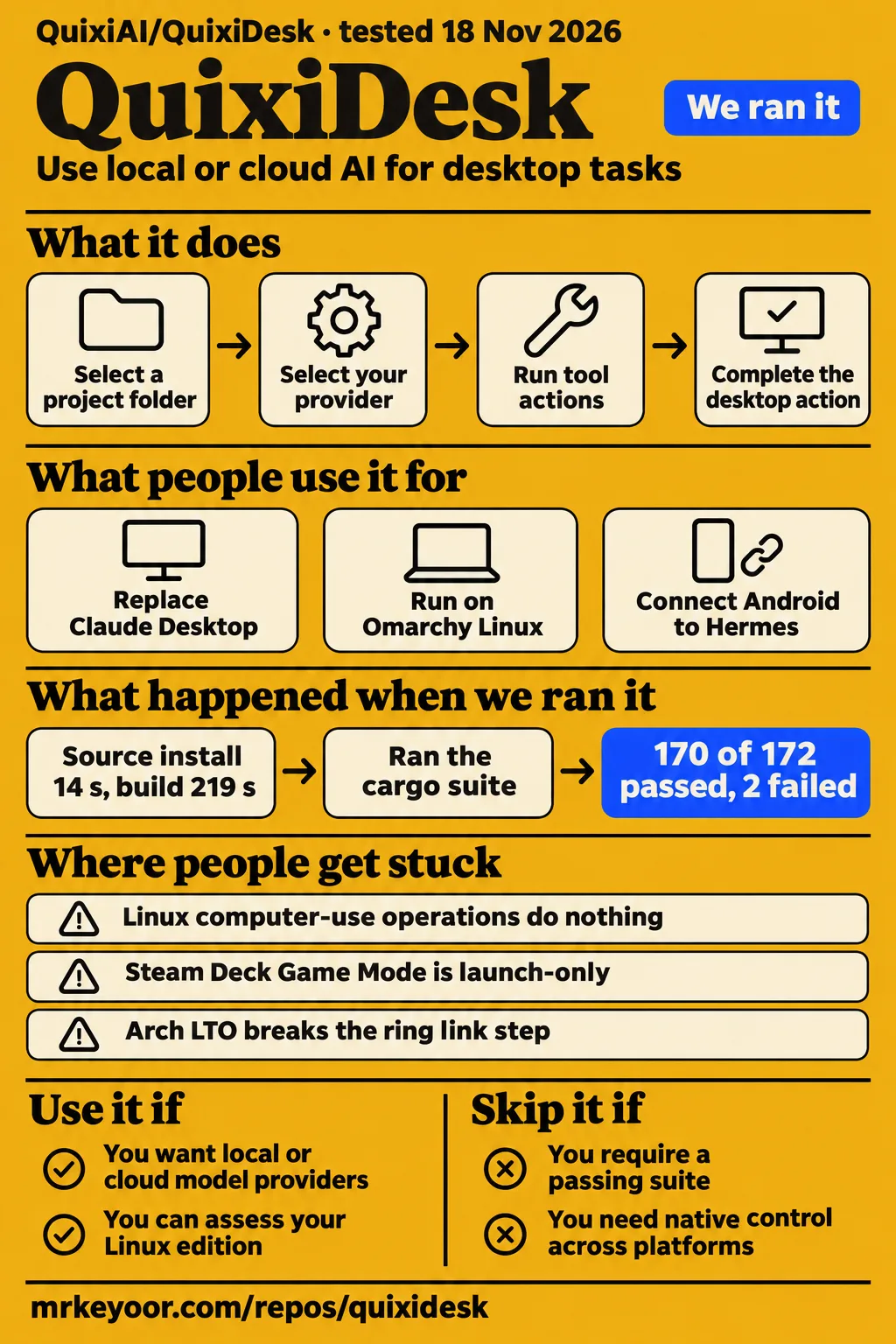
QuixiDesk built successfully in our sandbox, then its test command failed with two engine cases still red. It suits developers who want an inspectable desktop AI workspace with a choice of model providers and can assess the edition for their operating system. Readers requiring a passing suite or equivalent native desktop control across platforms should keep their existing assistant. The practical decision starts with the package you intend to run: upstream QuixiDesk, a downstream Linux edition or the separate Android harness.
What people use QuixiDesk for
Eric Hartford reports using QuixiDesk as a total replacement for Claude Desktop. Other supplied accounts describe Linux provider work, Hermes integration and an Android installation for a family member. Each account names a person and an edition or setup, which makes it more useful than a single undifferentiated feature list. The reports also show that choosing a model provider and choosing desktop integration are separate parts of the setup.
| Person | What they did | What the report supports |
|---|---|---|
| Eric Hartford | Reports replacing Claude Desktop with QuixiDesk using local or cloud AI. | The author's everyday-use assessment. Hartford's replacement report |
| Juraj Bednar | Reports running QuixiDesk on Omarchy Linux through Venice after contributing Linux and provider work. | A contributor's working setup. Bednar's Linux report |
| volkdude85 | Reports adding Hermes tools, daemon controls and Flatpak packaging. | Features of a modified downstream edition. Hermes integration posts |
| volkdude85 | Reports installing his Android edition on his mother's phone and connecting it to Hermes. | A completed family installation described as cumbersome. Android installation account |
The Android account includes a useful setup detail: the maintainer says installation took a couple of hours, with about half the time spent waiting for downloads. He reports completing the connection to Hermes and documenting the process. The distinction matters for someone planning the same handoff. A completed installation and an easy installation are different outcomes, and this account describes the former. Android setup report
The downstream maintainer also reports using his software with a judge in a courtroom context. In the same spoken account, he describes wanting to contribute his voice for AAC, or augmentative and alternative communication. These statements explain why he built an assistance tool around his own needs. They belong beside his edition's design rationale rather than in the upstream feature list. Maintainer's courtroom and AAC account
What happened when we ran it
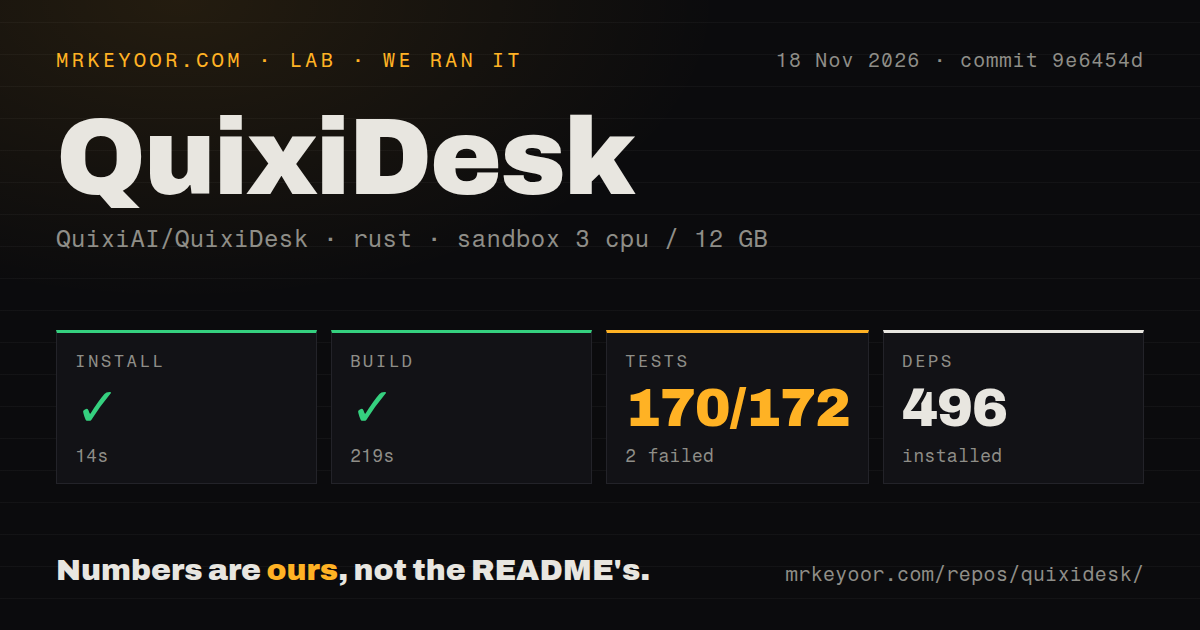
Our run at commit 9e6454d built successfully in 219 seconds and returned 170 passing tests and 2 failures. We measured the checkout on November 18, 2026, using a recorded configuration of 3 CPUs, 12 GB RAM and image lab-rust:1. Installation took 14 seconds, and the failing test step took 63 seconds. These are our source-build measurements, separate from the downstream maintainer's hardware and desktop reports.
| Recorded step or signal | Result | Meaning for the decision |
|---|---|---|
| Install | Succeeded in 14 seconds; 496 dependencies recorded | The checkout cleared the recorded dependency step. |
| Build | Succeeded in 219 seconds | The measured checkout built in this sandbox. |
| Tests | Failed in 63 seconds, exit 101; 170 passed, 2 failed out of 172 | The command failed a passing-suite requirement. |
| Repository scan | 242 files, about 85,668 source lines, 9.4 MB checked out | The scan recorded a multi-component source tree. |
| Automation signals | Zero CI workflow files found, no Dockerfile, a tests directory present | The scan found tests and no checked-in CI workflow. |
The failing crate summary contains 164 passes and 2 failures, while the supplied overall total contains 170 passes and 2 failures. The failed cases are cordis_host::capabilities::tests::ptc_runtime_executes_async_js_with_parallel_tool_bindings_and_captures_subcalls and replay_tests::ptc_preset_executes_run_code_and_records_subcalls_and_step_telemetry. The log directs a rerun with -p quixi-engine --lib and records the failing crate finishing in 4.42 seconds. Those names identify the affected tests without diagnosing their cause.
The separate deployment runner failed its Compose-file prerequisite. Its safety step found none of compose.yaml, compose.yml, docker-compose.yaml or docker-compose.yml. Another record nevertheless says QuixiDesk deployed with its own Docker Compose on November 18, 2026, with every port bound to 127.0.0.1. These records conflict; the failed prerequisite is the concrete deployment outcome. Teardown reports success.
Where people get stuck: reference files and platform integration
Issues #1 and #4 report compilation failures caused by a missing reference/ipc-exact-schemas.json file. Issue #1 names checkout 72c9d88; issue #4 names 0399ca5. Both issue pages show closure as completed, and our later checkout 9e6454d built successfully. Keeping the revisions attached to those outcomes gives readers a usable troubleshooting history rather than presenting an older failure as the current result. Issue #1 compilation report, issue #4 compilation report
| Problem reported | What the evidence says to do | Resolution shown |
|---|---|---|
Missing reference/ipc-exact-schemas.json |
Reporters suggest tracking the file or removing its mandatory compile-time dependency. | Both issues are closed as completed. GitHub issue #1, GitHub issue #4 |
| Packaging depends on the developer's checkout path | Use the packaging script with the corrected repository-root calculation. | Issue #4 marks that correction as fixed in 0399ca5. Packaging-path report |
| Linux computer-use operations silently do nothing | The downstream maintainer supplies capture, input, clipboard and other platform patches. | A downstream workaround described by its maintainer. Linux patch descriptions |
| Steam Deck Game Mode launches without a complete desktop experience | The maintainer directs readers to desktop mode and requires ydotoold for input. |
Game Mode is described as launch-only. Steam Deck guidance |
Issue #4 also lists hard-coded paths in resource preparation, schema generation, workspace defaults and test fixtures. Its packaging-script correction addresses one specific path problem. The current upstream README instructs readers to build directly from the repository, keep resources/ with the application and use --locked for dependency selection. Those instructions give a new checkout a clearer starting point than reproducing the historical reporter's home-directory layout. Current upstream build instructions
Community editions change what Linux support means
The downstream Linux repository describes two independent editions that patch an upstream release tarball. Its restrained Arch build excludes personal defaults; its personalized edition carries workstation-specific choices. The repository says patches 0006 and 0008, covering personal memory and voice wiring, are excluded from the generic build. Read the edition name alongside any feature description, especially when following a demonstration from the maintainer's own machine. Linux edition descriptions
| Edition | Evidence-backed identity | Decision consequence |
|---|---|---|
| Upstream QuixiDesk | Rust desktop workspace with provider configuration and MCP connections. | Start with the project's own implementation and documentation. |
| Restrained Arch build | Downstream patches without the personalized edition's configuration. | Consider its Linux packaging and platform work separately from personal defaults. |
| Personalized Linux edition | Maintainer configuration with edition-specific memory and voice wiring. | Read its dependency, onboarding and waiver documents. |
| Android harness | Separate downstream packaging with reported Hermes integration. | Follow its own installation documentation. |
The maintainer reports 46 capability checks passing across KDE, GNOME and XFCE, and four bugs discovered through testing on three machines. His README also documents practical fixes: disabling Arch LTO avoids the reported ring link failure; Wayland cursor position returns None; text input uses -d 25 on Wayland and -d 0 on X11. These are attributed downstream results and operating details, distinct from our upstream build and test totals. Maintainer's testing and platform notes
The downstream Flatpak ships through the maintainer's signed repository. His Flathub account describes rejection of a prebuilt-binary submission and the need for upstream ownership of the listing. He reports replacing binary packaging with a source build, preserving the vendored rmcp directory and creating the bundle repository on every build. The current downstream README describes the source build as compiling 564 crates inside the sandbox without network access. Flatpak packaging account, downstream distribution description
Permissions connect folders, providers and desktop actions
QuixiDesk's README says Manual mode allows directory listings and file reads, then asks before changes or commands. Auto mode permits tool actions without individual approval. A conversation needs a selected folder to obtain workspace file tools, and project tasks inherit their configured instructions and folder. This makes the folder selection and approval mode concrete parts of an evaluation task rather than incidental settings. Upstream folder and permission documentation
The downstream maintainer says KWin access enables moving windows and reading the screen, while the selected model can run on local hardware or elsewhere. His account describes memory as Markdown files on disk. These settings answer different questions: where stored memory lives, where inference happens and which desktop actions the application can perform. Start with a disposable folder and Manual approval so the chosen task has an explicit workspace and visible action requests. Maintainer's permission explanation
The upstream README documents AES-256-GCM encryption for provider credentials, with the encryption key held in macOS Keychain, Windows Credential Manager or Linux Secret Service. Linux requires an unlocked desktop secret service. Disposable profiles have a separate local test key and start with providers unconfigured. That gives a reader concrete setup requirements for evaluating a provider connection without copying production credentials into the test profile. Upstream credential and profile documentation
Repository activity and the recorded release
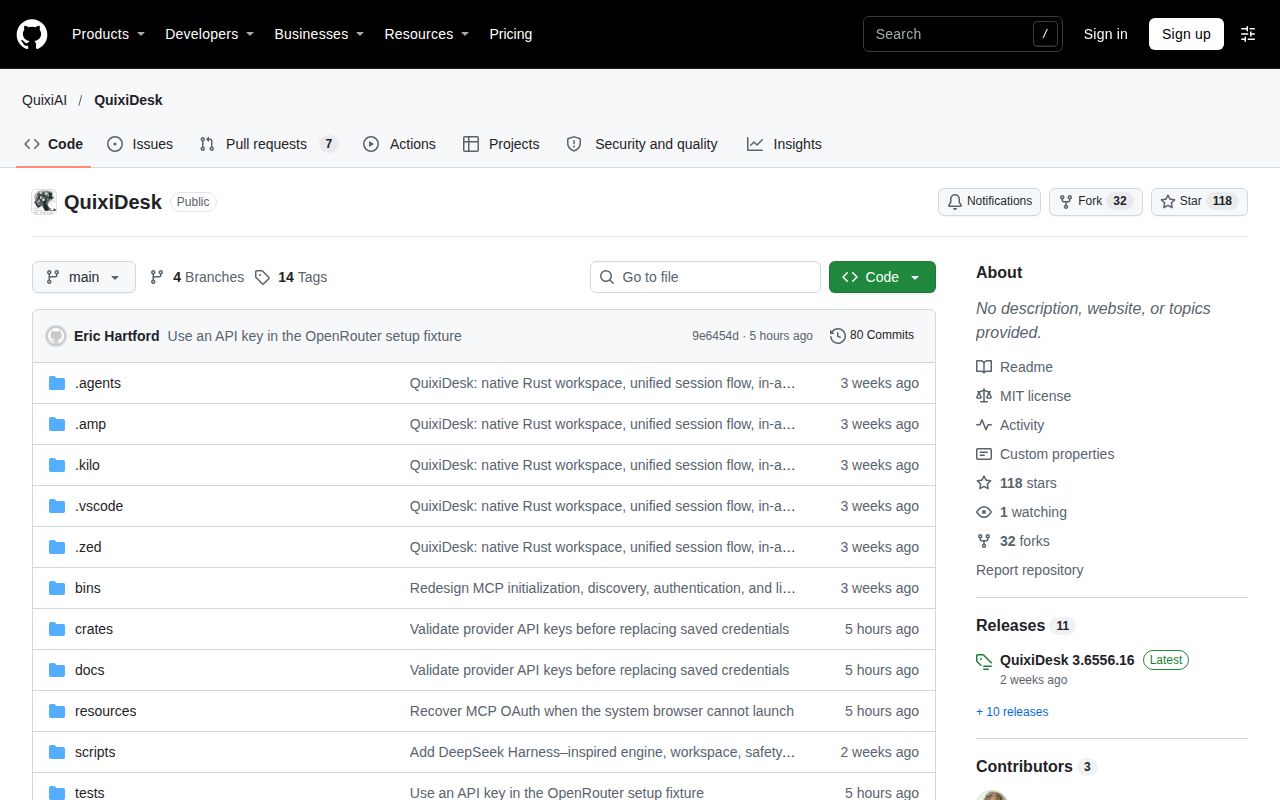
The supplied repository metadata records 118 stars, 7 open issues and pull requests combined, and a November 18, 2026 push. The latest-release metadata identifies tag v3.6556.16, published November 4, 2026. The build measurement belongs to commit 9e6454d. These identifiers describe separate observations: repository attention and activity, a published release tag, and the source checkout used for our measurements.
Bednar's report adds a concrete contribution account: he describes Linux-port work and provider integrations while running QuixiDesk on Omarchy through Venice. The issue pages likewise show specific portability reports and closure activity. For a prospective contributor, these records identify work people have discussed and changed. For a prospective user, the more immediate evidence remains the package documentation and the result of a task on the intended desktop. Bednar's contribution account
QuixiDesk vs Claude Desktop, T3 Code, Jan and AIChat
Choose QuixiDesk to assess its inspectable desktop workspace and provider choice, Jan for local desktop model use, or AIChat for terminal workflows. Hartford positions QuixiDesk as a recreation of Claude Desktop and explicitly distinguishes it from T3 Code. That positioning explains the replacement discussion; the alternative projects' own READMEs provide the firmer basis for choosing between desktop model use and a command-line workflow. Hartford's positioning statement
| Comparison | What the evidence actually compares | When to choose another route |
|---|---|---|
| Claude Desktop | Hartford reports replacing it with QuixiDesk using local or cloud models. | Keep the existing client while assessing the QuixiDesk edition against your required desktop task. |
| T3 Code | A reply names it; Hartford says QuixiDesk targets Claude Desktop instead. | Evaluate a coding-tool requirement separately from a desktop-assistant replacement. |
| Waiting for Hermes on mobile | The downstream author says that wait prompted his Android harness. | Choose the harness when you are prepared to own its installation. |
| Jan | Jan documents local model downloads, cloud connections and MCP integration. | Compare it when local desktop model use is the main requirement. |
| AIChat | AIChat documents a CLI with Shell Assistant, REPL, retrieval, tools and agents. | Compare it when your workflow belongs in a terminal. |
Jan's README describes downloading models from HuggingFace, connecting cloud providers and exposing an OpenAI-compatible local server. AIChat's README describes command and REPL modes, accepting files and directories as input, and integrating tools. Those descriptions support a workflow comparison without turning the table into a speed ranking. Choose the interaction style first, then assess the provider and tool behavior that your actual task requires. Jan README, AIChat README
What the other reviews get wrong
The current upstream README documents automatic scheduled runs while QuixiDesk stays open, contrary to HotRepo's statement that automatic dispatch is absent. It also says older definitions need enabling or saving once, missed times are reported without catch-up runs, and overlapping runs of the same schedule are skipped. Manual-mode scheduled tasks still wait for tool approvals. These documented behaviors give readers a more specific account than either a blanket scheduling promise or an older feature omission. HotRepo scheduling snapshot, upstream scheduling documentation
The upstream README explicitly says Linux and Windows lack the same native computer-use and folder-picker capabilities as macOS. Read Hartford's cross-platform replacement report alongside that statement. The downstream Linux maintainer describes adding the platform layer for capture, clipboard, synthetic input, file pickers, display enumeration, window lookup and application launching. Those descriptions explain why an application running on several operating systems can still require a different edition for a particular desktop action. Upstream platform scope, downstream platform work
The current upstream README says the replacement interface uses English. HotRepo also describes it as English-only, while Dev of the Day says QuixiDesk supports 11 interface languages. Use the upstream statement when describing the supplied current documentation. Keeping the conflicting article claim attributed preserves the discrepancy without extending either statement to every historical build or community package. Dev of the Day language claim, HotRepo interface description
Questions people ask
Issues #1 and #4 identify the missing-schema error as a compile-time dependency problem. The supplied questions also cover regeneration inputs, running tests, packaging and downstream permissions. The answers below separate the historical build reports from the current README commands, so a reader can choose the instructions that fit the revision and edition in front of them rather than applying every old workaround to a new checkout.
Why does a fresh QuixiDesk clone fail to compile because ipc-exact-schemas.json is missing?
Issue #4 says quixi-ipc embeds the schema at compile time while /reference/ is gitignored. The compiler therefore requires the file before the application runs. Its runtime parsing fallback cannot provide that missing compile-time input. The report names commit 0399ca5; our later 9e6454d checkout built successfully. Include the failing revision and exact error when reporting a recurrence. Issue #4 schema explanation
How can I obtain or regenerate the reference files needed to build QuixiDesk?
Issue #1 says the affected generator requires ignored reference data and an extracted JavaScript chunk. The report proposes tracking usable reference files or removing the mandatory embed, rather than treating the generator command alone as a solution. For a current checkout, the README directs readers to build from the repository without an extracted application bundle or external renderer. Match the instruction to the revision producing the error. Issue #1 generation inputs, current upstream build instructions
How can I run QuixiDesk's tests and macOS packaging script from my own checkout?
The README documents cargo test --locked --workspace with a disposable QUIXI_TEST_PROFILE, and ./scripts/package-macos-app.sh for macOS packaging. Its macOS instructions specify macOS 14 or later, Apple's command-line tools and stable Rust. Keep application resources with the executable or packaged app. Issue #4 marks the packaging script's repository-root correction as fixed in 0399ca5. These are documented instructions, separate from the recorded sandbox command outcome. Upstream test and packaging instructions, packaging correction
Why does the downstream QuixiDesk edition need permission to talk to KWin?
The downstream maintainer says KWin access lets his edition move windows and read the screen. He also says removing that permission removes window control. Decide whether those actions belong in the task you want the assistant to perform, then assess the permission request for that edition. Selecting local inference answers where the model runs; it is a separate choice from granting desktop-control access. Maintainer's KWin explanation
Why would I want an assistant built for a disabled person?
The downstream README describes an assistance device built first around one person's needs and later made installable for others. Its persona and onboarding explain that purpose directly. The useful evaluation is whether its documented functions fit your own task, such as organizing information or interacting with desktop applications. The maintainer's courtroom account and AAC ambition explain his motivation for that design. Downstream edition rationale, maintainer's spoken account
What we have not tested yet
Our measurements cover a source build and a failed test command at 9e6454d, not a completed interactive desktop session or a test of release tag v3.6556.16. The supplied release metadata contains no asset list or release-note extract. The test-log tail supplies no underlying assertion or exception, and the sandbox image label supplies no actual runtime or operating-system version. The deployment records conflict, and this pack contains no lab screenshot records or known-answer desktop tasks.
The supplied evidence leaves Claude Desktop parity, model answer quality, latency, task memory use, native computer control, cross-platform folder picking and sustained scheduling outside our measured results. The downstream Linux editions, Android harness, Steam Deck input, signed distribution repository and Wayland workarounds have not received an independent lab assessment here. Maintainer capability counts remain attributed reports. GitHub stars and activity provide no installed-user, retention or support-responsiveness measurement, and no independent head-to-head benchmark is supplied.
The historical issue extracts contain no documented schema-resolution explanation or complete regeneration route for their affected trees. The language reports lack matching versions and interface scope. The courtroom account supplies no task details or measured outcome; AAC ambitions and legal assertions supply no independent accessibility validation. Approval prompts and disposable profiles are not OS isolation: the README says profiles separate app state, while tool filesystem access, network access and OS permissions remain separate concerns. Rendered layout and resolved site links also remain outside this evidence-only correction.
A useful next step is one acceptance task with a disposable project folder: select your provider, keep Manual approval and complete the desktop action you need. Record the edition and commit alongside the result, and keep your existing assistant available. This proposes an evaluation; it adds no new test result to the successful build and two failed engine cases already recorded.