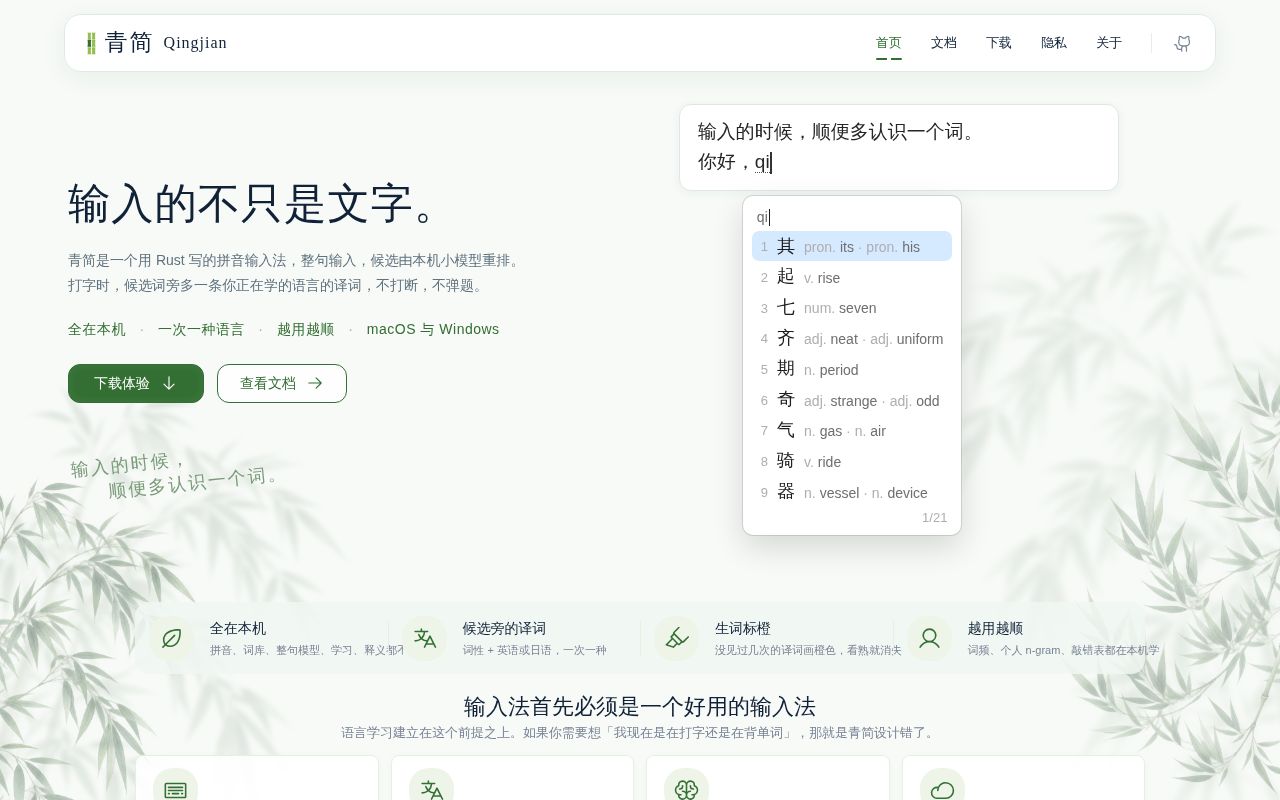
Three learning languages sit beside normal Chinese candidates
QingJian adds one small thing to a familiar input-method window: a translation beside each Chinese candidate. The user can choose English, Japanese, or Spanish, or turn translations off. Pinyin, full-sentence input, abbreviated pinyin, spelling correction, Shuangpin, Zhuyin, and Wubi are all described in the README. The translation remains secondary to the text you are trying to enter.
Typing and language study share the same moment. QingJian also records today's input volume, the last 7 days, lifetime use, and encountered vocabulary. Those statistics stay on the device. The project says pinyin conversion, dictionaries, the local sentence model, learned habits, and input statistics all run locally, with no account required.
Chinese documentation is a real adoption boundary
The repository's README, user guides, development notes, and code comments are written in Chinese. Its contributing guide says this is deliberate, while code identifiers and error strings remain English. We found no English README or English documentation tree. An English-speaking user can translate pages, but installation, privacy details, troubleshooting, and architecture decisions are written for a Chinese reader.
That choice matches the audience, yet it narrows who can safely contribute to an input method. Keyboard software touches password fields, accessibility APIs, and operating-system text services. QingJian's Chinese technical notes are unusually detailed, including platform boundaries and performance records. The language barrier, rather than missing effort, is what blocks an English-only contributor.
What happened when we ran it
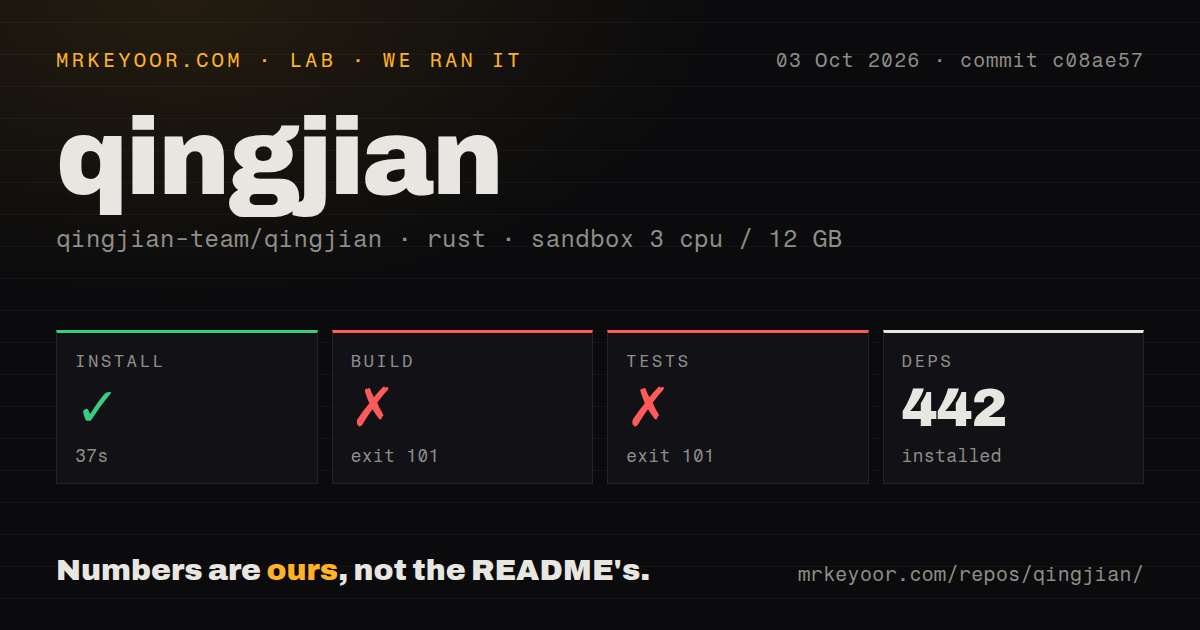
Our run installed 442 Rust packages in 37 seconds at commit c08ae57. The fresh Debian container had 3 CPUs, 12 GB of RAM, no secrets, and no elevated privileges. Its checkout contained 965 files, about 85,047 lines of source, and occupied 64.1 MB. Our test method ran the workspace on Linux rather than using a macOS runner.
The build failed with exit 101 after 62 seconds. Cargo reached objc2 v0.6.4, whose compile-time message says the crate only works on Apple platforms and asks for an Apple target, unless the caller is intentionally using GNUStep with its feature. The log then reports that objc2 could not compile. It does not show an application-level Rust error or a missing Debian system package.
The test command failed the same way after 35 seconds. It also reached objc2 v0.6.4 and stopped on the Apple-platform check before a test summary appeared. QingJian has 3 CI workflow files and no top-level tests directory, but those repository signals do not turn our failed Linux run into a pass. The default workspace path we measured is not platform-neutral on Debian.
macOS and Windows packages still carry beta warnings
Release v0.1.4 was published on September 24, 2026, and labels the macOS and Windows builds as testing-stage software. The macOS package has no Apple developer signature, so Gatekeeper requires approval under Privacy and Security. The Windows installer has no code signature and can trigger SmartScreen. Those warnings deserve attention for software that reads every composing keystroke.
The issue queue shows why the beta label matters. Issue 347 reports blank Chinese candidates on macOS 27 after a font-outline change. Issue 356 covers translation-selection shortcuts failing in Ghostty and cmux. A Windows issue describes the candidate window separating from the text field on a dual-monitor game setup. These failures sit in the system surfaces an input method must get right.
Linux has Fcitx5 support without the full settings experience
QingJian's first Linux build works through Fcitx5 and uses the system candidate panel. Release v0.1.4 provides a prebuilt x86_64 package made on Ubuntu 26.04. Other distributions are directed to build from source. The background service needs manual startup, and the README says Linux lacks cloud suggestions and a settings interface. Local candidates, learning, translations, and sentence-model reranking are present.
That is enough for an experienced Fcitx5 user to experiment. Configuration-file edits and service restarts replace parts of the graphical workflow. Our Debian compilation result adds another caution: the root workspace build attempted an Apple-only dependency. Use the documented Linux package or Linux-specific instructions rather than assuming a plain Cargo workspace command will work.
Cloud suggestions change the privacy model when enabled
Local operation needs no account and uploads no typing statistics, according to the README. Update checks contact the official site for a version list and can be disabled. Input logs are stored separately from statistics and can be turned off or cleared. Those choices give a user a reasonable local baseline for software that sits in the typing path.
Cloud suggestions are disabled by default. Once enabled, QingJian sends the current input and nearby text directly to the AI provider whose credentials you supply. Requests do not pass through QingJian's server, but the provider still receives context from what you are writing. Version v0.1.4 also changed logging so loaded API keys are replaced with *** and malformed environment lines no longer expose a key in logs.
Active October work does not erase the platform risk
GitHub showed 3,923 stars, 136 open issues, and 36 open pull requests on October 4, 2026. The last repository push was September 29, five days earlier, and recent work covers all 3 supported desktop systems. That is a busy project created on September 7. It is also too young for popularity to substitute for long-term input-method reliability.
QingJian is worth trying if the translation-in-the-candidate-window idea matches how you learn and you can read its Chinese support material. Keep cloud suggestions off until you have reviewed the provider's data handling, and test password fields plus your daily applications before making it the default. The 442-package install was easy in our sandbox. The platform-coupled build and unsigned releases make a fallback input method necessary.