
Separate worktrees give each agent task its own place
Proliferate keeps a task's branch, terminal, conversation, and review state together. If you're asking Claude Code to change an API while another agent handles an unrelated interface fix, separate Git worktrees give those changes different working directories. You still decide whether the patches belong together. The app's useful promise is that you can review each task without reconstructing which terminal owns which branch.
Our checkout contained 7,585 files and roughly 1,253,257 lines of source. This is a substantial application to adopt or modify for the convenience of organizing agents. The README advertises native agent harnesses and shared MCP integrations, plus recurring workflows. I'd start with independent branches: that gives you a concrete reason to use the workspace before introducing scheduled jobs or remote execution.
What happened when we ran it
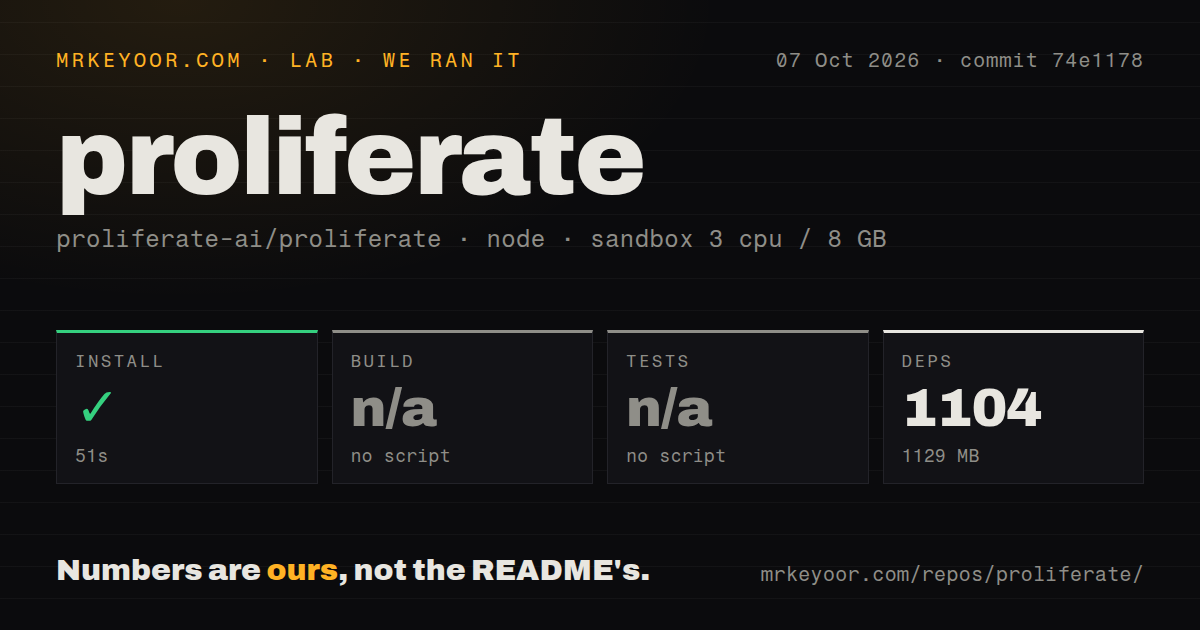
Our sandbox installed commit 74e1178 in 51 seconds on October 7, 2026, adding 1,104 pnpm packages and reaching 1,129 MB on disk. The checkout occupied 56.4 MB before installation. That is a useful dependency result, though the installed footprint deserves space in your development environment budget. It says nothing about how much attention reviewing several agents will save you.
The fresh Debian container had 3 CPUs and 8 GB of RAM, used image lab-node:22, and ran without secrets or elevated privileges. Build and tests were skipped because the harness found no corresponding script or target. Neither step passed or failed. These results cannot establish whether the native app starts or an agent completes a task.
The lab detected 26 CI workflow files, a tests directory, and monorepo workspaces, but no Dockerfile. Those are inventory signals, not executed checks. The skipped steps describe the harness result at this commit. They should not become a claim that Proliferate has no upstream checks, or that its documented deployment route is unavailable.
Source development needs Rust alongside Node
The README's desktop source route requires Rust stable, Node.js 22+, and pnpm. Full-stack development adds Python, uv, and Docker for the control plane database. The local profile guide explains why named profiles matter: each owns ports, a database name, runtime state, and a generated desktop identity. Separate worktrees need separate profile names, which remain bound to the worktree that first uses them.
The 1,129 MB from our install therefore covers only the measured dependency step. Profiles also have limits: native agent credential files remain user-level state, and OAuth or desktop deep-link checks must run serially because development apps share a callback scheme. That is specific, useful documentation. A separate working directory does not isolate every resource on your machine.
Self-hosting the server still leaves cloud runtimes with a provider
The deployment guide describes a Compose stack with Caddy, Postgres, migrations, and an API that also serves the browser application. Bootstrap can generate internal secrets, and email/password sign-in works without GitHub OAuth. Cloud repository access uses a separate GitHub App. E2B workspaces require both an API key and a published runtime template. The optional LiteLLM gateway brings its own credentials and configuration.
Our 51-second install did not exercise that deployment. The guide says cloud workspace runtimes remain provider-hosted even when the control plane is yours. It warns operators to select a server-v* deployment release rather than GitHub's generic latest tag. One documentation inconsistency deserves care: the environment example calls host runtime binaries required for cloud provisioning, while the deployment guide says current E2B templates already contain them. Follow the canonical deployment guide for that path.
Changing agent types still has a reported conversation boundary
Open issue #2208 requests switching agent kinds within an active session. Its author says moving between Claude, Codex, and Cursor requires a new session, losing the existing conversation context. The proposed handoff is a feature request. Choose Proliferate for keeping independent tasks organized, and don't assume that a shared interface makes different agents interchangeable halfway through a conversation.
Telemetry is another explicit choice. The self-hosting guide says anonymous telemetry is enabled by default, while vendor telemetry stays off for ordinary self-hosted deployments. The environment example provides an anonymous telemetry opt-out, and the desktop runtime configuration has its own telemetryDisabled setting. If your aim is keeping work inside your environment, check both settings rather than assuming that hosting the API settles the policy.
October activity supports a trial, with operating limits intact
GitHub recorded a push on October 15, 2026, with 516 stars and 104 open issues and PRs when checked on October 16. Issue activity includes a September 30 catalog-probe failure report, while an October 16 pull request addresses model controls during probing. The latest-release endpoint returned runtime-v0.4.29 from August 27. The later push and discussion show continuing activity, so that release date alone is no reason to call the project abandoned.
I'd try a local task and review its branch before configuring remote workspaces. Our 1,104-package install gives you a starting point, with no verified desktop session behind it. If separate task directories make your working day easier, test the specific harness and integrations you need next. If you mostly want one agent editing one repository, Aider leaves you with fewer workspace concepts to adopt.