The browser stays open between an agent's decisions
Playwright MCP gives a model a browser it can inspect and operate over several turns. The main input is an accessibility snapshot, which names links, controls, and page text in a structured form. An agent can click, type, upload files, inspect console output, watch requests, and save screenshots without treating every page as a picture. That is a sensible fit for exploratory work where the next action depends on what the previous page revealed. Because the snapshot exposes named controls, the model can refer to a button or field more precisely than it can infer a coordinate from a screenshot.
The server also keeps browser state. Its default persistent profile stores cookies and local data in a workspace-specific directory, while --isolated starts a disposable session. You can seed an isolated session from a storage-state file, connect to a current Chrome or Edge session through the extension, or attach over CDP. One persistent profile permits only 1 browser instance, so parallel clients need distinct data directories or isolated sessions.
Microsoft's CLI is the better fit for many coding agents
The project's own README draws an unusually useful line. MCP is for persistent state, rich inspection, and iterative browser reasoning. Playwright CLI with skills is recommended for coding agents that care about context efficiency because short commands avoid loading broad tool schemas and verbose accessibility trees. That distinction should decide the install before the project's popularity does. It also prevents a familiar mistake: adding a general browser server when a few explicit test commands already cover the job.
A debugging agent moving through an unfamiliar checkout may only need to open a route, inspect a selector, and record a test. The CLI covers that path with less protocol machinery. An autonomous workflow that logs in, follows branching UI state, returns later, and examines network traffic has a stronger reason to keep MCP. Playwright MCP exposes core actions plus optional capabilities for vision, PDF work, storage, network controls, testing, and DevTools.
What happened when we ran it
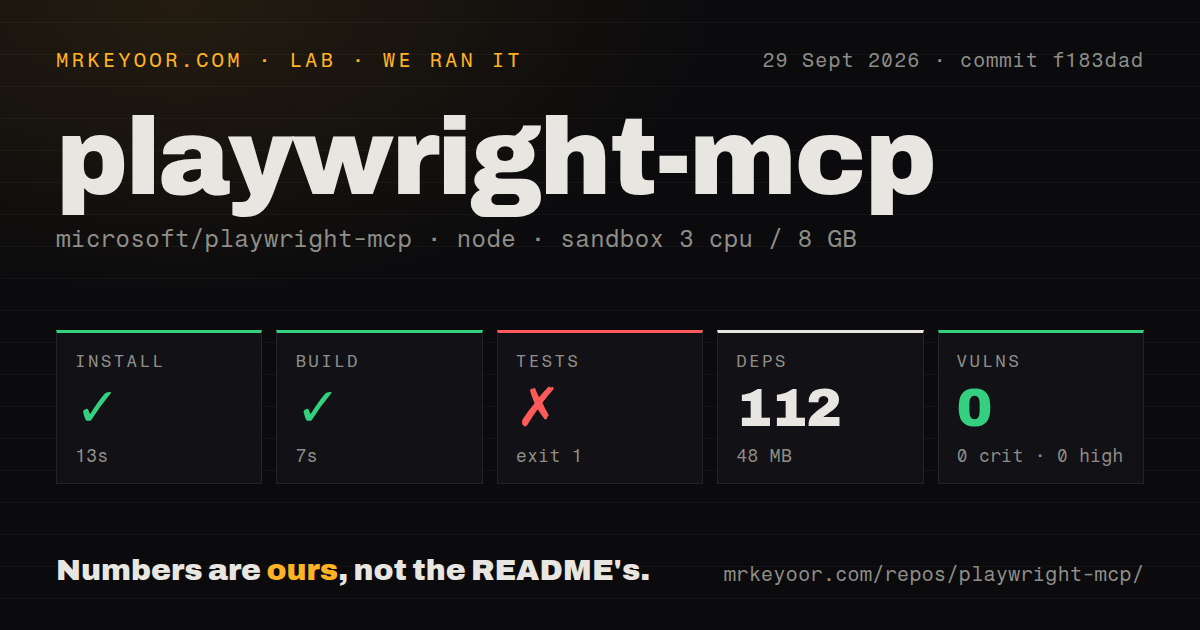
Our fresh sandbox installed commit f183dad in 13 seconds. Npm added 112 packages, the installed tree occupied 48 MB, and the build completed in 7 seconds. The checkout held 39 files and about 1,564 lines of source. Npm audit reported 0 known vulnerabilities across critical, high, moderate, and low severity. The repository also had 2 CI workflow files, a Dockerfile, and a tests directory.
Testing failed after 8 seconds before Playwright ran the suite. The log said the process was using Node.js 18.20.8 and that Playwright requires Node.js 20 or higher. Our supplied lab environment was the lab-node:22 image, so those 2 runtime facts conflict. The log does not explain the mismatch, and neither will we. A maintainer or adopter should reproduce the command and inspect which Node executable the test process resolves. Until that check passes, the successful build is not a clean release signal.
The simple config hides consequential browser choices
The smallest client configuration is just npx @playwright/mcp@latest. No hosted API credential is required for ordinary local browsing. Real use quickly raises questions the one-line setup cannot answer: whether sessions may retain login cookies, which workspace files the browser may upload, which origins it may reach, where screenshots land, and whether the MCP client may evaluate JavaScript inside an untrusted page.
Microsoft states that Playwright MCP is not a security boundary. The origin allowlist defaults to allowing all origins, does not cover redirects, and is explicitly described as unsuitable for containment. File access is limited to workspace roots by default, but an option can remove that restriction. The server can also load dotenv secrets, grant browser permissions, ignore HTTPS errors, and disable browser sandboxing. Each switch is useful, and each widens what a mistaken agent action can touch.
Docker narrows the browser choice to headless Chromium
The repository includes a Dockerfile and documents both short-lived stdio use and a long-running HTTP server on port 8931. The container route supports headless Chromium only. A team that needs to reproduce Safari-facing WebKit behavior or Firefox-specific bugs must use another installation path. The long-running example also binds to 0.0.0.0 and starts Chromium with --no-sandbox, so operators need network controls around it.
Development activity is current. GitHub showed 37,704 stars, 6 combined issues and pull requests, and a last push on September 28, 2026. Release v0.0.83 was published the same day. Those dates support active maintenance, while our failed test step keeps the recommendation conditional. Use the server when persistent browser context is central to the job, then pin the package, confirm Node 20 or newer inside the actual test process, and choose profile isolation before handing it an authenticated session.