Short answer: the source checks passed; try one real task next
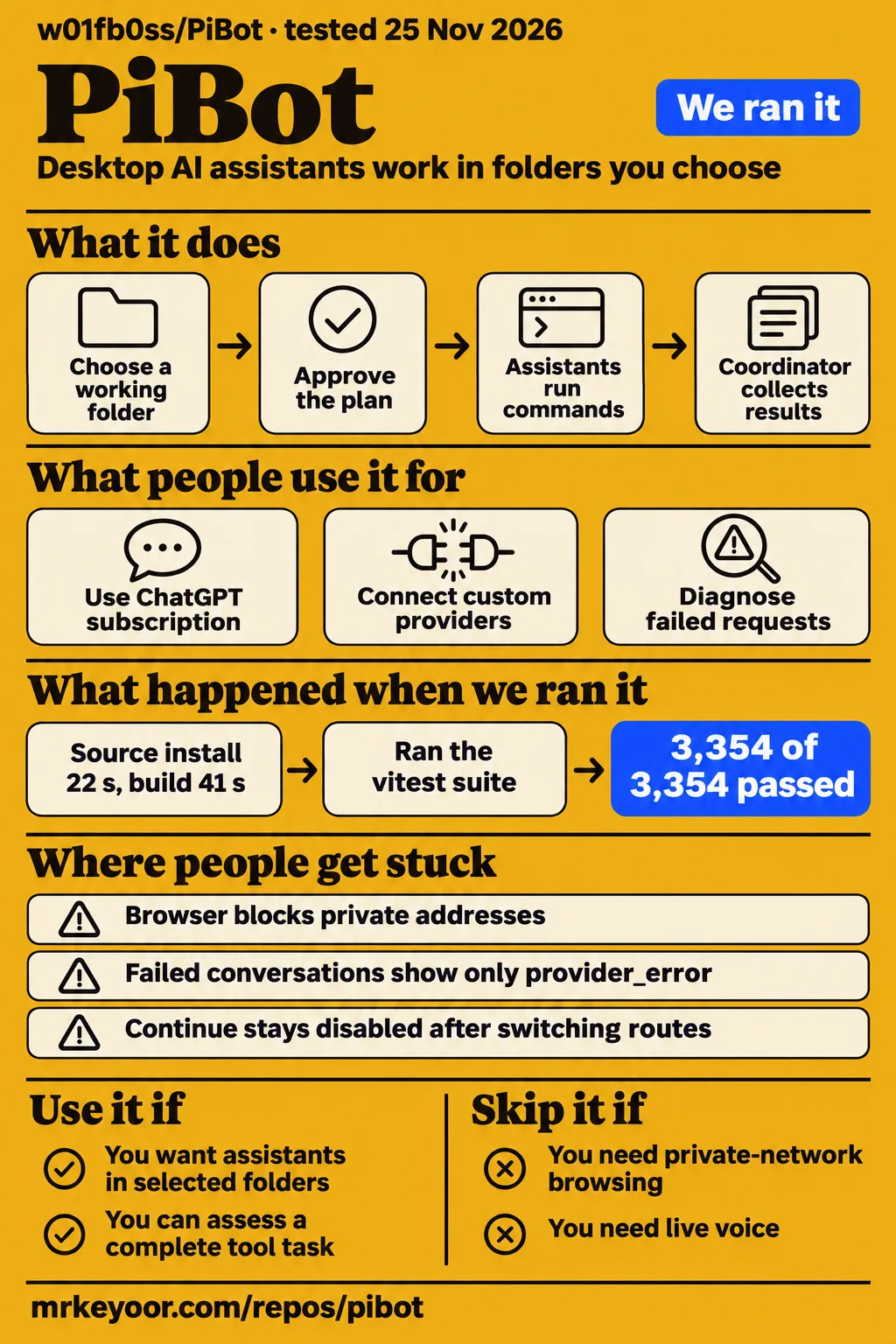
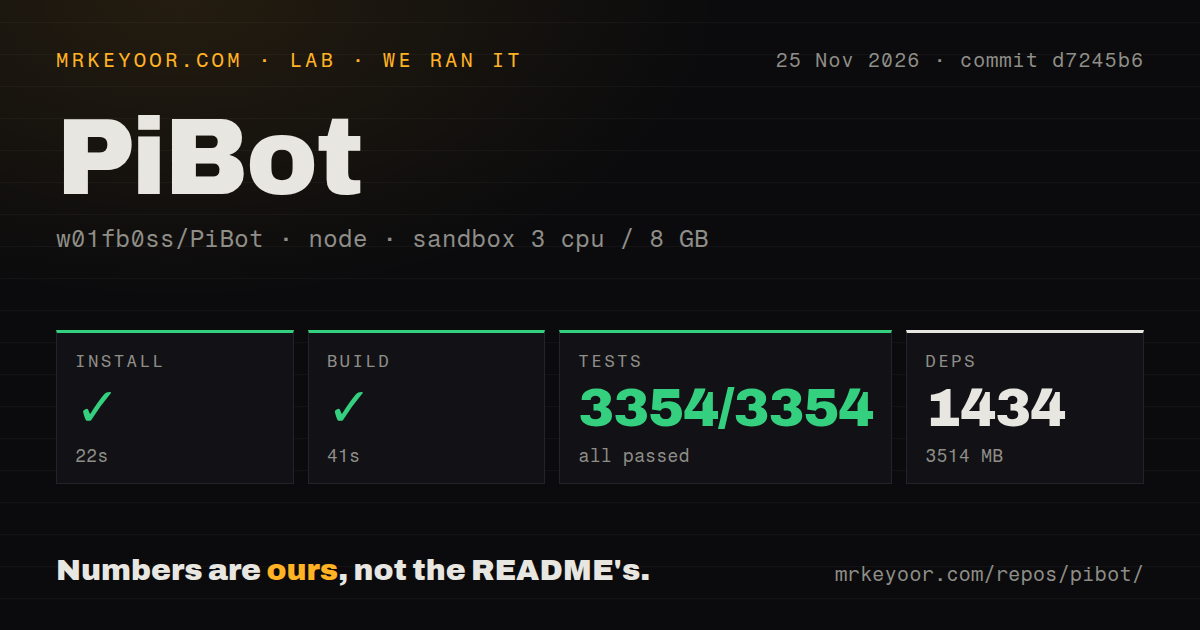
Our PiBot sandbox run passed all 3,354 Vitest tests at commit d7245b6, with installation completed in 22 seconds and the build in 41 seconds. Use it if you want named AI assistants working in folders you choose and you're comfortable checking a real task against your chosen model provider. Skip it if your essential job is browsing a private LAN or Tailscale application: issue #14's reporter encountered a hard block with no approval prompt.
The strongest reason to consider PiBot is its desktop workflow: the README describes individual Bots and coordinated group chats that can plan, run commands and edit files. The strongest reason to start small is the provider history. Two users can enter the same model name and have very different experiences because the app also sends instructions and descriptions of its tools. That is where the most useful reports in PiBot's tracker begin.
PiBot is a desktop app; the robot search results describe other projects
w01fb0ss/PiBot is a local-first desktop AI agent app, built on the pi agent kernel, according to its README. You give a Bot a working folder and talk to it directly, or put several Bots in a group with a coordinator. The coordinator hands work to members and collects their results; the README says you approve the plan before it runs.
If you searched for “pibot robot,” the KAIST research page describes a humanoid aircraft pilot, a different project. The PiBot CNC controller, IRM Systems' pipeline-management PIBOT and luodaoyi/pi-bot daemon are also separate entities. Their hardware specifications, customers and results tell you nothing about this desktop app. Use the full repository name, w01fb0ss/PiBot, when looking for downloads or troubleshooting.
What people use PiBot for
GitHub user iqbalbhawana reported GPT-6.2 Sol and Astra working after following the maintainers' recommendations in issue #4. That is a concrete compatibility result, rather than a claim that a group of agents completed a business workflow. The most useful user accounts describe getting a connection working, finding out why it failed, or reaching a boundary in the browser.
| Who tried it | What they wanted | What happened |
|---|---|---|
| iqbalbhawana, using a MacBook Pro with an M3 Pro chip and 36 GB RAM | Use GPT-6.2 Sol and Astra through ChatGPT subscription sign-in | Reported both models working; the maintainer confirmed their catalog entries shipped in v0.0.3. Issue #4 |
| The Windows reporter of issue #5 | Connect AMD Token Factory, InternLM and SiliconFlow as custom providers | Settings tests passed but conversations failed; a provider-level compatibility change restored operation. The maintainer shipped the default-role fix in v0.0.3. Issue #5 |
| The reporter of issue #3 | Find the real error behind provider_error | Captured upstream traffic through a local forwarding proxy and reported spending several hours investigating. Issue #3 |
| The reporter of issue #14 | Browse a private Tailscale-hosted web application | Navigation was rejected immediately, without an approvable exception. Issue #14 |
On X, jevlorde explicitly described their post as “not a hands-on test”. RoundtableSpace described the desktop agent workflow, while it_works_123 described local storage and approvals. Those posts explain the appeal. The issue reports above do more to tell you what happens after you start configuring it.
What happened when we ran it
Our November 25, 2026 source run at commit d7245b6 completed installation in 22 seconds, built in 41 seconds and passed 3,354 of 3,354 Vitest tests in 98 seconds, with zero failures. Those are our sandbox measurements, using a recorded configuration of 3 CPUs, 8 GB RAM and image label lab-node:22. The label alone doesn't identify the actual runtime or operating-system version.
| Recorded check | Result | What you can take from it |
|---|---|---|
| pnpm installation | Succeeded in 22 seconds; 1,434 dependencies recorded; 3,514 MB on disk | The developer dependency environment installed in this sandbox. |
| Build | Succeeded in 41 seconds | The recorded build step completed at d7245b6. |
| Vitest tests | Succeeded in 98 seconds; 3,354 passed, zero failed of 3,354 | The recorded test suite passed. |
| Checkout scan | 5,433 files, about 602,713 source lines, 75.4 MB checked out | This is a substantial workspace repository to modify. |
| Project signals | Three CI workflow files, a tests directory, monorepo workspaces; no Dockerfile detected | These describe the checkout, rather than the state of any live service. |
The separate hands-on deployment attempt stopped at the lab's Compose safety check. It reported: “none of compose.yaml, compose.yml, docker-compose.yaml, docker-compose.yml exists”. The lab required a Compose file. PiBot's README instead directs ordinary users to download a desktop application, so this failure identifies a mismatch with that lab deployment route, rather than a desktop startup failure.
There is a contradiction worth keeping visible: the run summary says “deployed with its own docker compose”, while the actual safety step refused to proceed. The step result takes precedence in this assessment. The lab teardown returned ok. There is no completed browser session or answered task to narrate from that attempt.
For source work, the README requires the Node version in .nvmrc and pnpm 12. It documents pnpm dev for development and identifies pnpm build as an Electron build without an installer. It also recommends PIBOT_DATA_DIR to separate development data from an installed app. The measured 3,514 MB belongs to our developer environment; don't read it as a measured download size for the desktop installer.
Where people get stuck: a passing provider test can miss the real request
The Windows reporter in issue #5 passed settings tests for three custom providers, then saw every real conversation fail. Real conversations included a system prompt, the instructions that define how the Bot should behave. PiBot sent those instructions with the developer role, a message label those gateways rejected. The settings test omitted the system prompt and therefore missed the incompatibility.
The reporter's temporary change set supportsDeveloperRole to false at the provider level and restored operation. They also reported breaking background startup by putting the setting at the model level. That makes hand-editing the database a poor first recommendation. The maintainer's v0.0.3 fix changes the default for custom OpenAI-compatible providers to system, keeps developer for api.openai.com and respects explicit compatibility settings. The proposed settings toggle belongs to v0.0.4, according to the same thread.
A second failure had the same outward symptom. In issue #2, the reporter captured an HTTP 200 response whose first streamed event was an error: the gateway rejected a tool's parameter description. Tool schemas tell a model which arguments it may send to a tool. Here, Unicode regular-expression patterns in those schemas triggered rejection before useful work began. The maintainer confirmed seven affected rules and said v0.0.3 removed those patterns from schemas sent to models while keeping validation inside PiBot.
| Symptom and report | Response documented in the thread | Release status to use when deciding |
|---|---|---|
| Custom providers pass the settings test but reject conversation instructions, #5 | Default custom-provider prompt role changed to system | Shipped in v0.0.3. Maintainer's reply |
| Strict gateway rejects a tool schema, #2 | Remove incompatible patterns from outgoing schemas, retain app-side validation | Shipped in v0.0.3. Maintainer's reply |
| Only provider_error appears, #3 | Show redacted, shortened upstream errors inside the local conversation | Planned for v0.0.4; the closing discussion says the contribution still needs review. Issue #3 |
| Continue stays disabled after switching sign-in routes, #7 | PR #8 ties test state to its route and model | Maintainer says fixed by #8 and shipping in v0.0.4. Issue #7 |
| Background brain exits during macOS startup, #10 | Install v0.0.3 over v0.0.2, then supply the brain log if it persists | Recommendation recorded; no successful follow-up in the thread. Issue #10 |
For your first conversation, choose a harmless task in a disposable folder that actually uses a tool. A green connection test answers a narrower question than a complete turn with instructions and tool schemas. Keep the app version alongside any error you report, because v0.0.2's gateway behavior and v0.0.3's fixes lead to different advice.
Local storage still sends prompts to your chosen provider
PiBot's README says chats, files, memory and keys stay local, while the chosen model provider sees the prompts you send. “Local-first” describes where the app's working state lives. If you select a remote model, that provider is part of your data path. The README also lists update checks, websites, searches and enabled connections among outbound activity.
The data guide says API keys and sign-in tokens are encrypted with the system secret store. It describes a local data folder containing chats, settings, Bots, memory and audit records, and says uninstalling the app leaves that folder behind. Its update checks send the app version and platform, with no identifier or usage data, according to the guide. These are the project's stated storage and connection practices.
Approval also has a specific boundary. Issue #14's reporter says private-network browser navigation is rejected outright, even though other sensitive actions can display confirmation cards. Telling the Bot in chat that it has permission doesn't lift that browser restriction. The reporter suggests manually attaching screenshots or saved HTML as workarounds. Those are useful options for a one-off inspection, but they change a live browsing task into reading material you supply.
Search adds another service choice. The author of issue #12, who discloses working at You.com, describes default keyless search as DuckDuckGo HTML scraping with Bing fallback. Brave, Tavily and SearXNG are existing alternatives in that account. You.com and Keenable are proposals here. In issue #13, a Keenable staff member says both keyed and keyless requests are logged under its default policy. A provider offering a keyless API still needs a clear disclosure about what happens to your search query.
English documentation exists; some useful troubleshooting is in Chinese
The README offers English, Chinese and Japanese versions and links to English online guides. You can read the installation route, model choices and outbound-data explanation in English. The data guide also documents a language setting, although our recorded checks don't include a rendered interface or a language-switching exercise.
Several of the most specific provider reports, including #2, #3 and #5, are written in Chinese. The relevant technical details are exact message roles, schema patterns and maintainer replies, so keep the original error strings when searching. The macOS startup and ChatGPT sign-in threads are in English. You don't have to infer language support from the language of a launch post.
PiBot vs Hermes, OpenBot and OpenMausBot
The reporter of issue #5 says the same keys and models worked in Hermes while PiBot v0.0.2 failed. That comparison is useful for diagnosing that version's request formatting. PiBot's subsequent fixes mean it should not become a permanent claim that Hermes has better provider compatibility.
| Alternative | Why it comes up | What the comparison supports |
|---|---|---|
| Hermes | The Windows reporter used identical keys and models successfully there | A working comparison for the reported v0.0.2 role and schema failures, followed by PiBot fixes in v0.0.3. Issues #5 and #2 |
| OpenBot | The voice requester cites its internal Codex app-server approach for live voice | A requester-reported precedent for a feature they want in PiBot. Issue #11 |
| OpenMausBot | The same requester describes an external sidecar bridge for voice | Another reported architecture, which the requester says would not fit PiBot's current interfaces. Issue #11 |
Choose your comparison around the job. If a custom gateway is your dependency, run the same harmless tool task through both clients and compare the complete response. If spoken conversation is the requirement, the voice thread gives you other apps to investigate. It doesn't provide a measured ranking of their audio quality, costs or reliability.
Questions people ask
GPT-6.2 Astra and Sol were added to both ChatGPT sign-in catalogs in v0.0.3, according to the maintainer in issue #4. OpenAI still decides model access for your plan.
How can I use GPT-6.2 Astra and Sol in Pi Bot through ChatGPT sign-in without an API key?
Update to v0.0.3 and use either ChatGPT plan or ChatGPT (Codex sign-in), the routes named in issue #4. The maintainer says both catalogs include the models without extra setup. iqbalbhawana subsequently reported both working; a catalog entry alone doesn't promise entitlement on every subscription.
Can I refresh Pi Bot's OAuth model catalog, or do I need an app update?
For these models, the maintainer's answer was an app update: v0.0.3 updated the model catalog PiBot pins. The thread gives no separate catalog-refresh procedure. The distinction matters if sign-in succeeds but the model picker still reflects an older app version.
How can I fix an external Codex system-info denial while keeping the sandbox enabled?
The maintainer in issue #4 says there is no supported workaround that keeps the sandbox on yet. They couldn't reproduce the denial on an Intel Mac and asked for machine details and sandbox-block information. The reporter's later provider success did not close that separate technical question.
Why do my OpenAI-compatible providers pass the settings test but fail in real conversations?
In issue #5, the settings test omitted system instructions that real conversations sent with an unsupported developer role. Issue #2 found a separate tool-schema rejection. Both fixes shipped in v0.0.3. Match your error to the specific failure rather than assuming every passing settings test covers full agent requests.
How can I see the upstream HTTP status and error message instead of only provider_error?
The reporter in issue #3 used a local forwarding proxy to capture the upstream response. The maintainer proposed redacted, shortened errors in the local conversation for v0.0.4, avoiding prompt or file content in exported logs. The thread ends with contribution review, rather than confirmation of a released diagnostics change.
Why does Pi Bot's brain process exit on startup on macOS 26?
The cause is absent from the host-log excerpt in issue #10. It shows brain exited code=1, brain restart limit reached and background_launch_failed. The maintainer directs the reporter to update from v0.0.2 to v0.0.3 and obtain the brain log if startup still fails; the host symptoms alone aren't a diagnosis.
Why is Continue still disabled after I switch from a failed API-key test to a connected ChatGPT plan?
Issue #7 describes stale provider-test state shared across onboarding routes. A failed OpenCode Go test kept Continue disabled after switching to a connected ChatGPT plan. The maintainer says PR #8 associates the test with its route and model and will ship in v0.0.4. That is a code-fix report with a future release target.
Can I have a real-time voice conversation with a Pi Bot using my ChatGPT sign-in?
The maintainer in issue #11 treats live voice as a candidate for a later release and explicitly excludes it from v0.0.4. SDK voice resources in the bundle don't establish an app feature. The request involves microphone permission, audio leaving the machine and a new audio transport, not simply adding a model name.
Can Pi Bot offer a keyless search API instead of scraping search-result pages?
You.com is proposed in issue #12, and Keenable in issue #13. The maintainer welcomed a You.com contribution while keeping DuckDuckGo/Bing as the default. These threads describe proposals, not implemented replacements. Existing search-provider choices include Brave, Tavily and SearXNG in the requester's account.
Can I approve Pi Bot browser access to a private LAN or Tailscale service?
The reporter in issue #14 says no approval card or settings allowlist is available for this browser block. They request approval per host and task. Manually attached screenshots or saved HTML are their current workarounds; exposing a private service publicly changes the network boundary and isn't our recommended fix.
What we have not tested yet
Our passing source checks don't establish desktop task success, multi-agent output quality, request latency, token costs or local-model performance. We have not tested the packaged installers, Android app, remote runners, approval enforcement, audit-log redaction, encrypted credential storage or recovery of changed files. The separate Compose attempt stopped before a usable deployment, and there are no task answers or screenshots from it to score.
We also have no repeated workload run across macOS, Windows and Linux. The successful M3 Pro report in issue #4 and the startup failure in issue #10 describe different user experiences; neither can replace a platform matrix. The YouTube entries we checked contain no transcript text, and the Bilibili material is a search listing, so neither supports attributing a demonstrated task outcome to a video creator. We found no Reddit account to add to these issue reports.
GitHub's public metadata on November 25 lists 562 stars, 10 open issues and PRs combined, and a last push on November 24, 2026. The latest-release endpoint returns v0.0.3, published November 22. Those are activity facts, alongside a dated release, rather than adoption or support guarantees. The useful next result is one complete task in your working folder with your provider, including the final file and any approval it needed.