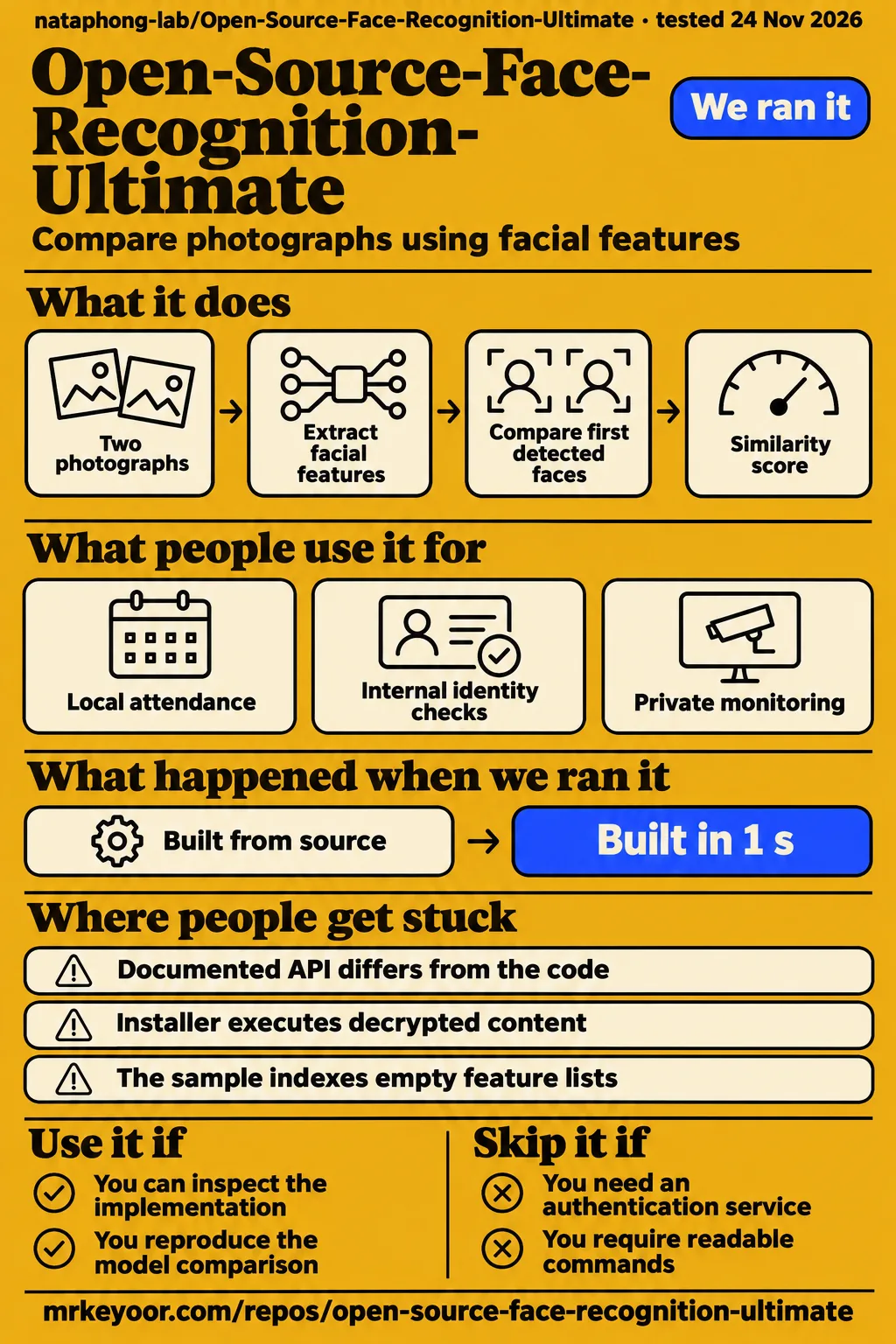
Our run installed Open-Source-Face-Recognition-Ultimate in 5 seconds and built it in 1 second, then pytest exited 5 with no tests collected. Use it if you are investigating a Python face-comparison model and can inspect the implementation before integrating it. Skip it if you need a ready-to-deploy authentication service: the documented API differs from run.py, and the installer executes decrypted content. The author's benchmark provides a specific model comparison to investigate.
What you can do with Open-Source-Face-Recognition-Ultimate
GetImageInfo in run.py returns six values: face count, bounding boxes, detection scores, landmarks, aligned images and features. The implementation combines face processing and feature extraction, then exposes a separate similarity function for comparing embeddings. An embedding represents facial features numerically. The return statement in Ultimate's run.py implementation gives callers several collections to unpack rather than a list of face dictionaries.
The executable example loads two image files, extracts their features and compares the first feature from each result. That supplies a starting point for a photograph-comparison application. The surrounding application still chooses which detected face to compare and how to handle images containing several people. The sample's use of features1[0] and features2[0] makes that selection explicit: index zero determines which detected features enter the comparison.
The README lists multiple-face detection among the project's capabilities. That capability and the example's first-face selection describe different parts of an application. Detection produces candidates; enrollment or identity comparison requires a rule for choosing among them. For a developer reading the code, the six returned values expose the information available at that boundary, including detection scores, landmarks and aligned images alongside the features.
What people use Open-Source-Face-Recognition-Ultimate for
Nataphong-Lab evaluated Ultimate against FacePlugin on five face-verification datasets and reported a 15.22 percentage-point average improvement. The author's benchmark table reports 98.28% average accuracy for its further-trained model and 83.06% for FacePlugin. Those figures concern the named evaluation datasets and the author's comparison, rather than an attendance installation or an identity service operating against a company directory.
| Who did it | What they evaluated | Reported outcome |
|---|---|---|
| Nataphong-Lab, the project author | Further training of the FacePlugin recognition model, evaluated on LFW, CFP-FP, AgeDB-30, CALFW and CPLFW | 98.28% average accuracy versus 83.06% for the baseline, an author-reported result |
The README identifies different evaluation focuses for those datasets, including frontal-to-profile, cross-age and cross-pose face verification. It also calls for identical dataset splits, image preprocessing, face alignment, verification protocols and evaluation metrics when reproducing the comparison. Those conditions give researchers a concrete reproduction task: hold the evaluation procedure constant while comparing the original model with the further-trained model.
On X, fishjar recommends Ultimate for local attendance, internal identity checks and private monitoring. The Chinese-language post presents those as possible applications. Its recommendation is useful as an example of how people discuss the project, while the author's benchmark identifies the specific evaluation reported by its developer. A recommendation and a measured deployment outcome are different kinds of evidence.
What happened when we ran it
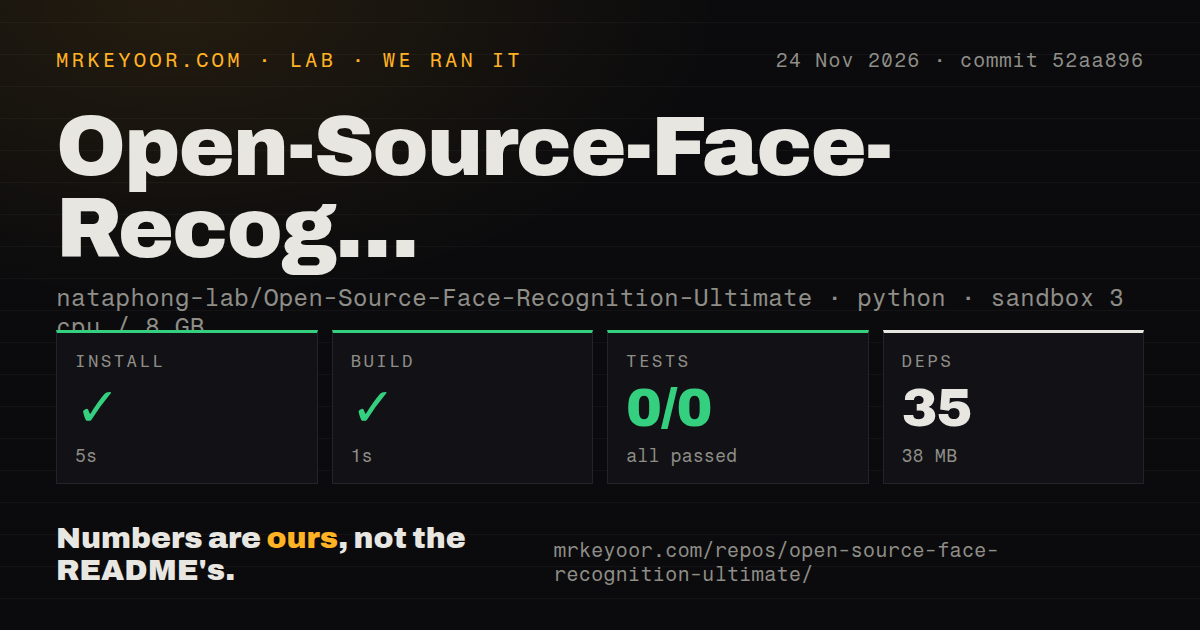
At commit 52aa896, our November 24, 2026 run installed Ultimate in 5 seconds, built it in 1 second and recorded pytest exit 5 after 2 seconds. The sandbox measurement recorded 35 dependencies and 38 MB on disk. The test log says exactly: no tests ran in 0.01s. Installation and build returned success; the test invocation collected zero tests.
| Recorded step or signal | Result from our sandbox |
|---|---|
| Installation | Succeeded in 5 seconds; 35 dependencies recorded; 38 MB on disk |
| Build | Succeeded in 1 second |
| Tests | Failed, exit 5, in 2 seconds; 0 passed and 0 failed of 0 |
| Test log | no tests ran in 0.01s |
| Repository scan | 42 files, approximately 2,337 source lines, 61.9 MB checked out |
| Automation and packaging scan | 0 CI workflow files; no Dockerfile; a tests directory exists |
| Recorded sandbox configuration | 3 CPUs, 8 GB RAM; image ghcr.io/astral-sh/uv:python3.12-bookworm |
The test step produced no passing tests because it collected no tests. The log tail contains no assertion failure or package error to diagnose. A tests directory exists, but this invocation collected zero tests from the repository. The 2-second outer step and pytest's 0.01-second message describe different scopes; both belong in the record, and neither replaces the other.
A separate deployment attempt stopped at its safety check: none of compose.yaml, compose.yml, docker-compose.yaml or docker-compose.yml existed, and that workflow required a Compose file. Its generic run description says deployment used the project's own Docker Compose, with every port bound to 127.0.0.1, contradicting the concrete failed step. The step records the outcome: deployment was blocked. The subsequent teardown reports ok.
Where people get stuck: the example and the API disagree
Ultimate's archived API reference specifies filename input and dictionary results; run.py accepts an image array and returns six separate values. The documented contract and inspected implementation therefore require different integration code. Passing a path and selecting an embedding by dictionary key belong to the documented class example. Loading an image and unpacking six values belong to the inspected module-level function.
| What you encounter | What the code or documentation shows | Practical response |
|---|---|---|
| Copying the class-based quick start | Documentation calls FaceRecognition; run.py exposes module-level functions | Identify the callable your wrapper will invoke |
| Passing a filename to GetImageInfo | The function applies OpenCV color conversion to its argument | Load an image array before calling this function |
| Treating the result as face dictionaries | The return statement contains six values | Unpack the result and select the feature collection |
| Comparing an image with no detected face | The example indexes features1[0] and features2[0] directly | Add image-load and empty-result checks |
| Expecting pose in the returned result | The function computes poses but omits them from the return tuple | Returning poses requires an interface change |
| Following Linux setup literally | The dependency sequence invokes winget and PowerShell | Resolve the platform-specific dependency procedure |
The sample directly indexes both feature lists, creating an indexing failure path when either collection is empty. An application wrapper should distinguish an unreadable image, a readable image containing no detected face and an image containing several candidates. Assigning a similarity score to those input failures would conceal why a comparison could not proceed and discard information the caller needs.
The similarity function returns (np.sum(feat1 * feat2) + 1) * 50, while the documented class example displays its output with a percentage suffix. That transformation appears in run.py; the README's class example separately uses similarity >= 75. Keep the score calculation and the application's acceptance rule explicit. A displayed percent sign describes the formatting of that example's output.
The installer decrypts code and executes it
The PowerShell installer decrypts Advanced.dat and passes the resulting text to Invoke-Expression. That execution path appears in install.ps1, following its integrity check and before execution of the decoded text. The script also assigns INSTALL_ROOT. For an installation review, the commands reaching the interpreter include both this readable outer script and the separate body of commands recovered from Advanced.dat.
The integrity check compares the payload against an expected authentication value. Inspecting the commands inside the decrypted text is a separate task from checking that value. The README's local-processing statement concerns biometric processing, while the installer contains this additional execution path. The separate env.conf contains an opaque ENV_DATA value, giving reviewers another concrete configuration item to trace rather than treating the README's processing description as an account of every installation step.
At volume, the example still compares the first face
Ultimate's executable example compares one pair of feature vectors after processing two image files. The workload shown in run.py selects the first feature from each result, although detection can produce multiple faces. A directory search or continuous camera service needs application code to select candidates and arrange comparisons beyond that two-file example. Those workloads also require a clear definition of what counts as one completed comparison.
For a larger evaluation, record face counts and separate detection failures from comparison results. Comparing two photographs, searching a gallery and processing successive camera frames require different selection and storage decisions. The README advertises real-time processing and CPU/GPU support. A capacity exercise should specify the intended workload, hardware and acceptance rule before gathering timings, so a measurement of one operation does not stand in for another.
For a model comparison, hold image pairs and preprocessing constant. The author's evaluation guidance calls for matching dataset splits, alignment, protocols and metrics. Changing those conditions alongside the model makes the result harder to interpret. The README's named datasets provide several evaluation focuses; an application evaluation should also account for the kinds of photographs its own enrollment and comparison workflow will receive.
Open-Source-Face-Recognition-Ultimate vs FacePlugin, CompreFace and InsightFace
FacePlugin is Ultimate's stated model baseline; CompreFace documents a Docker service, and InsightFace documents a server with optional liveness support. These projects offer different integration starting points. Ultimate's inspected example compares features in Python, while the alternatives' service interfaces expose operations through APIs. The table separates those documented interfaces from the author's model benchmark rather than turning them into an accuracy ranking.
| Project | Documented distinction | Pick it when |
|---|---|---|
| Ultimate | Additional training of the FacePlugin recognition model, with a Python comparison example | You want to investigate that model change and can reconcile the API |
| FacePlugin Open-Source-Face-Recognition-SDK | The original model named in Ultimate's evaluation | You need the author's baseline for a controlled reproduction |
| Exadel CompreFace | A Docker Compose service with REST APIs and role management | Your application needs a packaged recognition service and managed access |
| InsightFace | A self-hosted server with a Web UI, REST API and optional liveness addon | Those interfaces fit your application and the selected model's terms fit your use |
CompreFace documents REST APIs and a role management system for controlling access to recognition services. Those are concrete selection criteria when several applications or operators share a service. Ultimate's pair-comparison example addresses a smaller part of that application architecture. InsightFace's optional RGB liveness addon addresses a separate requirement from embedding comparison, so readers should distinguish the recognition model from additional components surrounding it.
InsightFace's README permits commercial use of its MIT-licensed code but restricts the described training data and trained models to non-commercial research. Its licensing policy covers manual and automatic model downloads. Selecting an interface therefore includes a separate decision about model weights and their terms. Permission to use the code and permission to use the downloaded models are distinct parts of that choice.
What the other reviews get wrong
HackerNoon's 2021 roundup says published source assures readers that software does not steal data; Ultimate's installer executes decrypted text. In "6 Best Open-Source Projects for Real-Time Face Recognition", the source-availability argument reaches beyond what inspecting an outer script establishes. Ultimate's visible installer shows why downstream commands also belong in a review: the PowerShell interpreter receives text recovered from another file.
Face Benchmark's November 2026 "Open-source face recognition: toolkits, shipped models and training data" says none of its three toolkits ships a liveness check inside the recognition model. InsightFace's September 9, 2026 update documents an optional RGB liveness addon. The addon corrects the broader implication that users must supply all liveness functionality themselves; an optional component and a check built into an embedding model remain different claims.
What the archived docs get wrong
The archived Ultimate quick start mixes face_sdk, facesdk and face_info; the live README uses consistent variable names in those examples. The archived spelling mismatch belongs to that archived text. The earlier integration table covers the other corrections: image-array input and six returned values in run.py differ from the documented filename and dictionary interface. Correcting variable names resolves one copying problem without reconciling those two contracts.
Questions people ask
Ultimate's author reports a higher five-dataset average than FacePlugin, and run.py compares embeddings extracted from image arrays. Those facts answer the two central adoption questions here: which model change the author reports and how the inspected example performs a comparison. The following answers also distinguish an example threshold from an application decision and separate Ultimate's two-file workflow from webcam examples in another library.
How does Open-Source-Face-Recognition-Ultimate compare with the original FacePlugin model?
Nataphong-Lab reports a 98.28% average across five datasets, compared with 83.06% for FacePlugin. The project's benchmark reports improvements on all five named datasets after additional training and model optimization. FacePlugin is the relevant baseline for reproducing that particular claim. The methodology asks for identical splits, preprocessing, alignment, protocols and metrics so differences in evaluation conditions do not become differences attributed to the model.
How do I process an image and compare two faces in Python?
In run.py, cv2.imread loads each image before GetImageInfo returns six values and get_similarity compares the selected embeddings. The executable example follows that sequence, selecting the first feature from each image. A wrapper should check image loading and empty feature collections before indexing, then choose a face when several candidates exist. These are integration recommendations based on the inspected example, rather than a newly executed replacement example.
What similarity threshold should I use for my application?
Ultimate's README uses 75 as an example threshold and says the appropriate value depends on the application, dataset and operating conditions. The documented class example accepts similarity >= 75. Use that as an example configuration when planning an evaluation, and record the application's actual acceptance rule alongside false matches and missed matches. The score calculation and the decision made from that score are separate parts of the integration.
How can I implement webcam face recognition with OpenCV and face_recognition?
The ageitgey/face_recognition README points readers to webcam examples requiring OpenCV. Those webcam workflows belong to face_recognition, a separate library from Ultimate. Ultimate's inspected run.py reads two files and compares their first detected faces. For a developer choosing a starting point, the distinction is the documented workload: a webcam example begins with camera frames, while Ultimate's inspected example begins with two photographs.
What is the best open-source face recognition model?
Ultimate's reported benchmark compares its further-trained model with FacePlugin across five datasets. It supplies a specific comparison rather than a ranking of CompreFace, InsightFace and every other recognition model. The evaluation guidance calls for matching splits, preprocessing, alignment, protocols and metrics. A selection exercise should apply those conditions to its chosen candidates and consider the interface, acceptance rule and model permissions required by the application.
Can I use InsightFace models commercially?
InsightFace's README restricts the described trained models to non-commercial research while allowing commercial use of its MIT-licensed code. The licensing policy applies to manual downloads and automatic downloads through its Python library. It also directs recognition-model licensing requests to the project. A developer choosing InsightFace as an alternative must therefore identify the selected weights and their terms separately from the code licence.
What training data underlies published face recognition accuracy scores?
Ultimate names LFW, CFP-FP, AgeDB-30, CALFW and CPLFW as evaluation datasets and describes further training of FacePlugin's model. The README distinguishes the benchmark datasets from the model-development description. Training data fits a model; evaluation datasets measure its performance. Reading the five benchmark names as a list of the additional training corpus would collapse those separate roles and assert more than the model-development description says.
What we have not tested yet
Our sandbox collected zero tests, and the separate Compose attempt stopped before a recognition workload. The code-reading findings are not executed recognition tests, and this revision adds no execution results. We have not reproduced the five-dataset benchmark, inspected full evaluation configurations, measured inference latency or throughput, or compared CPU and GPU behavior. The sandbox image label also does not establish actual Python or operating-system versions. The run.py extract ends before its decision branch, leaving its acceptance operator outside this review's evidence.
The decrypted Advanced.dat payload and the consumption of ENV_DATA remain unexamined. Downstream installer behavior, including network activity, is outside the recorded observations; the visible execution path proves neither malicious behavior nor safety. The repository scan is not a dependency-security audit. There is no independent benchmark reproduction or confirmed Ultimate production deployment in the material reviewed. The X post recommends applications, while the detailed video demonstrations concern other software.
Ultimate's working liveness or anti-spoofing implementation, probability calibration, additional training-data provenance, code and model licence texts, and commercial-use rights are unresolved here. Zero-fee wording answers a price question rather than a permissions question. A Linux dependency procedure and the relationship between the documented class interface and run.py also require a reproducible walkthrough. Rendered layout, evidence-handle resolution, automatic related links, recommendation modules and template content were outside this text review.