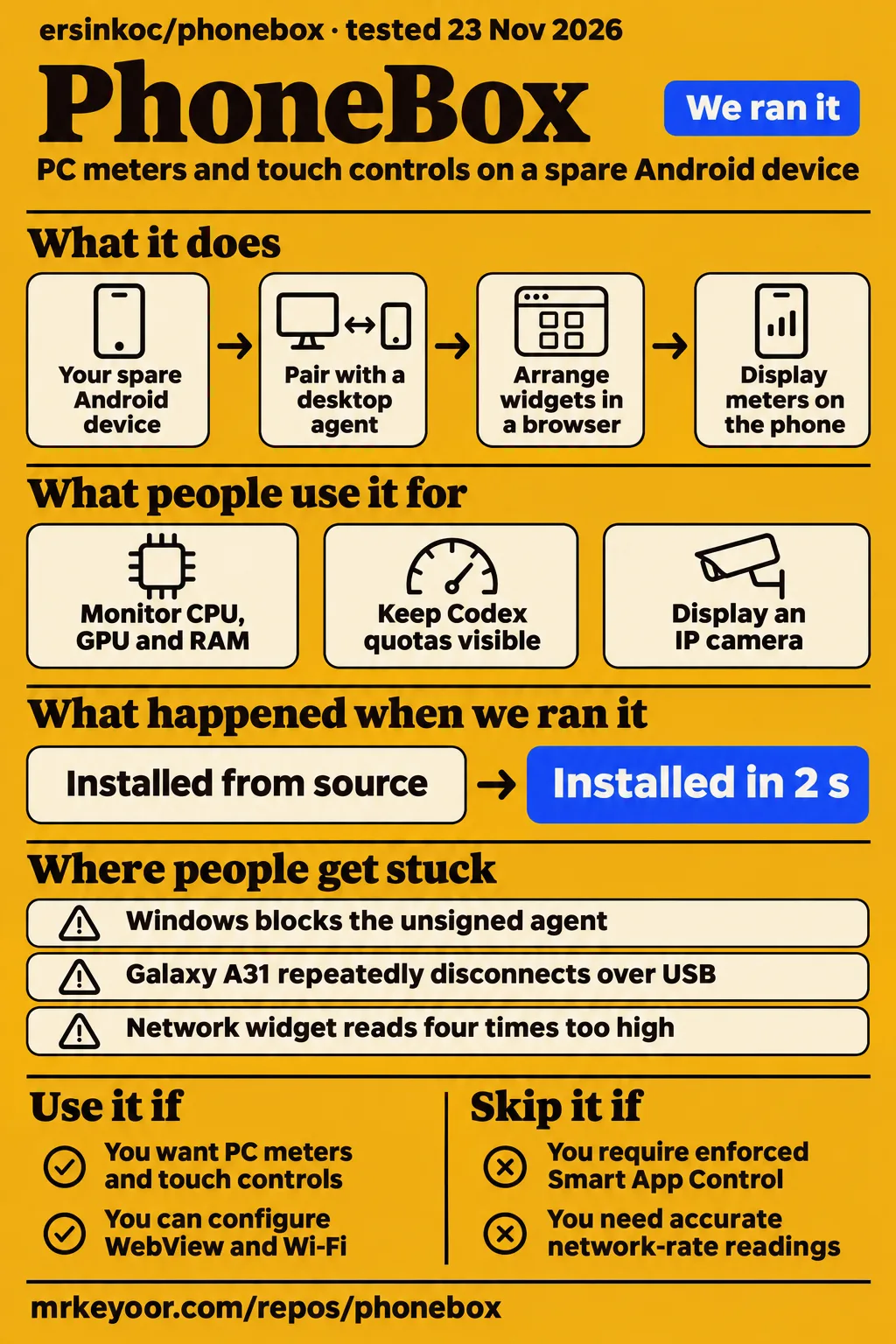
PhoneBox is worth considering for a spare Android device that will show PC meters and touch controls beside your keyboard. Windows Smart App Control is a concrete reason to rule it out: the maintainer says there is no supported installation route with that policy enforced. Our UI-test command at commit bf74b03 ended with 504 failed and 3 passed after 269 seconds. Those results and the named device reports below answer different parts of the installation decision.
PhoneBox pairs your Android device with a PC
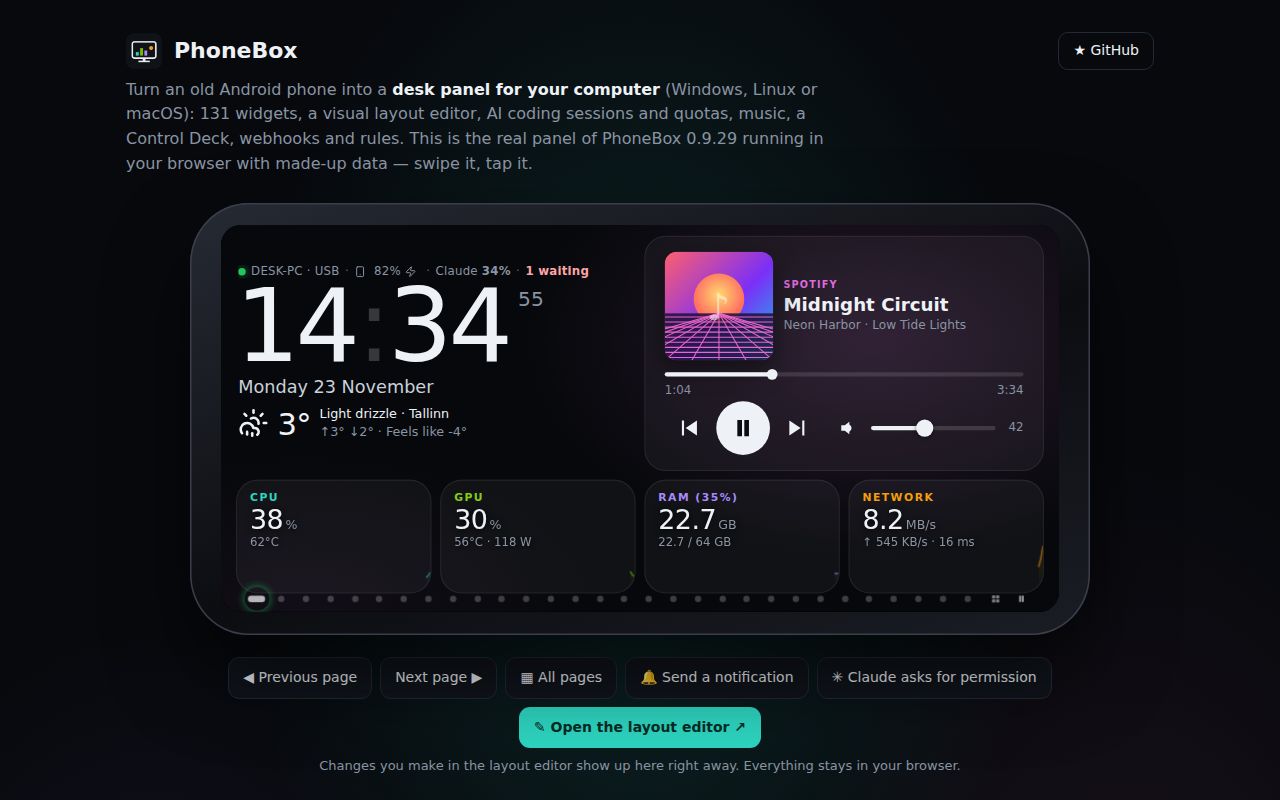
PhoneBox pairs a full-screen Android app with a small desktop agent, according to its English README. The desktop platforms are Windows, Linux and macOS, and the connection can use USB or paired Wi-Fi. You arrange widgets in a browser editor, then display system statistics, coding information, music or touch controls on the phone. The project is MIT licensed and requires no PhoneBox account or cloud service.
The repository reviewed here is ersinkoc/phonebox. The combined-ai/phonebox-android-mcp repository describes hosted Android phones for AI agents, while GoPhoneBox's support site handles mobile-service accounts and billing. Their signup instructions belong to different products. For this desk panel, the README directs users to install an agent on their computer and an APK from the repository's releases on their Android device.
What people use phonebox for
GitHub users report working PhoneBox dashboards on a Galaxy Tab S and a Galaxy A3, with device and browser details attached to their results. Other discussions cover GPU monitoring, a camera widget and shared-mouse input. The table separates those tasks and configurations so that an Android 6 tablet report does not become a claim about every old phone or every input method.
| Person and task | What they reported |
|---|---|
| phongnguyen2277, repurposing a Samsung Galaxy Tab S | Android 6.0.1 worked after sideloading WebView 106; the maintainer recorded working Wi-Fi pairing, widgets and page swiping in issue #184. |
| menes97, keeping statistics and notifications visible | PhoneBox 0.9.20 stayed up for hours on a Samsung Galaxy A3 with Android 7.0 and Chrome 101, showing system meters, Codex quotas and pushed notifications in issue #73. |
| Juracid, monitoring a Radeon RX 7900 XTX | After initially seeing no GPU data, the user reported working monitoring without LibreHardwareMonitor running following the Windows GPU change in issue #49. |
| Hoangminhfcb, showing an IP camera | The camera worked, but pictures were choppy and flashed black between frames; the maintainer subsequently shipped rendering changes in 0.9.19 in issue #209. |
| nonchita100, using a shared PC mouse | A debug APK from PR #432 worked on a Galaxy A22 with Android 13, Deskflow and a locally patched Input Leaf client: clicks, page drags and long presses worked, and keyboard attachment stopped restarting the activity in issue #425. |
MakeUseOf identifies continuous CPU, GPU and RAM monitoring as its preferred use for the combination of an old phone and PhoneBox. Its desk-panel article also describes placing shortcuts beside live graphs and a now-playing widget. A practical starting layout is therefore a system display with a few controls beside it. The README's templates include System, AI quotas, Sessions, Music and Control Deck.
What happened when we ran it
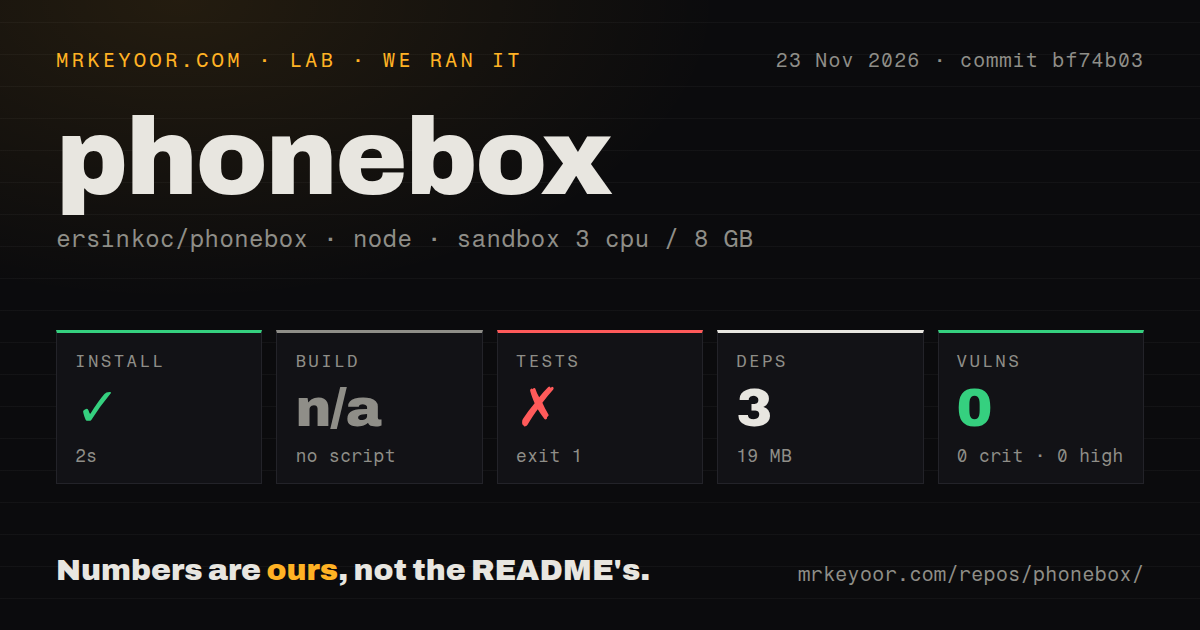
Our November 23, 2026 run installed the npm UI-test dependencies in 2 seconds, then tests exited 1 after 269 seconds, according to our lab measurements. The checkout was commit bf74b03 and the npm project was in ./tools/ui-tests/. The log summary records 504 failed and 3 passed. Build was skipped because that npm project had no build script or target.
| Recorded step or observation | Result |
|---|---|
| npm dependency installation | Succeeded in 2 seconds; 3 dependencies recorded; 19 MB on disk |
| Build | Skipped because this npm project had no build script or target |
| Tests | Failed, exit 1, after 269 seconds; log summary: 504 failed, 3 passed |
| npm audit | 0 known vulnerabilities: 0 critical, high, moderate or low |
| Checkout | 693 files, approximately 127,484 source lines, 23.2 MB |
| Repository scan | 6 CI workflow files; no Dockerfile and no tests directory detected |
| Sandbox configuration | 3 CPUs, 8 GB RAM, image label lab-node:22 |
The failing tail names panel.spec.js:79:1, a case checking that a chart whose metrics are all unknown falls back to CPU. It failed again on retry. The output names error-context files and Playwright trace archives before ending with the failing summary. Although the repository scan detected no directory called tests, the command ran UI tests from tools/ui-tests/; those are different observations about the checkout.
A separate deployment attempt failed its safety step because none of the required Compose filenames existed: compose.yaml, compose.yml, docker-compose.yaml and docker-compose.yml. The run summary nevertheless says it deployed with Docker Compose on November 23, 2026, with every port bound to 127.0.0.1. The failed step contradicts that summary, so the deployment result is blocked. The teardown record reports ok. PhoneBox's README documents a desktop-agent and Android-app installation route.
Where people get stuck: installation policy and device-specific faults
Issue #69 reports a Windows block after a successful checksum check, while issue #410 records repeated USB disconnects on a Galaxy A31. These are different failure paths, and a closed GitHub issue can still describe an unresolved problem. The table separates shipped changes, recovered installation attempts, debug-build results and investigations awaiting more information, rather than treating the issue's open or closed label as the outcome.
| Symptom and reporter | What changed or what to do next | Status in the discussion |
|---|---|---|
| Windows blocks the agent, Vishwas-27 and murali89ga | SignPath approved the project and test signing worked, but the production certificate was pending in #56. | Closed for tracker housekeeping; production signing pending. |
| An OPPO A71 package installer hangs, anandyakshit | ADB installed the app. The user later said the normal package installer worked and could no longer reproduce the hang in #73. | Recovered without an identified cause. |
| Terminal shortcut fails on Windows 10, anandyakshit | The maintainer shipped a PowerShell fallback and installed-terminal fallbacks for Linux in 0.9.11 in #73. | Release inclusion documented. |
| Samsung Galaxy A31 repeatedly disconnects, jcfms | Logs show USB suspend events; cable, port, power and fast-charging changes failed to settle it in #410. | Investigation open. |
| Network widget reads about four times too high, MrKatsuragi | The maintainer requests pc.netDownBps and pc.netUpBps from local /api/state alongside a simultaneous measured rate in #169. |
Closed while waiting for a report, explicitly unsolved. |
| Shared mouse clicks fail, nonchita100 | PR #432's debug APK passed the reporter's device checks in #425. | Merged; the maintainer says it missed 0.9.28 and will ship in 0.9.29. |
The Galaxy A31 report describes a phone-data permission dialog appearing on reconnection and stutters during games. The maintainer's log comparison places the sharp increase at agent 0.9.26, and later logs show FUNCTIONFS_SUSPEND. In the network-meter discussion, the reporter's adapter counters checked correctly. The maintainer therefore asks for the agent's outgoing values beside the measured transfer rate to locate where the factor of four appears between the agent and the screen.
Android 6 has a device report; Android 5 has scaling limits
Release 0.9.19 added installation support for Android 5.0 and 6.0, according to issue #184. The Galaxy Tab S tester initially saw an outdated-WebView notice and encountered a Google Play sign-in loop. Sideloading WebView 106 removed the warning, after which the tester reported smooth rendering and operation. The maintainer identifies WebView 106 as the last version for Android 6 and WebView 95 for Android 5.
Android 5's older WebView produces poorer widget scaling and retains the outdated-WebView notice. Android 7 has a different example in issue #73: menes97's Galaxy A3 used Chrome 101 as its WebView provider while the standalone WebView was older and disabled. For weather on Android before 7.1.1, the maintainer added the tester's certificate workaround, installing Let's Encrypt's ISRG Root X1, to the FAQ. Browser rendering and certificate trust are separate setup details.
Security: unsigned Windows releases face an installation block
The README says Windows release agents remain unsigned until SignPath issues the release certificate. In issue #56, the maintainer reports project approval and a successful test-signed build, then says the production certificate remains pending. MakeUseOf discusses a SmartScreen warning, while issue #69 addresses Smart App Control, which the maintainer says has no per-app exception list. The 0.9.11 setup change explains that block more clearly.
The original #69 report also says Windows and ANY.RUN flagged a trojan. The maintainer attributes the detections to the unsigned agent and offers checksum and build-provenance checks. The README's security section separately documents settings on 127.0.0.1:8765, optional Wi-Fi over HTTPS with a pinned certificate and paired key, and commands and integration credentials staying on the computer. Wi-Fi is off by default; optional widgets contact external weather, quota and other services.
Camera support uses RTSP pictures through the PC
Issue #209 describes a Camera widget that pulls a manually entered RTSP address through ffmpeg installed on the PC. Hoangminhfcb confirmed that the feature worked, then reported choppy pictures and black flicker. The maintainer released the initial feature in 0.9.18 and rendering changes in 0.9.19, including decoding the next picture before swapping it in. The implemented display is a sequence of pictures, and ONVIF discovery is absent.
The requester wanted the camera feed to behave like continuous video and also asked about discovery through ONVIF. For a camera whose vendor generated changing stream addresses, the user proposed maintaining the address with a separate PC script. That makes the stream address and PC-side ffmpeg part of the installation task, alongside choosing a widget layout. The camera discussion distinguishes the working first implementation from the later rendering changes.
PhoneBox vs Stream Deck, Touch Portal and Android Auto
Choose PhoneBox for PC meters and touch controls on a spare Android device; consider Stream Deck when you want physical controls. The README documents PhoneBox's monitoring and touchscreen functions, and the YouTube overview presents reusing a phone as an alternative to buying the hardware. MakeUseOf compares the customizable buttons with Touch Portal and favors PhoneBox for persistent performance monitoring after describing Android Auto at a desk.
| Alternative | What the comparison says | Decision it helps frame |
|---|---|---|
| Hardware Stream Deck | The YouTube overview presents PhoneBox as a free reuse option instead of buying the hardware. | Whether reusing an Android touchscreen is the attraction. |
| Touch Portal | MakeUseOf compares PhoneBox's customizable buttons with Touch Portal. | Whether phone-based buttons and shortcuts are the main task. |
| Android Auto at a desk | MakeUseOf says it tried Android Auto to reduce distractions, then favors continuous PC monitoring with PhoneBox. | Whether a continuously visible performance display is the intended use. |
MakeUseOf describes buttons that open apps or websites, fire keyboard shortcuts and run macros, alongside live graphs and a now-playing widget. The README also lists microphone, media, application-audio and system controls. A dedicated microphone control and a page of system graphs use the same screen differently: choose the task first, then select the widgets and layout. The comparison is useful for deciding between a reused phone display and separate control hardware.
Outdated claims, corrected
The YouTube overview's Android 7 minimum predates the 0.9.19 change adding Android 5.0 and 6.0 installation support. Its 120-widget figure is a version snapshot: MakeUseOf's article says 124, while the README says 131. The README also lists 30 templates. These totals describe what each source records; Android and WebView compatibility is a separate question from the size of the widget catalog.
Issue #30's standby complaint concerns a contributor's fork rather than an upstream built-in feature, according to the maintainer's correction in the standby discussion. The contributor also retracted part of the technical explanation. A second identity correction concerns the hosted Android service: its MCP repository advertises credit without a card, while its coding-agent setup page describes a card-required trial. Those conflicting signup descriptions concern phonebox.dev; ersinkoc/phonebox requires no PhoneBox account.
FAQ
PhoneBox turns an Android device into a PC monitor and touch control deck through its Android app and desktop agent. That answers the old-phone question raised in the YouTube overview. Windows, Linux and macOS are listed in the README, while issue discussions add device-specific answers about Android versions, WebView providers, signing and USB faults. The questions below keep those answers tied to the relevant platform or reported configuration.
Can PhoneBox turn an old Android phone into a PC system monitor and touch control deck?
Yes: the README documents PC monitoring and touch controls through an Android app paired with a desktop agent. CPU, GPU, RAM, disks, network and ping appear in its monitoring list. Its Control Deck list includes app and URL shortcuts, key combinations, macros, microphone controls and media controls. Layouts are arranged in the browser editor and displayed on the phone.
Can PhoneBox replace a Stream Deck for my shortcuts and media controls?
PhoneBox supports touchscreen shortcuts and media controls, and the YouTube overview presents it as an alternative to buying a Stream Deck. The README lists application audio, microphone, media, OBS and system controls among its control categories. For a shortlist, identify the action you need first: opening an app, sending a keyboard shortcut and controlling media are distinct functions documented for PhoneBox.
Does PhoneBox work with Windows, Linux and macOS?
The README lists all three desktop platforms and says there is no iOS version. Linux media uses playerctl; macOS media lists nowplaying-cli and Spotify or Music fallbacks. Release builds cover Windows x64, glibc Linux x64 and ARM64, and Apple silicon and Intel Macs. The platform table ties individual widgets to hardware, installed tools and permissions.
Can PhoneBox show CPU, GPU and AI usage quotas on a spare phone?
Yes: menes97's report describes CPU, GPU, RAM and network meters alongside Codex quotas on a Galaxy A3 with Android 7.0 and Chrome 101. The same report names clock, weather, media, pushed-value widgets and notifications. The README lists Claude, Codex and Antigravity quotas as well as local coding sessions among the available coding-related displays.
Can I use PhoneBox on Android 5 or Android 6?
Release 0.9.19 added installation support for both, according to issue #184. The Galaxy Tab S report describes Android 6.0.1 with sideloaded WebView 106. The maintainer describes Android 5's WebView 95 as having poorer widget scaling and retaining the outdated-WebView notice. The README recommends Android 6 or later while permitting installation on Android 5 and newer.
Does PhoneBox run properly on Android 7 phones?
Issue #73 contains positive reports from an OPPO A71 on Android 7.1.1 and a Galaxy A3 on Android 7.0. The Galaxy A3 tester says PhoneBox 0.9.20 stayed up for hours using Chrome 101 as its WebView provider. The discussion also records the OPPO package-installer hang, successful ADB installation and the user's later inability to reproduce the installer problem.
Which WebView version does an old Android device need for PhoneBox?
The maintainer identifies WebView 106 as the last version for Android 6 and WebView 95 for Android 5 in issue #184. On the Android 7 Galaxy A3 in #73, Chrome 101 provided WebView while the standalone component was disabled. The Android 6 tester sideloaded WebView 106 after a Google Play sign-in loop, so the reported route includes both the operating system and the active browser component.
Can I make an Android 6 phone into a large Windows microphone mute button?
The README lists microphone controls and recommends Android 6 or later. Those documented pieces fit the microphone-button task raised in the community questions: an Android device supplies the touch surface, while the desktop agent handles PC controls. In the browser editor, layouts can contain resized widgets on separate pages, and Control Deck is one of the listed starting templates.
Why is Windows flagging the PhoneBox agent as a trojan?
The maintainer attributes the detections to the unsigned agent in issue #69 and provides checksum and build-provenance checks. The README also says SmartScreen or antivirus software may warn or block unsigned releases. Issue #56 records SignPath project approval and test signing, with the production release certificate still pending. These are the project's explanation and signing status, rather than an independent malware verdict.
Can I install PhoneBox without disabling Windows Smart App Control?
The maintainer says there is no supported route with Smart App Control enforced while the release agent remains unsigned. In issue #69, the maintainer also says to keep that protection enabled and explains that it has no per-app exception list. Release 0.9.11 improved the setup message so the installation process explains the block instead of stopping without that explanation.
When will a signed Windows PhoneBox agent be available?
The maintainer gives no date for the production certificate in issue #56. The discussion says SignPath approved the project and a test-signed agent passed a smoke test. Issuing the release certificate remains on SignPath's side, and the maintainer says the next release after issuance will ship a signed agent. The README retains the unsigned-release notice.
Why does my Samsung phone keep disconnecting and reconnecting over USB with PhoneBox?
Issue #410 records repeated disconnects on a Galaxy A31 and logs containing USB suspend events. The maintainer's comparison places the sharp increase at agent 0.9.26, while the reporter describes permission prompts and game stutters on reconnection. The investigation remains open after cable, port, power-setting and fast-charging changes failed to settle the reported problem.
What we have not tested yet
Our run covers the npm UI-test project at bf74b03; a completed phone-and-PC installation, touch response, long-running USB or Wi-Fi stability, battery consumption, desktop resource use and meter accuracy remain outside that run. The failing tail lacks an underlying exception, so it supports no diagnosis of a browser, package or fallback-code cause. The skipped npm build says nothing about compiling the separate agent or APK. Actual runtime and operating-system versions require toolchain logs; lab-node:22 is the recorded image label.
The community results also have specific boundaries. Issue #184 lacks an Android 5 physical-device success report, and its Android 6 result is one device configuration. Issue #73 contains no separate successful Terminal-shortcut retest. Issue #209 contains no user confirmation after the rendering changes. The shared-mouse success covers a debug APK and locally patched Input Leaf; the latest-release endpoint returned v0.9.28, while the maintainer described 0.9.29 as the release intended to contain that fix. The microphone-mute proposal is an intention rather than a completed test.
The review includes no independent malware classification, authentication or certificate-pinning audit, comparative Stream Deck or Touch Portal performance measurements, or test of the fork's standby behavior. npm audit's zero-advisory result applies to known dependency vulnerabilities in the measured npm project. Repository attention and sampled issue replies do not measure installed adoption or production reliability. For a phone-and-PC evaluation, the useful result to record is the actual device, connection and outcome for one essential widget.